
Free Content Marketing Report Template

Track, analyze, and optimize content performance across SEO, GEO, and organic social in one place.

Show exactly how content drives conversions and revenue with this content marketing report template.

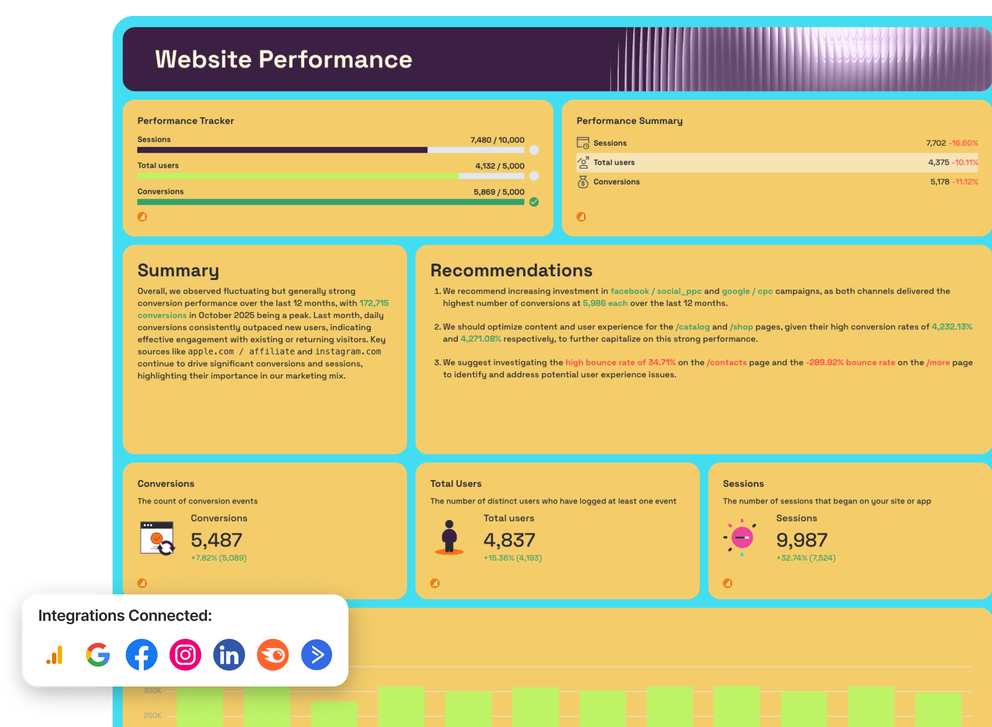
Content Marketing Report Template - Website performance dashboard with charts and key metrics.

Create Custom Content Marketing Reports in Seconds

With Whatagraph IQ, just tell us what you need, and we'll build a stunning content marketing report for you. No templates or manual setup required.

What To Include in a Content Marketing Report Template

A strong content marketing report template follows a simple rule: start with outcomes, then explain what drove them.

Each section below mirrors how real content marketers structure reports in Whatagraph—summary first, then channel-level detail, supported by trends, comparisons, and clear visuals.

1. Marketing Summary

Channels connected: All your marketing channels

This is the executive overview for stakeholders. It ties your marketing strategy to results and sets context for the rest of the performance report.

In short, it answers one question fast: Is content working, and why?

What to include:

  • High-level key performance indicators (KPIs): total users, sessions, conversions, conversion rate
  • Performance trackers showing progress vs. targets
  • A short written summary highlighting wins, losses, and changes from the previous content monthly report
  • One to three recommendations to help optimize future marketing efforts
  • Trend graphs (last 12 months) for clicks, impressions, conversions
  • Funnel visual showing impressions → clicks → conversions

2. Website Performance

Channels connected: Google Analytics 4

This section shows what happens after content drives traffic. It’s where you connect website traffic to behavior, outcomes, and revenue.

What to include:

  • Website traffic: users, sessions, new users
  • Engagement metrics: average engagement time, bounce rate
  • Conversions and conversion rate over time
  • Traffic and conversion breakdown by source
  • Device and platform performance
  • Demographics (country, age, gender)
  • Line charts for trends, bar charts for source comparisons, tables for page-level performance

3. SEO

Channels connected: Semrush, Google Search Console, Google Analytics 4

This section measures how content performs in organic search and where it’s gaining—or losing—visibility.

What to include:

  • Organic traffic and SEO-driven conversions
  • Keyword rankings (Top 3, Top 10, Top 20)
  • Average position and ranking distribution
  • Keyword-level performance (impressions, clicks, CTR)
  • Backlinks and referring domains
  • Keyword movement over time (improved vs. declined)
  • Pie charts for ranking distribution, tables for keyword breakdowns, trend lines for growth

4. GEO

GEO focuses on how content performs in generative and AI search engines, alongside traditional SEO. It helps you understand how new discovery paths contribute to overall content marketing results.

What to include:

  • Sessions, users, and events from AI sources
  • Views and engagement trends from GEO traffic
  • Top referring AI sources and URLs
  • GEO vs. SEO comparison metrics
  • Landing page performance for GEO traffic
  • Time-series graphs for views and sessions
  • Tables comparing GEO and SEO performance side by side

5. Facebook

This section focuses on how organic social media content performs organically on Facebook and how this leads to more followers, clicks, and conversions.

What to include:

  • Reach, impressions, and follower growth
  • Engagement metrics (reactions, comments, shares)
  • Engagement rate and post-level performance
  • Content format performance (posts vs. reels)
  • Follower demographics (country, city)
  • Funnels from impressions → reach → engagement → clicks
  • Line charts for trends, tables for top-performing posts
  • Carousel tables showing top performing posts and stories

6. Instagram

This section of the dashboard visualizes how Instagram social media marketing content leads to more followers, clicks, and conversions.

What to include:

  • Impressions, reach, and follower growth
  • Engagement rate and total interactions
  • Stories and reels performance
  • Video plays and engagement by content type
  • Audience demographics and follower growth rate
  • Trend graphs for reach and engagement
  • Carousel tables for top posts, stories, and reels

7. LinkedIn

The LinkedIn section shows how content performs with a professional audience and supports B2B lead generation and awareness goals.

What to include:

  • Key metrics like impressions, clicks, and engagement rate
  • Follower growth and new followers
  • Post-level engagement and click performance
  • Audience demographics by role, location, or seniority (where available)
  • Trend charts for impressions and clicks
  • Carousel table highlighting top-performing posts

8. Email Marketing

This section connects how email content leads to clicks and conversions.

What to include:

  • Emails sent and delivered
  • Open rate and click-through rate (CTR)
  • Conversions driven by email campaigns
  • Email marketing Performance by campaign or newsletter
  • Engagement trends over time
  • Bar charts for campaign comparison
  • Line charts for opens, clicks, and conversions

Why Marketers Love Reporting With Whatagraph

Whatagraph's AI is saving so much time and energy for our marketing specialists. We now have more time to focus on strategic things that help both our agency and our clients grow.

Lars Maat

Lars Maat

Co-Founder @ Maatwerk Online

StarStarStarStarStar

Whatagraph took us to the next level with our clients and within our team. Our relationships with clients have been amazing, and we’ve even been able to retain them longer.

Kim Strickland

Kim Strickland

Digital Marketing Specialist @ Peak Seven

StarStarStarStarStar

Whatagraph is easy to use, visually attractive, and much smoother compared to tools like Looker Studio. It helped us not only get clients on board but also keep them within the agency.

Stef Oosterik

Stef Oosterik

Quality Manager @ Dtch. Digitals

StarStarStarStarStar

Whatagraph has become an essential partner for scaling our reporting, and my teams love it because it saves so much time. We’d recommend it to any team looking to automate data reporting and use AI for insights.

Danielle Roberts

Danielle Roberts

Director of Implementation & Support @ Rentable

StarStarStarStarStar

Frequently Asked Questions

Have more questions? We answered them below.

What is a content marketing report template?

A content marketing report template is a predefined structure for reporting on content marketing results across SEO, social media, email, and website performance. It organizes marketing data into a single marketing dashboard so your marketing team can review traffic, engagement, conversions, and revenue impact without manually building reports.

Can you customize Whatagraph’s content marketing report template?

Yes. In Whatagraph, you can customize your dashboard templates using Whatagraph IQ Themes. You just need to upload a screenshot of your brandbook or type in a prompt. Whatagraph will automatically detect the fonts and colors and apply them to your marketing dashboard in seconds. You can still manually adjust the fonts and colors but the grunt work is already done for you. 

What are the benefits of using a content marketing report template?

A structured digital marketing report template helps your marketing team:


- Replace manual spreadsheets with live dashboards


- Track campaign performance consistently across channels


- Align reporting with actual business outcomes


- Deliver clear ads reports, SEO summaries, and social insights in one place


- Share automated reports with stakeholders on a set schedule


- Monitor performance in near real-time, not weeks later

What metrics should be included in a content marketing report template?

An effective content marketing campaign template should focus on key metrics that reflect outcomes, not just activity, including:


- Website traffic and engagement by channel


- SEO visibility in the search engine results


- Content performance breakdown and engagement trends


- Social media reach and interaction metrics


- Email performance from your email marketing report


- Paid distribution context, including Google Ads, ad campaigns, and PPC report data


- Conversion metrics relevant to lead generation or ecommerce


- Cross-channel comparisons using consistent marketing metrics


- Clear trend graphs to show change over time

Is there a free digital marketing report template available?

Yes. Whatagraph offers a free digital marketing report template you can use to report on content, SEO, social media, email, and paid performance. Connect your marketing data sources and turn it into a live marketing dashboard instead of a static spreadsheet.

How do I create an effective content marketing report template?

To build an effective template:


- Start with a summary page designed for stakeholders


- Organize sections by channel, not by tool


- Focus on outcomes using consistent marketing metrics


- Use visual elements like graphs instead of raw tables


- Include context from SEO, social media marketing, email, and ads


- Automate delivery with scheduled automated reports


- Iterate based on how your marketing team actually uses the report