


What is budget pacing?
Budget pacing is checking how fast ad spend is running against the budget for the period, so a campaign doesn't run out of money early or finish the month with budget left over.
There are two ways to get it wrong:
- Overpacing: spend runs ahead of plan. The budget runs out before the month ends, and the campaign goes dark on the days it might have converted best.
- Underpacing: spend runs behind plan. The client gets fewer results than they paid for. For some clients, like a nonprofit that has to spend every dollar of a grant, underspend is as bad as overspend.
Pacing comes down to these numbers:
Expected spend to date = budget × days elapsed ÷ days in period
Pace = actual spend ÷ expected spend to date
Projected spend = actual spend ÷ days elapsed × days in period
Required daily spend = (budget − actual spend) ÷ days left
Here's an example. A client has a $30,000 monthly budget. On day 10 of a 30-day month, they've spent $14,000. Expected spend to date is $10,000, so they're pacing at 140%. At this rate they'll spend $42,000 by month end. To be in the budget, they need to drop to $800 a day for the next 20 days.
It's important to catch this as soon as possible, not after the client has spent $42,000 by month end.
Traditionally, agencies would do budget checks every day manually. This is time-consuming and can be prone to human errors.
What Whatagraph IQ Agents can do is check how each client and campaign is pacing towards budget and notify you every morning via Slack, email, or even in your project management tool. This means you'll always be on top of budget and make changes before it's too late.
How do marketing agencies use AI agents to track budget pacing in Whatagraph?
Agencies use budget pacing agents to check spend against each client's plan on a schedule and notify them every day. The account manager reads it and decides what to change. Here's what that looks like at two agencies.
A US agency with a nonprofit client that can't under- or over-spend
This agency plans every campaign's budget per month. One client is a nonprofit: if a campaign has $300 for November, spending $210 is a problem, because they need to use every dollar. Spending $375 is a problem too, because that's money they shouldn't be spending.
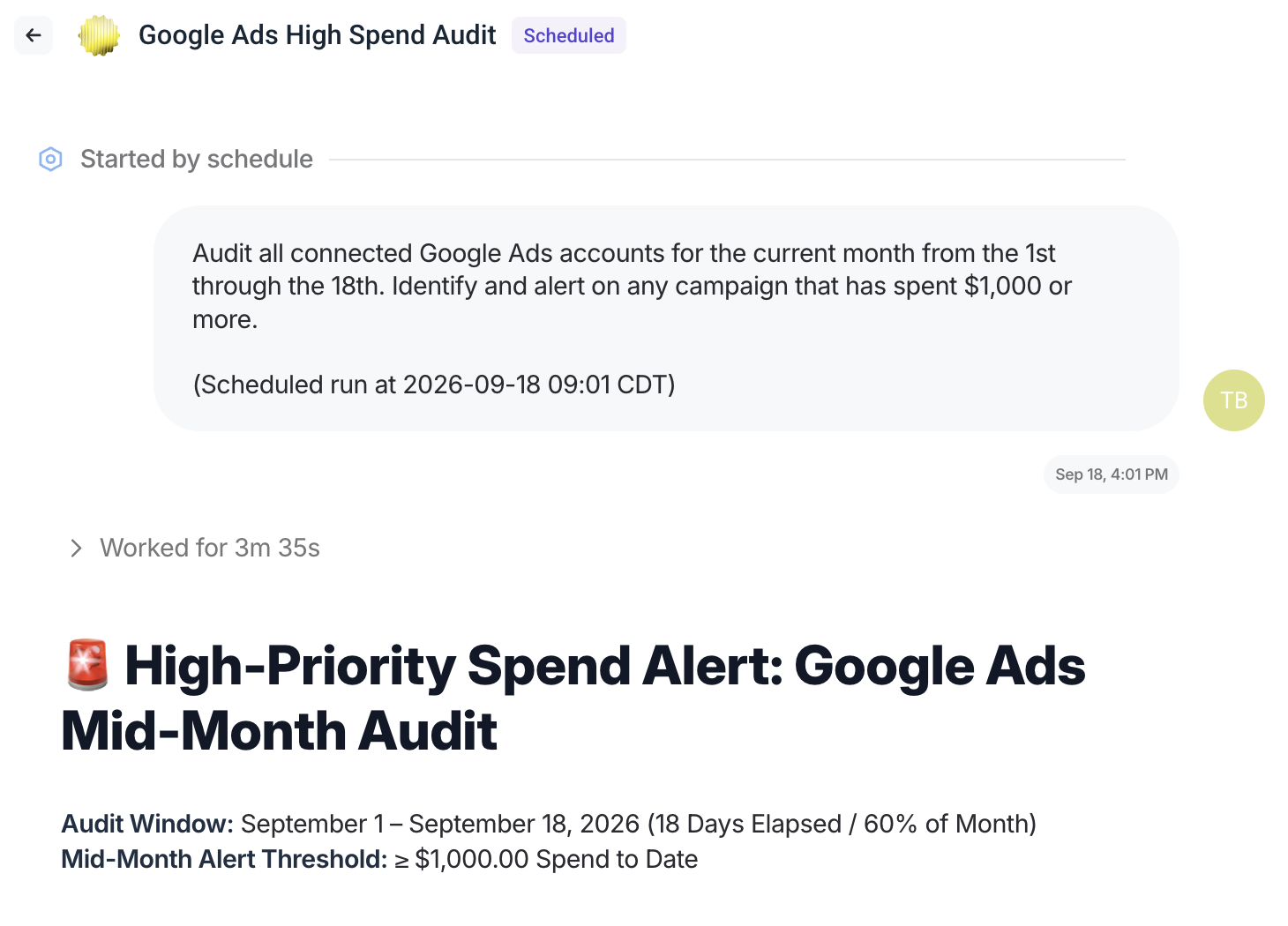
They built a spend-cap watch agent on Whatagraph that runs on the 18th of every month. It checks every Google Ads campaign daily from the 1st to the 18th of the month, flags any campaign that has spent more than $1,000, and says "none" when everything's clear.
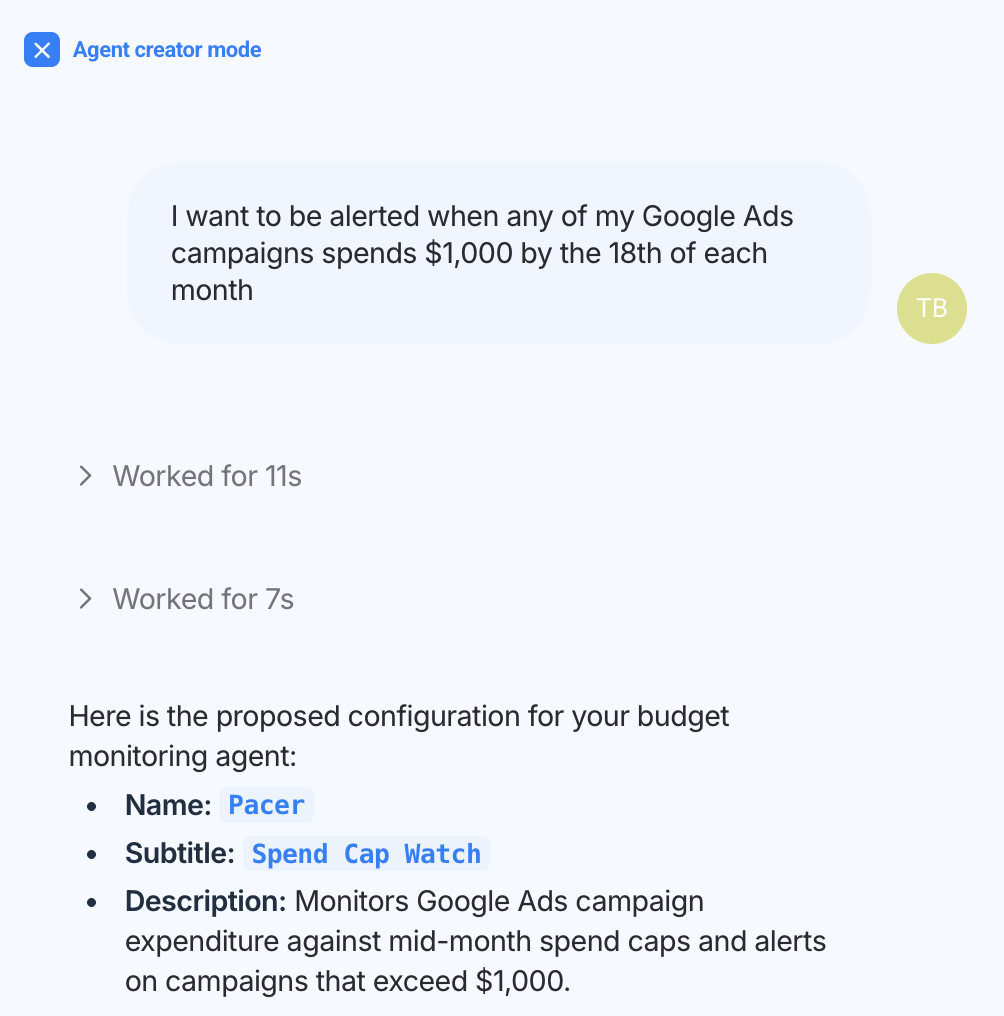
On the 18th of the month, as scheduled, the agent ran an audit and gave the agency lead an overview of what's going on in the account.
"At various points in the month, the agent would watch to make sure that spending the right amount, not over, not under, tell me if there's significant deviation at a certain level that I define."
A UK agency: catching campaigns that stopped spending
Sometimes a campaign stops spending, and nobody notices until the client asks.. This agency built an agent that checks spend every day and lists any campaign that spent less than half of its daily budget. They ran it on one client first before rolling it out across their client book.
Manual vs. automated budget pacing
You don't have to pick one. The agencies we've talked to keep their budget plan and their judgment, and let an agent do the checking. The agent reads spend, compares it with the plan, and flags what's off. A person decides what to change.
Here's how the options compare:
| Manual (budget sheet + platform checks) | Platform rules and scripts | AI agent + specialist | |
|---|---|---|---|
| How often it's checked | When someone has time | On the rule's schedule | On your schedule, daily or several times a day |
| Where the plan lives | The budget sheet | Inside each ad platform | Your budget sheet, read by the agent |
| Cross-channel view | Built by hand | One platform at a time | Every connected channel, per client |
| What you're told | Whatever the sheet shows | That a threshold was crossed | What's off, by how much, and the likely cause |
| Who acts | The account manager | The rule, automatically | The account manager, after reading the alert |
| When the owner is away | Checks stop | Rules keep running | The agent keeps checking and anyone on the team can read the alerts |
| Typical failure | A problem found at month end | A rule that pauses the wrong campaign | A loose brief, caught when you review the first alerts |
Manual pacing still makes sense for a brand-new account with no history, or during a launch when the budget changes every day. For budgets that repeat month to month, let the agent do the checking and keep your people on the decisions.
If you're rebuilding how you report spend to clients, see our guide to PPC reporting.
How to set up budget pacing alerts with an AI agent
Treat the first few weeks as co-creation. The agent runs the check, you read the alerts, and you tighten the rules until the alerts match what you'd have flagged yourself.
1. Put the plan where the agent can read it. Keep one budget sheet with the plan per client, campaign or target group. Connect it as a Google Sheets source, or upload it to the agent as a file. If a client has a single monthly budget, you can put it in the brief.
2. Make spend one number per client. Group each client's ad accounts into a source group, so all their Google Ads accounts count as one. Build spend as a custom metric in the Data Hub, with currency conversion if clients spend in more than one currency.
3. Decide what "off pace" means for each client. A band (for example, 90% to 110% of expected spend), a hard cap, a minimum share of daily budget, or all three. A $3,000 account and a $300,000 account shouldn't share one rule.
4. Write the brief. Tell Whatagraph IQ Agent in plain language what you want, or paste this:
Run every [weekday] at [time], in [client's time zone].
For each client in [space or client list], compare spend to date for [this month / this quarter / this year] with the budget in [budget sheet name or file].
Use [custom metric name] for spend. Group accounts using [source group names].
Flag any campaign, channel or target group that is:
- above [110]% or below [90]% of expected spend to date
- over [cap] before [date]
- below [50]% of its daily budget yesterday, or not spending at all
For each flag, give the budget, spend to date, pace, projected month-end spend and the daily spend needed to land on budget. Say what changed compared with last week and the likely cause.
If a campaign has no budget in the sheet, list it instead of guessing. If everything is on track, reply "none".
Don't change budgets, bids or campaign status. Only report.
5. Run it once and check the numbers. Compare the agent's spend figures with the ad platform for two or three campaigns. Fix anything that doesn't match (usually a currency, a time zone or a campaign missing from the sheet) and tell the agent to save the fix to its instructions.
6. Schedule it. Daily works for most budgets. Run it several times a day for large budgets or during launches. It runs on Whatagraph's servers, so nobody has to open a laptop.
7. Decide where the alerts go. Each run starts a conversation in Whatagraph that the whole team can see. If you've connected Slack, the agent can post the summary to a channel.
8. Keep the changes with a person. The agent does the checks but it's up to your specialists to decide where and how to change the budget.
Copy the agent for the next client, and change the budget source and the thresholds.
What are the benefits of budget pacing with AI agents?
The first benefit is catching problems sooner. The business impact comes from what that changes: fewer wasted budgets, fewer awkward client calls, and account managers who spend their time fixing spend instead of finding the problem.
✅ Overspend caught in hours, not at month end. A German agency had a campaign meant to spend EUR 20,000 over a month spend it in a single day, and nothing flagged it. A check that runs every few hours catches that on day one.
✅ Underspend fixed while there's time. An underpacing campaign found on day 25 can't be saved. Found on day 5, the budget can still be spent or shifted to a campaign that needs it.
✅ Every client checked, every day. Manual pacing favors the biggest accounts and the ones someone remembered. An agent checks all of them on the same schedule.
✅ The budget sheet stays. The plan stays in the sheet your team already trusts and edits. The agent reads it instead of replacing it.
✅ Alerts that explain themselves. Each flag comes with the numbers and the likely cause, so the account manager starts from a diagnosis instead of a spreadsheet.
✅ Checks don't stop when someone's away. The agent lives in the team's workspace, so pacing keeps running and anyone on the team can pick up an alert.
✅ Better conversations with clients. Spend that lands on plan, and early notice when it won't, makes the monthly client report a better conversation.
Best practices for PPC budget allocation
Pacing only works if there's a plan to pace against. These practices keep the plan realistic and the budget moving to where it performs:
- Split the budget before the month starts. Allocate by campaign, channel or target group, and write it into the budget sheet with a planned column and an actual column. A budget that only exists as one monthly total can't tell you which campaign is off.
- Plan the curve, not only the total. Even daily spend is the default. Launches, sales and seasonal peaks need front-loaded or back-loaded plans. Put the curve in the sheet, so pacing checks against it instead of a straight line.
- Keep a reserve. Hold back part of the budget for campaigns that outperform, and release it mid-month.
- Move money from underpacing campaigns to budget-limited ones. When a campaign can't spend its budget and another is capped by its budget, shift the difference. Pacing alerts tell you where. Google Ads flags campaigns that are "limited by budget" in its own pacing insights.
- Set pacing bands by budget size and client risk. Tighter bands for large budgets and for clients like nonprofits with fixed grants. Looser bands for small, stable accounts.
- Check more often near the end of the period. A 10% gap on day 5 can still be recovered. On day 28, it usually can't.
- Log every change and why. Note each reallocation in the sheet. Next month's plan starts from what actually worked, and the agent can read the log for context.
For the report your clients see at the end of the month, start from our PPC report template.
What common mistakes to avoid in budget pacing?
1. Pacing against a budget the ad data doesn't have
Monthly and annual budgets usually live in a spreadsheet, not in the ad platform. Daily budget is available as a field for some integrations but not all. Another UK agency's first pacing agent reported a third of the budget spent with half the month gone. It was checking against numbers someone had typed in, and they wanted it running on live data.
Give the agent the plan directly: connect the budget sheet, upload it, or, where the native integration doesn't expose daily budget, connect the ad platform's own MCP server to the agent.
2. Treating the platform's own overspend as a bug
Google Ads and Meta both spend above the daily budget on purpose. Google says a campaign "might spend up to twice your average daily budget" on a given day, but won't spend more than 30.4 times the average daily budget in a month (Google Ads Help, checked September 2026). Meta says it "may spend up to 75% over your daily budget" on some days, but not more than seven times the daily budget over a week (Meta, via Jon Loomer, November 2023).
Pace against the month, not the day, and tell the agent these rules, so it doesn't flag a normal high-spend day as a problem.
3. Checking before the data has settled
Spend data lands with a delay, and accounts sit in different time zones. A check that runs at 6 a.m. in London can report half a day for a client in New York. Schedule checks after data settles, and set the time zone per client in the brief.
4. Adding up spend that isn't defined the same way
One platform reports in euros, another in dollars. One includes tax, another doesn't. Some ad platforms report cost in micros. Add those up by hand and the pace is wrong before you've started. Define spend once as a custom metric, with currency conversion, and every check uses the same number.
5. One rule for every client
A 10% band that suits a $300,000 account creates noise on a $3,000 one, and misses real problems on a fixed grant. Too many alerts and people stop reading them. Set bands per client, send one summary per run, and have the agent reply "none" when everything's clear, so silence doesn't get mistaken for a broken check.
6. Acting on a number you haven't checked
A US agency lead we spoke to put it this way: data that's right 99.9% of the time is still wrong the one time you've built a client meeting on it. The agent reads the same governed data as your reports, which removes most of the mismatch. Before you change a budget, check the flagged number in the platform.
7. Letting the agent change budgets on its own
Pausing campaigns or changing budgets through an agent depends on each ad platform's access rules, and Meta's is rolling out gradually. Even where it's possible, a budget change is a client decision. Keep the agent on detect and notify, and keep the change with your account manager.
8. Mixing pacing with everything else that changes
Pacing is about spend against a plan. A sudden drop in conversions or a broken tracking tag is a different problem with a different fix. Keep the pacing agent focused, and handle the rest with campaign monitoring.