


What is automated client reporting and how do agents help?
Automated client reporting means your client reports update with fresh data and insights and go out on a schedule, instead of you having to rebuild them by hand every time.
If you have one or two clients, reporting isn’t much of an issue. But once you grow past that number, reporting becomes a full-time task that takes up most of your month, leaving little to no room for delivering strategic recommendations to clients and optimizing campaigns.
Add to that the fact that each of your clients would have campaigns on multiple platforms - Google Ads, Facebook Ads, LinkedIn Ads - and leads sit in Hubspot or purchases sit in Shopify, consolidating all this data into one place and getting accurate, consistent reporting is a massive undertaking.
That’s where agents come in. They can streamline reporting, automate recurring tasks, and close the gap between data and recommendations.
In Whatagraph, IQ Agents work on the same data, metric definitions and reports your team already uses. These pre-made agents automate the entire reporting process:
- Recap builds a report from a short prompt, or rebuilds one from a report your client already likes.
- Omni blends sources from different channels into onesource, so Google, Meta and GA4 can sit in a single widget.
- Rollup aggregates many sources of the same category (e.g. paid ads channels) into one. All of a client's Google Ads accounts into a single view, or every paid channel into one combined source.
- KPI builds custom metrics and custom dimensions. Calculated fields like CTR, ROAS, CPA or a cross-source total, and dimensions that normalise messy campaign names into groupings you can actually filter by.
- Insight answers questions about the data and writes a first draft of the narrative (wins, watchouts, recommendations) into a comment widget for you to review.
- Triage finds broken widgets, blends and sources, shows you the fix, and applies it after you confirm.
- Brand applies the client's logo, colors and fonts, and sets up delivery by email or share link.
You can also build one reporting agent per client that runs the whole monthly job on a schedule: duplicate the report, update it, rewrite the commentary and flag what needs review. You’ll see an example of this further down the page.
Technically, you can also automate sending the reports out to clients on a schedule. But agencies that are using agents at Whatagraph all have one unanimous advice: don't let reports go out without your review and approval.
Human specialists are still very much needed to verify the data in reports, add more context, rewrite commentary with their judgement, and then finally sign off reports to go out to clients.
If you're choosing a reporting tool, our client reporting tools roundup compares the main options.
How do agencies use AI agents to automate client reporting in Whatagraph?
Marketing agencies are using agents to produce monthly client reports on a schedule. The specialists still do the analysis: they check the numbers, push the agent to dig further, fix what it got wrong, and sign off before anything reaches the client.
Here are two case studies that prove this:
How GKV's analytics team automated client reporting and got back 70+ hours a month to focus on strategy
GKV is a full-service communications agency based in Baltimore, USA, and the analytics team produces monthly reports for 12 clients. Each report used to take them 10 to 15 hours, which added up to 120 to 180 hours every month on reporting.
The team used to spend 3 out of every 4 weeks on monthly reporting, and some clients didn't get last month's report until the final week of the month. That leaves only one week in a month for providing data-driven insights and recommendations to client teams.
Then, the Director of Digital Analytics and Strategy at GKV, Anna Alexiadi Smyrniotaki, tested out IQ Agents.
She built specialist agents for each of the clients that would create monthly reports, write commentary inside reports, and answer ad-hoc analysis questions.
The first agent she built was in August, and she scheduled the monthly reports to be generated on the 2nd of the next month.
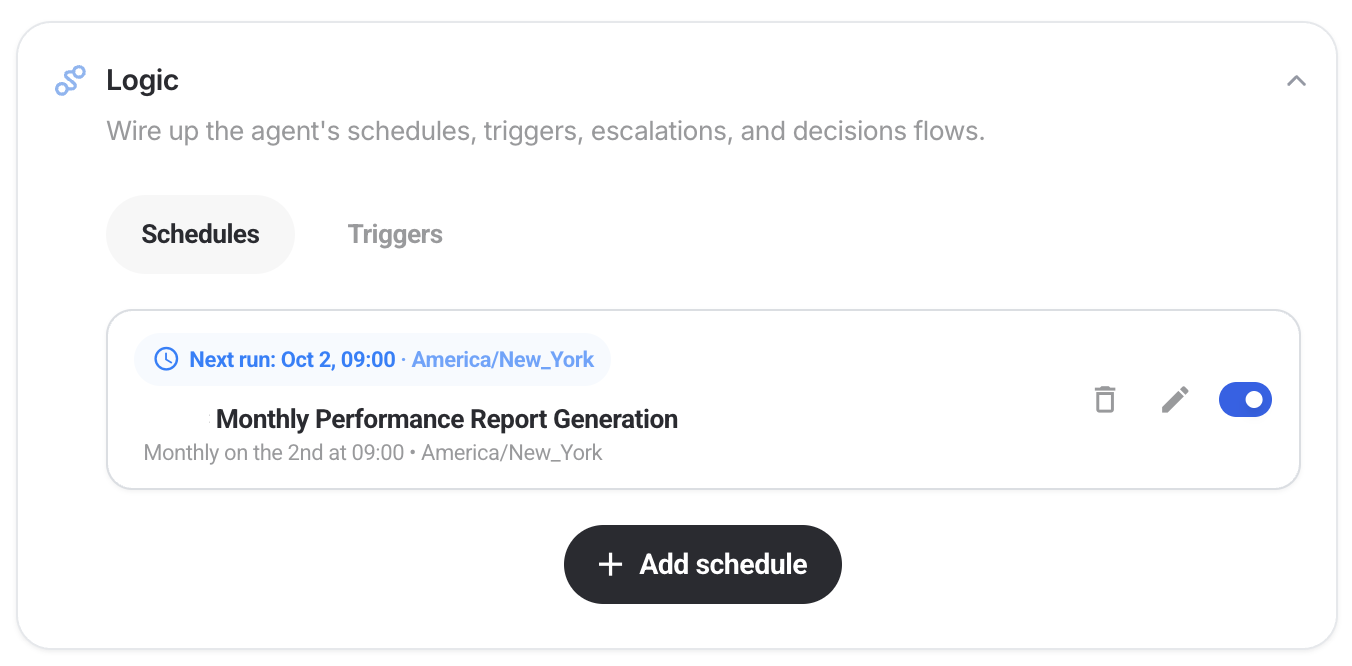
When the 2nd of September came around, the agent built the reports without Anna having to prompt or have their laptop open. The agent also read the client's previous reports and matched their structure without being asked to.
“I have a wealth of prior reporting available in Whatagraph, and so the agent was able to, without even me telling it to, match the output to what the previous reports looked like. That was a surprise."
The scheduled report only took 7 minutes to create. But Anna went back and forth with the agent: dive deeper into this, check your numbers here. She calls it co-creation, and says the output got better because of it. Her team still signs off every report before it goes to the client.
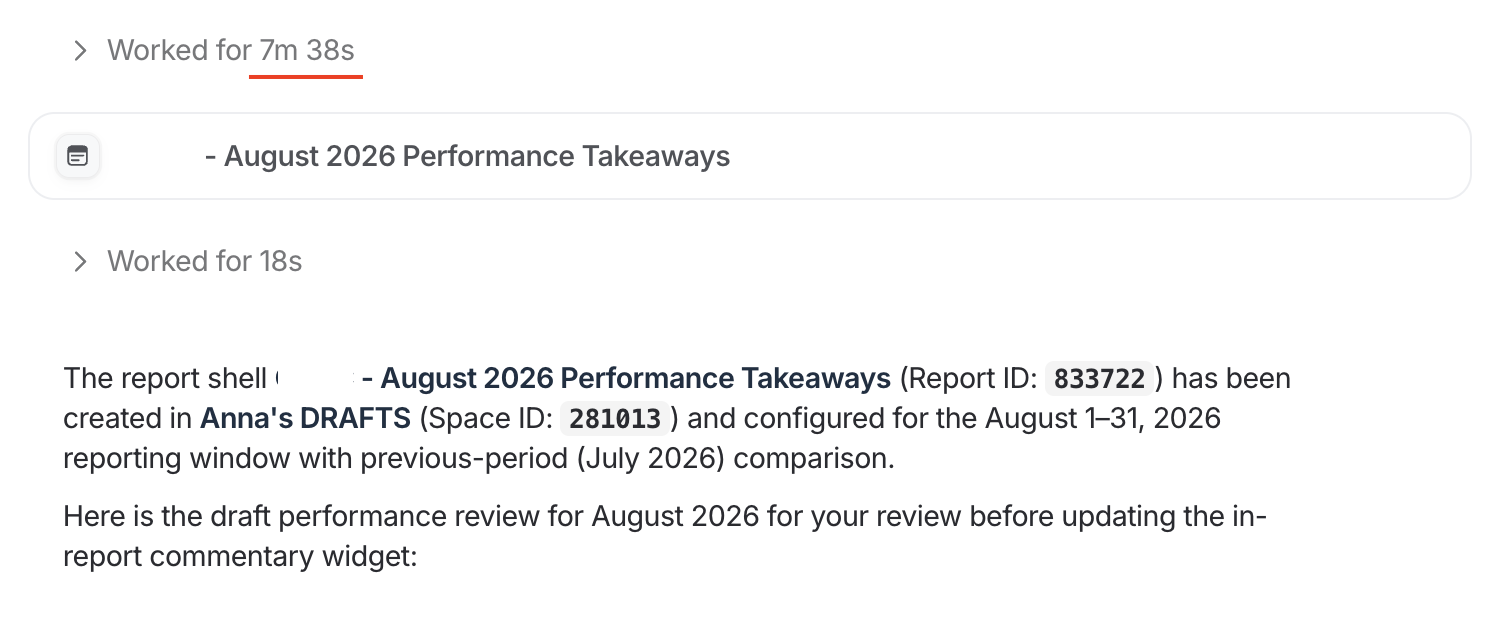
Across 12 clients, agents reduced reporting time from 120 to 180 hours to around 48 hours a month. That's roughly 70 to 130 hours back every month.
“Agents enable us to get started on monthly reporting from a rough draft of performance takeaways, so we can focus on curating deeper insights and more actionable recommendations."
Anna and the analytics team now spends most of their time on conducting deeper analysis and delivering strategic recommendations to clients.
With agents, analyses that used to need at least a two-day turnaround go out in one to two hours, up to 92% faster. Answers to client questions now go deeper too.
"With agents, I can do my job faster and better. I anticipated the faster, but not the better."
Read the full case study here.
A German agency: the team checks what the agent changed
At this German agency, the head of the PPC team briefed his agent on how he wants commentary written: the overall picture first, then the comparison with last month, then the outlook.
For a client with a seven-figure budget, he told the agent to duplicate the report, update it, and write within the existing layout. It took about five minutes, in German.
Ten days later, four people on his team had built agents for their own clients. They said the commentary sounded native and kept the agency's existing style.
"I just need to check the reports now, and it saves an hour of work per report."
At both agencies, the agent produces the draft on schedule, and a specialist reviews it, corrects it, and signs it off before the client sees it.
Automated vs. manual client reporting: which is better?
Neither is better than the other. Marketing agencies we’ve talked to say you need both: automated reports for the first draft, then the specialist reviews the output, adds more context, digs deeper in certain areas, before it reaches clients. AI agents can greatly reduce the time taken to get to that human judgement and analysis part.
Here’s how the work compares:
| 100% Manual | Automated with an AI agent + human oversight | |
|---|---|---|
| Building the report | Someone copies last month's report and updates it by hand | The agent duplicates it and rolls the date range forward on a schedule |
| Commentary | Written from scratch, or edited from last month's text | Drafted in your house style, then edited by the specialist |
| Time as you add clients | Build time and review time both grow with every client | Creating new reports is now 99% automated, only human review time grows |
| Consistency | Depends on who built the report this month | Same structure and style every month |
| Typical errors | Stale dates, missed widgets, copy-paste mistakes | A wrong setting or wrong metric when the brief is loose, caught in human review stage |
| Client context | Lots of context but they can get lost when the specialist has many other things to do | Added by the specialist during review |
| Best for | One-off reports, pitches, a client's first report | Monthly and weekly reports that repeat |
Manual still makes sense for one-off work, where there's no previous report to copy and the structure is still changing. Once a report repeats, automate the build and keep your people on the analysis.
What are the benefits of automated client reporting?
The first benefit is time. The business impact comes from what that time turns into: reports that reach clients sooner, better analysis, and more clients per person on the team.
✅ Less time spent on each report. Pulling data, copying last month's report and rewriting the same commentary are the slowest parts of reporting, and they're the parts automation takes over. One US full-service agency cut the time on its standard monthly reporting by more than half.
✅ Reports reach clients sooner. When every report is built by hand, the last clients in the queue wait. At the same agency, some clients used to get last month's report in week four. With the build automated, the team is aiming to finish regular reporting in the first one or two weeks of the month.
✅ More time for analysis. The hours saved go into the work clients value: explaining changes, answering questions and planning next steps. The agency's analytics lead says she now gets back to clients "not only faster, but with more informed feedback."
✅ Room for proactive work. Checks that never get prioritized, like working out which clients a platform change affects, start happening once the monthly build stops taking the whole month.
✅ Consistent reports across the team. Every report follows the same structure, definitions and house style, so quality doesn't depend on who built it this month.
✅ Fewer manual errors. Stale date ranges, missed widgets and copy-paste mistakes mostly come from rebuilding reports by hand. Automation removes the rebuild.
✅ Better client retention. The report is what clients see every month, and late or inconsistent reports make renewal conversations harder. Dtch. Digitals cut client churn by 50% after moving to automated, live reports in Whatagraph.
How to set up automated client reporting in Whatagraph with IQ Agents
Here's how to automate the reporting process with an agent on Whatagraph, step by step.
- Connect the client's sources. Link their ad accounts, analytics and CRM once. Whatagraph’s ready-made agent - Roster - can connect them and flag broken connections.
- Define the metrics. Set custom metrics like ROAS and CPA once. Group a client's ad accounts into a source group. Blend channels where you need one view. Define them once, and every report and agent reads the same definitions.
- Build the master report. Upload a previous report your client likes and ask Whatagraph IQ Agent to duplicate it for you. No report yet? Ask the agent to build one for you or start from a monthly report template.
- Brand it. Apply the client's logo, colors and fonts with the Brand agent.
- Create a specialist reporting agent for each client. Just tell IQ Agent in plain language what you want or duplicate a pre-made reporting agent and edit it with your client’s context.
- Give it the client's context. Save the client's goals, KPIs and tone to the agent's memory. Attach past reports or strategy docs to its knowledge.
- Set permissions. Set report and widget edits to need approval until you trust the output.
- Run it once. Use this prompt to run scheduled reporting:
On the [day] of every month, duplicate [report URL], update it to last
month, and rewrite the commentary on every tab in the same style.
Flag anything you're unsure about.
When you're done, write a summary of what changed and what needs my review. Don't share or send the report to the client.
- Correct it. Tell the agent what to fix. Save the fixes to its instructions, so the next run starts from them.
- Schedule it. Pick a monthly date, like the 2nd. It runs on Whatagraph's servers.
- Set up delivery. Add an email automation with a manual approval step. Nothing sends until someone signs off.
- Copy it for the next client. Agents are shared with your team. Duplicate the agent, then change the report URL and the client's context.
Common challenges of implementing automated client reporting
1. Combining data from different ad platforms in one view
Every ad platform reports its own way. Google Ads and Meta name metrics differently, use different attribution windows, and can report in different currencies and time zones.
Most teams export each platform into a spreadsheet, or pull everything into a dashboard tool through third-party connectors, then reconcile the totals by hand. That works for a handful of clients. At 30 or 40, the dashboards slow down, connectors break, and someone spends a day each month fixing the gaps between tools.
Whatagraph connects to each platform natively and gives you two ways to combine them. Source groups roll up accounts of the same type, like all of a client's Google Ads accounts, into one source.
Blends join different channels, like Google Ads, Meta and GA4, on shared dimensions such as date and campaign. Rate metrics like ROAS and CPA are built as custom metrics on top of the combined totals, so you don't end up averaging each channel's average. Set it up once, and every report for that client reads the same combined view.
2. Inconsistent campaign naming across platforms
The same campaign often has three names: "Brand_Search_US" in Google Ads, "US - Brand" in Meta, and a UTM tag in GA4 that matches neither. Campaigns get renamed mid-flight, and each account manager has their own convention.
Reports that group or compare by campaign end up with duplicate rows, or with last month's numbers that don't line up with this month's. Teams patch it with lookup tables and regex in a spreadsheet, then update them every time someone launches a campaign.
In Whatagraph, you fix this with custom dimensions. A custom dimension maps messy campaign names to one clean value, or groups them into categories like brand, prospecting and retargeting. You can write the rules yourself or have AI classify campaigns into the categories you define. Define it once, and every report uses the same names.
3. AI commentary that sounds generic
Most AI-written commentary restates the chart: sessions went up 12%, CPC went down 4%. The client can already see that. What they want to know is why it changed and what you'll do next, and a model can't work that out from the numbers alone.
The fix is context and structure:
- Give it the client's goals. A 10% rise in CPA means one thing for a client scaling spend and another for a client cutting it.
- Show it your past reports. An AI that reads the last few reports picks up your structure and tone.
- Tell it the structure you want. For example: the overall picture first, then the comparison with last month, then the outlook.
- Point it at the metrics that matter. Tell it to write about the KPIs in the report, not every metric in the account.
- Leave the why to your specialist. Client meetings, offline changes and strategy decisions don't live in the ad data, so a person adds them in review.
4. Finding the balance between automation and human review
If you automate too little, you save an hour and still rebuild most of the report. If you automate too much, a wrong number can reach the client with your logo on it.
A split that works: automation handles the repeatable parts, meaning pulling data, rolling the report forward, checking every widget loaded, and writing the first draft. A person handles anything the client reads closely: the headline numbers, the commentary, the recommendations and the final sign-off. Start with approval required on every change. As the output proves reliable, relax approvals on routine edits, and keep the final sign-off on every report.
5. Knowing where to start
Reporting automation touches data connections, metric definitions, templates, commentary and delivery. There are more options than any team can test at once, and teams that try to automate everything together tend to stall.
Start with the report you rebuild most often, for one client. Get it running, compare the first cycle with the second, then copy the setup to the next client.
6. The setup depends on one person
In a lot of agencies, reporting runs on one person's spreadsheets, scripts or prompts. When that person goes on holiday or leaves, reports slow down or stop, and nobody else knows how the numbers were built.
Keep the setup where the whole team can see it. In Whatagraph, metric definitions, templates and agents live in the team's workspace instead of one person's files. Agents are shared across the team, so a colleague can run the same agent with the same instructions, and conversations with an agent are visible to the team by default.
Best practices for automated client reporting with agents
- Create a reporting agent per client. Instead of using a general reporting agent, create a custom client specialist agent that has all the context of each client, the report structure that works best for them, their branding, the way they like insights to be written, and historical data in one place. This means the agent can create reports that are exactly on-par with what each client expects, including commentary that is more nuanced and contextual.
- Point agents to templates and examples. Instead of having an agent create a report from scratch (where it can easily mess up), give it a report template you used before for the client, or an example you like. Check here for PPC reporting examples and templates.
- Define every metric once. If "conversion" means a purchase for one client and a form fill for another, write that down per client. If ROAS is calculated three different ways across your reports, pick one.
- Fix campaign naming first. Agents group and compare campaigns by name. If a campaign gets renamed mid-flight, map the old name to the new one, or last month's numbers won't line up with this month's.
- Pick one conversion source per client. Conversions reported by Google Ads and by GA4 won't match. Decide which one each client's report uses, so the commentary doesn't switch between them.
- Start with one client. Get one report right with agents, then use them for the rest of your clientbook.
- Get a human specialist to sign off every report. Keep the review step on for every client, including the ones that have run cleanly for months.