Windsor.ai Pricing: What Are You Really Paying For?
Windsor.ai’s pricing starts at $0 for a 30-day free plan and moves up through five paid tiers billed annually:
- Basic at $19/month
- Standard at $99/month
- Plus at $249/month
- Professional at $499/month
The Enterprise plan is custom-priced based on your data volume and connector needs.

Mar 10 2026●5 min read


That’s the story on the surface.
According to my own calculations, plus what real users report on G2, Reddit threads, and Twitter—all seem to reinforce that the pricing page is the glossy version.
So before you anchor your budget to the sticker, let’s look at reviews, do some example math, and why you might outgrow Windsor.ai even before you start.
Windsor.ai Pricing Overview: What’s Included In Each Plan?
According to Windsor.ai’s pricing page, these monthly prices (billed annually) are current as of December 2025:

Here’s the TL;DR version, in case you don’t want squint at the screenshot above:
| Plan | Price Per Month (billed annually) | Users | Data Sources | Accounts | Data Warehouse Volume (Monthly Active Rows - MAR) | Additional MAR Cost |
| Free | $0 (30-day free trial) | 1 | 10 | 15 | Free plan version only includes basic volume | Upgrade required |
| Basic | $19/month | Unlimited | 3 | 75 | 5M MAR | $20 per +1M |
| Standard | $99/month | Unlimited | 7 | 75 | 5M MAR | $10 per +1M |
| Plus | $249/month | Unlimited | 10 | 200 | 5M MAR | $8 per +1M |
| Professional | $499/month | Unlimited | 14 | 500 | 50M MAR | $4 per +1M |
| Enterprise | Custom | Unlimited | Up to 300 | Up to 50,000 | 50M MAR | $3 per +1M |
SSO and auto-add accounts are only available on the Professional and Enterprise plans, while true enterprise-only features include invoice payments, an enterprise SLA, custom connector development, and enterprise onboarding.
What are the key takeaways for your budget?
A few things jump out once you start comparing the plans side by side:
- The Professional plan and Enterprise plan include the same 50M Monthly Active Rows (MAR) limit: That means you’re paying $499/month vs. a custom quote for the exact same data-warehouse volume. The only real difference is the enterprise add-ons (invoice payments, SLA, custom connectors, onboarding), not the data allowance itself.
- The jump from Basic ($19) to Standard ($99) is huge—and real users feel it too: A small business owner, Paul R. says on G2: “...going from $19 per month to $99 is a jump.”
- The MAR overage pricing is the only part that scales reliably: The higher the tier, the cheaper the extra MAR.
Most importantly, it’s worth naming what Windsor.ai actually is: a no-code ETL/ELT tool built to move data from 325+ marketing sources into warehouses, spreadsheets, and BI tools.
That means the pricing model you see above is not for an all-in-one, AI-powered reporting tool like Whatagraph, which handles the ELT pipeline in the background so you can spend your time building client-ready dashboards.
The moment Windsor becomes only one component of your stack, your total cost grows—not just in dollars, but in what I’d call opportunity cost.
So, your real cost includes Windsor PLUS your BI tool PLUS warehousing PLUS the time you’ll spend maintaining and fixing the pipeline. The pricing looks cheap until you factor in the hidden labor.
Meanwhile, a platform like Whatagraph replaces the entire pipeline: ETL, harmonization, visualization, and reporting; and saves teams like Maatwerk Online over 100 hours per month on reporting. Here’s co-founder Lars Maat in his own words:
Whatagraph’s AI saves time and energy for our marketing specialists. And the hours we’re saving is just pure profit. We now have the time to focus on more strategic things that help both our agency and our clients grow.
What Do Real Users Say About Windsor’s Pricing?
For this section, I reviewed G2, Reddit, and Twitter, filtering only for comments that mention pricing, cost, renewals, or value for money—and only pulling in posts from the last 18 months so the feedback reflects Windsor.ai’s current product and pricing model.
A recent post in r/PPC shows how a user was billed CAD $1,762 for a full-year subscription they didn’t intend to renew. The first charge attempt failed (flagged as potential fraud), but Windsor retried the next day and it went through.
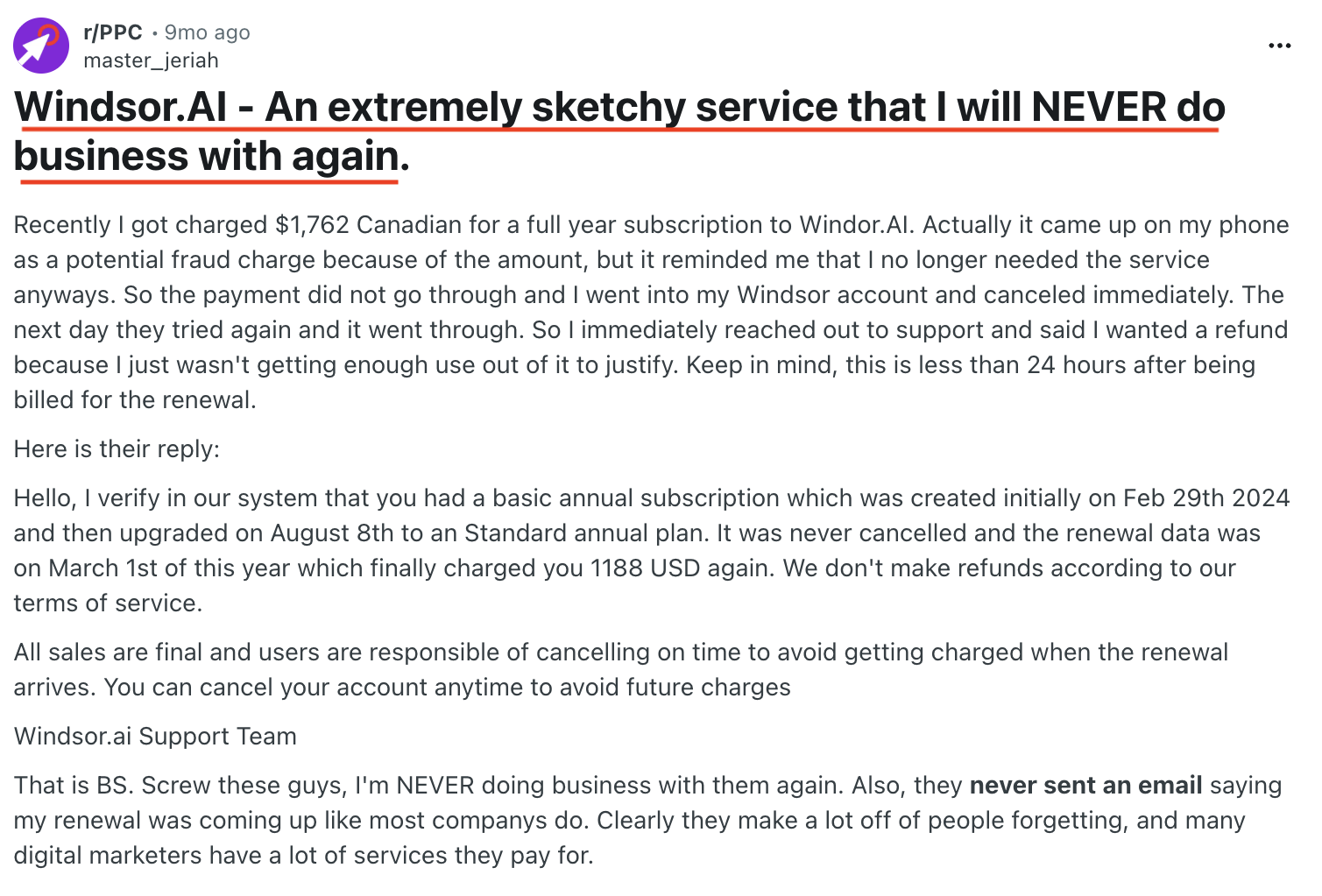
When the user requested a refund within 24 hours, Windsor refused, citing their terms:
“We don’t make refunds… All sales are final and users are responsible for cancelling on time.”
An alleged former employee, in the same thread, says this behavior is Windsor’s “modus operandi.”
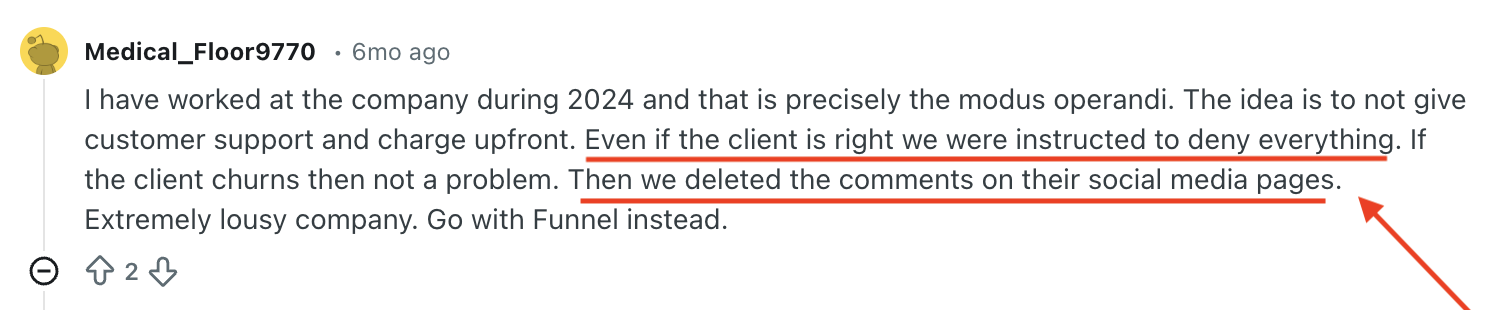
“The idea is to not give customer support and charge upfront. Even if the client is right we were instructed to deny everything… Then we deleted the comments on their social media pages.”
Of course, one heated Reddit thread, or even a few, isn’t the full picture. So let’s zoom out and look at what paying customers consistently say about Windsor.ai’s pricing on G2 and Trustpilot.
Deepak J., a Senior Analyst, says on G2:
“The usage-based pricing jumps quickly once you add extra data sources.”
In the same vein, Trustpilot reviews from the last year highlight a related problem: the value you get for what you’re paying.
Julia describes major performance issues:
“No service should take two hours to load such a small amount of data…unacceptable for a paid plan.”
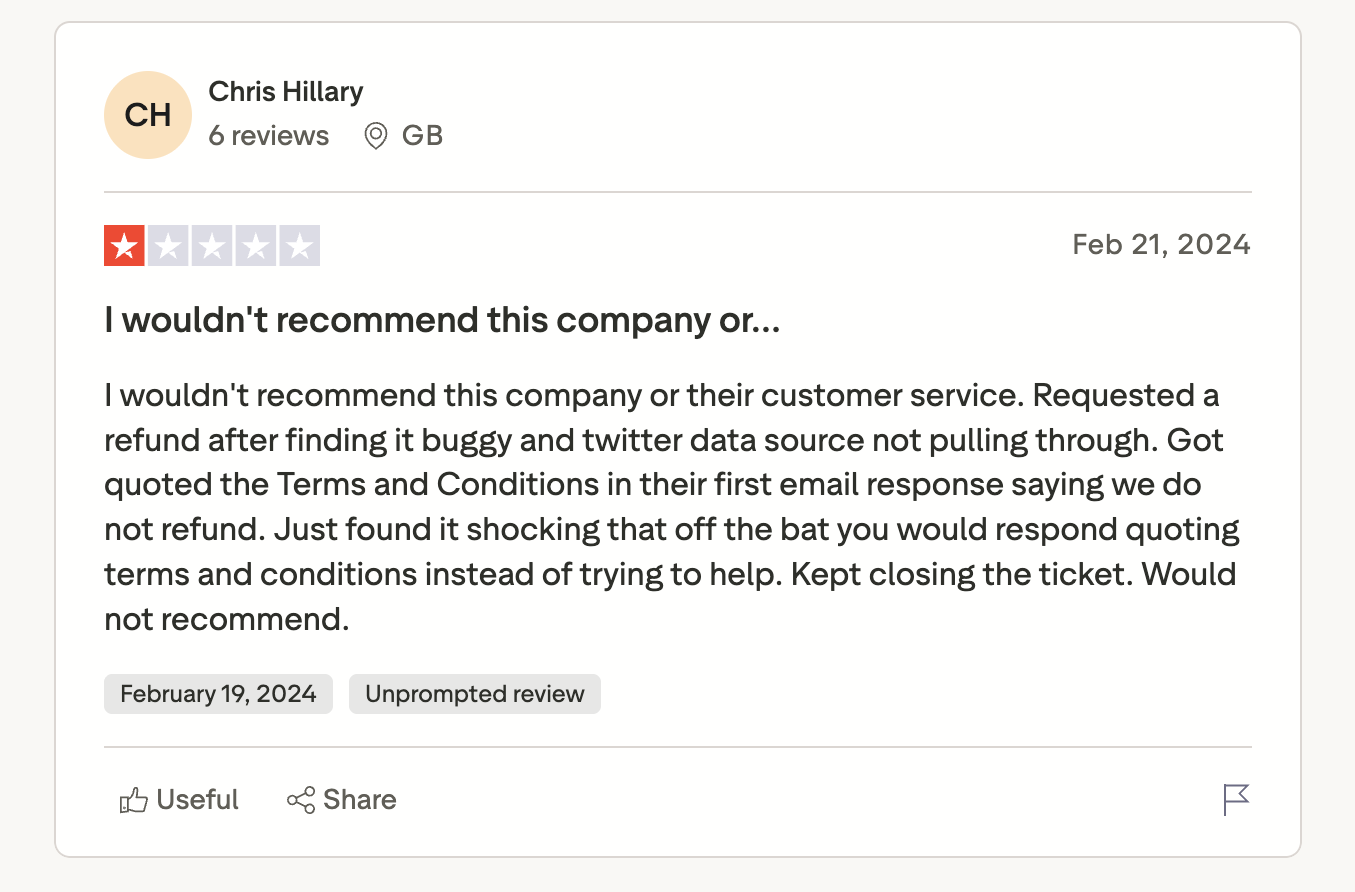
Chris Hilary echoes this with a support-related pricing issue:
“Requested a refund after finding it buggy… they quoted Terms and Conditions saying we do not refund… Kept closing the ticket. Would not recommend.”
Now let’s hop over to another universe entirely—X. The most recent and damning pricing-related post comes from Data Analyst Bobby Lansing:
“Word of caution: Windsor AI does not give refunds. I am filing a dispute with my credit card.”
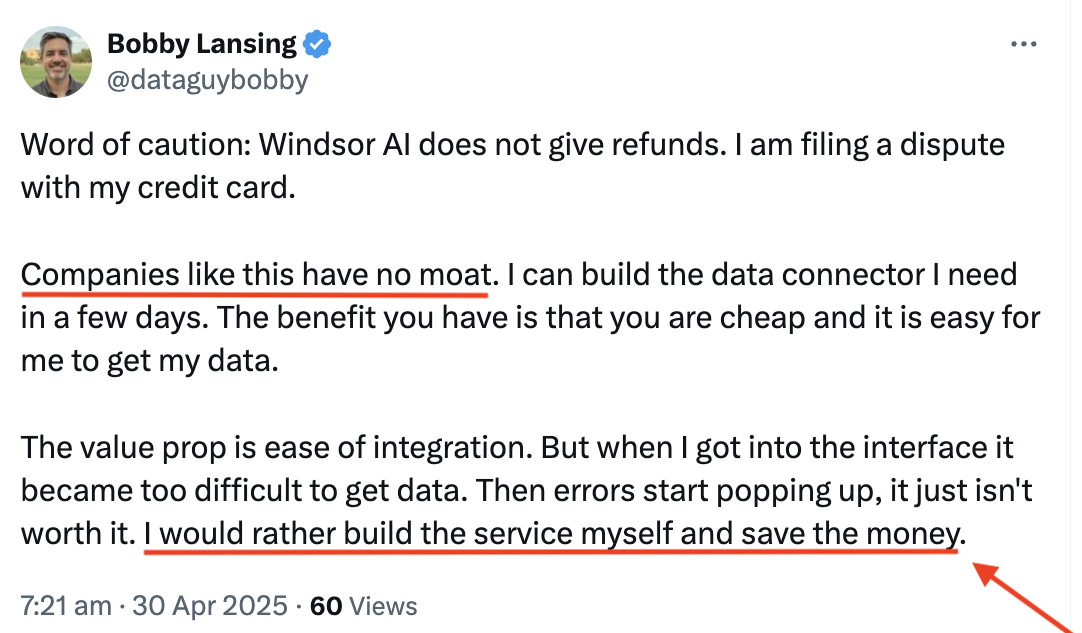
He goes further to question the price-to-value ratio:
- “Companies like this have no moat.”
- “I would rather build the service myself and save the money.”
TL;DR: The consensus across G2, Reddit, Trustpilot, and X is that Windsor.ai is affordable on paper but risky in practice, especially if you scale or rely on it for client work.
Given these pricing and support pain points, it's no surprise users are looking for Windsor.ai alternatives. How does it stack up against Whatagraph though?
Windsor.ai Pricing vs. Whatagraph Pricing: Head-to-Head Comparison
Windsor sells data movement, while Whatagraph sells finished reporting—and the respective pricing plans reflect that.
Whatagraph keeps things simple: no maze of feature walls. Whatagraph's pricing scales with your needs. Check out the official pricing page for more details. Want help picking a plan? Get a demo.
For the exact breakdown (it does get updated), the pricing page is the source of truth.
Windsor’s free tier is…a demo, not a tool. As of December 2025, Windsor’s free plan limits you to one user, one data source, and one account. That’s enough to confirm a connector works, but not nearly enough for anyone running even basic reporting. You get a sandbox, not a starter plan.
Agencies stuck between “tiny” and “full-blown” end up overpaying or compromising.
Let’s say you’re a small agency managing reporting for 5 clients, each with 3–4 marketing data sources (Google Ads, Meta Ads, Google Analytics 4, Shopify, etc.).
You’ll outgrow the basic plan quickly, so let’s pick the middle tier.
- The Windsor Standard plan at $99/month.
- Need extra Monthly Active Rows? Say +5M at $50/month; (5M × $10 per 1M on Standard).
- Occasional connector overages or extra accounts: ~$20/month cushion.
Total Windsor cost so far: $169/month
Sounds fine so far. Let’s keep going.
You choose Looker Studio as your visualization layer.
- Free, but each connector (Supermetrics-style) can cost $39–$99 per month.
- You’ll need at least 2–3 specialty connectors you can’t get through Windsor alone.
Let’s be conservative:
Looker Studio connector bundle: $120/month.
Now for BigQuery storage and queries for multi-client datasets: $20–$50/month
Let’s take the midpoint: $35/month.
And remember, ETL tools don’t eliminate work—they move work.
So, for typical ETL maintenance, you’re looking at: schema mismatches, source API changes, failed syncs, data destination task errors, BI dashboard rebuilds, QA every time a client changes naming conventions.
Even efficiently-run teams lose 8–15 hours/month on this data pipeline.
Let’s pick a conservative number:
- 10 hours/month
- Your analyst or AM costs roughly $35/hour (even low for EU/U.S.)
Labor cost: $350/month.
Now let’s add it up. The total monthly cost for a “cheap” Windsor setup:
- $674/month for Windsor plus the reporting stack
vs.
That's the number that should give you pause, not because Whatagraph is automatically cheaper on paper, but because that $674 is buying you a pile of tools you still have to glue together yourself. Whatagraph's pricing buys the whole thing, done: no separate connector fees, no warehouse bill creeping up quietly, no analyst quietly eating the maintenance tax nobody budgeted for.
So really, your real reporting cost is 3–5x higher than expected.
Whatagraph avoids that entirely, our tiers increase in logical, workload-aligned increments, so teams don’t get punished for outgrowing a starter plan by 5%–10%.
Ready to save 100+ hours per month on marketing analytics? Get a demo.
Published on Dec 02 2025
WRITTEN BY
Brinda GulatiBrinda Gulati is a fractional content marketer and freelance writer who specializes in data-driven storytelling and writing easy-to-understand, informative content for humans. She has two degrees in Creative Writing from the University of Warwick, and believes that above all, stories are a deeply human endeavor. She has two dogs, knows thrifting spots, and loves afternoon naps.