GoHighLevel MCP: Connect GHL to Claude and trust the answers
You can connect GoHighLevel to Claude easily with a GoHighLevel MCP and it takes about ten minutes.
In this article we'll show you not only how to connect GHL to Claude, but also how to get accurate cross-channel answers from other marketing channels you use.

Aug 20 2026●10 min read


Ask Claude which lead sources performed best for a client this month and your GHL MCP will give you a confident, well-formatted answer.
But something about that answer just feels off.
It's not a Claude issue, but a data issue.
Without the right context in place, like normalized lead sources, defined metrics, or your ad channels mapped to your CRM data, the answer Claude gives will be incomplete and generic.
That's the problem this article is about. In this article we'll cover:
- What a GoHighLevel MCP server is and how it differs from the GoHighLevel API
- Three types of connectors and why only one answers cross-channel questions
- Two options to connect GoHighLevel to Claude
- A full prompt library organized by use case so you can hit the ground running
TL;DR
- A GoHighLevel MCP server is a connector that lets Claude query and act on your HighLevel data in plain language.
- HighLevel's own server is strong inside a single sub-account. It reads and writes contacts, opportunities, calendars, and conversations. But it can't pull data from your other marketing channels like Google Ads and Facebook Ads.
- Whatagraph isn't another MCP. It's a marketing intelligence platform where GoHighLevel sits alongside Google Ads, Facebook Ads, GA4, and the rest, already unified.
- Map your GoHighLevel opportunities to your ad channels with a blend, define cost per booked appointment once, and one question covers every channel and every client. Prompt library at the end.
What is a GoHighLevel MCP server?
A GoHighLevel MCP server is a connector that gives an LLM like Claude direct access to your HighLevel account. You ask in plain language and get an answer back, no clicking through sub-accounts to find out what happened.
MCP stands for Model Context Protocol, an open standard introduced by Anthropic in late 2024.
Arturas Lazejevas, Whatagraph's CTPO, puts it in plain terms:
Think of MCP as a door that LLMs like Claude or ChatGPT can use to access any of your systems that you connect (through the MCP).
Three types of MCP servers for marketing
Not all MCPs for marketing are built the same way. When a vendor says "we have an MCP" in 2026, they could mean three completely different products behind the same wire protocol.
Arturas breaks it down like this:
| Single platform MCP | Stitched connector MCPs | MCP over a governed data layer | |
|---|---|---|---|
| What it is | A protocol wrapper over one platform's API | Multiple platform wrappers side by side. Nothing shared between them | A protocol over a unified data model. Metrics, currency, attribution all reconciled at ingest |
| Cross-channel answer | Not its job. One platform by definition | The LLM stitches at query time. Math drifts | Pre-blended in the data model |
| Same question, same answer | Yes, within that platform | No. Depends on the prompt | Yes. Metrics defined once |
| Cost per question | Cheap. One platform call | High. N platform calls plus LLM reconciliation in tokens | Cheap. Reconciliation already done |
| Where it fits | Single platform questions. Direct platform workflows | Quick answers when one platform is enough | Daily multi-channel reporting. Multi-client or multi-location operations |
GoHighLevel MCP is the first one and Whatagraph’s MCP is the third one—the one with the governed data layer.
This means with Whatagraph, you don’t just get a MCP connector just for one siloed marketing channel, but for all your cross-channel data that is cleaned and normalized.
And with Whatagraph IQ Agents—AI agents that build reports, monitor all your accounts, and flag you when things are off—you can stay on top of clients and accounts no matter how many you have on your roster and get time back for strategy and growth.
More on this in the next section.
How to connect GoHighLevel to Claude [2 options]
There are two ways to do this. Connect GoHighLevel's own MCP server directly, or connect GoHighLevel through Whatagraph alongside every other channel you run.
Option 1: HighLevel's own MCP server
Best for: working inside a single client's account. Contact management, pipeline cleanup, ad-hoc CRM operations, and anything where the answer lives entirely in GoHighLevel.
HighLevel ships its own MCP server, and for a lot of people it's the right choice.
The LeadConnector MCP server runs at a hosted endpoint and works with any HTTP-based MCP client, which by now means most of them: Claude Desktop, Claude Code, Cursor, Windsurf, VS Code, and the OpenAI Playground included. There's also a Claude-specific endpoint HighLevel shipped later, with a wider operation catalog.
Setup runs about ten minutes. You generate a Private Integration Token in your sub-account under Settings, or use OAuth, which HighLevel recommends because it exposes more scopes. Then you point your client at the endpoint and approve. Your API credentials only reach what you granted them, and the locationId tells the server which sub-account you're working in.
Two rules from HighLevel's own setup guide.
- Grant view scopes first and only add edit scopes once you've watched it return the right data.
- And test in an internal or throwaway sub-account, never a paying client's live location, until you trust what it's doing.
If the official server doesn't cover something you need, there are community builds on GitHub with far wider tool coverage. Those you self-host, usually on something like Vercel or your own infrastructure, which means you own the uptime, the credential storage, and any bug that touches client data.
However, there are limitations to watch out for.
Limitations of GoHighLevel MCP server
1️⃣ First, it only works with GoHighLevel and not with your other marketing data.
The GoHighLevel MCP server connects to one platform. Your marketing runs on six.
Your leads come from Google Ads and Facebook Ads. Your traffic data is in GA4. Your rankings are in Search Console. Your calls are in a call tracking tool. GoHighLevel holds what happened to the lead after it arrived, and nothing else.
So the questions clients ask you have no path through it:
- What did a booked appointment cost us last month?
- Which channel brought in leads that closed, not just leads that showed up?
- Is Google or Meta producing better pipeline this quarter?
- How does this month compare across everything we're running?
Every one needs GoHighLevel and at least one other platform in the same answer. The MCP has half the data and no way to reach the rest.
You can bolt on more MCP servers, one per platform, and ask Claude to reconcile them in the conversation. That's the stitched setup in the middle column of the table above, and it's where the numbers start drifting. Different definitions, different attribution windows, different currencies, all being reasoned about on the fly, every single time you ask.
2️⃣ Second, every request runs against one sub-account. Agencies can authorize several locations in one connection and switch between them by naming one, which is a real improvement, but switching isn't spanning.
HighLevel says so directly in its multi-account support documentation: every operation executes against a single sub-account at a time, even on an agency connection, and cross-location operations aren't possible. So "which of my 40 clients is trending down" doesn't work either.
Agencies have been asking for this for years. There's a long-running thread on GoHighLevel's own ideas board requesting an agency-level view across all sub-accounts, and the agencies in it aren't asking for convenience. One owner running close to 200 sub-accounts puts it plainly: "Attrition is brutal if we can not successfully show our clients progress." He wants one weekly view of which accounts are slipping, not 200 separate reports.
Option 2: connect GoHighLevel to Claude through Whatagraph
Best for: agencies and teams running multiple marketing channels alongside GHL and want a holistic and accurate view of performance in one place
Whatagraph is a marketing intelligence platform for cross-channel marketing data, and the MCP is a query layer we put on top of it. Google Ads, Facebook Ads, GA4, Search Console, call tracking, email, and GoHighLevel all sit in the same place, already unified, before Claude sees them.
So it isn't one connector against another connector. It's one platform's connector against every platform you run, in one place.
As Arturas explains:
Whatagraph doesn't query separate connectors like Facebook, Google Analytics, and Google Ads on the fly and have Claude reason about it. We unify all of that data as it comes in. The MCP is just the query layer on top.
For GoHighLevel, the mapping is the point.
Your opportunities and leads carry a source and a campaign. So do your ads. Join them on that key inside Whatagraph and the CRM outcome sits next to the spend that produced it. Define cost per booked appointment once as a custom metric and it returns the same number in the chat, in the client's report, and in next quarter's review.
That answers all four questions above in one query.
- What appointments cost across Google and Meta together.
- Which channel produces pipeline and which produces noise.
- Whether the ROAS holds once you count what happened in the CRM rather than what the platform reported.
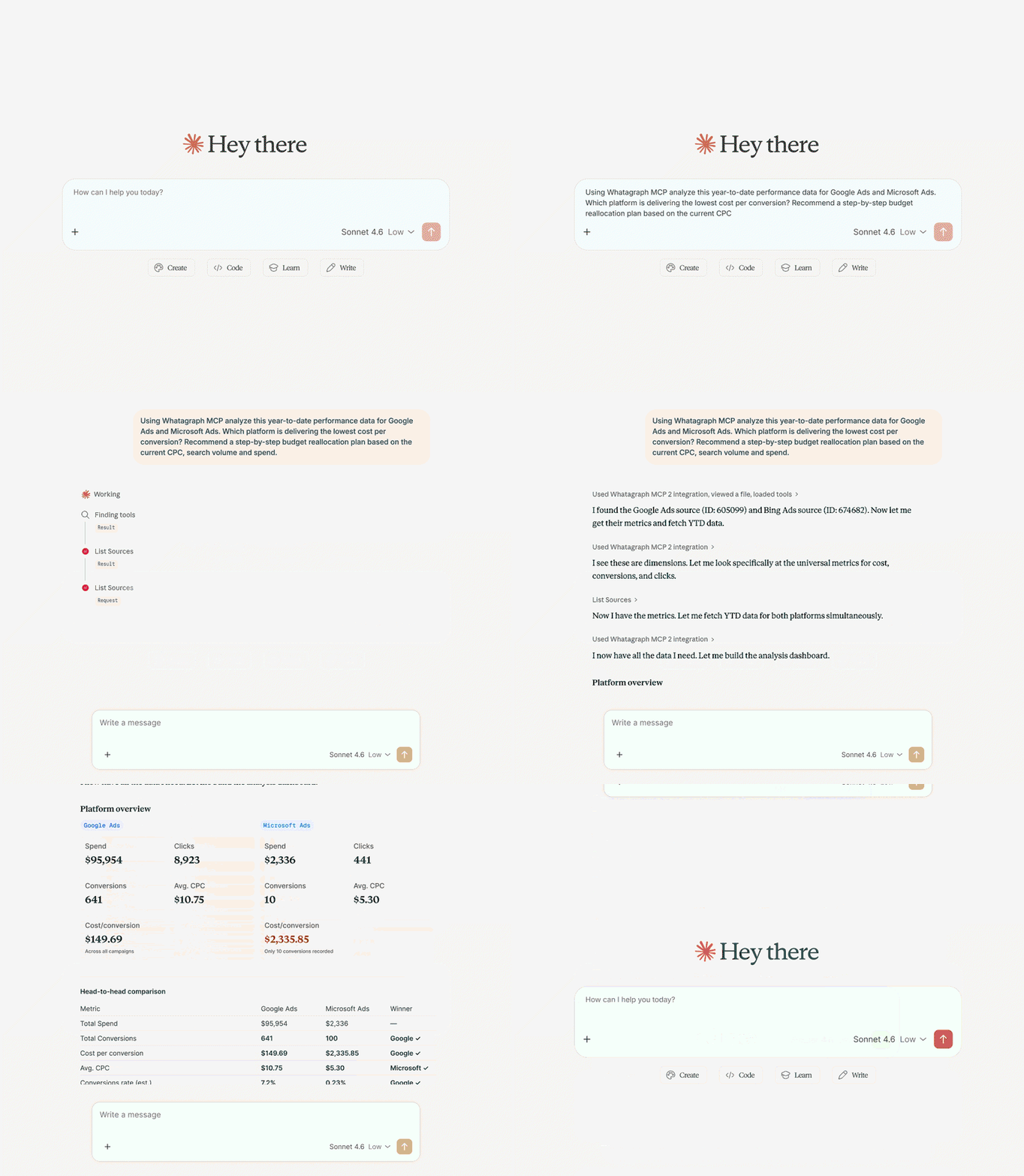
Go even one step further Whatagraph IQ Agents.
IQ Agents run on the same governed foundation and do both jobs on their own: building the reports, and watching every client, connection, and metrics and catching them before it breaks or something goes amiss. Early access is open here.
Setup takes a few minutes and no code. Here's a step by step to get started.
8 steps to connect GoHighLevel to Claude with Whatagraph MCP
Setting up Claude GoHighLevel access through Whatagraph takes a few minutes.
Before you start, make sure you have three things ready:
- a Whatagraph account with your GoHighLevel account connected
- a Claude account
- Owner or Full Admin access to your Claude workspace
Here's a video walkthrough:
If you're on a team plan and don't see the option to add a custom connector, you'll need whoever manages the account to do this part.
A trick: log into your Whatagraph account in the same browser you're using for Claude. The authorization step becomes one click instead of a separate login flow.
Step 1: Connect your GoHighLevel account in Whatagraph
If you haven't already, connect GoHighLevel as a data source inside Whatagraph. This is where the data lives; the MCP gives Claude a way to query it.
You get the full CRM side: contacts, new leads, opportunities by stage, open, won and lost, total pipeline value, closed revenue, win rate, stage conversion rates, bookings, showed and no-show appointments, booking conversion rate, calls, emails and SMS sent, and reply rates.
All of it breaks down by source, campaign, channel, or location. You'll use that in step 2.
Step 2: Connect your other marketing channels
Add every other platform you report on. For most agencies that's Google Ads and Facebook Ads first, then GA4, Google Search Console, call tracking, and email.
Connect them the same way you connected GoHighLevel. Each one becomes a source in the same account.
Do this now, not later. The blends in step 3 join GoHighLevel to these channels, and you can't join to something that isn't connected.
Step 3: Set up your governed data layer in Whatagraph
This is a non-negotiable. As Arturas puts it:
My suggestion would be to really embed your business logic into Whatagraph first, so that Claude doesn't need to reason about it. It doesn't need to figure that stuff out every time.
Here's what to set up before you start querying:
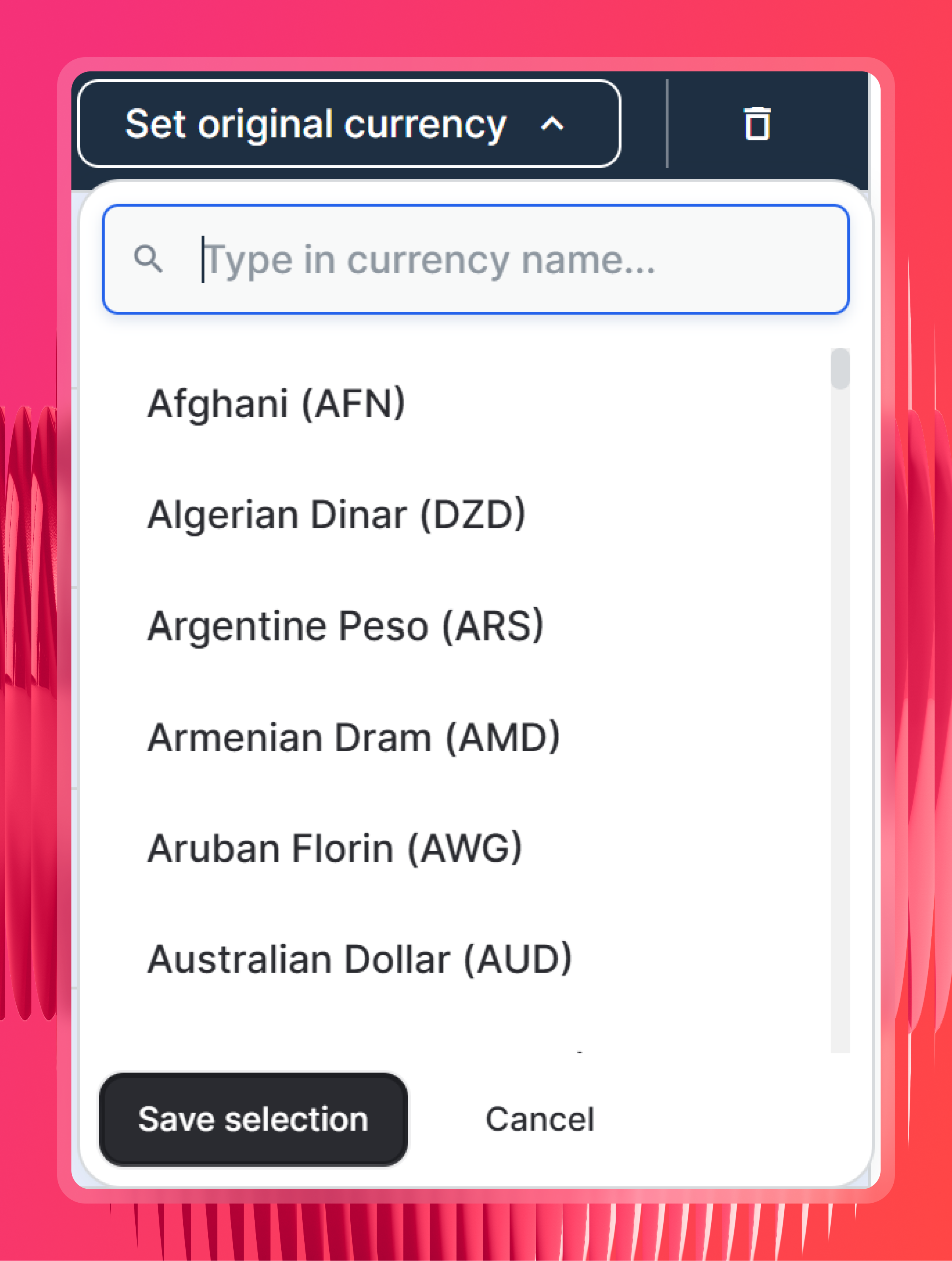
Check currency settings. Whatagraph detects the original currency for each source automatically. In the rare cases where it can't, you can set it manually.
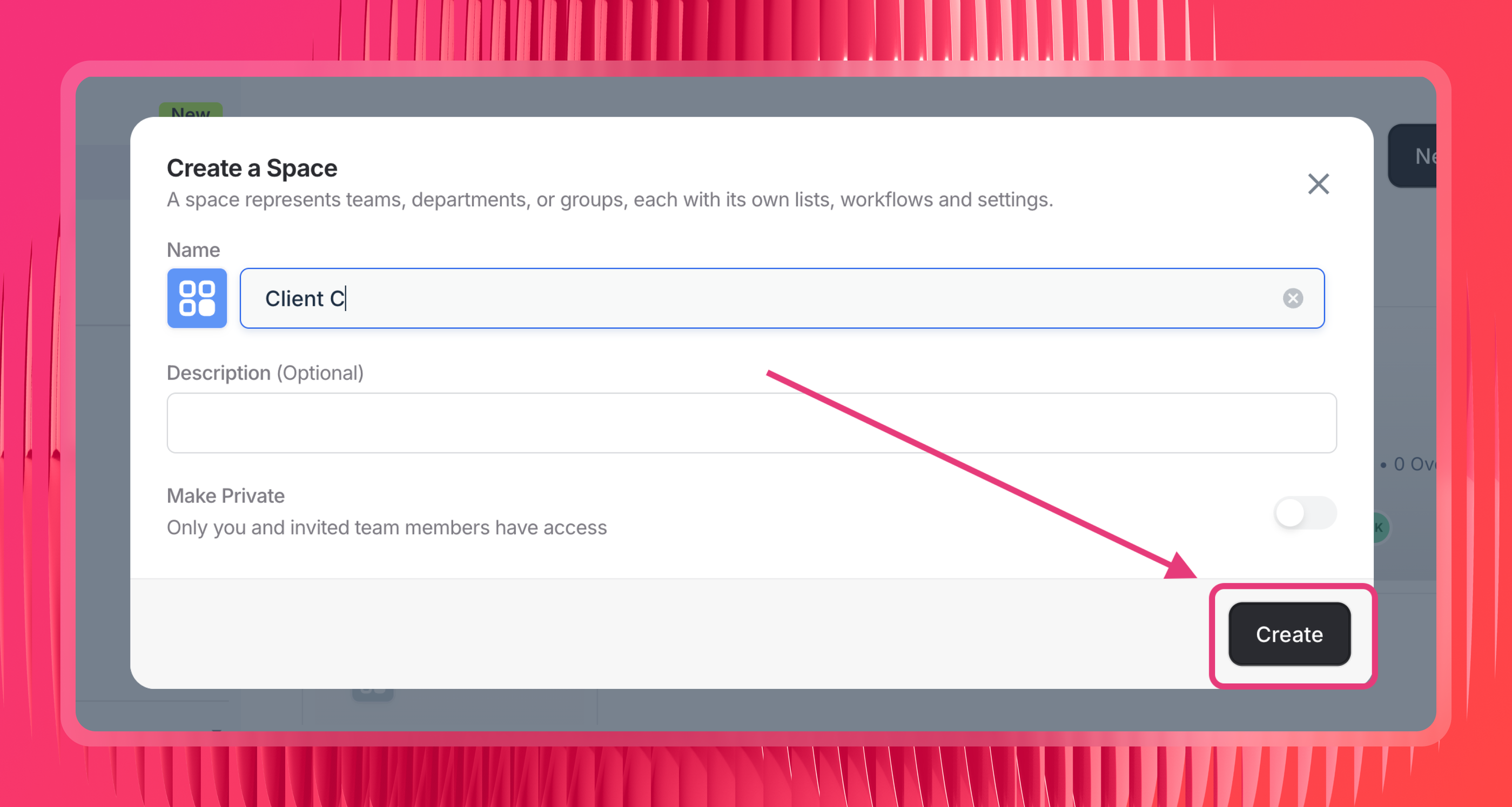
Organize sources into Spaces by client or location. Claude scopes queries by Spaces on Whatagraph, so if your sources aren't organized this way, it has to search across everything. One Space per client, with that client's GoHighLevel sub-account and their ad accounts inside it.
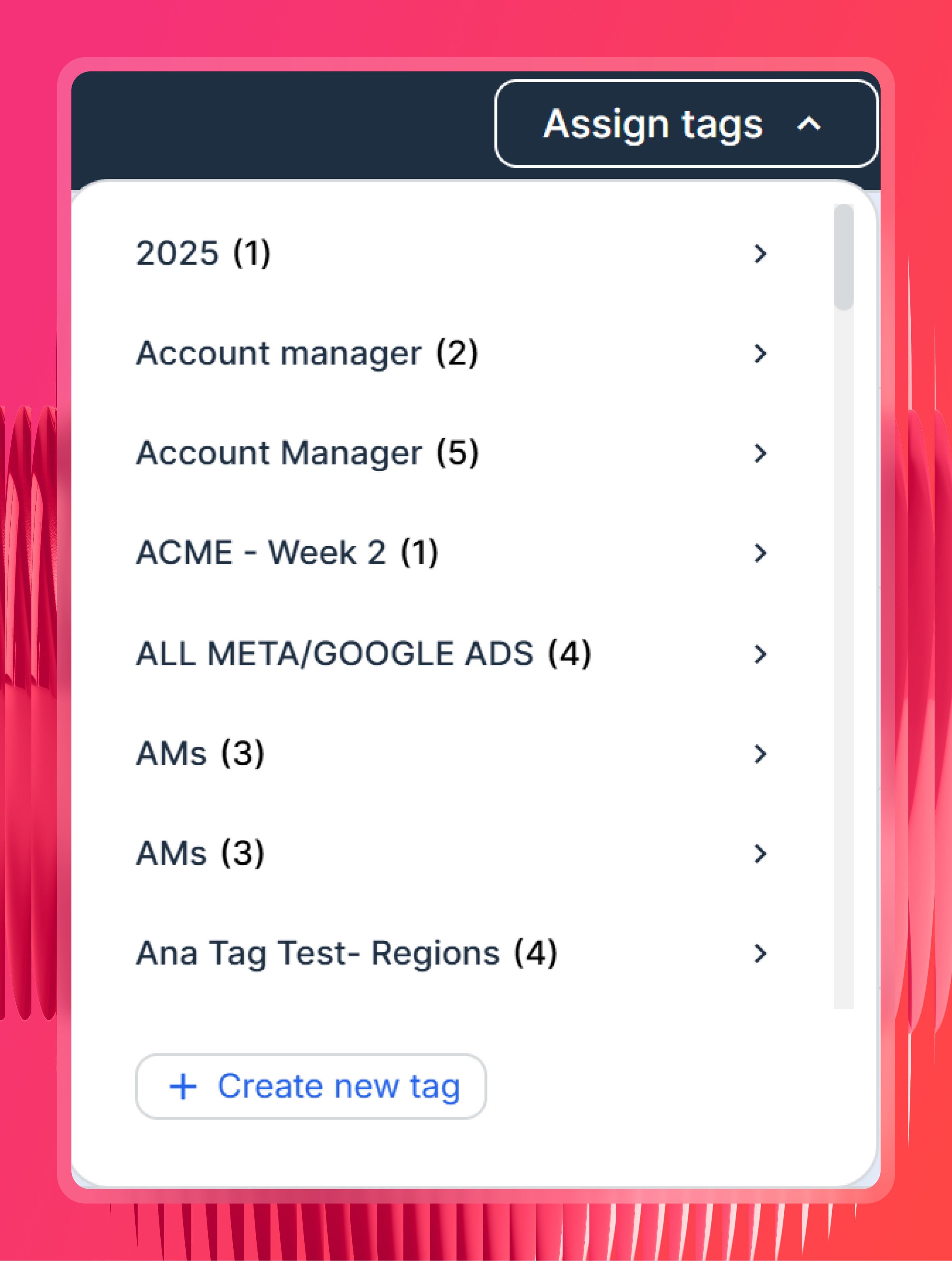
Tag your sources (optional but useful). Label sources by client, region, account manager, or client tier so you can filter by those labels in Claude without spelling out which sources to include every time.
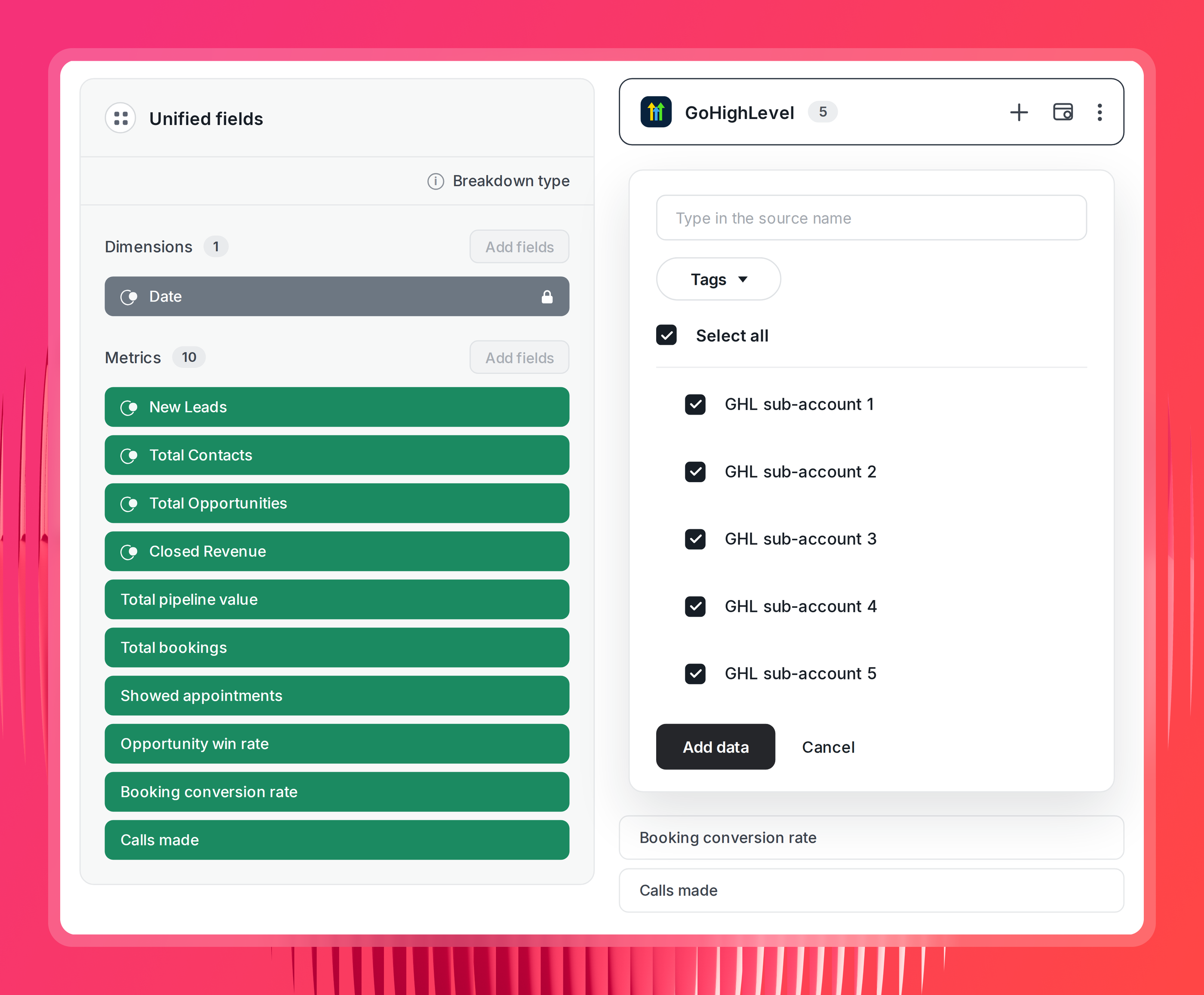
Create Source Groups for your GoHighLevel sub-accounts. A Source Group aggregates multiple accounts from the same channel into one combined source. Point it at all your sub-accounts and they become one source Claude can query in a single call. So "which of my clients had the lowest booking conversion rate last month" is one question, not 40.
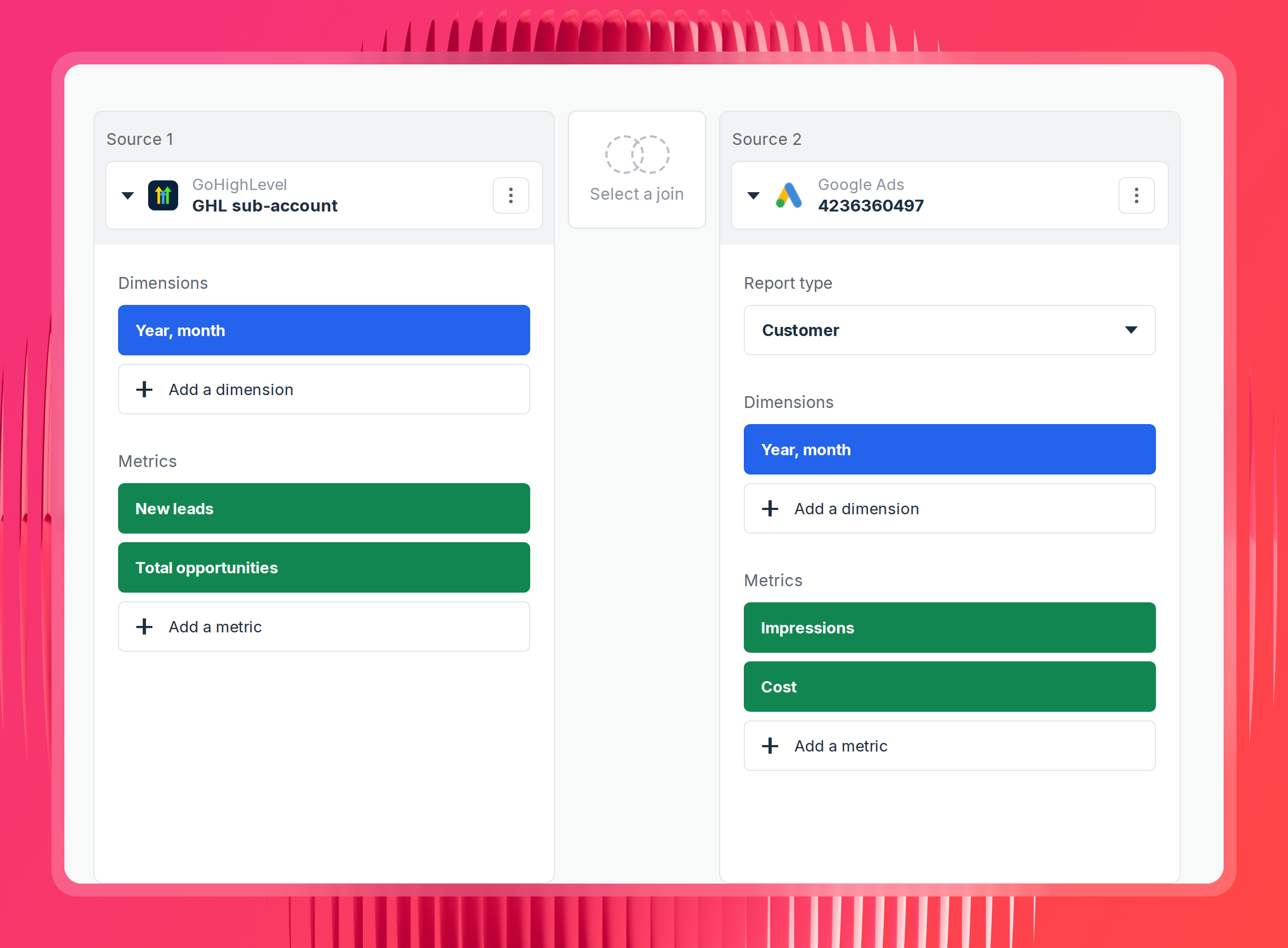
Create data blends for different channel types. GoHighLevel and Google Ads don't share a report type, so a Source Group won't work here. Use a blend to merge them into one virtual source on a shared join key. Campaign works if your UTM discipline is solid. Date works if it isn't, and gets you channel-level answers rather than campaign-level ones.
Define your custom metrics and formulas. Cost per lead, cost per booked appointment, cost per closed deal, lead-to-close rate. Build them on top of the blend so Claude reads a definition instead of reconstructing one.
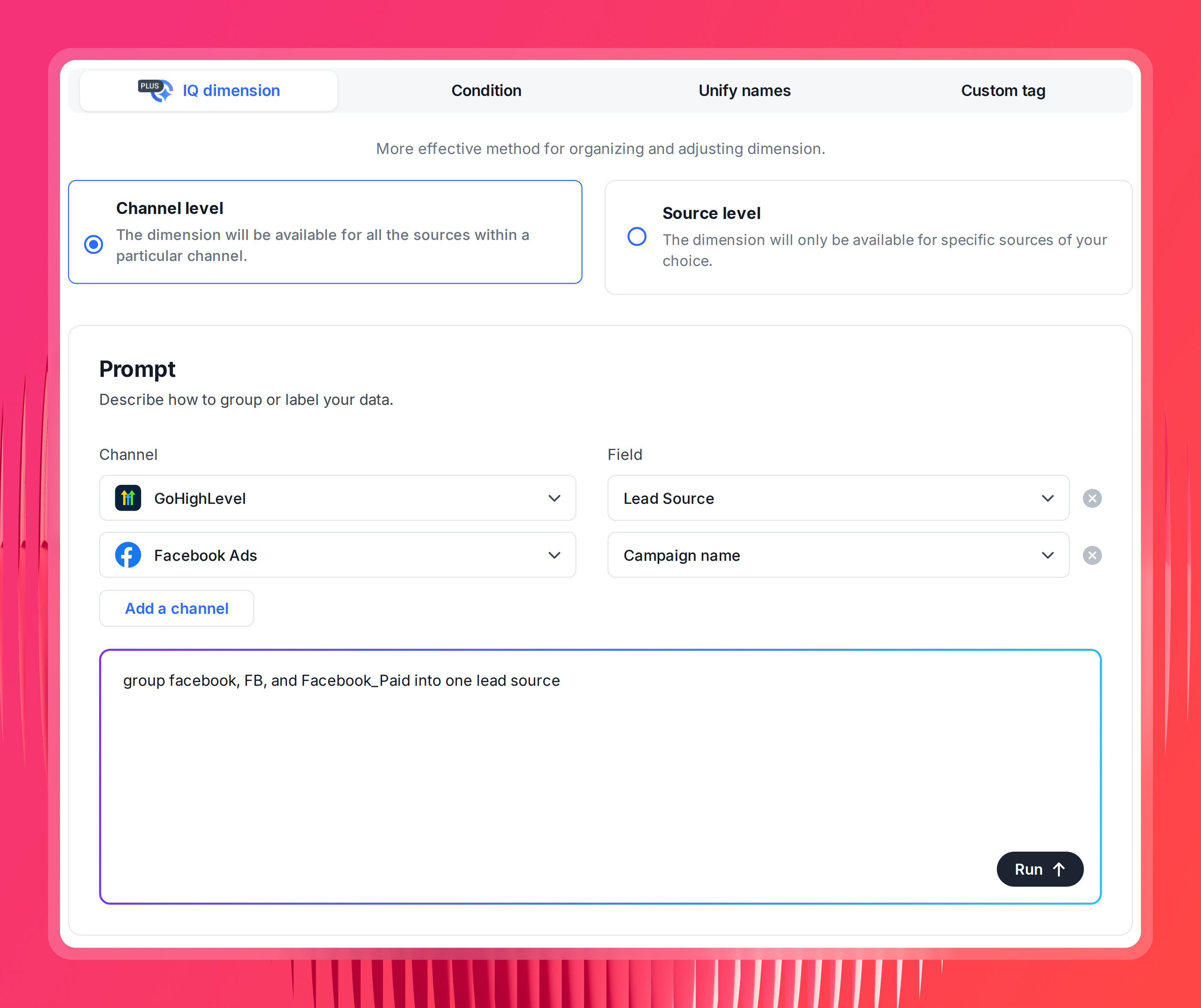
Define custom dimensions if needed. Naming drifts across sub-accounts. If one location calls a stage "Closed Won," another "closed-won," and a third "Won," Claude reads three different stages and your conversion rates stop meaning anything. Same for lead sources: "facebook," "FB," and "Facebook_Paid" should be one source, not three. Normalize them here and it applies everywhere.
The more of this you do upfront, the better Claude's answers will be.
Step 4: Add the Whatagraph MCP connector in Claude
Now, go to Claude. Open Settings and navigate to Connectors. Look for the option to add a custom connector.
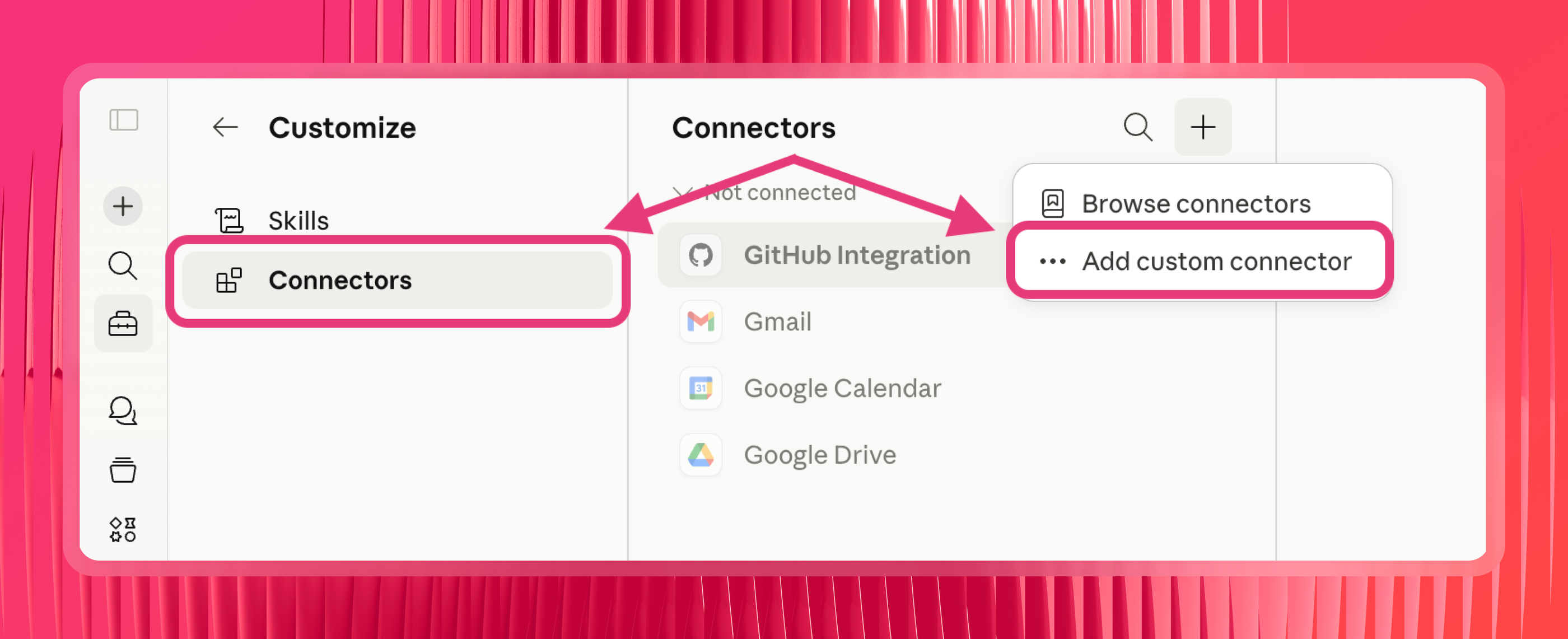
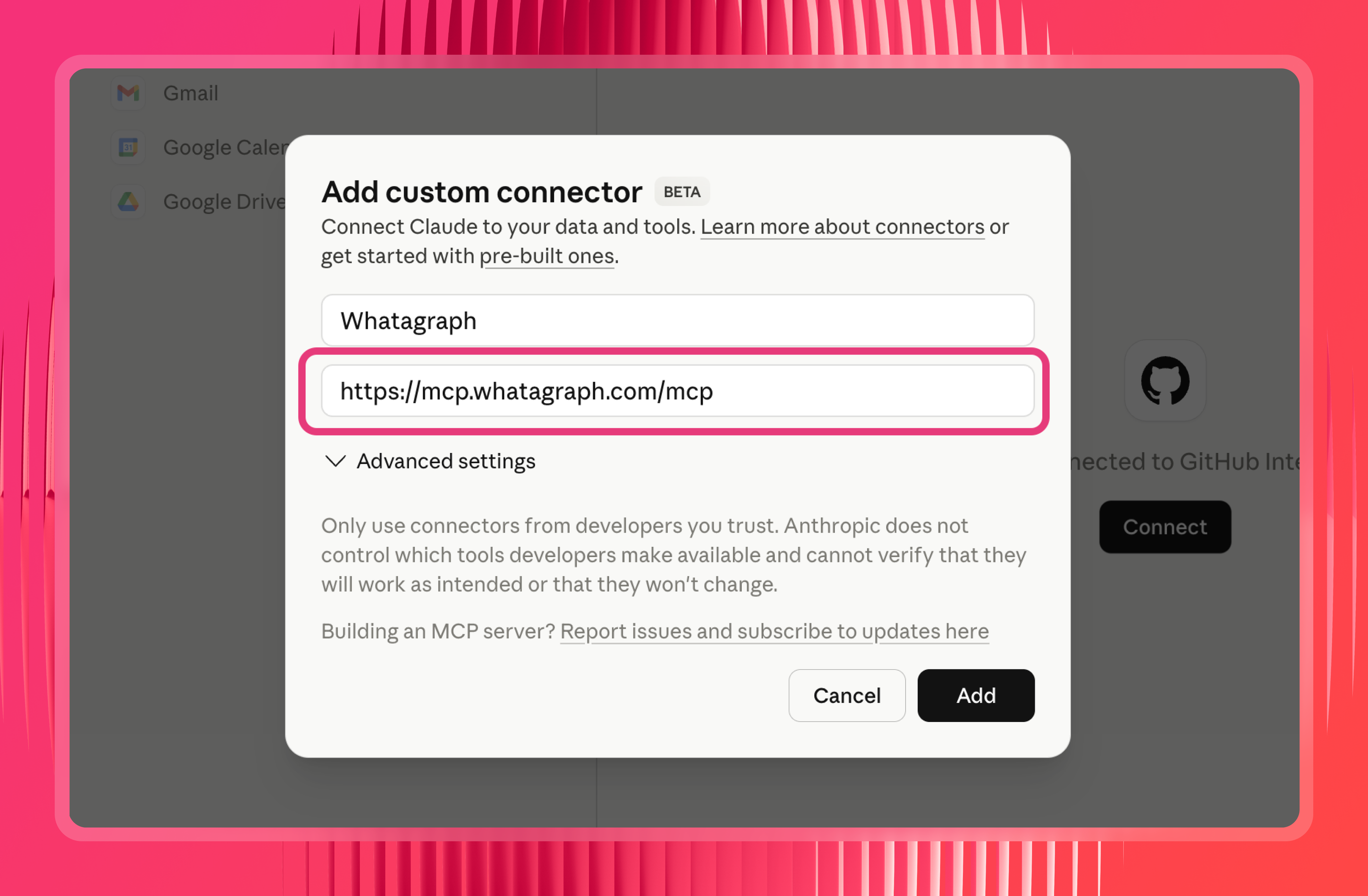
Then, paste in the Whatagraph MCP server URL:
https://mcp.whatagraph.com/mcp
 Step 5: Authorize the connection
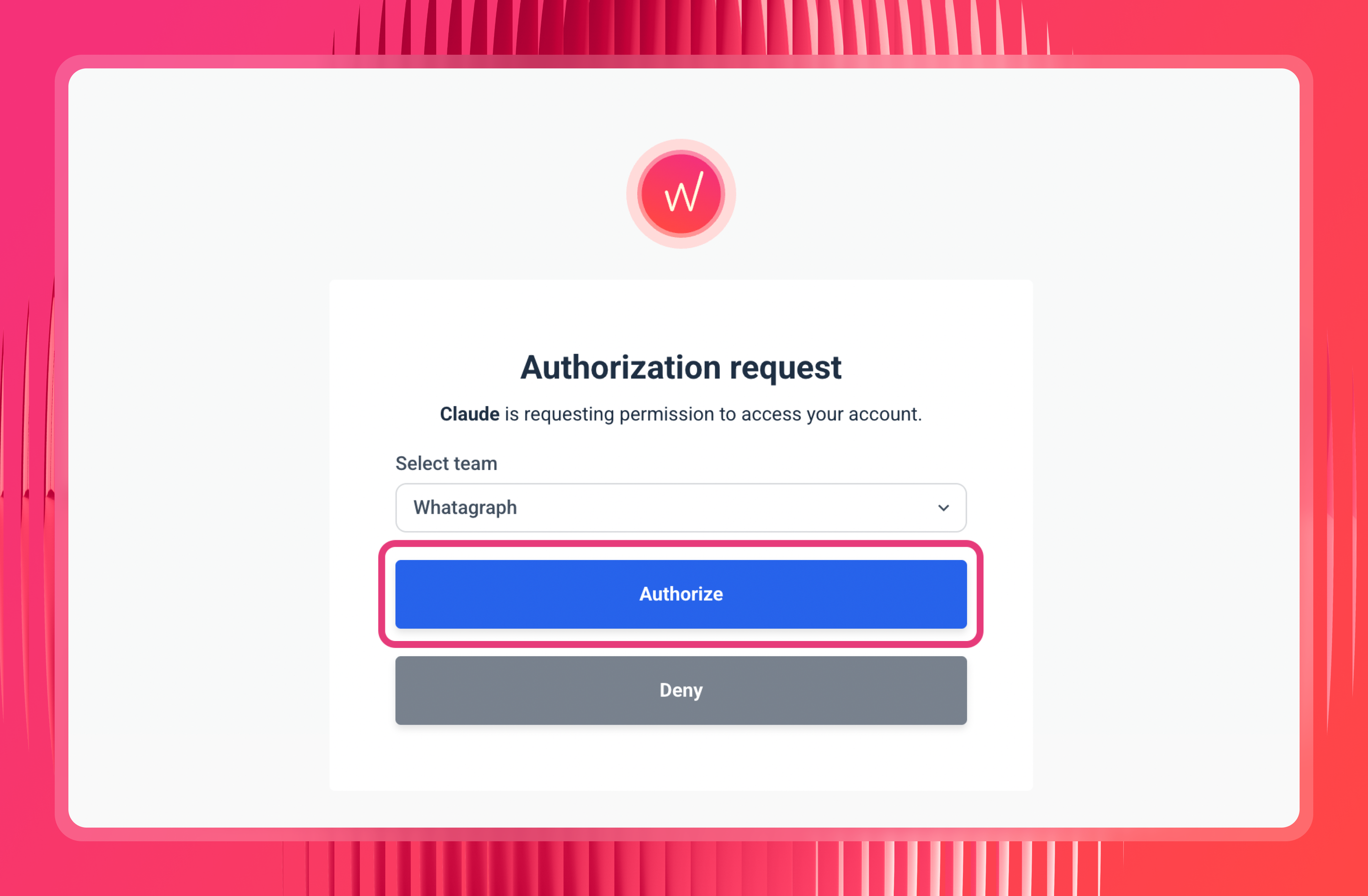
Claude will open a Whatagraph authorization page. If you're already logged in, you'll go straight to team selection. Pick the team you want Claude to access and click Authorize. No API keys, no passwords, just the one click.
Step 6: Set permissions to "Always allow"
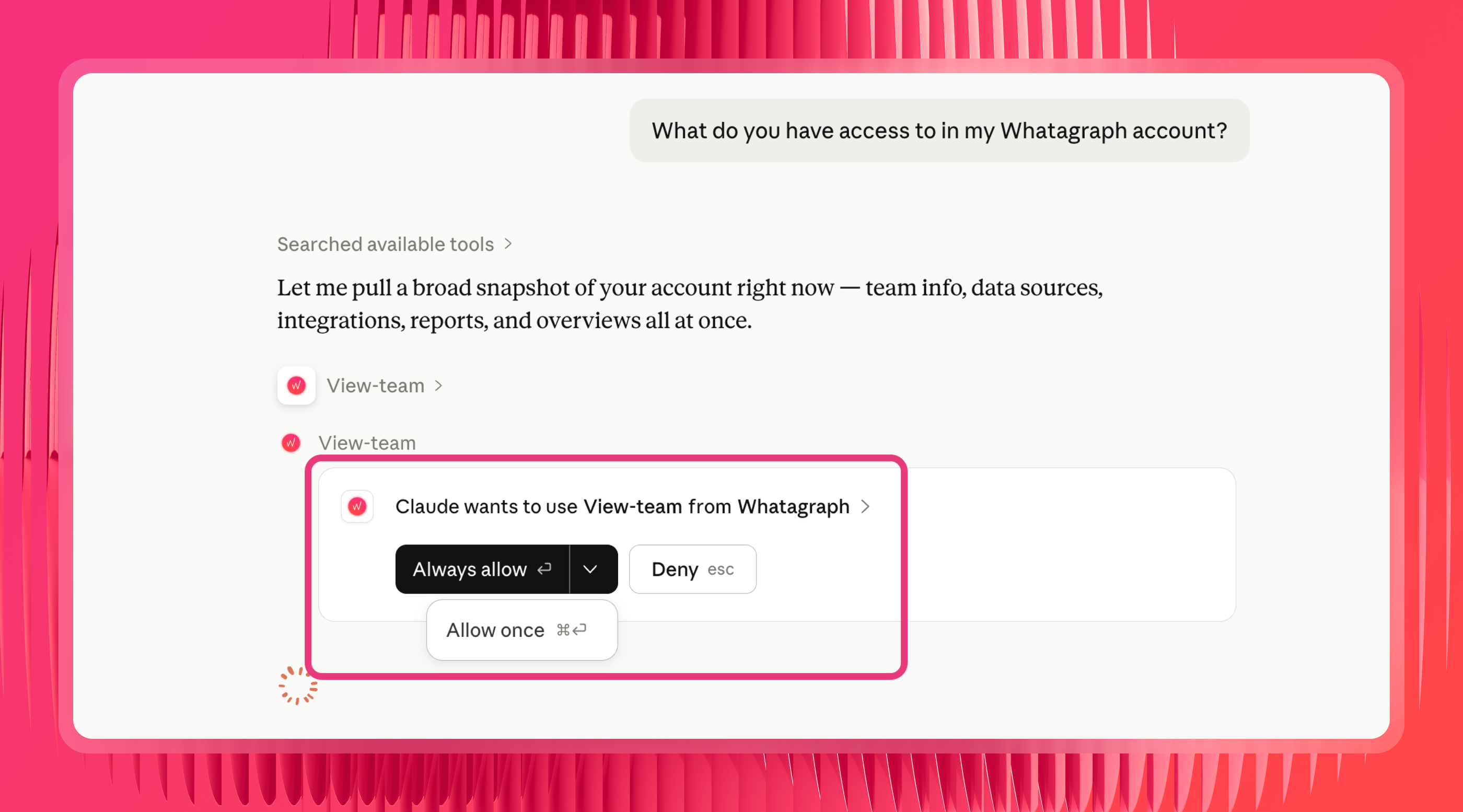
Once connected, you'll see a list of tool permissions. If these are set to "Needs approval," Claude will ask you to authorize every single time it pulls data, which gets annoying quickly. Switch the read tools to "Always allow."
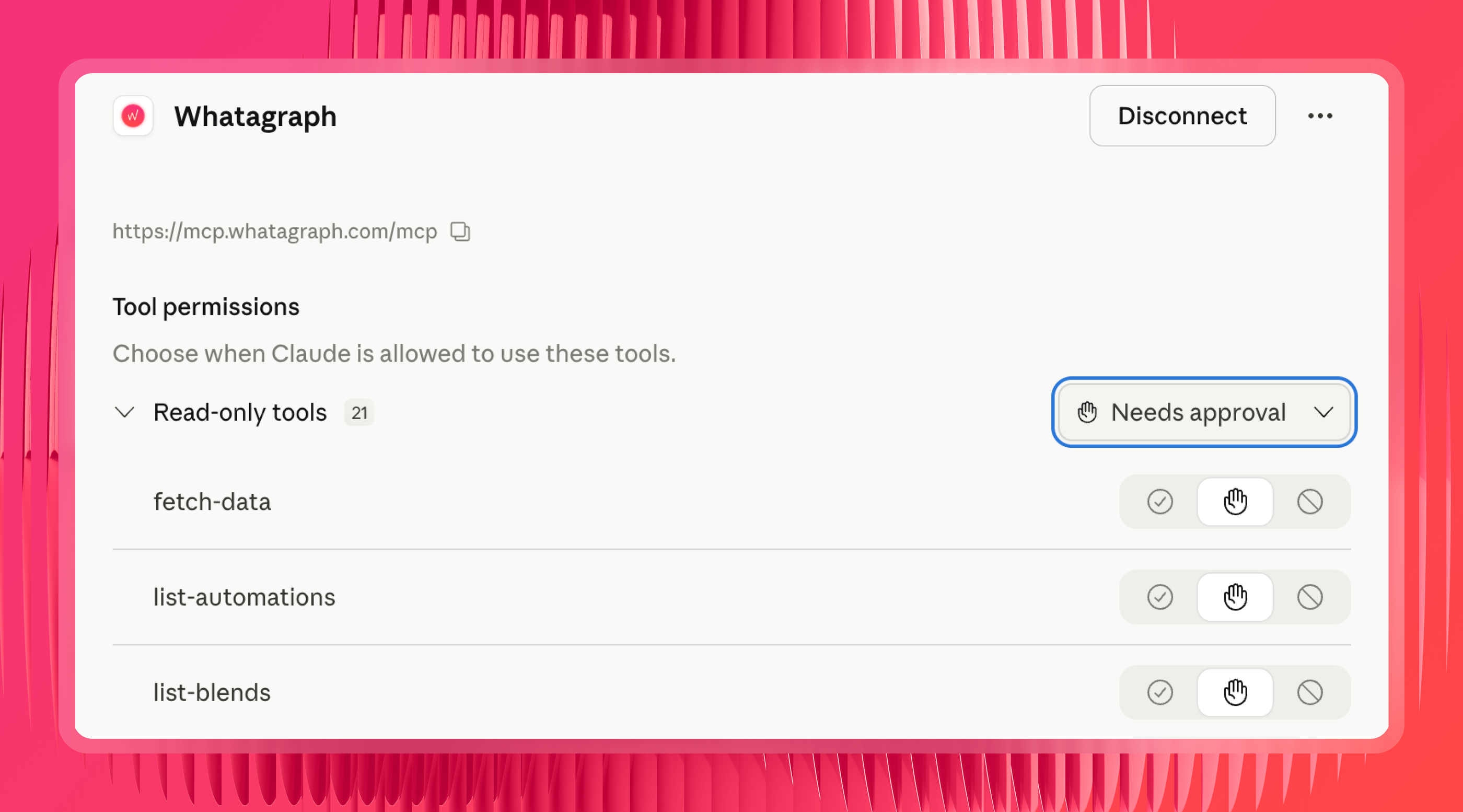
Treat the write tools differently. Whatagraph's MCP can create and edit metrics, dimensions, and reports, not just read them. Arturas recommends leaving those on approval until you've watched them behave, and keeping delete tools blocked until you need to clean something up.
Step 7: Test it
Ask Claude: "What do you have access to in my Whatagraph account?" It should come back with your connected sources and account details. If it does, you're good to go.
Step 8: Add your own organizational context with Claude skills (optional but recommended)
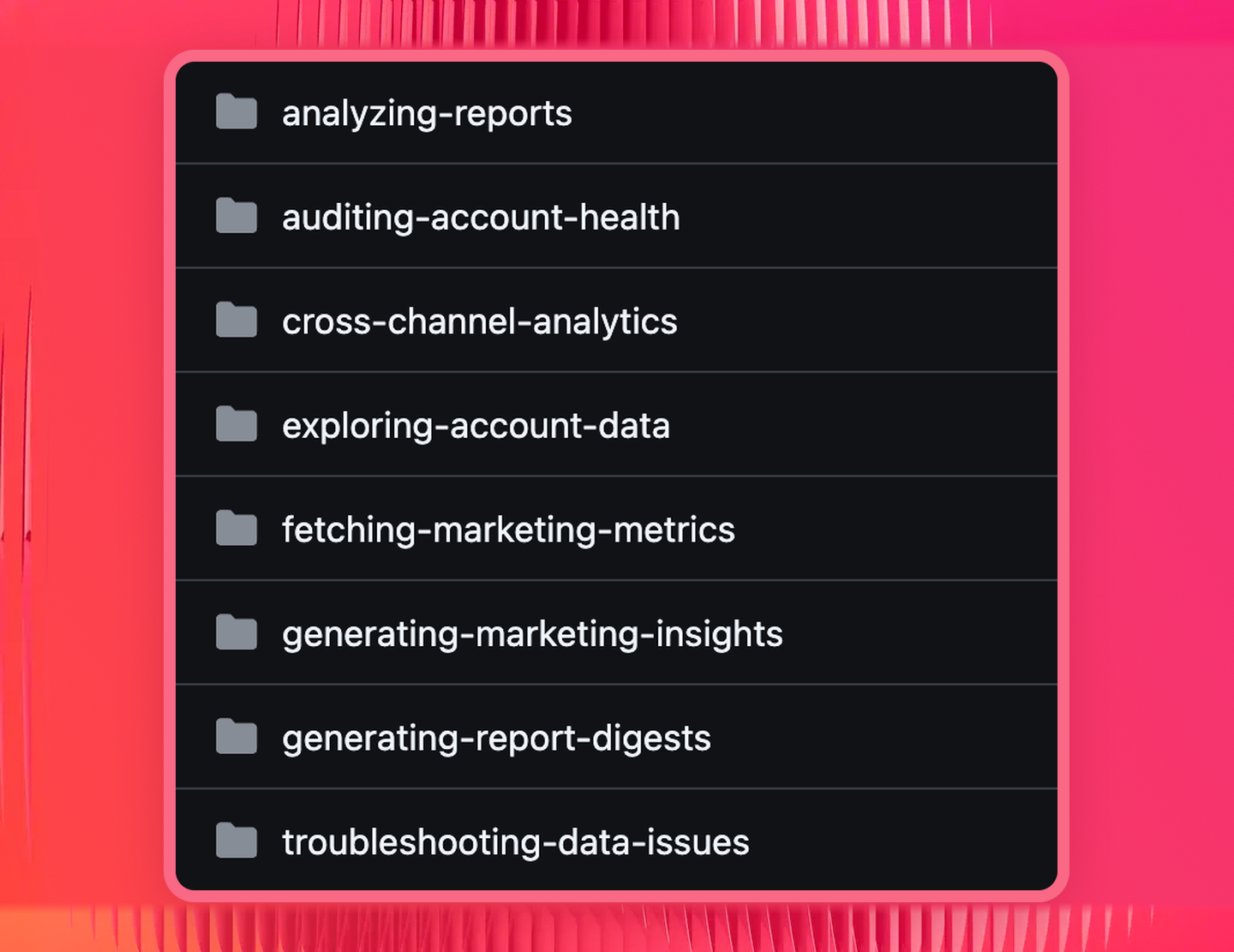
Whatagraph has a set of pre-built skills already embedded in our MCP. You don't need to create your own or download any from GitHub.
As Laurynas explains it:
Each of Whatagraph's pre-made skills either sequences multiple tool calls in a logical order, or brings structured knowledge so you don't have to piece the picture together yourself.
What you can add on top is your own organizational context.
Create a custom Claude Skill that tells Claude things only you know: which Source Group to query for which client, how you define a qualified lead, which pipeline stages count toward a closed deal, which campaigns to prioritize.
GoHighLevel prompts library by use case
Once your GoHighLevel data is connected and your business logic is set up in Whatagraph, you can use these prompts to analyze it in Claude.
A note on the last three groups: they only work once you've built the Source Groups and blends from step 3. Without those, Claude can answer for one client at a time and can't reach your ad spend at all.
Lead and pipeline health
The question most people start with when they connect GoHighLevel to Claude is what's in the pipeline and what's moving.
Try these prompts:
- "How many new leads came in for [client name] this month compared to last month?"
- "Show me total opportunities, open, won, and lost for [client name] over the last 30 days."
- "What's the total pipeline value and closed revenue for [client name] this month?"
- "Which lead sources brought in the most opportunities for [client name] this quarter?"
- "Compare opportunity win rate across all my clients for the last 90 days."
- "Show me new leads by campaign for [client name], sorted by volume."
- "How much closed revenue came from each channel last month?"
Funnel conversion, lead to booked to showed to won
These prompts find where the funnel leaks, rather than just counting leads.
Try these prompts:
- "For [client name] this month, show me new leads, total bookings, showed appointments, and won opportunities. Where's the biggest drop-off?"
- "What's the booking conversion rate for [client name] over the last 60 days, and how does it compare to the previous 60?"
- "Show me no-show and cancelled appointments as a percentage of total bookings for [client name], broken down by week."
- "Break down stage conversion rates for [client name]'s main pipeline. Which stage is losing the most opportunities?"
- "Compare booking conversion rate across all my clients this month. Rank from lowest to highest."
- "For [client name], is the problem lead quality or follow-up? Show me leads, bookings, and show rate by source."
- "Which lead sources produce appointments that show up, and which produce no-shows?"
Cost per lead, per booked appointment, and per closed deal
These are the cross-channel prompts. They need the blend from step 3, because the spend lives in Google Ads and Meta and the outcome lives in GoHighLevel.
Try these prompts:
- "What did a booked appointment cost for [client name] last month across Google Ads and Facebook Ads?"
- "Show me cost per lead by channel for [client name] this month."
- "Which channel produced the lowest cost per closed deal for [client name] this quarter?"
- "Compare cost per lead and cost per booked appointment by campaign for [client name]. Which campaigns are cheap on leads but expensive on appointments?"
- "For [client name], show me spend, new leads, showed appointments, and closed revenue by channel for the last 30 days."
- "Which campaigns are driving leads that never book? Show spend and booking rate by campaign."
- "Is Google or Meta producing better pipeline value per dollar spent for [client name] this quarter?"
Cross-client and portfolio
Ask about the whole book at once instead of opening 40 sub-accounts.
Try these prompts:
- "Which of my clients had the biggest drop in new leads this month versus last?"
- "Rank all my clients by opportunity win rate for the last 30 days."
- "Which clients are producing closed revenue below where they were last quarter?"
- "Show me total pipeline value across every client, sorted highest to lowest."
- "Which clients have a booking conversion rate below 30% right now?"
- "Give me a portfolio view: new leads, bookings, and closed revenue for every client this month."
- "Which of my clients need attention this week, and why?"
Client reporting and summaries
Get a plain-language brief before a client call without opening a dashboard.
Try these prompts:
- "Give me an executive summary of [client name]'s performance for the last 14 days."
- "Using GoHighLevel and ad data for [client name] this month vs. last month: compare spend, new leads, bookings, show rate, and closed revenue. Write a 3-paragraph summary that leads with the headline result, explains the two biggest drivers of that change, and gives one specific recommendation for next month."
- "Summarize the key wins and issues across all sources in the [Space name] space."
- "What are the top 5 lead sources by closed revenue for [client name] this quarter, and how do they compare to last?"
- "Show me calls made, emails and SMS sent, and reply rates for [client name] this month. Is follow-up speed improving?"
- "Draft three talking points for tomorrow's call with [client name] based on this month's numbers."
Account and connection health
Check that nothing has quietly broken before a client spots it.
Try these prompts:
- "Are there any broken or disconnected sources right now?"
- "Show me all sources that are failing and which space they belong to."
- "Are there any GoHighLevel sub-accounts with zero new leads in the last 7 days?"
- "Which clients have had no new opportunities created this week?"
- "Are there any sources in [Report Name] with missing or zero data?"
- "Do I have any reports that aren't set up with automated delivery?"
Note: for pacing against a specific target, set up Goals directly in Whatagraph first. Claude can then read those targets alongside current performance and tell you who's on track.
Want to see this on your own data? Start a 14-day free trial with Whatagraph.
Published on Aug 20 2026
WRITTEN BY
YamonYamon is a Senior Content Marketing Manager at Whatagraph. With an eye for detail and a knack for always considering context, audience, and business goals to guide the narrative, she's on a mission to create genuinely helpful content for marketers. When she’s not working, she’s hiking, meditating, or practicing yoga.