We tested the top 8 AI marketing agents for reporting [2026]
AI marketing agents analyze, plan, and carry out marketing tasks without needing your laptop open or requiring constant prompts.
When it comes to reporting, AI marketing agents can create reports, write commentary, and give insights and recommendations based on your connected data and previous report examples, on a schedule you set.
In this article, I tested 8 AI marketing agents for reporting with full features and pricing for each.
Full disclosure: one of these tools is ours. But that’s because we’ve actually seen 66 marketing teams testing out our multiplayer AI agents, and they’re now automating manual work and giving back human specialists hours every month to focus on what matters.
But we’re also not here to bash our competitors. We researched them thoroughly (and even tried them out) so you can really understand what they’re great at and if they’re best for you.
By the end of the article, we hope you’ll find an AI marketing agent that fits your needs, whether it’s us or not. Skip straight to the AI marketing agents comparison.

Oct 10 2026●25 min read


- What are AI marketing agents?
- The 8 best AI marketing agents for different marketing jobs
- 1. Whatagraph IQ Agents
- 2. Databox AI Agents
- 3. Improvado AI Agent
- 4. NinjaCat AI Agents
- 5. Funnel AI
- 6. Supermetrics’ Super AI
- 7. AgencyAnalytics AgencyAI
- 8. Your AI assistant with an MCP connector
- Which AI agent is best for marketing?
Salesforce has given the CMO a new letter. The A-shaped CMO is a leadership framework for a world where people and AI agents work side by side. In Salesforce’s research, 81% said they felt fully equipped to lead a hybrid workforce of humans and agents. But one in four had never used agentic AI themselves.
So the confidence is in. The agents, less so: just 13% said agentic AI was fully implemented across their organization.
The trade press, meanwhile, has already moved on to the death of the marketing dashboard. The proposed future has agents investigating results, explaining what changed, and recommending what to do next, with dashboards supplying the evidence. The argument is mostly right, but it skips the part where the explanation is only as good as the numbers the agent read on its way in.
That’s the standard I’m bringing to this guide to AI marketing agents: what work can you hand over, what comes back, and how easily can you check it? We’ll examine the tools through the jobs you need done, including the setup and supervision they leave on your desk.
What are AI marketing agents?
AI marketing agents are software systems that use AI to plan and carry out marketing tasks, using connected tools and data to work toward a goal. They can choose the next step based on what they find, within the access and permissions you give them.
For example, you might ask an agent to investigate why a client’s cost per lead increased last month. And with the right connections, it could pull campaign data and investigate which campaigns contributed most to the increase.
Whatagraph's CTPO, Arturas Lazejevas, frames it as a hiring decision:
“Imagine you’re hiring a specialist to do a task and work with specific kinds of tools. And you don't expect yourself to be available for the AI teammate to be able to do the job.”
What’s the difference between fixed automation and AI agents?
That ability to choose the next step is what separates an agent from a fixed automation. Anthropic, for example, says that workflows follow predefined paths, while agents direct their processes and tool use dynamically. A scheduled report can arrive every Monday without being an agent; punctuality alone doesn’t qualify it for the promotion.
Nor does an agent need the keys to everything. Whatagraph's CTPO, Arturas Lazejevas, describes one stage of adoption as AI operating as a team member, "executing work under human direction and validation."
In June 2025, Gartner estimated that only about 130 of the thousands of vendors claiming to offer agentic AI really did. They call the repackaging of existing assistants, chatbots, and automation tools “agent washing.”
So before adding another subscription, ask:
- Can it decide what to check next? Give it a goal, such as investigating a rise in cost per lead. Can it choose which campaigns to examine and pull more information based on what it finds?
- Can it do the work in your tools? Ask it to retrieve campaign data and create an update in your reporting system. Find out which steps it can execute, which require your approval, and which involve you copying something into another tab.
- Can you check what it did? Ask to see the source figures, the actions it took, and any changes it made.
Those are the questions behind the reviews below. Each starts with the marketing job the agent is meant to do, then examines how much of that job it can finish and what you’ll need to check.
The 8 best AI marketing agents for different marketing jobs
Where a trial or a self-serve plan would have me, I gave the agent the same job I'd give a junior analyst on the first of the month.
Where the agent lives behind a sales call or a waitlist, I reviewed the documentation, the release notes, and whatever footage shows a cursor doing something.
Each of those entries says so in its first line, and none of them gets a verdict on anything I didn't watch work. Whatagraph commissioned this guide, and its agents get the same scrutiny as every other tool here. If something falls short, I’ll say where and how.
You’re the one who has to use the software after the demo ends, and that’s who I’m writing for.
| AI agent | Best for… | Key strength | Hands-on test? | Price |
|---|---|---|---|---|
| Whatagraph IQ Agents | Teams repeating reporting and account checks across clients, brands, or markets | Shared agents with saved client context, schedules, and approval controls | Yes. Built and duplicated agents, uploaded files, tested schedules and triggers, and automated delivery. | Agent launch pricing pending; Max platform plan from €999/month. |
| Databox AI Agents | Teams that need AI analysis now and can wait for dedicated agents | Reusable analysis Skills, with Routines for scheduled delivery | Partly. Tested Genie and Skills; dedicated Agents weren’t available yet. | Free Genie access with 50 AI credits/month. Analyst from $71/month; Team Core with Routines from $199/month. |
| Improvado AI Agent | Marketing teams with complex data pipelines and analyst support | Reviews proposed business context before saving it to the Knowledge Graph | Yes, limited. Tested an uploaded report; didn’t connect live ad accounts. | Limited free access; MCP Only $100/month; Advanced and Enterprise custom-priced. |
| NinjaCat AI Agents | Agency networks and enterprise teams managing large account portfolios | Pre-built specialists for campaign checks, data QA, and client preparation | No. Reviewed documentation, agent library, release notes, and customer feedback. | Custom pricing; tailored proofs of concept. |
| Funnel AI | Teams preparing marketing data for reporting tools and warehouses | Creates and edits reporting fields, with proposed rules available to inspect | No. Reviewed documentation, pricing, and customer feedback. | Starter from $300/month; Business from $600/month; AI and MCP included. |
| Supermetrics’ Super AI | Teams building dashboards or accessing Supermetrics data through an AI assistant | Generates dashboards from prompts and supports follow-up edits in chat | Partly. Tested Studio with sample data and inspected campaign permissions; no live campaign changes. | Starter from $44/month, including 4,000 monthly Studio AI credits. |
| AgencyAnalytics AgencyAI | Agencies already using AgencyAnalytics for client reporting | In-app skills for account investigations and client-update drafts | Yes. Connected GA4 and attempted report creation; the report was left unfinished. | From $20/client/month, including AgencyAI; 14-day free trial. |
| Claude or ChatGPT with an MCP connector | Marketers who want to work with reporting data from their existing AI assistant | In my Claude test, flagged sample data and missing comparisons instead of filling the gaps | Yes, with Claude + Whatagraph MCP. Tested data retrieval and a reporting draft. | Depends on the assistant and connected platform plans; budget for both. |
1. Whatagraph IQ Agents
- Best for: Marketing teams repeating the same reporting and account checks across dozens of clients, brands, or markets.
- My review process: Hands-on. Whatagraph gave me access to IQ Agents and I have built custom agents, duplicated pre-made ones, uploaded reference files, tested schedules and triggers, and automated report delivery. My assessment covers the setup as well as what happens after you ask the agent to get on with it.
Whatagraph IQ Agents are built for the backlog of agency work, like preparing reports, checking accounts, and making changes across a reporting setup. They run on schedules or triggers, with shared configurations that your colleagues can use without rebuilding everything themselves.
The pre-made agents have specific assignments. For example, Sweep handles bulk editing, Omni blends sources, and Intake supports client onboarding.
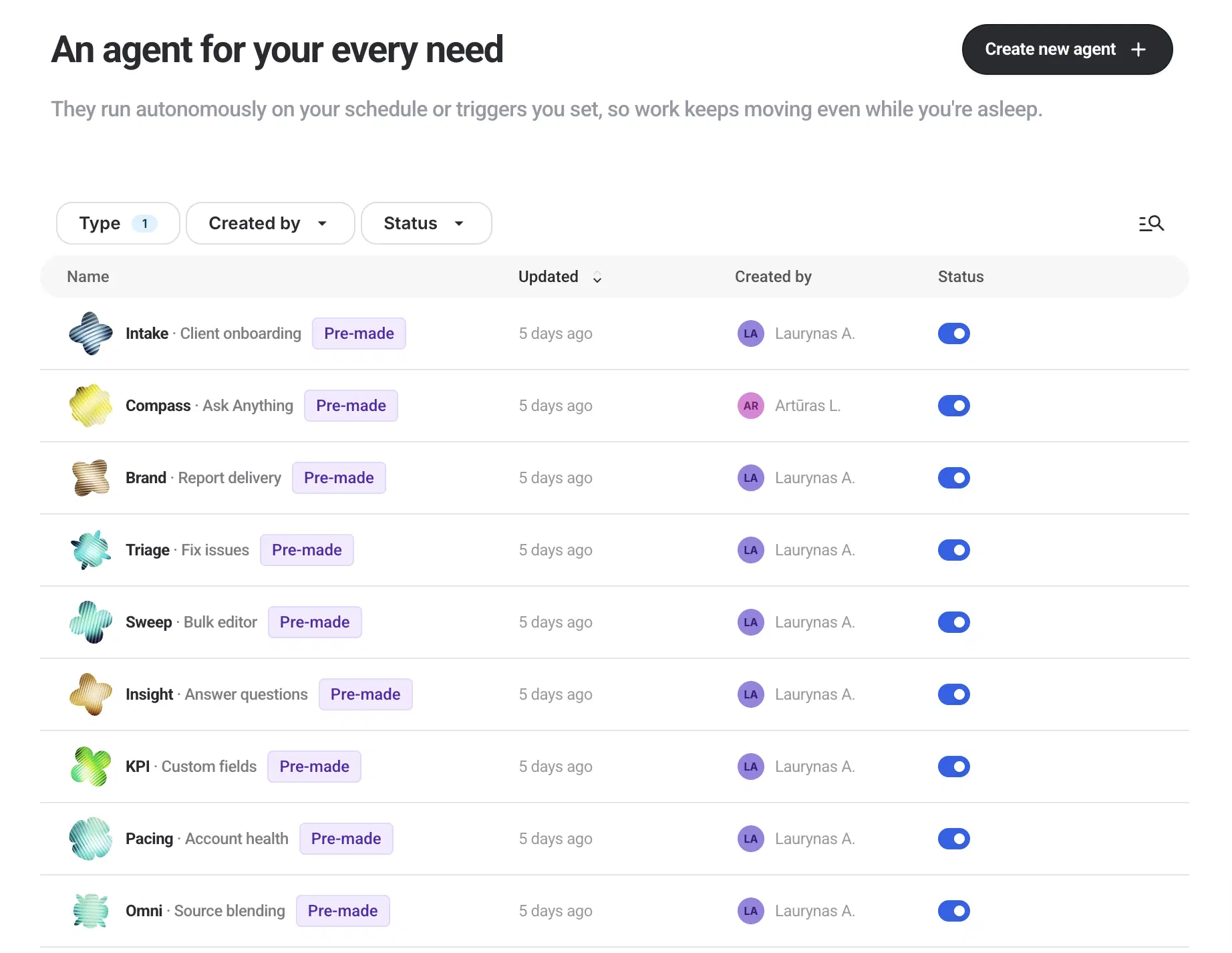
I like having a defined starting point: you can duplicate a pre-made agent and adapt its instructions to your team’s work, rather than build from scratch. The starting point is a specialist with a defined job, so you don't have to open a blank builder.
The jobs I’d shortlist it for include:
- Build monthly reports on autopilot: Connect your sources, upload a previous report you used for each client (or build a new one from scratch with an agent), brand it, and ask the agent to create it for you every week or month with fresh data.
- Draft reporting commentary: IQ Agents prepare updates using performance data and client context, leaving the account team to review the explanation before it goes out.
- Update reports in bulk: The bulk editor identifies affected reports and presents changes for confirmation.
- Monitor ad spend: Configure ad spend tracking against budget targets and have an agent flag accounts that need attention.
- Pace budget for all your clients and campaigns: Agents check each client's ad spend against their budget every day and flag campaigns that are overspending or underspending so you can fix them before the month ends.
The setup starts with your data. In Whatagraph’s Data Hub, you connect sources and define the metrics your reports and agents will use. If your agency excludes branded search from a particular calculation, you establish that once.
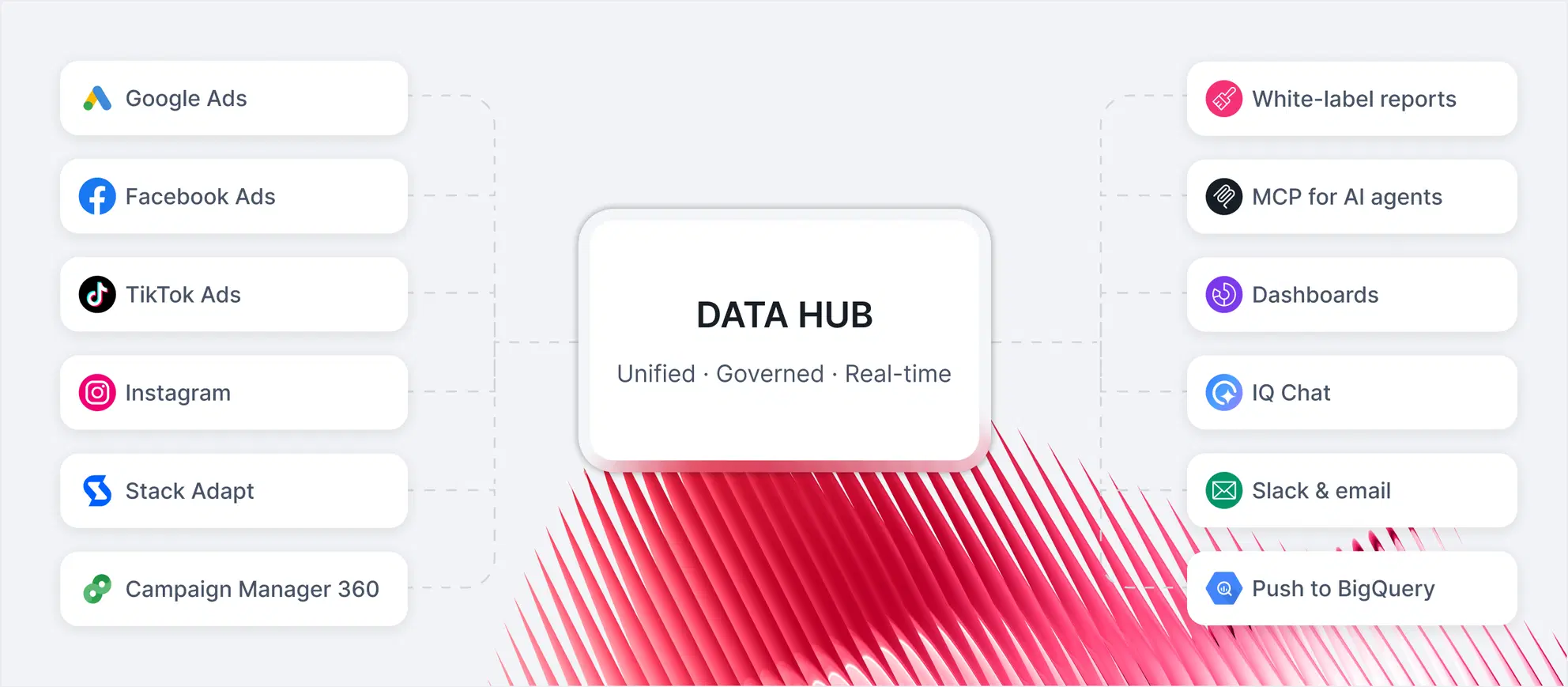
Then you brief the agent: which client it’s working for, what the report should cover, and which actions need your approval. You can attach past reports and client documents, then run the task yourself or put it on a schedule.
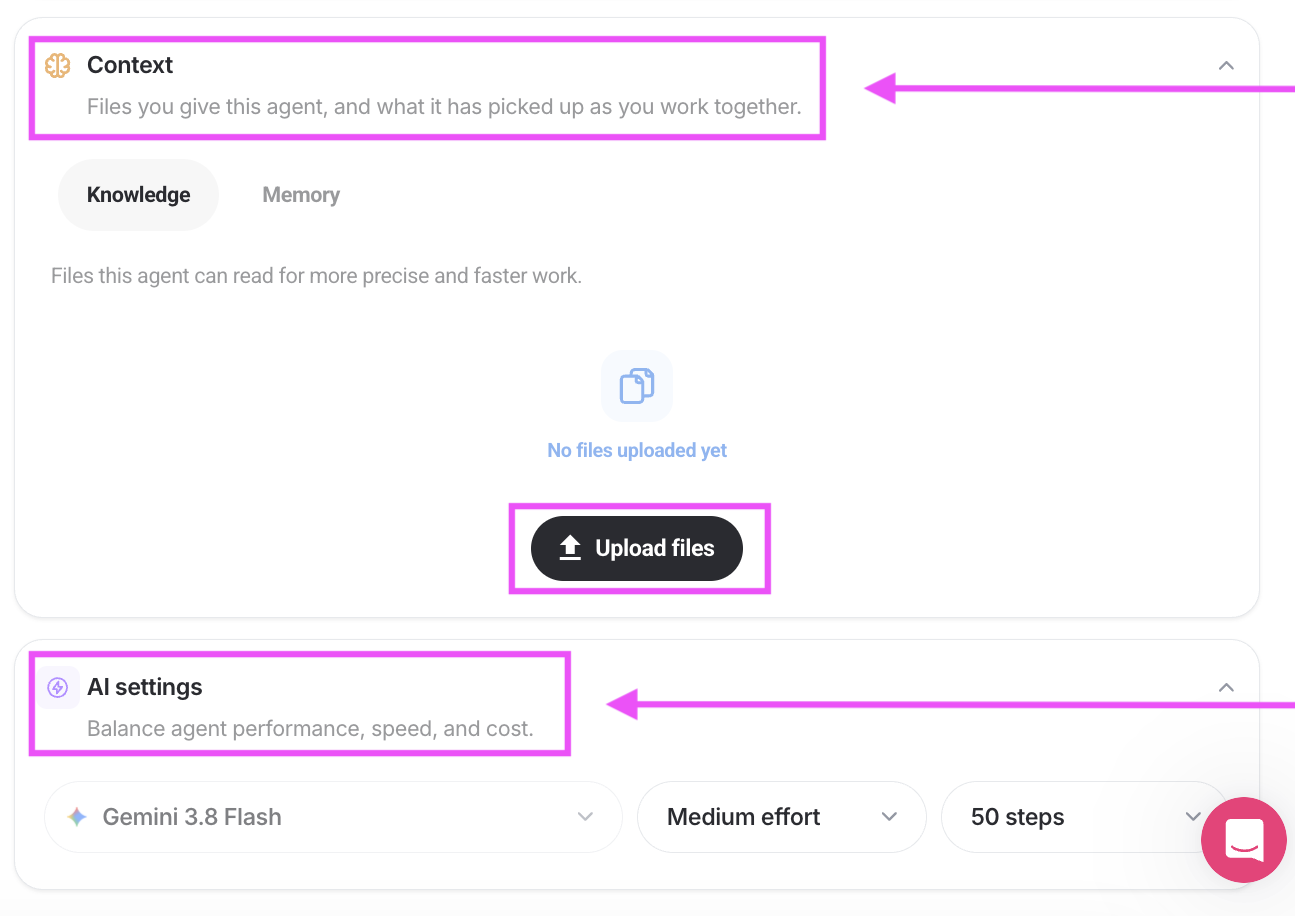
The agent then uses those instructions to carry out the work; it can bring in another agent to check the draft and request corrections. Your team can inspect the steps in the shared conversation, review the output, and approve delivery if you’ve required it.
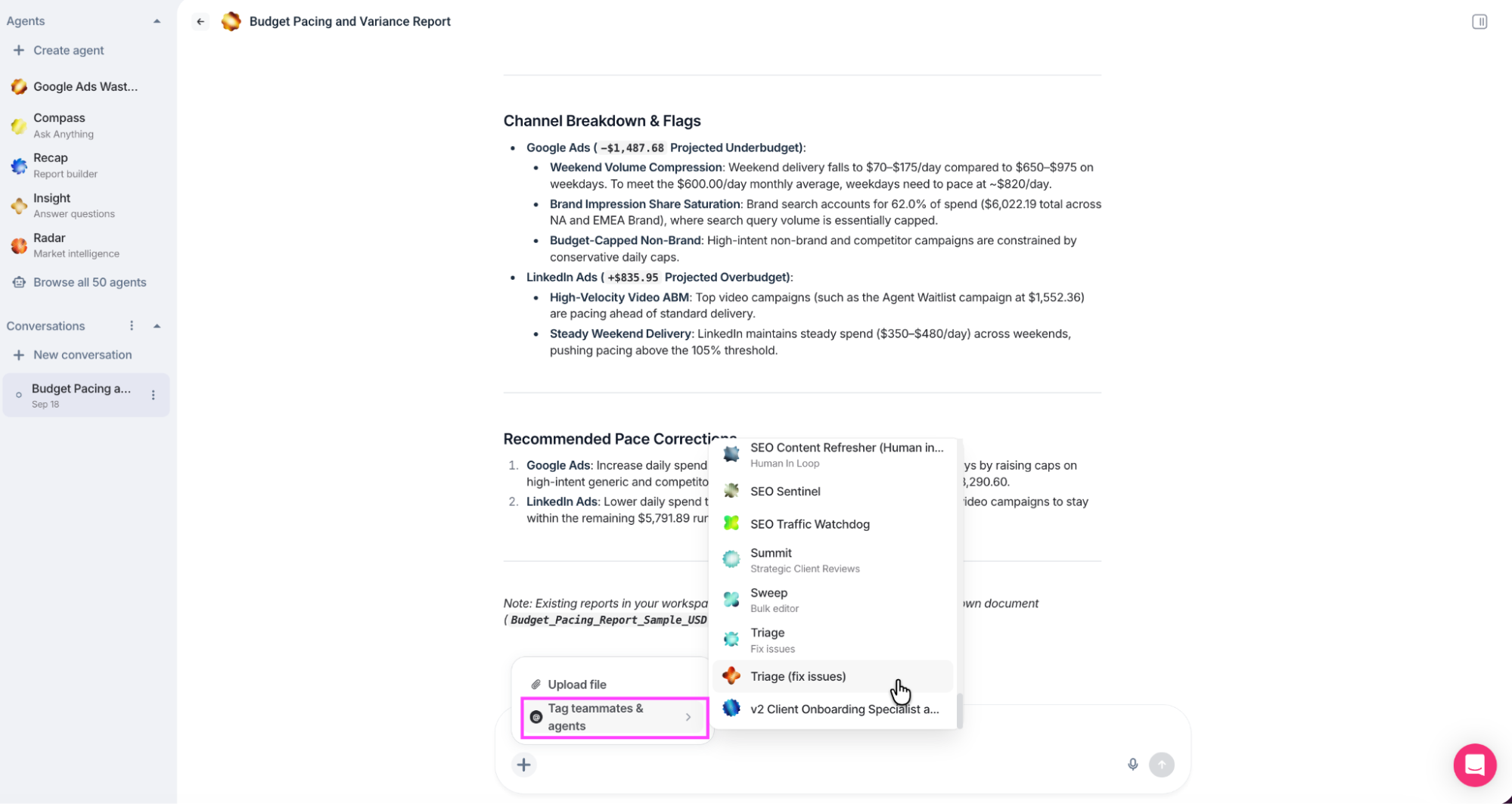
For day-to-day work, I quite like being able to tag a teammate or another agent into the conversation. If I’m reviewing a budget-pacing analysis and want a second opinion, I can bring someone in where the work is already happening.
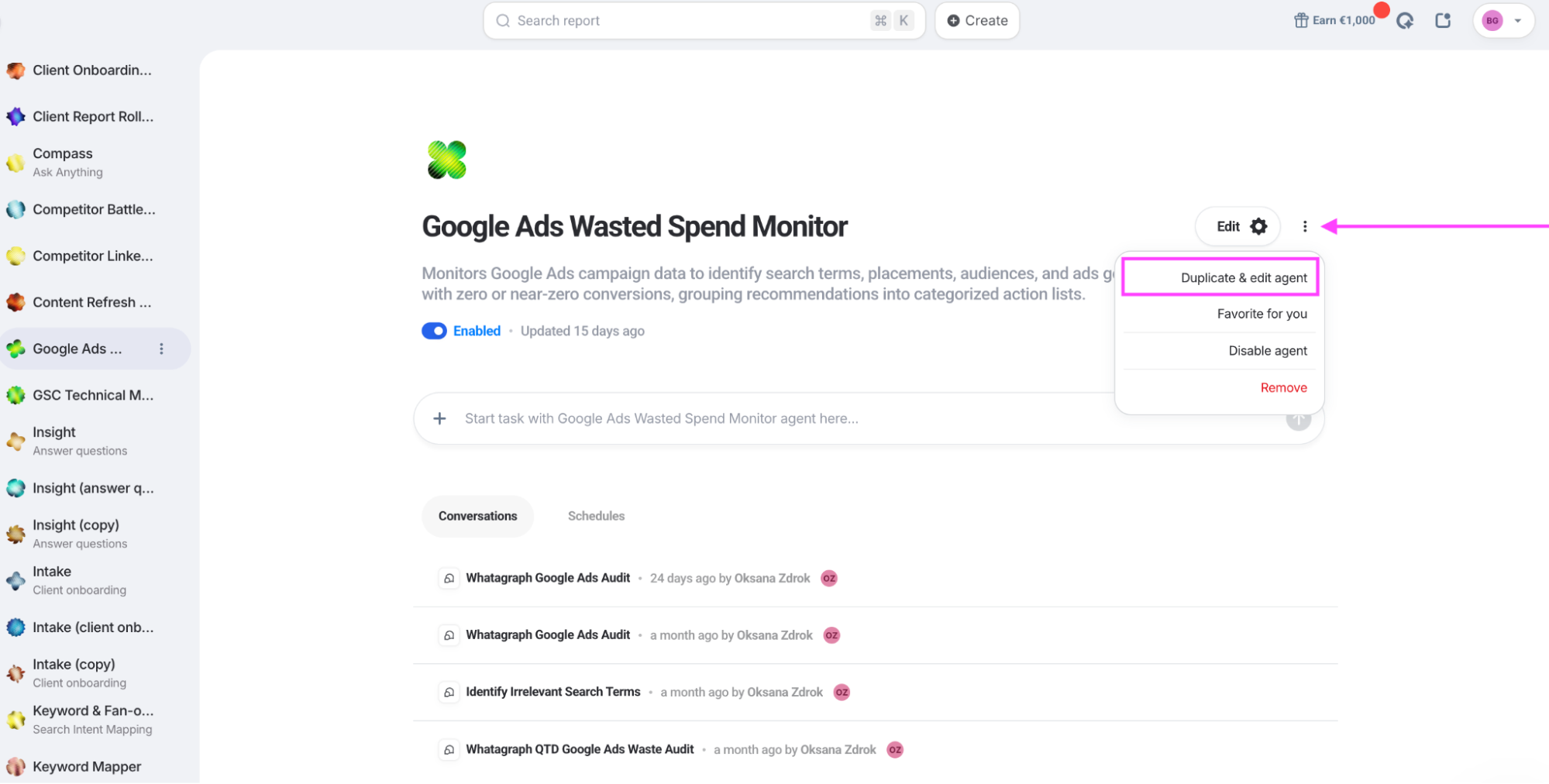
Whatagraph’s Demand Generation Manager, Oksana, built a Google Ads Wasted Spend Monitor to find spend producing little or no reported conversion activity. The agent checks search terms, ad groups, and other campaign elements against instructions saved in the agent.
The assignment stays put, so Oksana doesn’t have to start every morning by explaining what wasted spend means to someone who was told yesterday.
Read more: 10 AI marketing workflows from real marketing agencies we talked to
Arturas Lazejevas, CTPO at Whatagraph, puts the team-wide ambition like this:
“IQ Agents let everyone in your organization work agentically, not just the one or two people who are already proficient with AI. They remove the learning curve and the cost of entry, so the whole organization can become agentic.”
In fact, GKV, a full-service communications agency based in Baltimore, saved 70+ hours a month on reporting and use that time to deliver deeper, proactive analysis and strategic recommendations to clients. Their Director of Analytics also described using an agent for a separate task that would otherwise have stayed in the backlog:
“I just had the IQ Agent complete this task, which it did in about 10 mins, while I was doing other things. This is the kind of task I would put in the backlog as non-urgent, but the agents enabled me to be proactive instead."
Read the full case study here.
Limitations: Write functions are still limited depending on the ad platform and their API setups.
Whatagraph IQ Agents pricing
IQ Agents are included in all pricing plans because we believe agentic marketing is the future, not an add-on.
2. Databox AI Agents
- Best for: Teams whose needs center mainly on scheduled reports and analysis, with agents following as soon as Databox ships them.
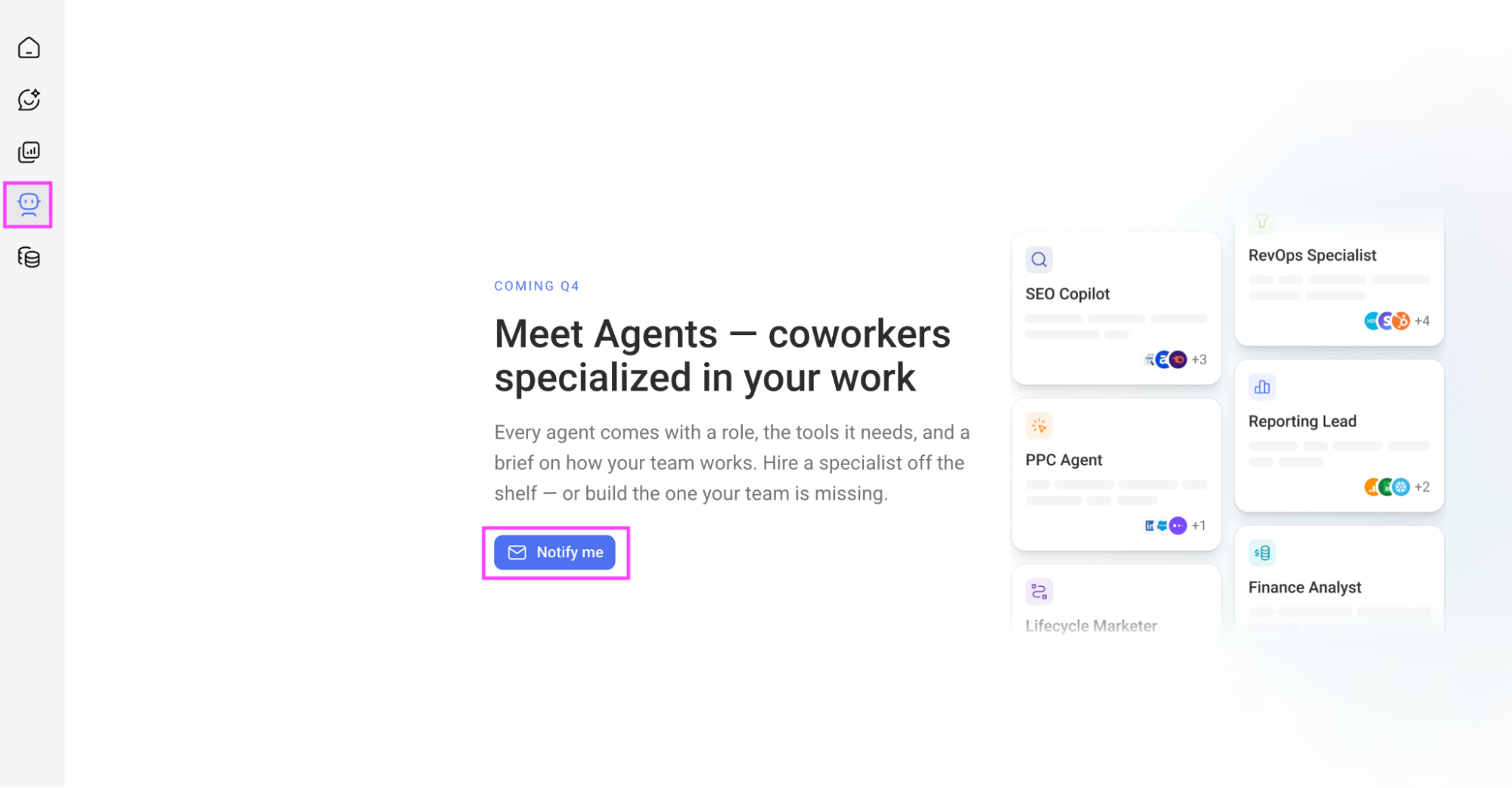
- My review process: Hands-on. I chatted with Genie, the AI Analyst, set up business context in Personalization, and browsed and installed skills from the marketplace. I didn't set up a routine or run a full scheduled report. I went looking for the agents; they're coming in Q4, and there's a “Notify me” button where they'll be.
Databox relaunched as an "agentic analytics platform" in September 2026. And what that means today is three things that already exist and one that doesn't:
- Genie, the AI Analyst, is a chat window over your connected data.
- Skills are saved procedures for an analysis you run often, triggered with a slash command, and the Skills Marketplace has expert-built ones from third parties, from a cross-channel paid ads report to an SEO metadata rewrite that explicitly leaves the approving to you.
- Routines put a skill on a schedule and deliver the result to email or Slack.
The agents are the fourth thing. The product page describes an agent builder that combines your skills, routines, and connected tools, with a roster of SEO Copilot, PPC Agent, RevOps Specialist, and Finance Analyst.
The setup goes something like this: connect your data, give Genie your business context, then choose the analysis you want it to run. In Personalization, you can select an analyst type and specify the business metrics that matter to you.
You'll find separate tabs for installed Skills and the marketplace, where you can add more.
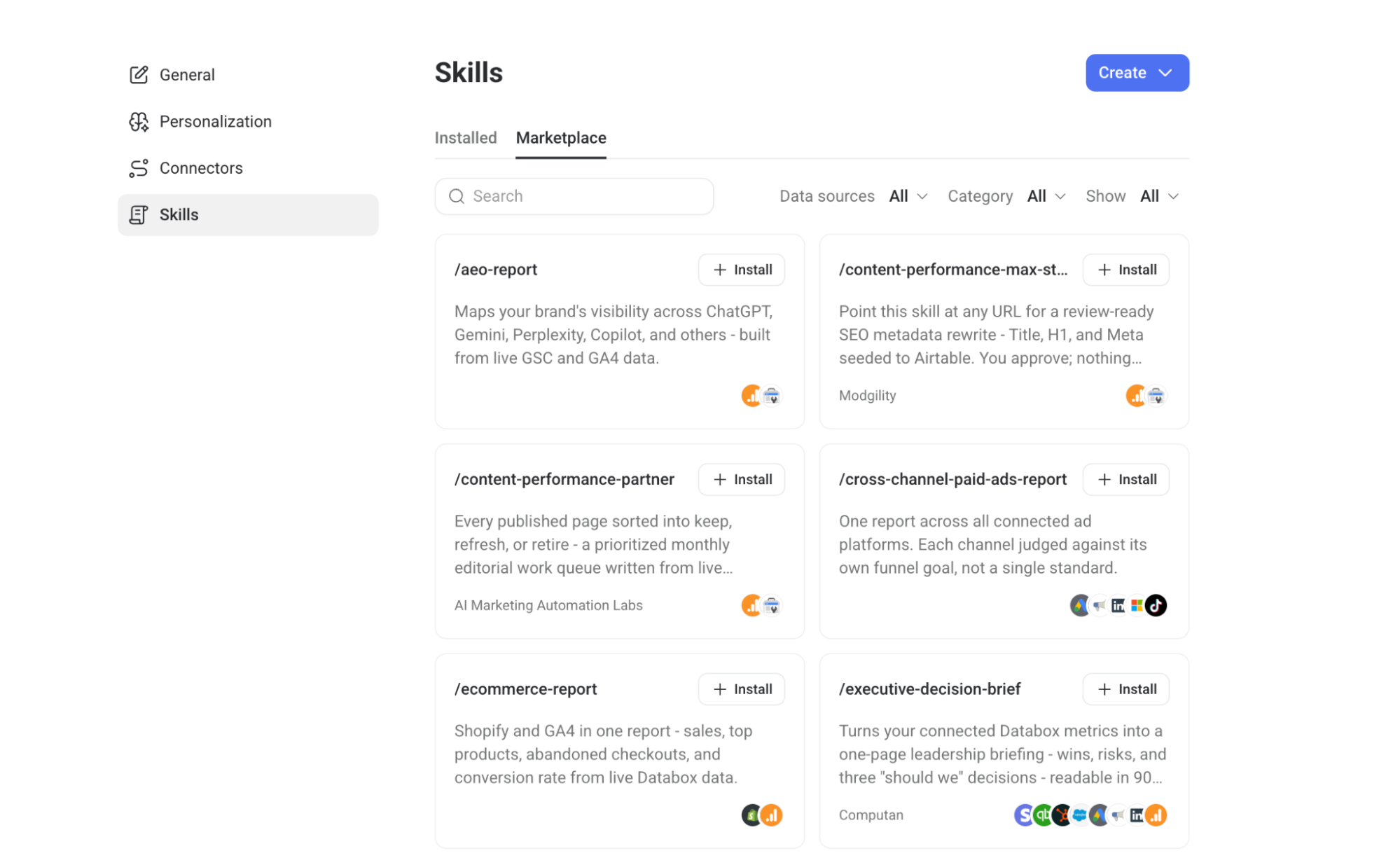
I do like having actual assignments to choose from. The skills I’d investigate first include:
- Review paid advertising: The cross-channel paid ads skill is described as combining connected advertising platforms into one report, assessing each against its own funnel goal.
- Plan content updates: The Content Performance Partner skill proposes sorting pages into keep, refresh, or retire, producing a prioritized editorial queue.
- Prepare a leadership update: The Executive Decision Brief skill is designed to turn connected metrics into a one-page briefing.
But where I found myself working harder was understanding how everything fit together. I chat with Genie, set business context in Personalization, manage instructions in Skills, and use Routines for scheduling. Each part has a purpose; taken together, however, they leave me assembling the workflow across several places.
Limitations: For a product that’s already relaunched as an “agentic analytics platform,” I expected to be able to try an agent. Instead, I found a “Notify me” button. Genie, Skills, and Routines give you things to work with today, but the rebrand has arrived ahead of the feature I came to test. For a fuller account of the reporting side, Whatagraph's Databox review covers it.
Databox pricing
As of October 2026, the free plan includes Genie and 50 AI credits per month. If you choose annual billing, Analyst starts at $71/month and includes pre-built skills; Team Core starts at $199/month and adds custom skills and Routines. Agency starts at $79/month, with additional client packs charged separately.
AI usage draws from your plan’s credit allowance, and Agents are still marked “Soon.”
3. Improvado AI Agent
- Best for: Mid-market and enterprise teams with a data function, ten or more platforms, and a warehouse they'd like an analyst to read.
- My review process: Hands-on, on the limited free AI Agent access. I didn't connect ad accounts, so what follows is the agent working on a document I uploaded, plus the product documents and recent G2 reviews for the parts I couldn't reach.
Improvado is a marketing data pipeline first: 1,350 connectors feeding a warehouse, with a transformation layer that normalizes metrics before anything downstream sees them. The AI Agent sits on top. You ask questions in plain language; it queries the governed dataset, builds charts, drafts documents, and searches the web for benchmarks to set against your numbers.
The jobs I'd shortlist it for:
- Answer the question before the analyst is free: Ad-hoc cross-channel questions against normalized data, with the working visible, every tool call included.
- Ship the recurring report without building it: Scheduled chats deliver a fresh answer on a cadence; the home screen offers "Run with agent" workflows like a weekly performance briefing and a reusable white-label client report.
- Get your business context out of people's heads: The Knowledge Graph builder reads your documents and proposes what the agent should know, card by card.
My first few minutes in Improvado involved working out where everything lived. The sidebar separates Chats, Knowledge Graph, Dashboards, and Automations, with data connections and transformation recipes further down. Then, clicking Knowledge Graph took me into a chat.
I uploaded a sample June 2026 report and asked the agent to review my Knowledge Graph and add missing business context.
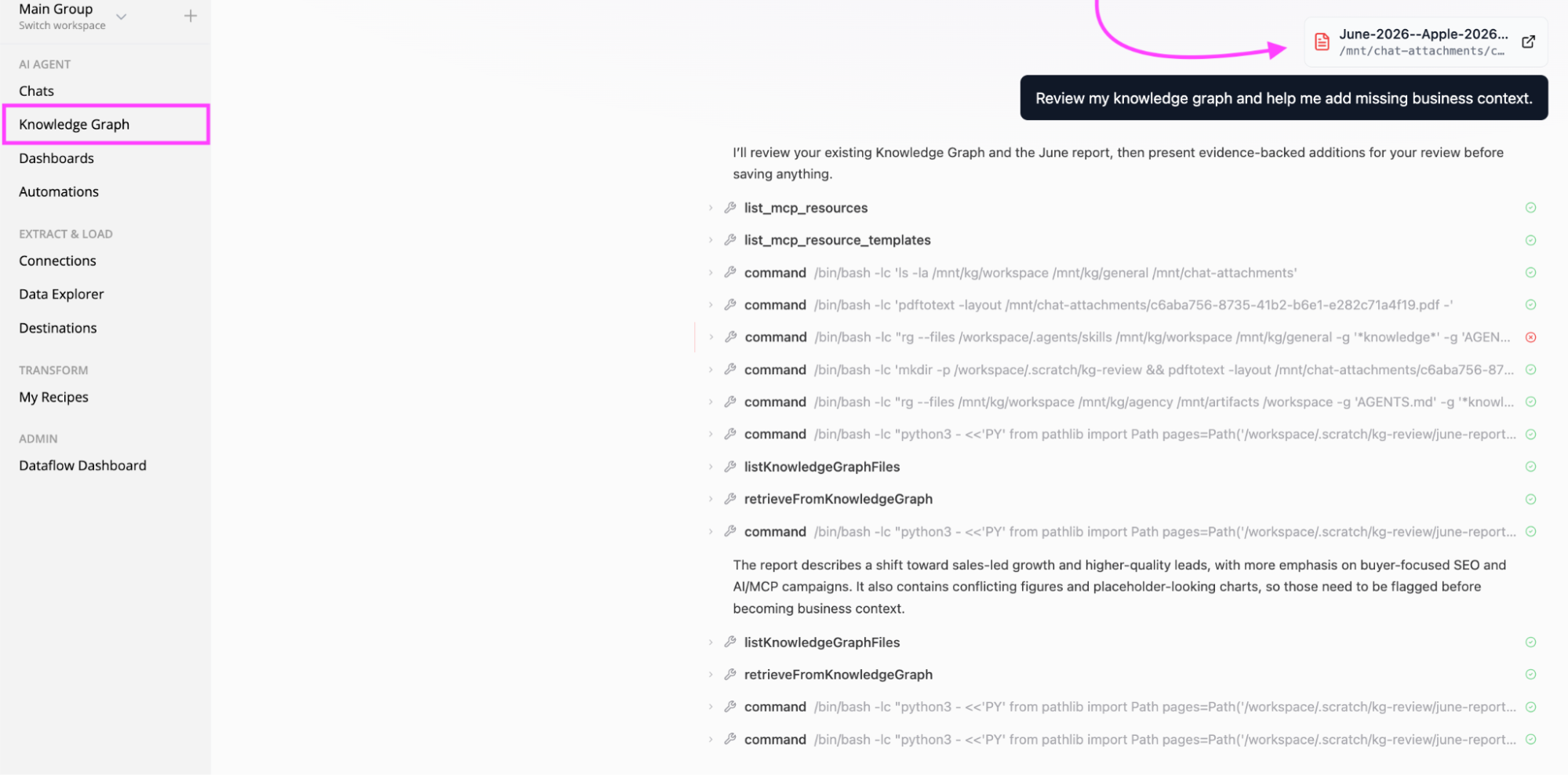
The agent returned five proposed additions for me to review. More interestingly, it flagged conflicting figures and missing definitions, including qualification criteria and attribution rules. Those were findings to verify against the report, but I liked that it raised them before saving anything.
The Make it your knowledge panel was the strongest part of this test. Each proposal explained what the agent wanted to retain, why it needed confirmation, and which report pages supported it. I could add corrections or context, then confirm, decline, or skip the proposal.
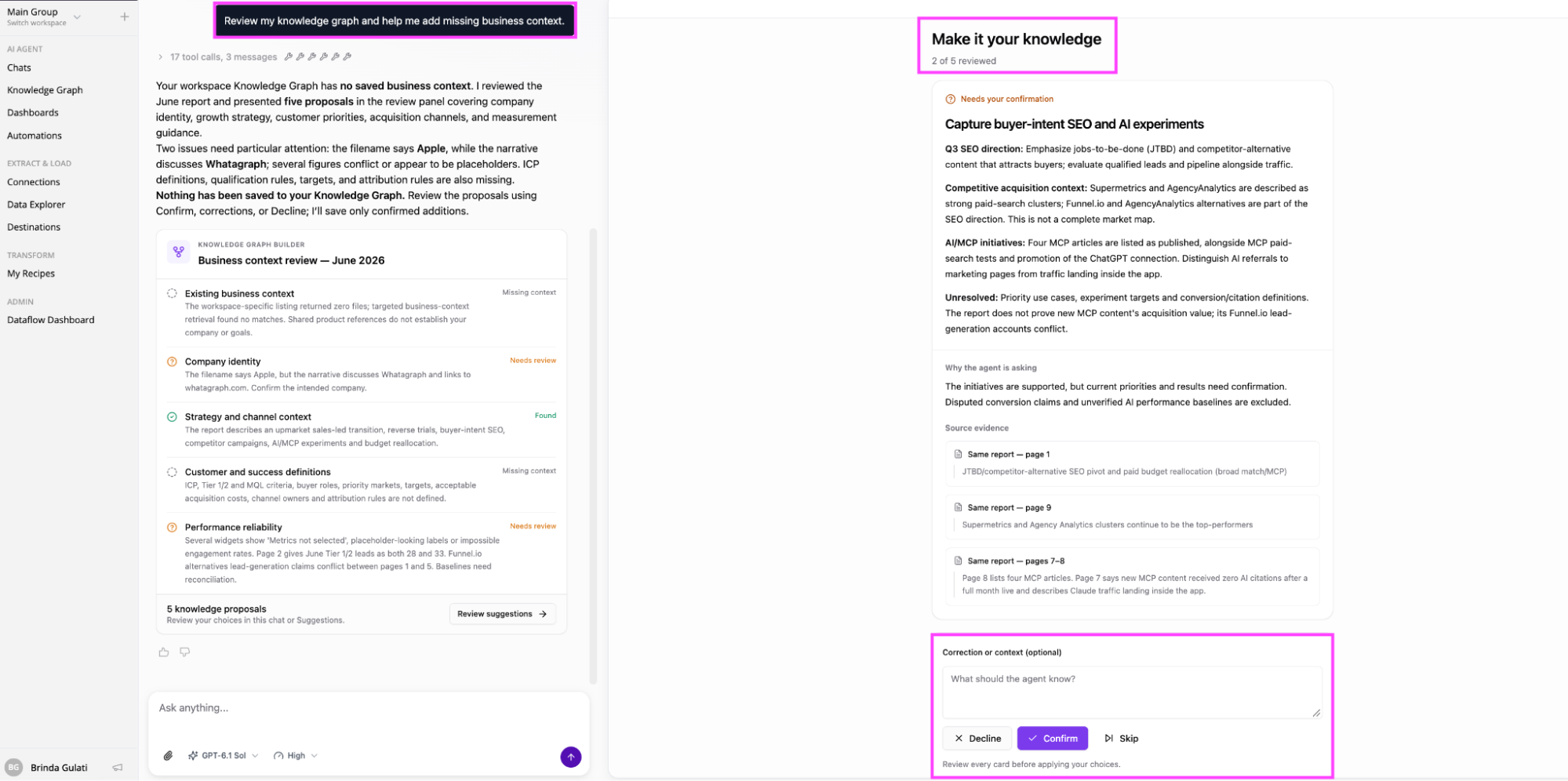
According to Improvado’s Knowledge Graph documentation, saved context can apply across the account or stay within a particular workspace. The agent also adds its own working notes and documents, which remain available to inspect.
Limitations: The agent depends on the pipeline underneath it, and that pipeline takes work. G2 lists an average implementation time of two months for Improvado. The connector opacity a recent G2 reviewer describes becomes especially awkward when an agent starts interpreting the results. Improvado’s current pricing includes Marketing Data Governance on Advanced and Enterprise. The free tier lets you try the agent against limited live queries, but it won’t show you what implementing and maintaining the full reporting setup will demand.
Improvado pricing
As of October 2026, Improvado’s pricing page lists Free Limited access with AI Agent, one workspace, and 50 MCP actions per week. MCP Only costs $100/month for using its data tools through an existing AI assistant.
Advanced and Enterprise plans have custom pricing.
4. NinjaCat AI Agents
- Best for: Agency networks and enterprise marketing teams running hundreds of accounts, especially those already on Snowflake.
- My review process: I reviewed NinjaCat’s agent library, setup documentation, release notes, and customer feedback. I haven’t tested its agents hands-on; NinjaCat offers custom proofs of concept rather than a standard trial.
NinjaCat has been the heavy-duty option for agency reporting for a decade. The agents run on top of that: a Data Cloud built on Snowflake, so large customers can run NinjaCat inside a warehouse they already own. The company says it monitors $4 billion in annual media spend across 300-plus clients, which tells you who it's for.
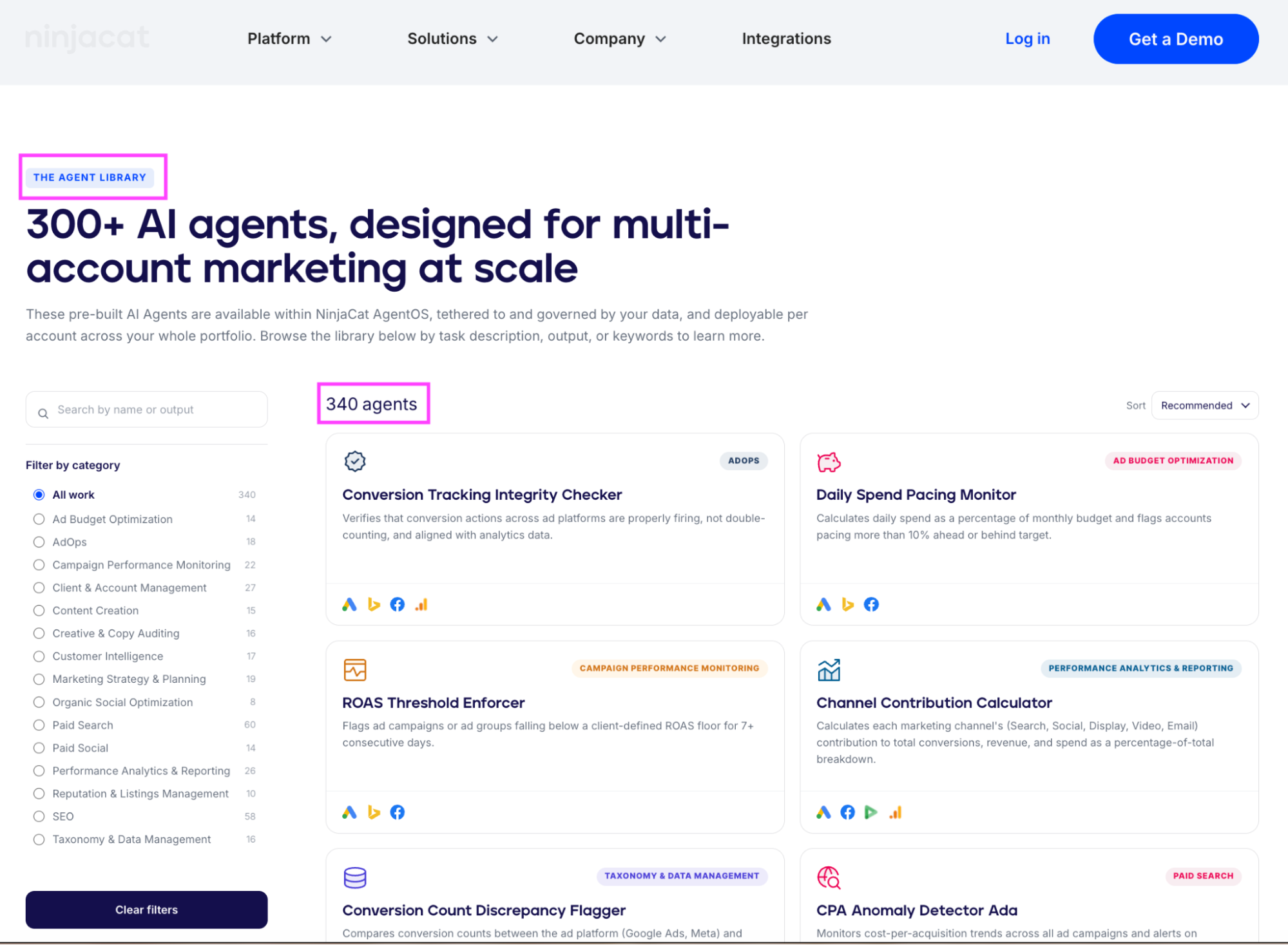
The headline number is 340 pre-built agents in the library, filterable by category.
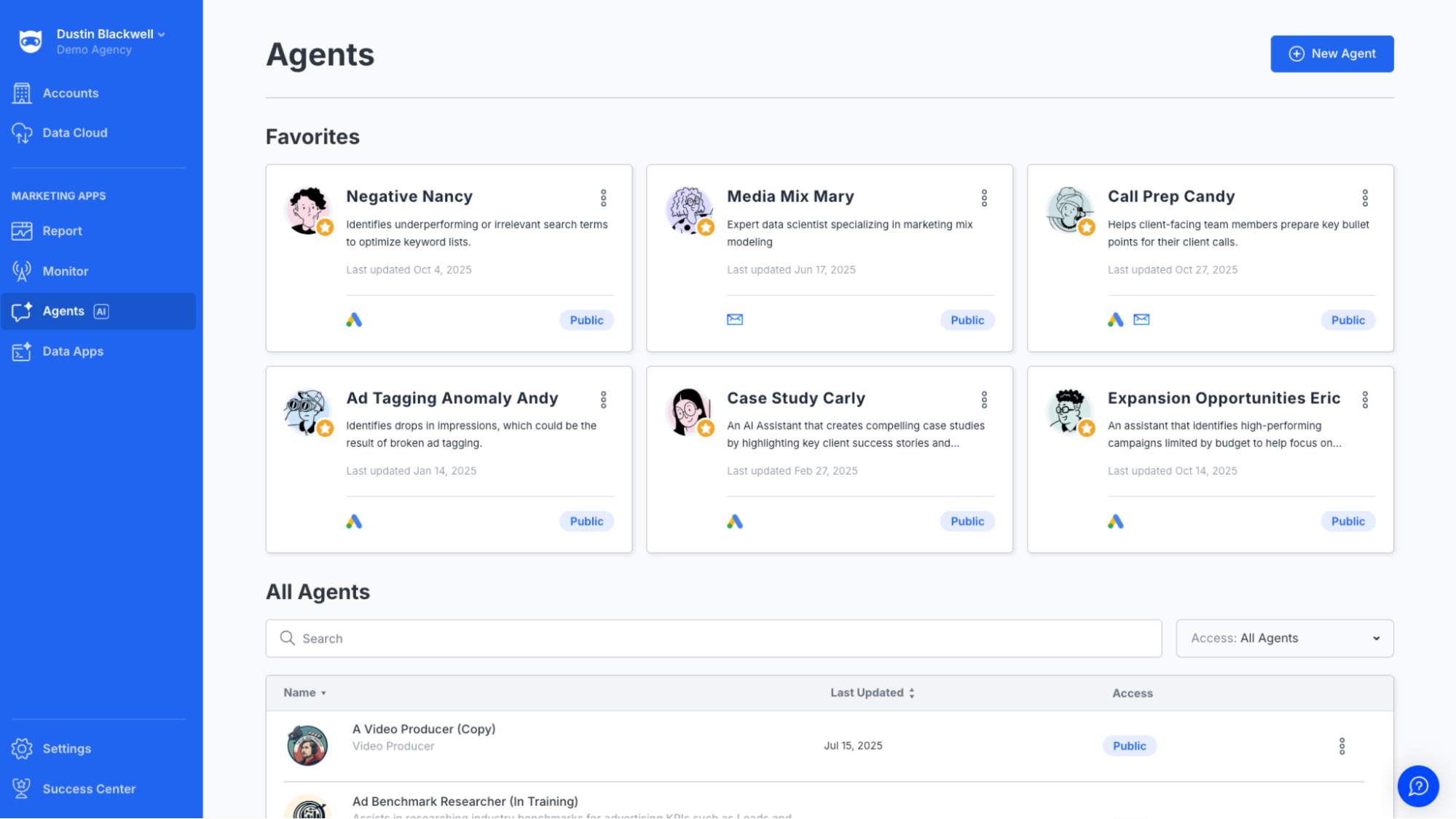
The agents in a workspace come with names and faces: Negative Nancy finds wasted search terms, Ad Tagging Anomaly Andy watches for impression drops that suggest broken tracking, Call Prep Candy writes bullet points before a client call.
Source: G2
The jobs I’d shortlist it for include:
- Check tracking discrepancies: Compare conversion counts between advertising platforms and analytics, identifying differences that need investigation.
- Audit campaign details: Check ad copy for incorrect product names, outdated dates, or departures from the client’s standards.
- Prepare client conversations: Assemble performance highlights and meeting briefs so account managers have the supporting numbers ready.
The setup starts with datasets in NinjaCat Data Cloud. You choose a pre-built agent or describe a custom assignment to Agent Builder Bob, then give it the relevant data and instructions. NinjaCat’s documentation recommends narrowing datasets to the fields and records the task needs.
NinjaCat says it combines language models with code execution and, where appropriate, fixed rules, SQL, and validators. That’s relevant for these assignments: checking whether spend crossed a threshold should produce a calculation someone can inspect. I’d ask to see that calculation in the proof of concept, alongside the agent’s explanation.
The Snowflake foundation is the strength and the dependency. If your data doesn't already live somewhere like that, you're buying the pipeline before the agents.
Limitations: In an October 2025 G2 review, Quoc Nhat T. praised NinjaCat’s navigation but wanted easier app connections and agent configuration. The current documentation says that Agent Builder Bob drafts instructions and suggests datasets, while your team checks the selections, tests the answers, and adjusts the prompts. Even Preview runs consume AI credits before the agent is published. That doesn’t establish whether setup has improved since the review, but it does let you budget for staff time and credits spent getting the agent ready to save staff time.
NinjaCat pricing
As of October 2026, AI Agent pricing is custom, based on your scale and required services. NinjaCat offers tailored proofs of concept.
5. Funnel AI
- Best for: Marketing and data teams who want governed, warehouse-ready data in their own BI tool, with an agent that edits the data model.
- My review process: Documentation-based. I reviewed Funnel’s product pages, setup guides, pricing, and customer feedback from G2 and Reddit.
A data hub first, Funnel features 600-plus connectors, harmonized fields, and destinations like Looker Studio, BigQuery, and Snowflake.
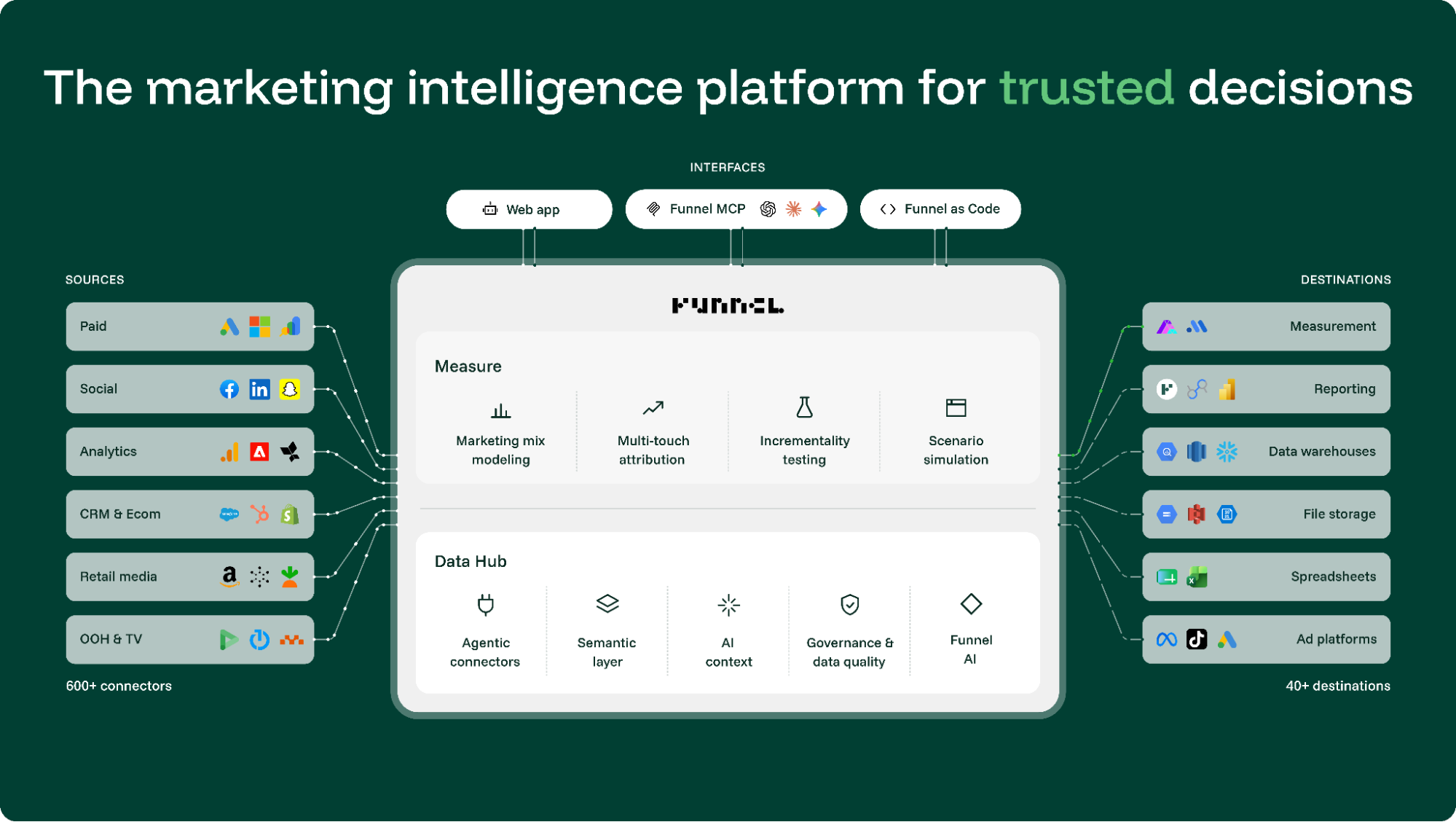
Funnel AI is the agent layered over that, and its remit is narrower and more concrete than most on this list; it answers questions, creates and edits fields, builds and updates dashboards, and schedules recurring analysis delivered to email or Slack. Funnel AI is included on every plan, as is the MCP that puts the same data in Claude or ChatGPT.
When you ask Funnel AI to change something, it shows you the rules it proposes before anything is applied, and you can edit or undo them. Funnel's own phrase is "no black box."
The jobs I'd shortlist it for:
- Fix the data setup without opening a ticket: Ask for a custom dimension or a new metric in plain language, inspect the rule it proposes, apply it.
- Put the recurring question on a timer: Turn an analysis into a scheduled task with a delivery destination and a kept history.
- Feed the warehouse something you trust: Naming-convention enforcement and compliance metrics (Business tier and up) catch the taxonomy problems before they reach BigQuery.
In Funnel, shared instructions don’t mean shared conversations. Funnel’s documentation says chats are private to each user, and each session works within one workspace. That means colleagues can reuse the assignment, but you share the findings through dashboards or Data Explorer views.
Limitations: Funnel AI operates on Funnel's data; it isn't a cross-tool agent with connectors into Slack, Asana, or your CRM. The most useful governance features, naming conventions and roles among them, start at Business. And pricing has been a moving target in 2026: G2's listing had Starter at $400, a recent Reddit post reported $200, and a vanished pricing calculator, and the live page says something else again.
Funnel pricing
As of October 2026, Funnel’s pricing page lists Starter from $300/month and Business from $600/month, billed annually. Enterprise pricing is custom; Funnel AI and MCP are included across plans.
The final quote depends on the capacity you buy through flexpoints, allocated across connectors, connected accounts, and destinations. They aren’t AI chat credits, and the bill doesn’t automatically rise because your campaigns generate more rows. Read my honest Funnel review.
6. Supermetrics’ Super AI
- Best for: Teams that already pipe Supermetrics data into Looker Studio or Sheets and want to see the same data inside Claude or ChatGPT.
- My review process: Hands-on with Supermetrics Studio’s sample-data dashboard and chat-based editing. I also inspected the AI chats integration and campaign-management settings. I didn’t test live campaign changes.
Supermetrics has three AI surfaces and doesn't say which one is the agent. Supermetrics Studio opens in a separate workspace, where you describe a dashboard and its AI builds it. AI chats connects Supermetrics to tools such as ChatGPT and Claude, where you can query your marketing data. The two connect: you can build a dashboard in an external AI chat and send it to Studio for hosting and sharing.
The jobs I'd shortlist it for:
- Build the dashboard without building the dashboard: Describe it, or paste a screenshot of one you like, and Studio generates a live board with a side panel of next steps.
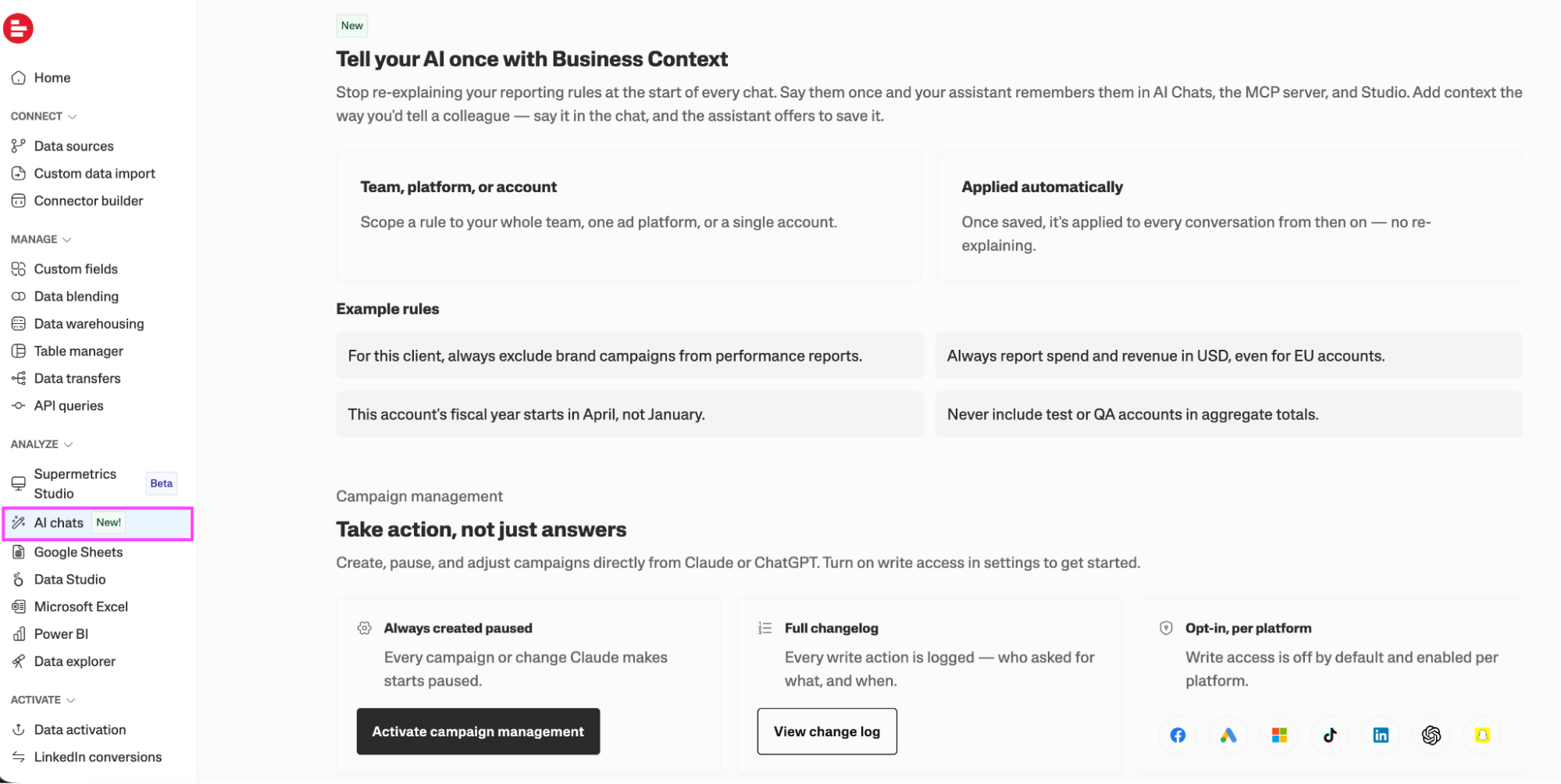
- Tell the AI your rules once: Business Context lets you save a rule scoped to the whole team, one ad platform, or a single account, and it applies across AI chats, the MCP, and Studio from then on.
- Change a campaign from a chat: Campaign management lets Claude or ChatGPT create, pause, and adjust campaigns across Facebook, Google, Microsoft, TikTok, LinkedIn, Snapchat, and ChatGPT Ads.
I started in Studio with the Google Search Console traffic and top queries example. The AI produced a serviceable board with headline metrics, a performance chart, and suggested additions.
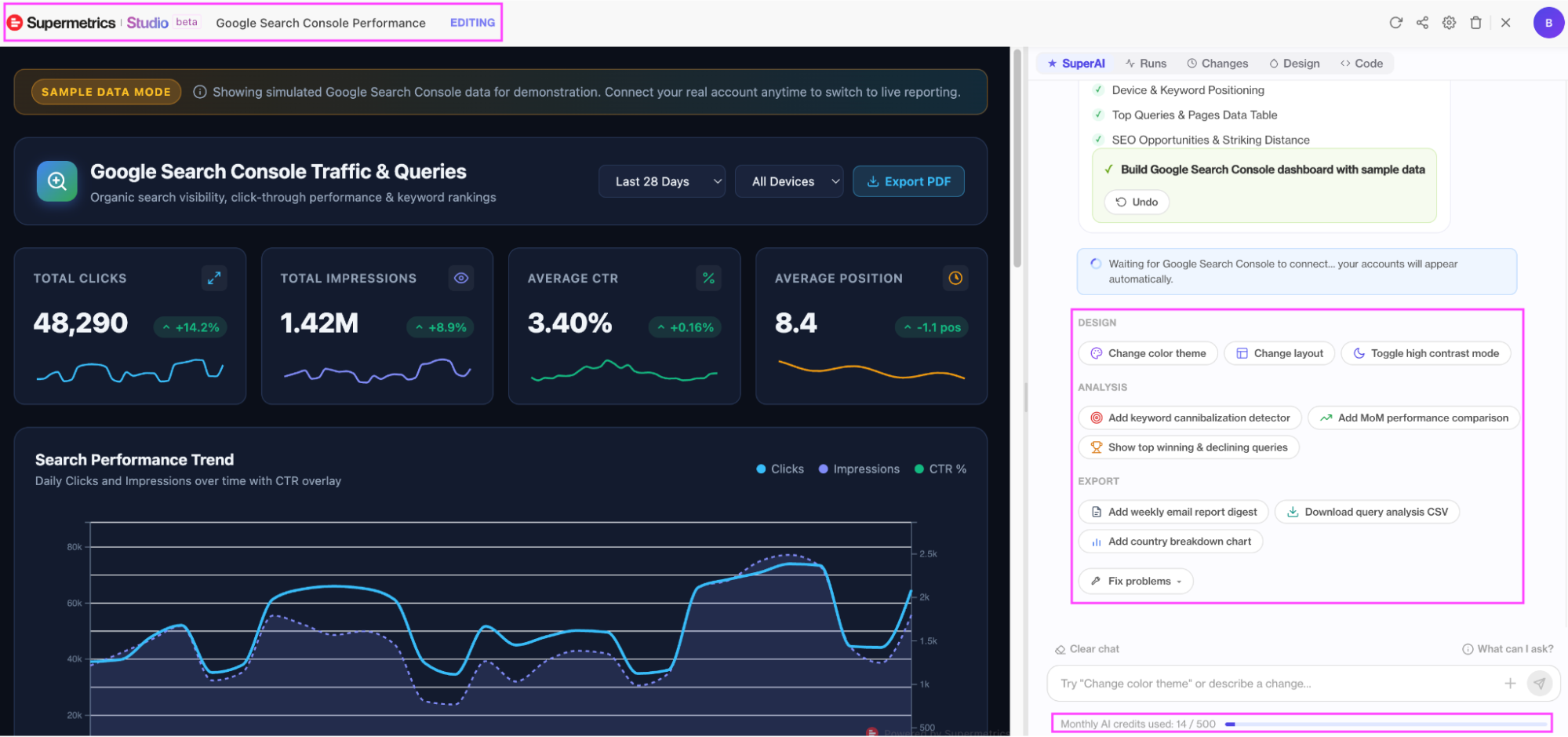
I liked how easy it was to ask for changes. The sidebar offered shortcuts for changing the layout, switching colors, adding comparisons, and fixing problems. I could keep describing what I wanted without learning where every setting lived.
Then I tried a small adjustment: high-contrast mode. I had to wait for about a minute and a half for the board to update. That’s tolerable once. Across a client’s fonts, colors, and successive requests to make something slightly more blue, it starts to feel like a long way around a formatting toolbar.
My screen showed 14 of 500 monthly AI credits used at that point. That was the session’s displayed total, not a measured cost for the contrast change.
There are manual controls, although they weren’t obvious to me during this workflow. Supermetrics documents direct text editing, a Design tab for colors, and dragging some elements into place. I’d use those for the finishing touches and keep the AI for changes that justify the wait.
In the settings I inspected, write access was off by default, with access enabled for selected connected accounts. The documentation describes configurable approval requirements and a change history; new campaigns start paused.
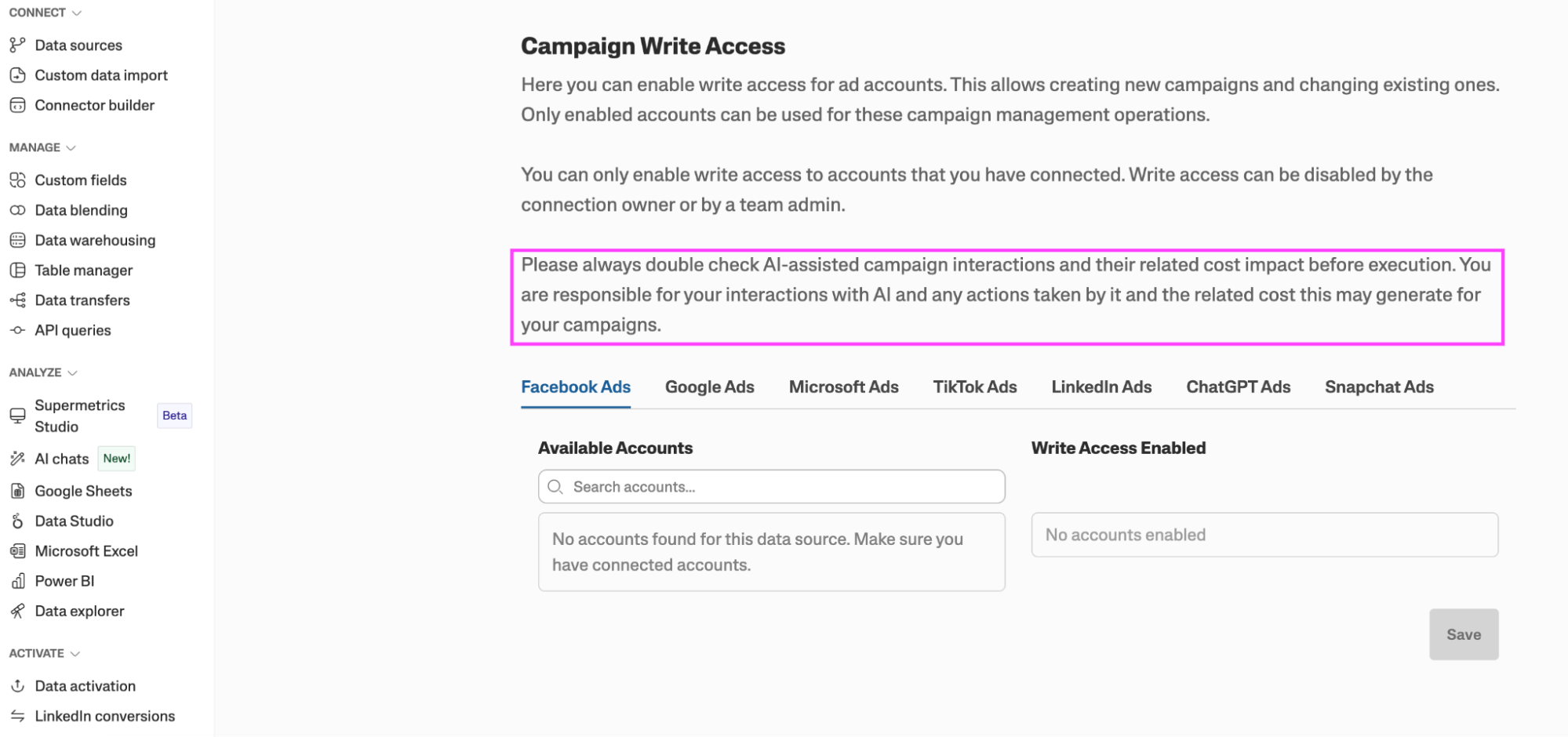
I’d want approval settings nailed down before enabling it on a client account. The AI can make the change, but explaining the bill is still your job.
Limitations: There are three AI products with no map between them. Studio is in beta and edits only by chat, which is slower than a mouse for cosmetic changes and costs credits. The campaign actions run through a general assistant with a Supermetrics plugin, so the thing writing to your ad account is Claude or ChatGPT with a very good set of permissions, which brings back the question from earlier about setups that live in one person's chat window.
Supermetrics AI pricing
As of October 2026, Starter begins at $44/month billed annually, or $55 billed monthly, with one core destination. The pricing page lists 4,000 monthly AI credits for Studio on Starter. Growth starts at $177/month billed annually, with 12,000 Studio credits; Enterprise is custom-priced.
7. AgencyAnalytics AgencyAI
- Best for: Small agencies already on AgencyAnalytics for client reporting who want an assistant for account-management chores, and who'll check its output.
- My review process: Hands-on. I connected my website’s Google Analytics account, explored AgencyAI’s skills, and asked it to create a report.
AgencyAI isn't a separate product; it's a sparkle icon that opens a chat panel beside whatever you're looking at, with a slash menu of skills: investigate a keyword ranking, investigate a metric change, draft a client update email, create a client report, find at-risk clients, celebrate client wins, research a prospect.
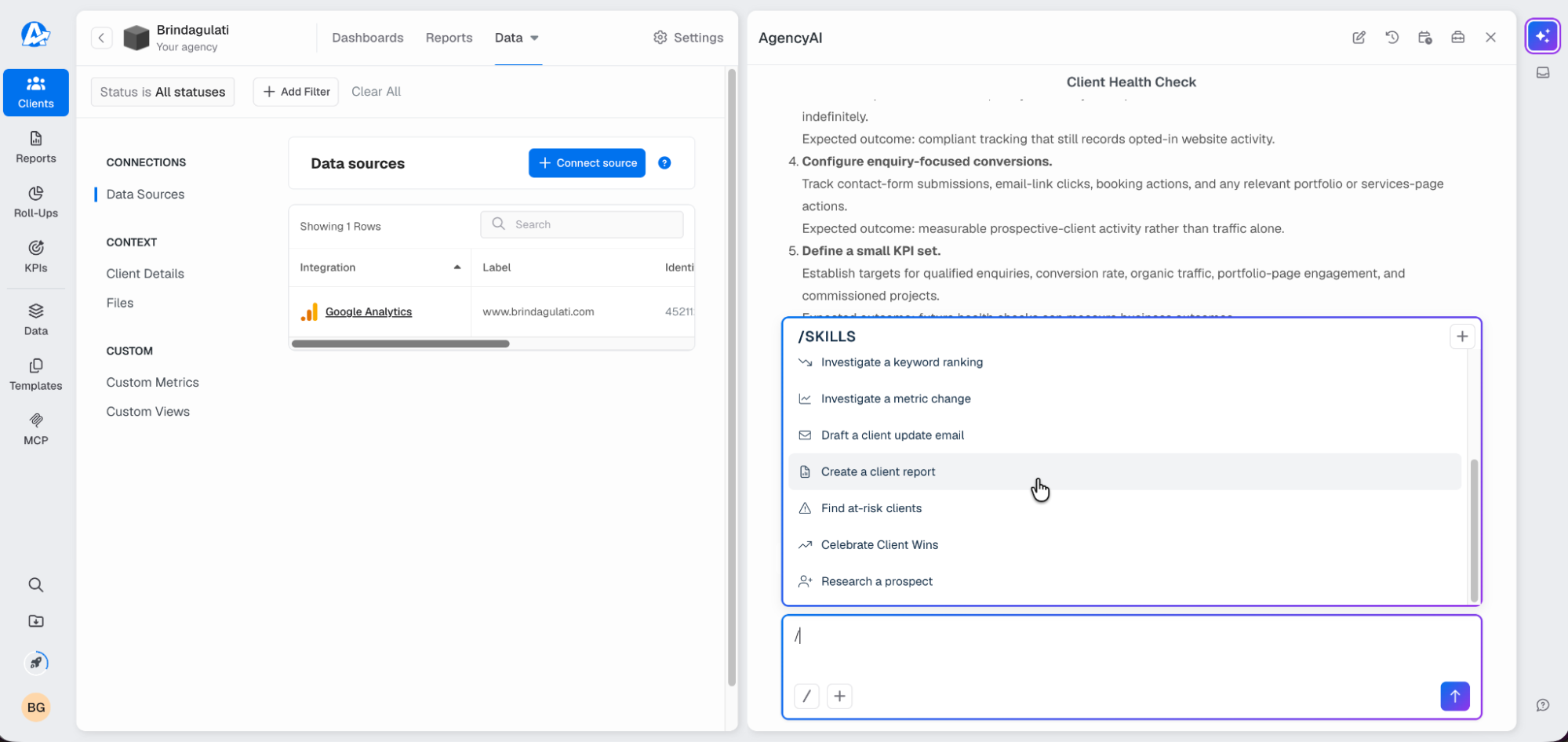
The jobs I'd shortlist it for, based on the evidence in the skills menu:
- Spot the client who's about to leave: Find at-risk clients across the portfolio, which is the question agency owners actually lose sleep over.
- Write the Monday email: Draft a client update from the connected data.
For my test, I wanted an internal GA4 technical audit. My Google Analytics connection was visible in the client’s data sources, but I had to prompt AgencyAI again to get it to look for the data.
AgencyAI then proposed an outline covering the reporting status, measurement issues, data coverage, and recommended fixes. I approved it. Before creating the report, AgencyAI presented a permission request with Allow once, Allow always, and Deny options. I liked being shown the intended action before it proceeded.
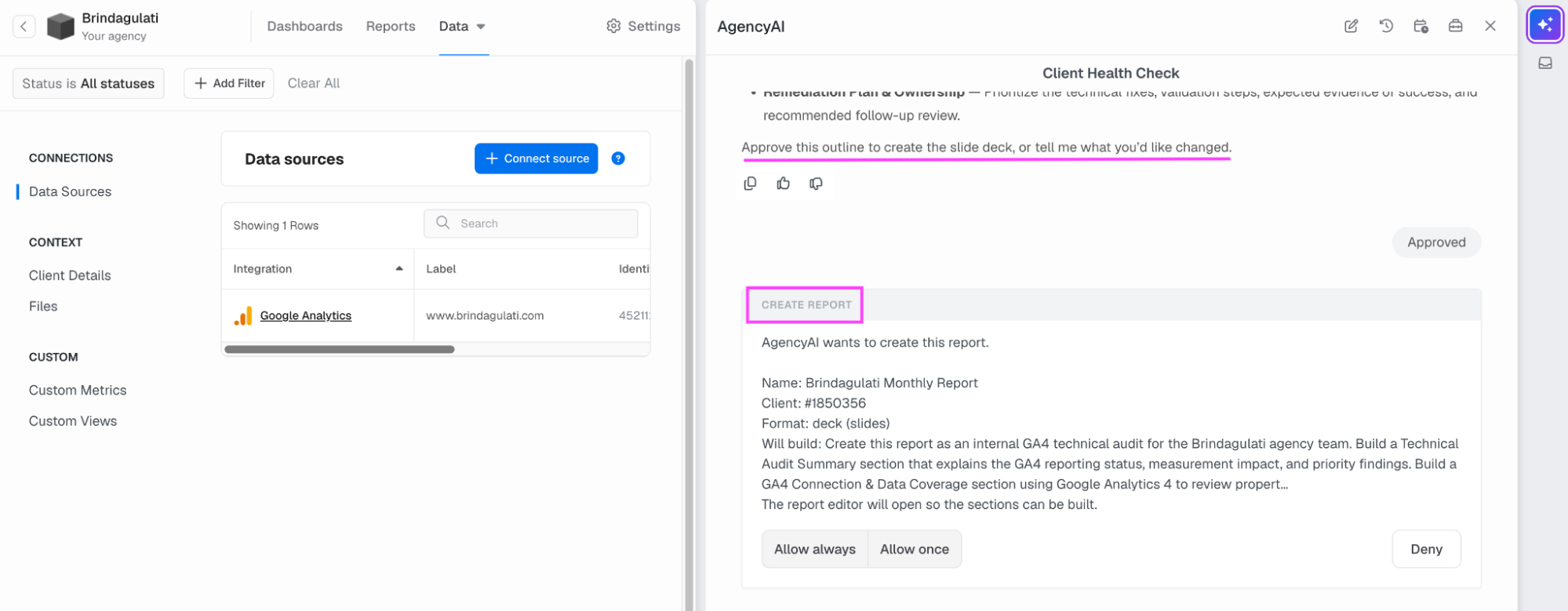
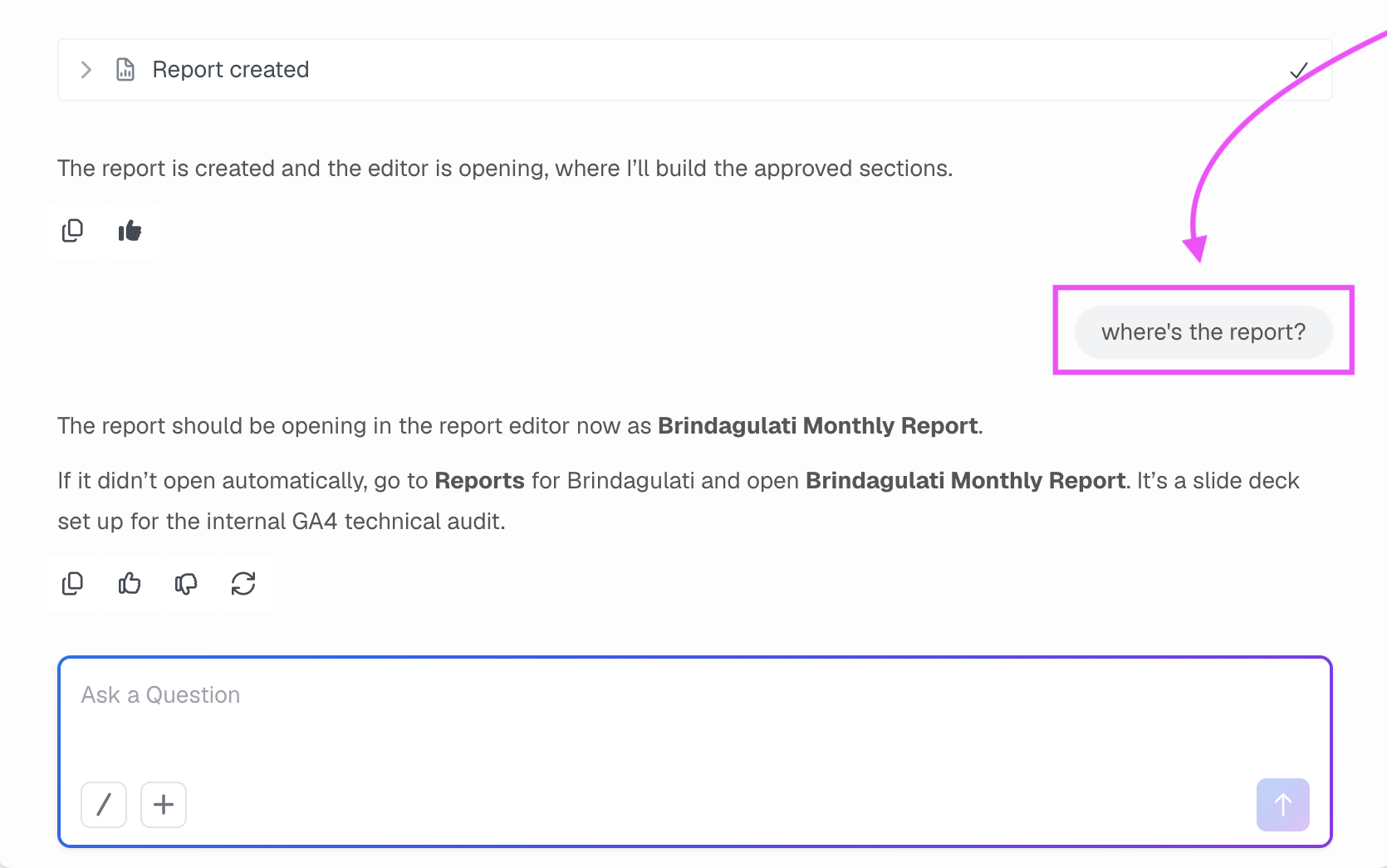
AgencyAI said the report had been created and the editor was opening, where it would build the approved sections. Nothing opened for me. I asked, “where’s the report?” and it directed me to the Reports area to find it myself.
When I opened the editor, only the cover and table of contents were listed. So by now, I’d approved an outline, approved the action, chased the result, and opened it manually.
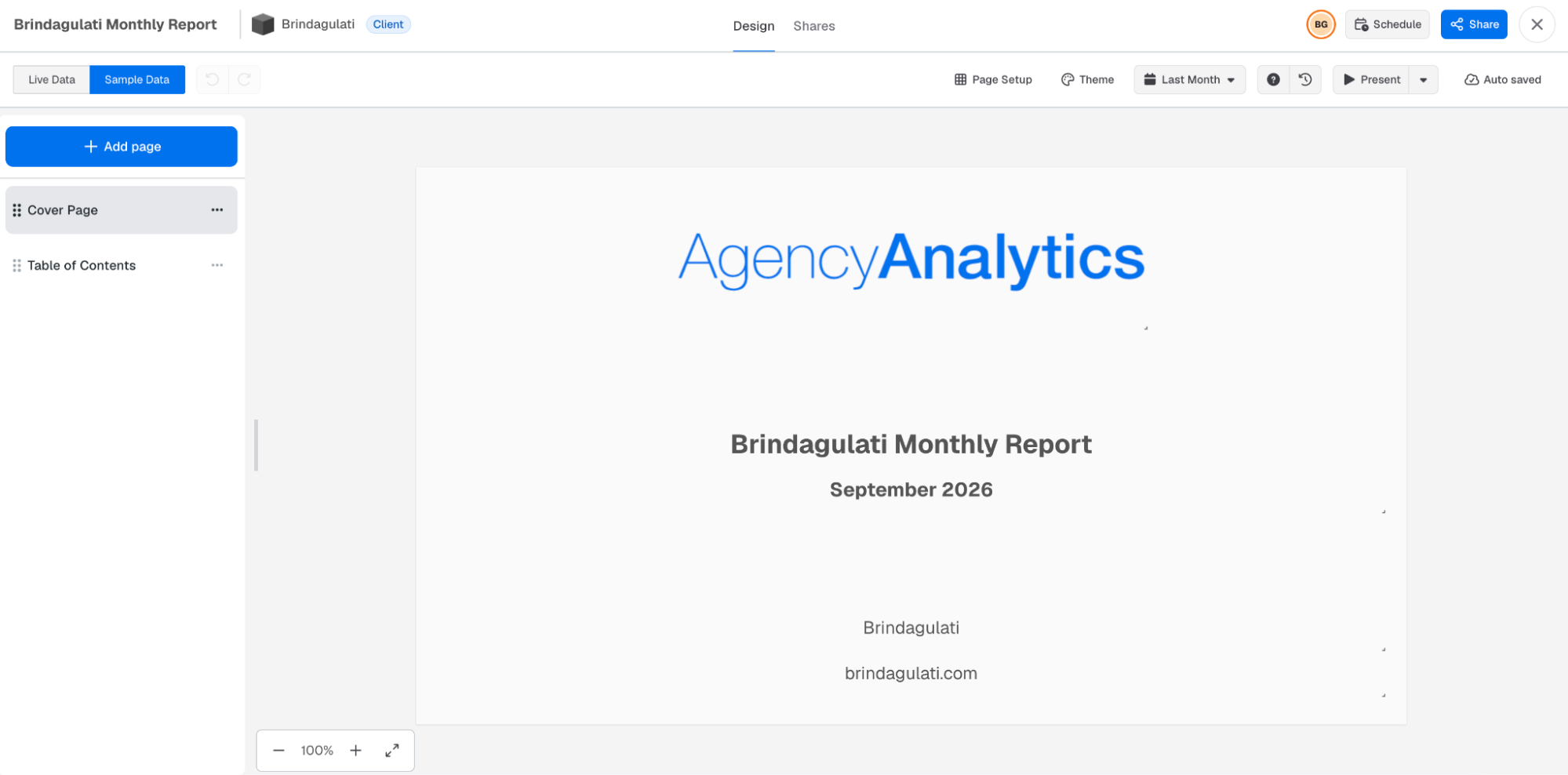
Limitations: In my test, the handoff from chat to report editor left the task unfinished. The interface doesn’t establish whether the cause was data access, an editor issue, or the agent’s execution. I’d try AgencyAI for bounded analysis and drafting tasks before trusting it to assemble a complete client report; read my full, honest review of AgencyAnalytics.
AgencyAnalytics AgencyAI pricing
As of October 2026, AgencyAnalytics lists its core plan at $20 per client per month, billed annually, including AgencyAI insights and analysis. They offer a 14-day free trial without a credit card, with volume pricing available for agencies managing 25 or more clients.
For the per-client arithmetic at scale, our AgencyAnalytics pricing breakdown covers it.
8. Your AI assistant with an MCP connector
- Best for: Marketers who want to see what Claude or ChatGPT can do with their marketing data before paying for another agent.
- My review process: Hands-on, on Claude with the Whatagraph MCP connected to a Whatagraph account.
There are five tools on this list that support MCP, the open standard that lets assistants like Claude or ChatGPT read from a connected system, and each describes it as a feature. When we look at things from the other side of the door, we find that the assistant is the agent, while the platform is the data. This is the arrangement most teams already use.
In LeanData’s 2026 survey, 62% of respondents used custom applications built on LLM APIs, and 69% used AI embedded in tools they already owned.
For this guide, the assistant-plus-connector setup is the baseline. You give the assistant access to your marketing data, give it an assignment, and see how much supervision comes back with the answer.
I’m using Whatagraph’s MCP connector for this entry. Here, that means Claude or ChatGPT can retrieve information from your Whatagraph account while you work in the chat. Read access is available on every Whatagraph plan; tools that create, update, or delete things depend on your plan.
You’ll need a Whatagraph account with the sources you want to analyze connected.
In ChatGPT:
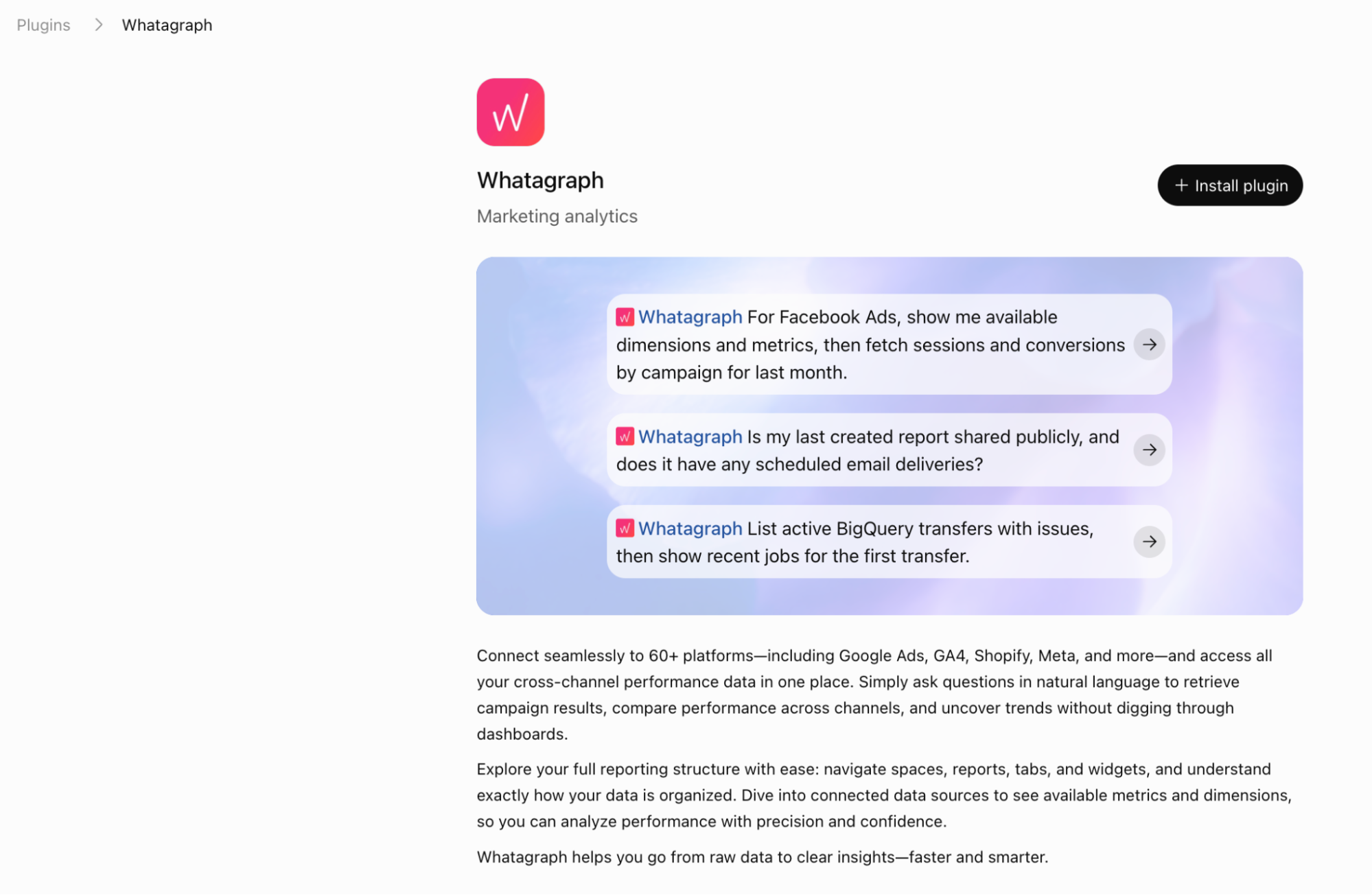
- Open the Whatagraph listing; in my interface, the button says Install plugin.
- Follow the connection prompts and authorize your Whatagraph account.
- Select the Whatagraph team you want the assistant to access and review the permissions.
In Claude:
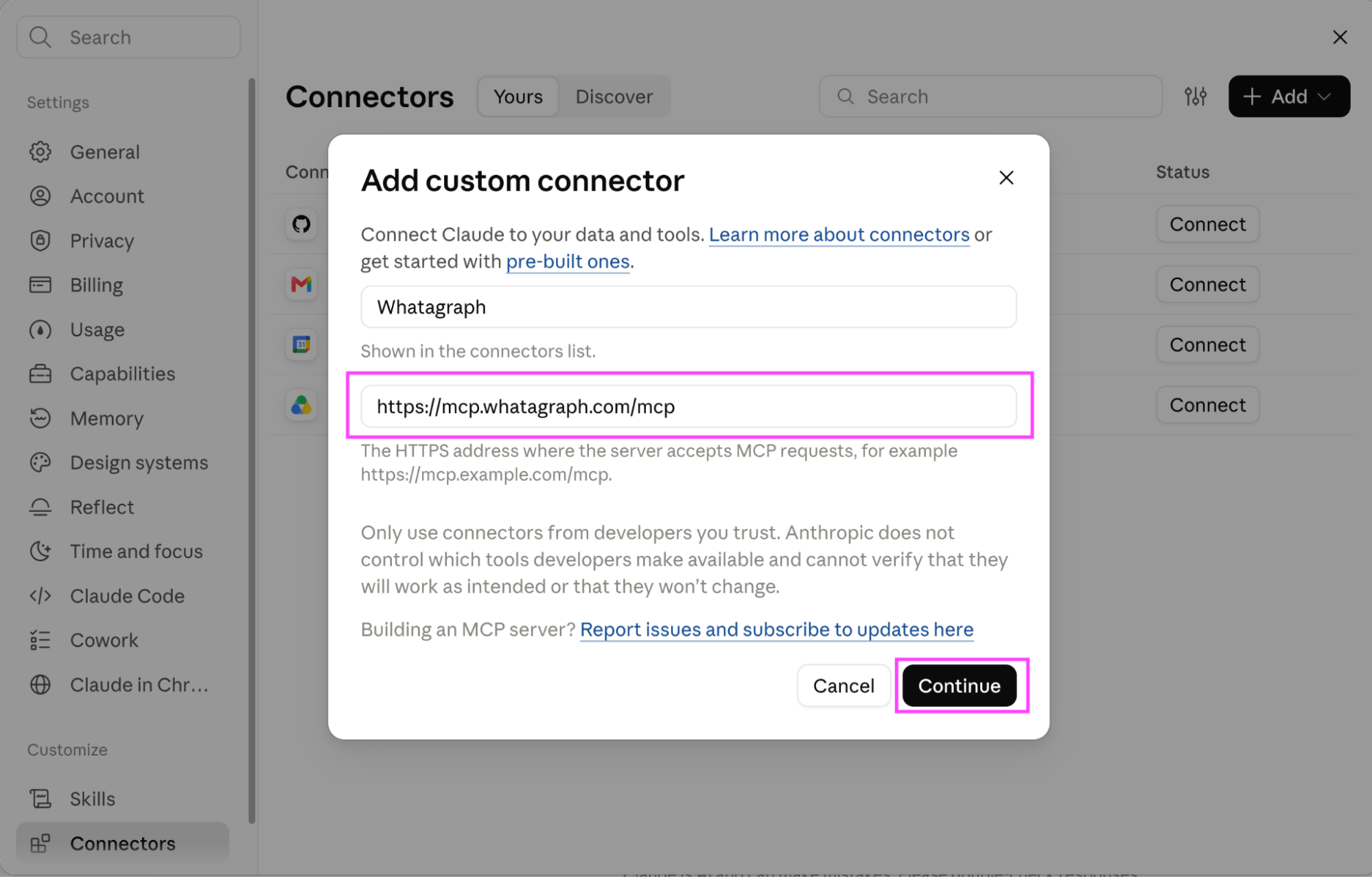
- Open Settings > Connectors, click Add, and choose the option to add a custom connector.
- Enter https://mcp.whatagraph.com/mcp as the server URL.
- Save the connector, authorize your Whatagraph account, and select your team. If your workspace restricts connector setup, an owner or administrator may need to complete this step.
The connection includes ready-made workflow instructions for tasks such as spend analysis, client briefings, and source audits. You can ask the assistant to load the relevant skill before giving it an assignment.
The connection also reaches Whatagraph’s IQ Agents. You can ask your assistant to find an agent, hand it a task with supporting files, and retrieve its response without switching interfaces. Whatagraph also supports building and managing agents through the connection, where your access allows it.
I connected my Whatagraph account to Claude in less than three minutes. I already had my data sources set up when the connection time arrived.
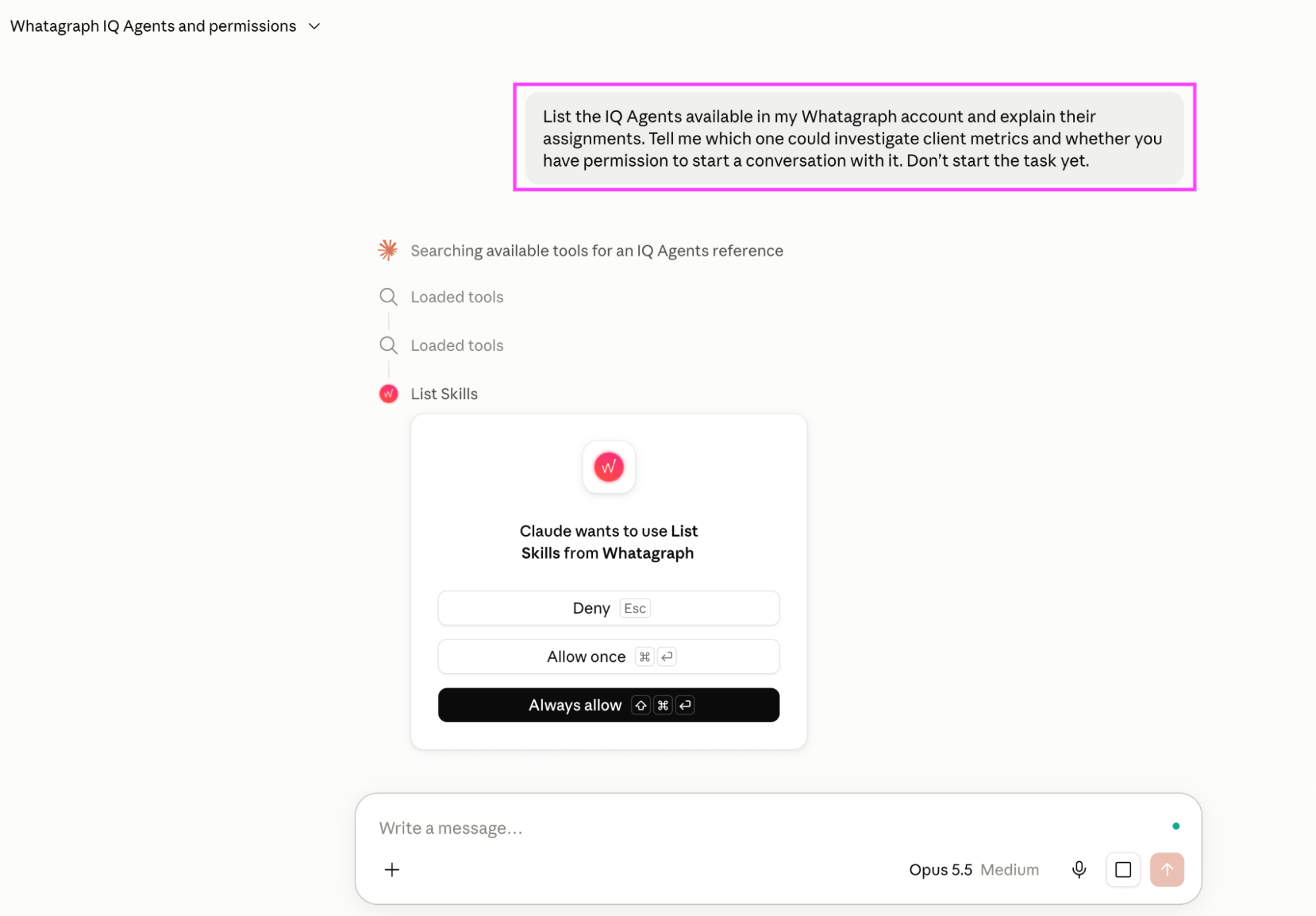
I then asked Claude to list my IQ Agents, explain their assignments, and identify which could investigate client metrics. Before proceeding, it asked permission to use Whatagraph’s “List Skills” tool, with options to deny, allow once, or always allow.
I gave Claude the standard task over the Whatagraph MCP. In under two minutes, it came back with spend per channel, and then did something I hadn't seen any tool on this list do on its own. Where it didn't have the comparison data, it left a bracketed placeholder in the draft rather than a figure.
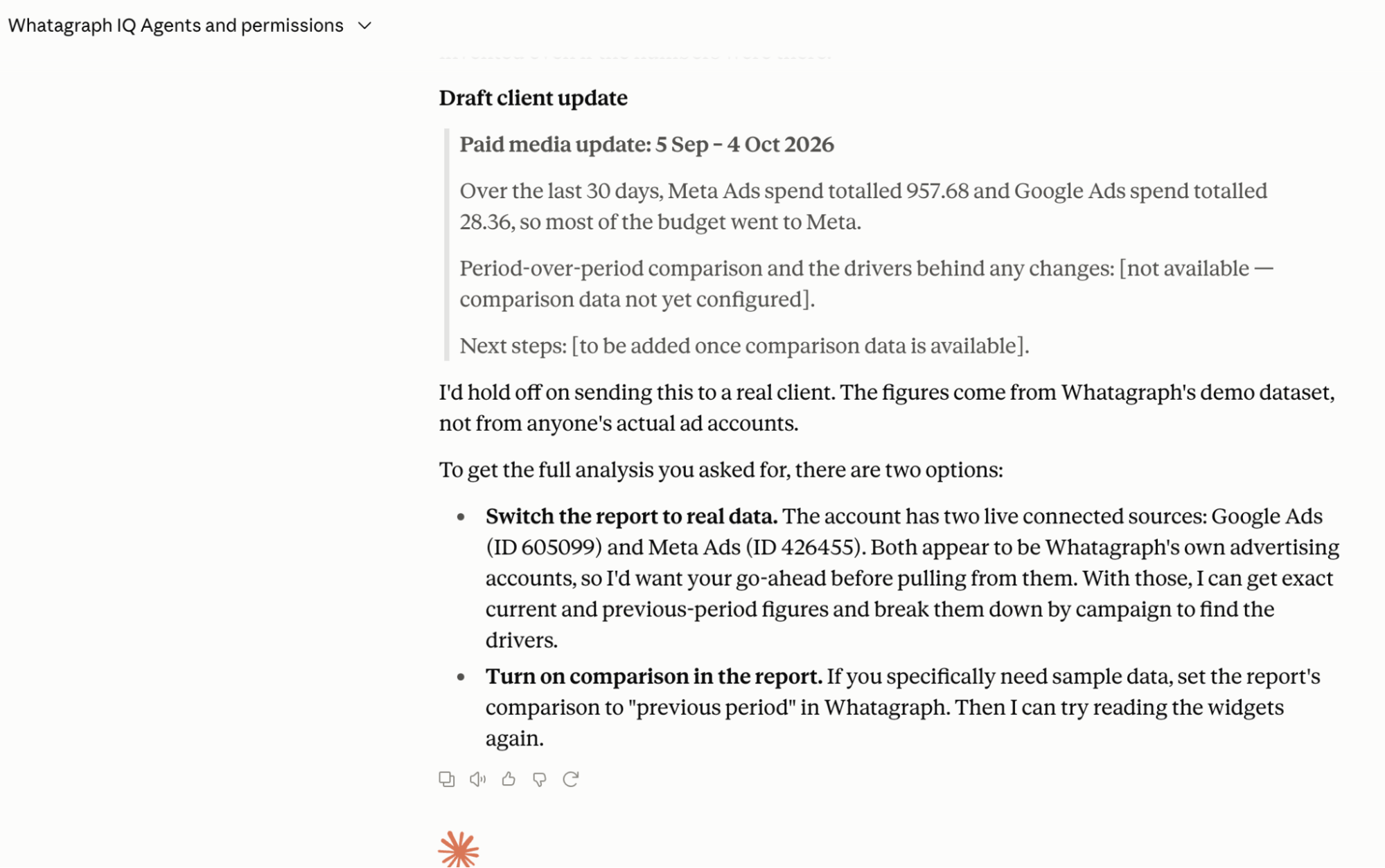
- It told me not to send the update to a real client because the numbers came from Whatagraph's sample dataset.
- It found the two live sources in the account, noted they looked like Whatagraph's own ad accounts, and asked for my go-ahead before reading them.
- It also pointed out that if I turned on "previous period" comparison in the report, it could do the analysis I'd asked for.
That's the standard from the top of this piece, met by a general assistant over a governed connector. The explanation was only as good as the numbers it read on its way in, and it said so.
Limitations: Everything about the setup is personal, including the connector, the chat history, the house rules you typed in message three. It's the best analyst on this list and the worst colleague. Whatagraph makes this argument itself, which you'd expect.
Which AI agent is best for marketing?
The honest, and frankly, irritating answer is that it depends on which job you're handing over, which is why this piece is organized that way. There’s plenty of work in marketing that deserves to be handed over, and several tools here gave me reasons to be hopeful.
But I also approved a report that turned out to be a cover page and a table of contents. Elsewhere, I went looking for an agent and found a notification signup.
The best moments, for me, were the stops. Supermetrics creates every AI campaign paused. NinjaCat falls back to rules and SQL where consistency beats a language model's opinion. Whatagraph makes a destructive action run as a preview first, so a delete only happens if you ask twice.
Those are things I can work with. So is an agent that tells me the data is insufficient before I’ve forwarded its confident explanation to a client.
Here’s what I’d do:
- Start with one recurring assignment, ask the three questions above, and make the vendor demonstrate the answers.
- Give the agent a number you already know and see if it matches.
- While you’re evaluating it, require approval for changes and read what it asks to do. Count that review time, too.
For shared reporting work that needs to run while nobody’s logged in, Whatagraph IQ Agents is where I’d start.
Published on Oct 10 2026
WRITTEN BY
Brinda GulatiBrinda Gulati is a fractional content marketer and freelance writer who specializes in data-driven storytelling and writing easy-to-understand, informative content for humans. She has two degrees in Creative Writing from the University of Warwick, and believes that above all, stories are a deeply human endeavor. She has two dogs, knows thrifting spots, and loves afternoon naps.