The Best MCPs for Marketing in 2026 for Cross-Channel Analysis
An MCP for marketing lets you connect your marketing data straight to AI agents and LLMs like Claude, and “talk to” your data in one place.
But not all MCPs are created equal.
In this article, we dive deep into three different types of MCPs for marketing - single-platforms, stitched connectors, and a governed data layer - and a selection of the best MCPs for each.

Jul 01 2026●10 min read



You're running Google Ads, Meta, LinkedIn, maybe TikTok, with analytics in GA4 and your leads sitting in a CRM.
Every week, someone (your client or your leadership) wants to know how things are going:
So you go to do the thing everyone's talking about: connect your channels to Claude and get back answers to just share with your client or leadership.
Here's the thing though - it’s easy to connect single channels to Claude, but it gets tricker when you want to connect multiple platforms.
You could build your own cross-channel MCP, but it's time-consuming and very technical. And whenever API changes for an ad platform (and they change a lot), you need to update and maintain that system, which can easily become a huge task of its own.
We've got you covered.
This is a guide to the best MCP servers for marketing (the best MCP for marketers, however you search it).
We'll walk through the ones worth knowing in 2026, sorted into three different types - and which one to choose to get accurate cross-channel answers you can share with your clients or leadership.
What is MCP for marketing, exactly?
MCP stands for Model Context Protocol. Anthropic introduced it in late 2024, and the name is pretty literal: it gives an AI model context, through a protocol.
Arturas Lazejevas, CTPO of Whatagraph, puts it in plain terms:
Think of MCP as a door that LLMs like Claude or ChatGPT can use to access any of your systems that you connect (through the MCP).
So instead of exporting a CSV from Google Ads, pasting it into Claude, and asking it to make sense of the numbers, Claude walks through the door and reads them itself.
But not all marketing MCPs are built the same. We broke down three main types available in the market right now.
3 different types of marketing MCPs (one will give you the most accurate answers)
When a vendor says "we have an MCP," that can mean three completely different things. Here’s a short summary:
- Single platform MCP: this let you connect to ONE platform only, e.g. Google Ads or Google Search Console
- Stitched connector MCP: this “stitches” together different platforms, e.g. Google Ads, Meta Ads, LinkedIn Ads, in one MCP
- MCP over a governed data layer: this is where you bring in data from ALL the marketing platforms you’re using, standardize metrics and dimensions, and then query this “governed” data with Claude or ChatGPT.
Here’s a longer summary:
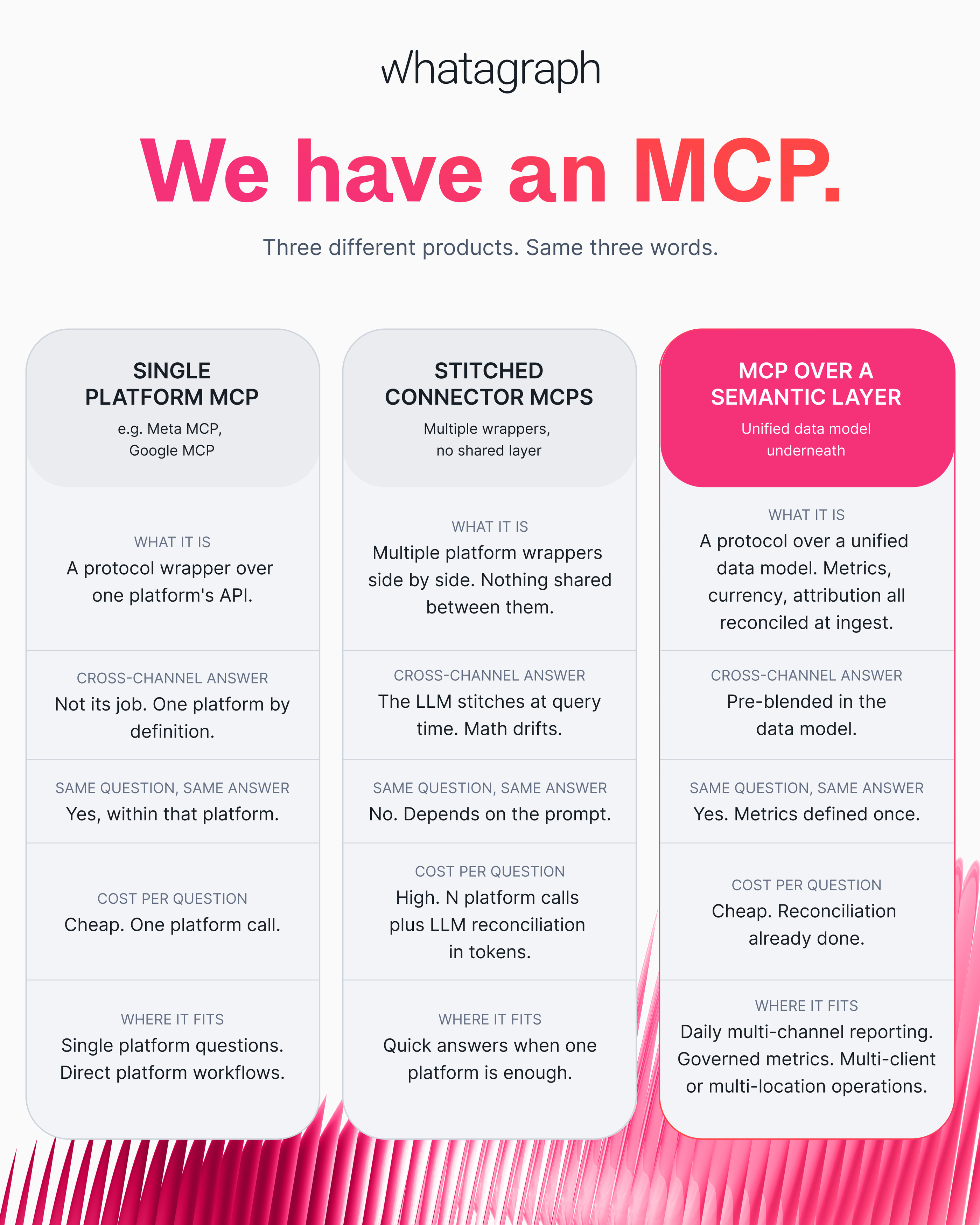
In this article, we’ll give you the best MCPs for each type of MCP.
Best all-in-one MCP for marketing with a cross-channel governed data layer
Most marketers aren't using one channel in silo - you're running Google Ads alongside LinkedIn Ads, setting up tracking in Hubspot and Google Analytics, and managing email campaigns on Mailchimp.
How do you bring all this data together, standardize everything, and ask cross-channel questions in Claude?
That’s where Whatagraph comes in.
Whatagraph is a marketing intelligence platform with one governed data layer for all your cross-channel marketing data.
You bring data from 60+ marketing channels into one place with native, stable integrations - and Whatagraph unifies them into a single data layer that powers your client reports, your internal dashboards, and your AI assistants.
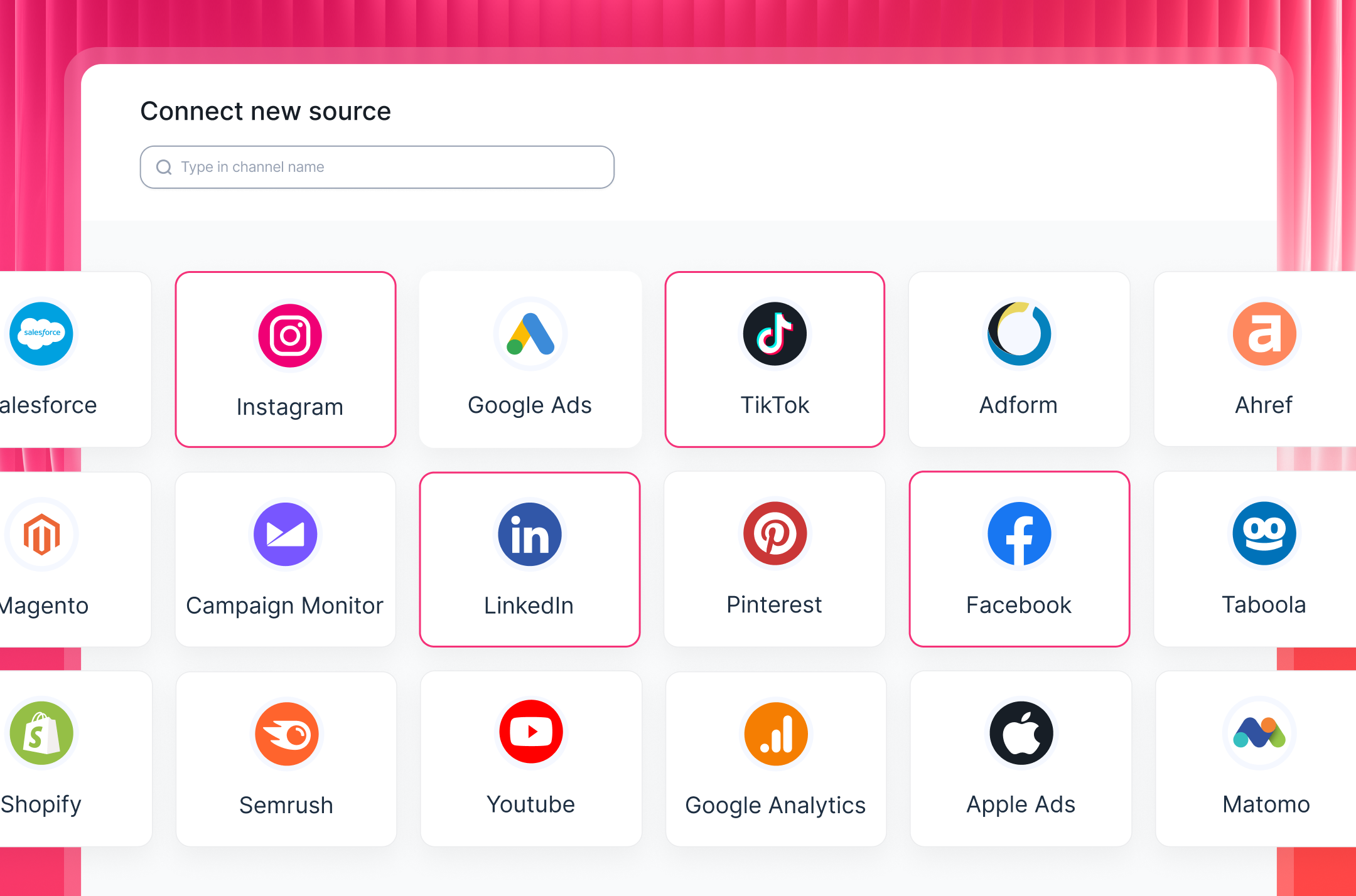
So when you query that data in Claude through Whatagraph's MCP, the answer comes from the same governed layer as your reports, not from raw channel APIs being stitched together on the fly.
But what does “governed data” actually mean?
It means the messy, slightly boring, but important work of making your data trustworthy is done once, up front, before LLMs and AI agents see the data. And most teams skip this step.
This user in this AI marketing stack Reddit thread sums it up best.
 In Whatagraph, that looks like this:
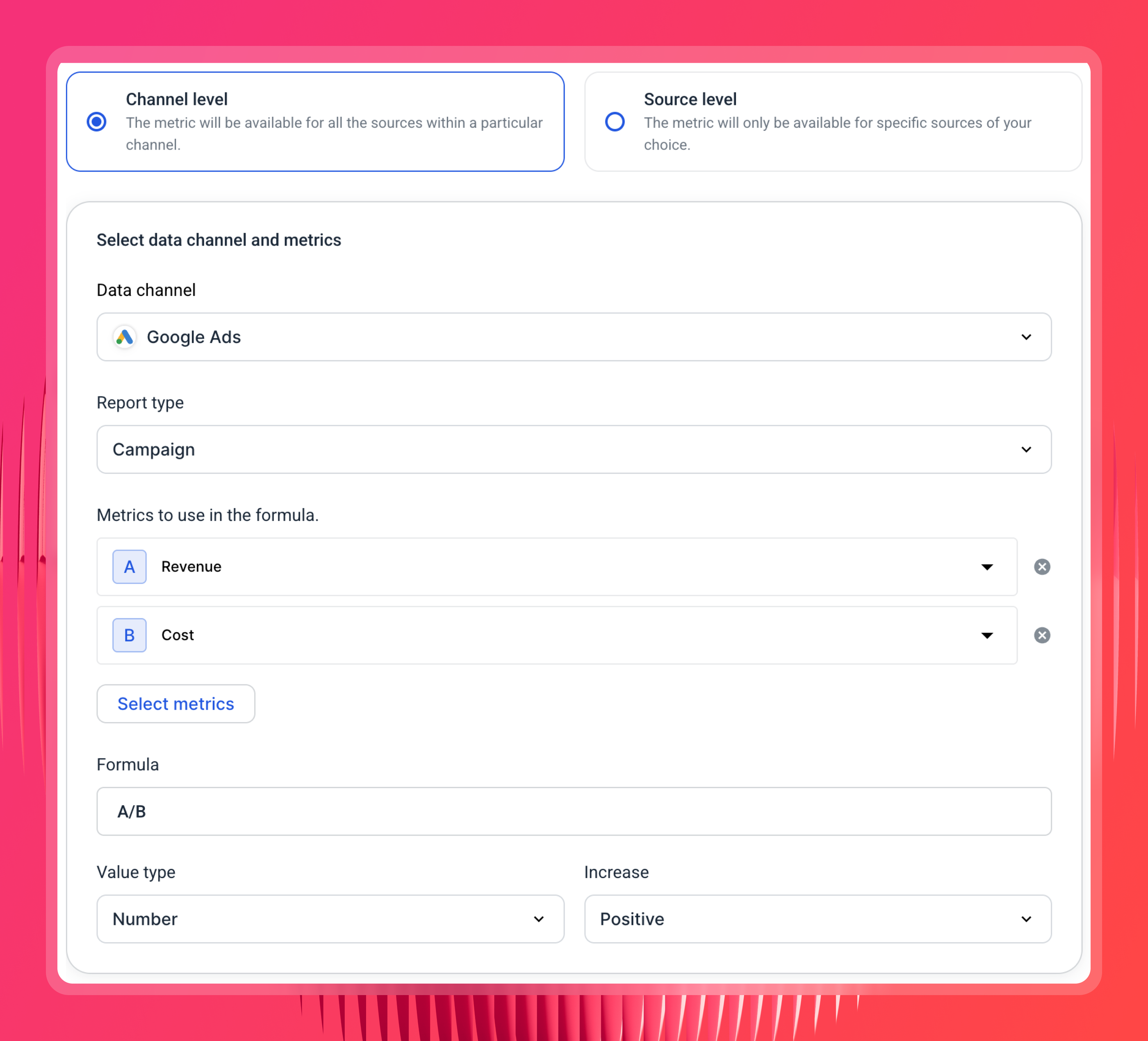
Create custom metrics. You define a metric once and it means the same thing everywhere. For example, a marketing efficiency ratio (revenue over total spend) calculated the same way across every client and channel, instead of Claude reinventing the formula each time you ask.
Create custom dimensions. When your campaign naming is inconsistent across channels, you can consolidate it here. So "Brand," "Brand_Exact," and "01_Brand_Search" all show up as "Brand" when Claude queries them, instead of three separate things that don't add up. With Whatagraph IQ, you just need to choose your channels and dimensions and ask AI to consolidate dimensions for you.
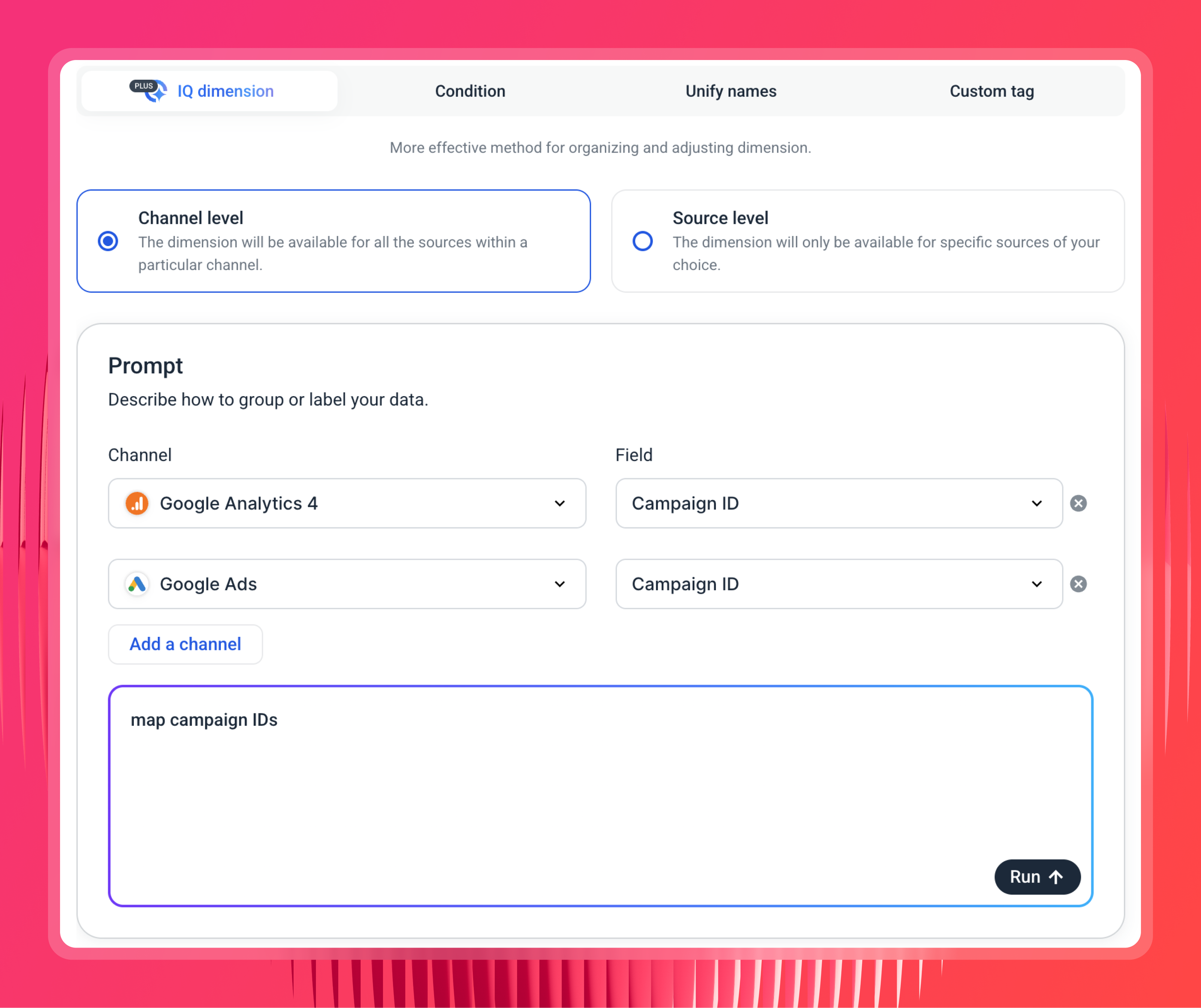
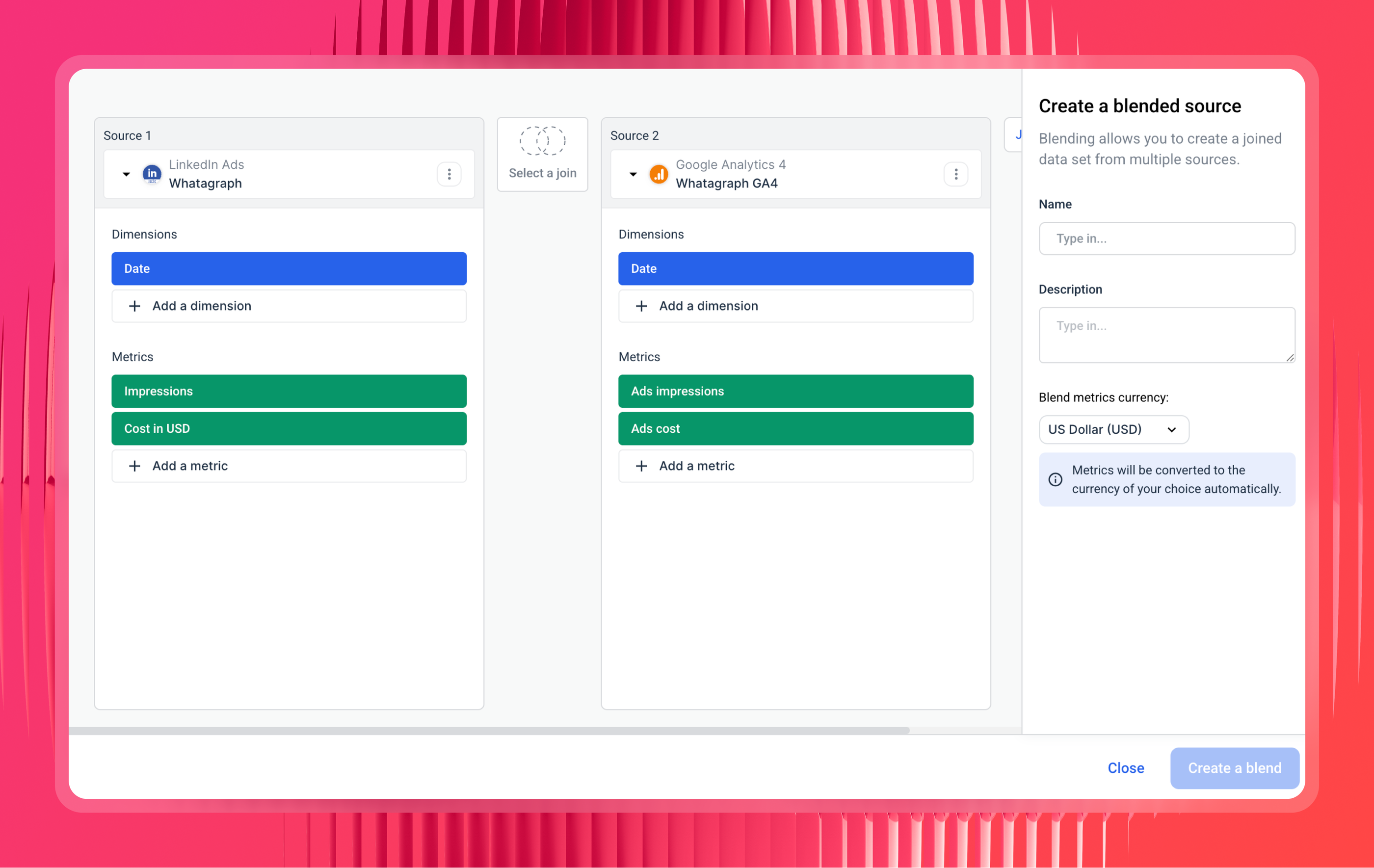
Blend cross-channel data. You merge channels that don't share the same report type or metric names into one virtual source. For example, blending GA4 and Google Ads on a shared key like date or campaign, so you can ask about traffic and spend together and get one coherent answer.
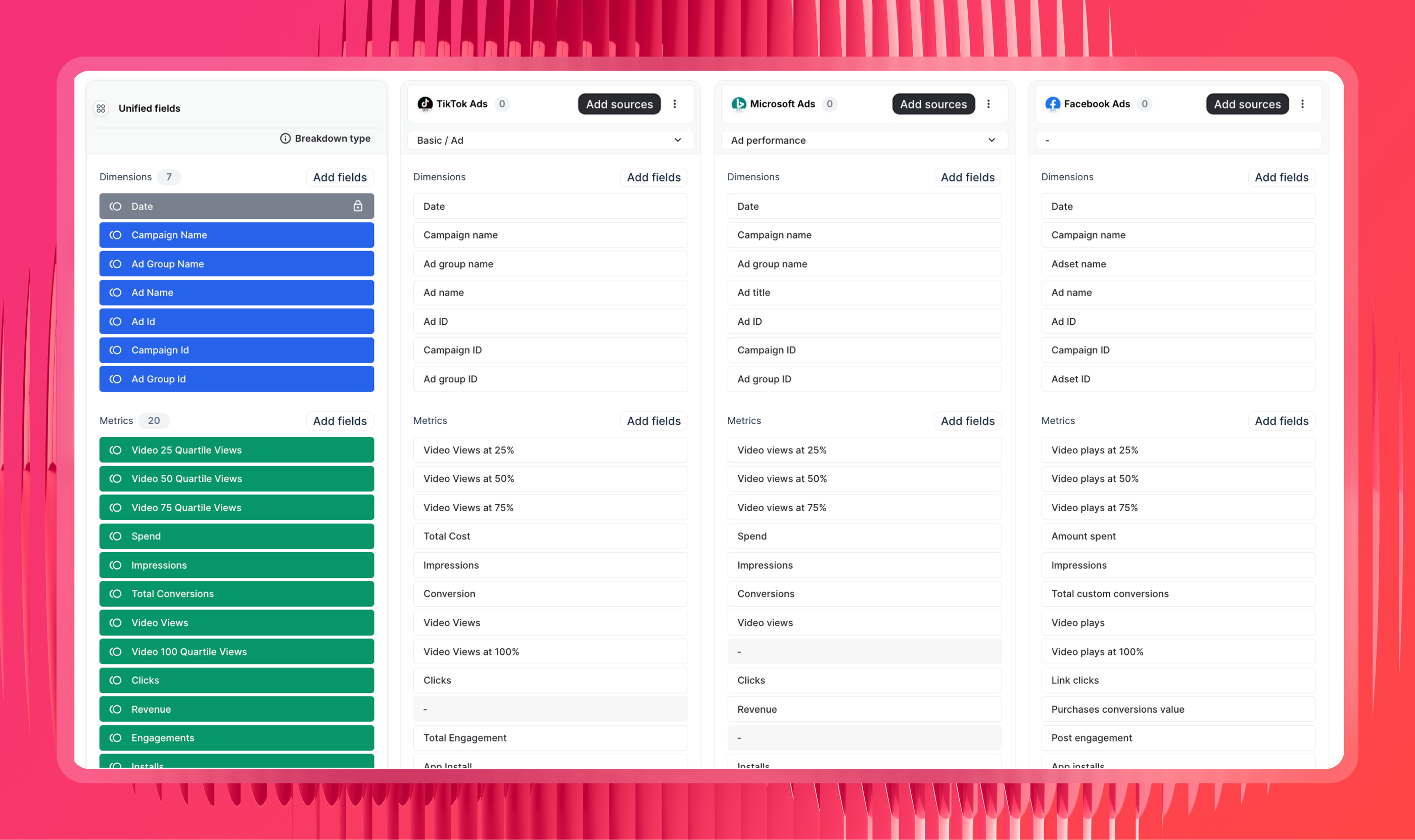
Create source groups. You aggregate similar channels (say Google Ads, Meta, and LinkedIn) into a single unified source or multiple accounts from the same channel (e.g. Google Analytics 4 properties) so Claude can query in one go. This is the most powerful feature of Whatagraph that marketing agencies with dozens of clients and multi-location business love.
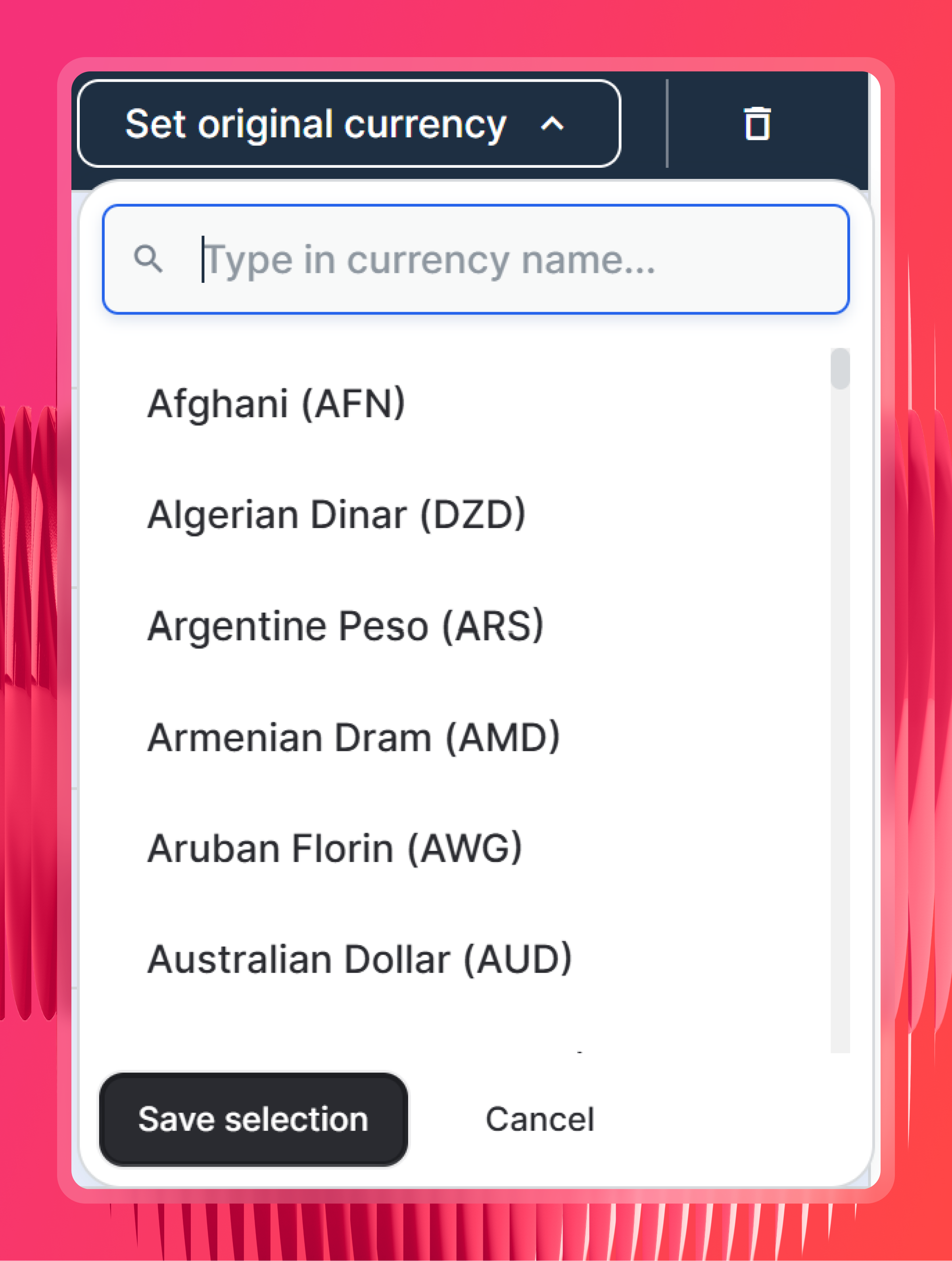
Set your currency settings. Whatagraph detects the original currency for each source and converts everything into one reporting currency, so a blended spend number isn't quietly mixing euros and dollars.
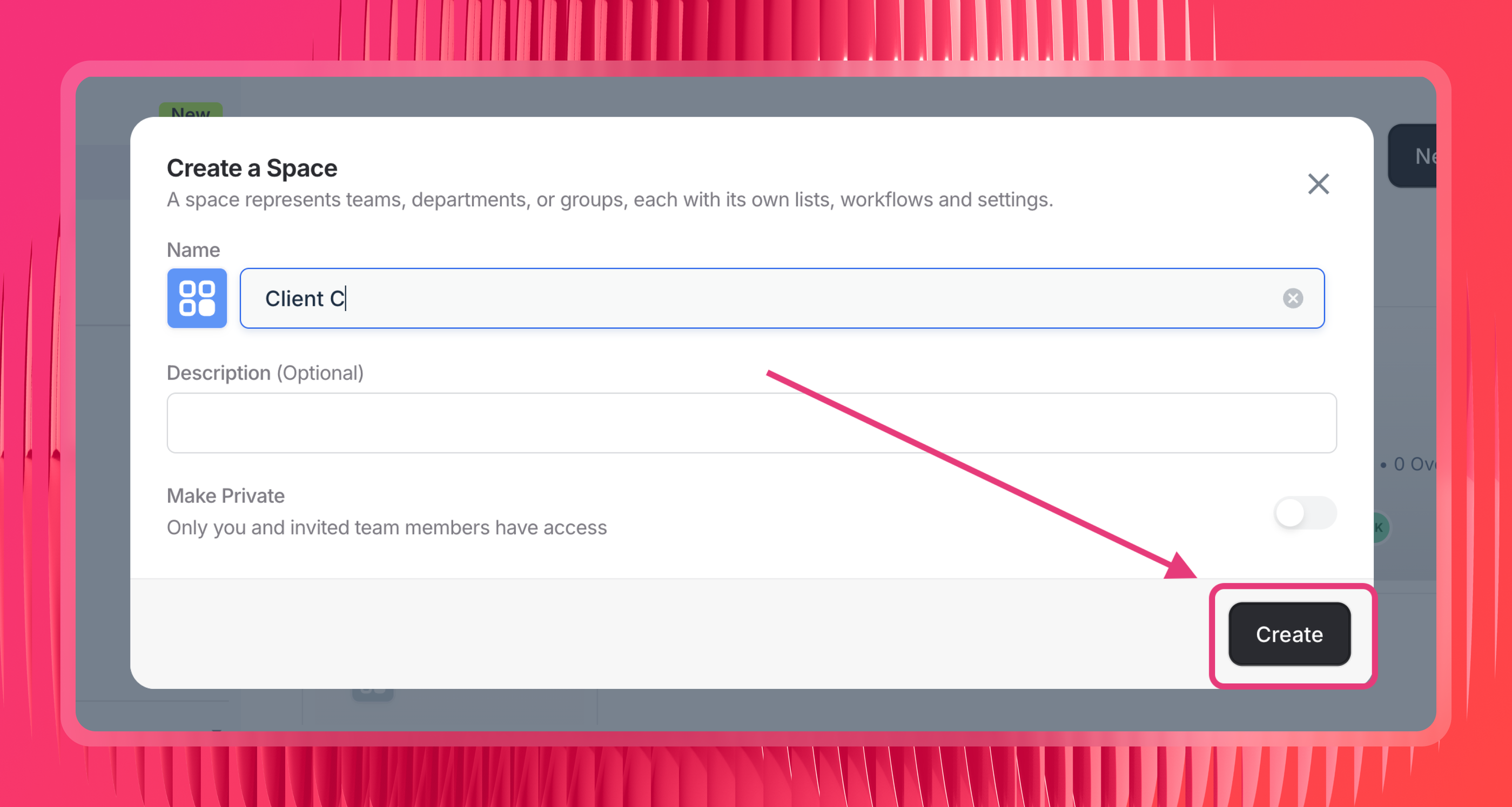
Organize into Spaces. You organize sources and reports into client folders, or folders by location, so Claude scopes its answers to the right client or region instead of searching across everything.
When all of that is defined before the query, Claude isn't reconciling anything on the fly. It's reading numbers that already agree with each other. Ask the same question on Monday and Friday and you get the same answer.
Tanja Keglić, Performance Marketing Manager at Achtzehn Grad, puts the appeal well:
The biggest reason we chose Whatagraph was because of its holistic approach to reporting. We can blend data from different channels and see in one view what's the performance and what needs to be changed.
That "one view" is the whole point of the governed approach. The blending happens in the data model, not in the chat.
And the payoff is time. The team at Maatwerk Online saves around 100 hours a month on reporting since moving this work off manual pulls. That’s the time you can use to build relationships with your current clients, source new ones, and grow your agency.
Here's how Lars Maat, the agency's co-founder, describes it:
Whatagraph saves time and energy for our marketing specialists. And the hours we're saving is just pure profit. We now have the time to focus on more strategic things that help both our agency and our clients grow.
Whatagraph’s MCP takes minutes to set up - here’s the full guide and a video walkthrough.
Whatagraph also comes with AI agents for marketing that build reports, monitor accounts, and alert you of important updates, even with your laptop closed.
They run on the same governed layer, so they're working from the same definitions your reports use. Teams are using them to:
- Check spend against the monthly cap daily across every channel and flag anything off pace
- Onboard a new client end to end: connect the sources, apply your tags, build the report from your template
- Sweep a whole client folder when a metric gets deprecated, list every widget using it, then swap them in one pass
- Pull the month's optimizations into the commentary widgets so your AM edits instead of writes
- Catch a broken connection or a source returning zeros before the report goes out
The difference between agents and MCP is this:
- With an MCP, only individuals have access to the context, connections, and skills built on Claude or ChatGPT.
- With Whatagraph IQ Agents, the entire organization (and all your team members) have access to the same context, connections, and skills.
This means reports are consistent, insights are truly self-serve, and the entire organization stays aligned.
Request early access to IQ Agents here.
Best stitched connector MCPs
This is the most common type of MCPs going around on LinkedIn or Google.
These MCP servers let you connect to a couple different platforms in one place, so you don’t need to build or use a different MCP for each channel.
A few of them are genuinely excellent at what they do.
But there's one catch that runs through the whole category - they consolidate the connection, not the definitions.
Each platform's data still comes back the way that platform reports it. Google's "conversions" and Meta's "conversions" are still different things, currencies aren't reconciled, naming isn't standardized. So the second you ask for a blended number, Claude is the one stitching it together in the chat, every time. That's the "math drifts" row from the table.
None of that makes these tools bad. It makes them great for fast, one-platform-at-a-time ad ops, and shakier for governed cross-channel reporting. Here's how the main ones stack up.
1. Markifact
Best for: marketers who want one connector that reaches almost every platform and can actually make changes, not just read.
Markifact is the broadest connector out there. If your stack is sprawling and you want a single login that touches all of it, this is the most complete option.
How it works: you connect your platforms (Google Ads, Meta, TikTok, LinkedIn, GA4, Microsoft, Shopify, HubSpot, and a long list more) behind one OAuth flow. It's hosted, so there's no server to run, and it has full read and write access with a human approval step on every write before anything goes live.
The goods: the coverage is hard to beat, and the approval-on-every-write setup is a smart safety net if you're letting Claude actually change things. One connector, almost everything.
The catch: it's calling each platform's live API in real time, so what comes back is raw, platform-native numbers. Brilliant for execution, but it doesn't normalize anything before Claude sees it. Ask a blended question and you're back to Claude doing the math.
2. Blend AI
Best for: performance marketers who live in paid media and want fast, day-to-day ad ops from the chat.
Blend is more focused than Markifact, and that focus is paid. Marketers running a lot of ad accounts seem to love it for the daily grind: shifting budget, launching campaigns, pulling quick performance breakdowns without opening five dashboards.
How it works: you connect Google, Meta, TikTok, Microsoft, and Pinterest with OAuth (about two minutes, no API keys), and you get full read and write across all of them. It holds partner status with the major ad platforms.
The goods: it's genuinely fast for optimization work, and the paid-media focus means it's deep where it counts. If your job is mostly "act on one platform at a time, quickly," it's a strong pick.
The catch: same trade-off as the category. A "blended ROAS across everything" answer is still being assembled at query time, not pulled from a reconciled model. Great for acting, weaker for trusting a cross-channel total.
3. Paid Media MCP (by Pau Ferrer)
Best for: paid-media marketers who want an open-source, self-hosted option across Google, Meta, and TikTok, with normalized metrics baked in.
Built by digital marketer and marketing engineer Pau Ferrer, this open-source (MIT) server is a more thoughtful take on the stitched-connector idea. It pulls live data from Google Ads, Meta, and TikTok, but unlike most of the tier, it normalizes every metric into a common shape before the data leaves the server.
How it works: you self-host it (Node.js, connect it to Claude Desktop or Claude Code) and supply your own API credentials for each platform. It exposes 16 read-only tools, and normalizes spend, clicks, CTR, CPC, CPA, ROAS, and more into one shared vocabulary across all three platforms. On top of that sits an optional Claude layer of skills and subagents that run scored audits and a blended cross-channel summary.
The goods: it's free, transparent (you can read exactly what it does), read-only by design, and the normalization plus the "business analyst" synthesis layer push it closer to a real cross-channel answer than most connectors get. A strong pick if you're technical and want control.
The catch: it's really technical. This is a developer tool, not a product you click to install, so you'd need an in-house engineer, or an implementation partner, to set it up and keep it running. It's also tuned specifically for Spanish (EU) advertisers, so its built-in benchmarks and compliance rules assume that market. Great if you have the engineering resources; a lot to take on if you don't.
4. Supermetrics and Coupler.io
Best for: teams whose main job is getting numbers out fast, and who come from the reporting-and-data world rather than ad ops.
Both of these tilt toward pulling data rather than pushing changes, which makes sense given where they come from.
How it works: Supermetrics has an MCP covering a big list of sources (Google Ads, Meta, LinkedIn, TikTok, GA4, HubSpot, Salesforce, Shopify, and more), giving your AI assistant direct access to live data without manual exports. Coupler.io does something similar, letting your AI query the consolidated datasets it imports from your sources.
The goods: wide coverage, no more CSV exports, and a familiar fit if you already use either for reporting. Good for ad-hoc "why did CPA spike yesterday" questions.
The catch: "consolidated" here means the connection lives in one place. It doesn't mean the metrics have been defined once and reconciled across channels. That's exactly the line between this type and the governed type above.
5. Pipeboard and Synter
Best for: ad teams who want broad paid coverage, with Pipeboard the pick if source-available code and a free tier matter to you.
Two more worth knowing if ads are your world.
How it works: Pipeboard gives you five ad platforms (Meta, Google, TikTok, Snap, Reddit) behind one OAuth, with 230+ tools and new campaigns paused by default, a nice safety touch. It's source-available with a free plan. Synter goes wider, around 14 platforms with full read and write, at roughly $199/month.
The goods: Pipeboard's paused-by-default creation and free tier make it low-risk to try, and the code being inspectable is a plus if that matters to your team. Synter's reach is the draw if you're on a lot of platforms at once.
The catch: both are connection-layer tools. Same trade-off as the rest of the tier: they get you to the data, they don't reconcile it.
6. OpenTabs
Best for: reaching a tool that has no MCP at all, as a fallback rather than a foundation.
OpenTabs is the odd one out here, and it's worth knowing because people ask about it. It's not a marketing tool.
How it works: it's a source-available Chrome extension plus local MCP server that lets Claude act inside web apps you're already logged into, by calling the same internal APIs the app's own frontend uses. There are 90+ plugins across all kinds of services.
The goods: if a tool you rely on has no MCP, OpenTabs can often reach it through your browser session anyway. As a "reach almost anything" fallback, it's neat, and it runs locally.
The catch: it's general-purpose plumbing, not a marketing data layer. It can fetch and act, but it does nothing to unify or define your numbers. Fine as a last resort, not as your reporting foundation.
Best single platform MCPs
These are the servers built to do one platform, well. If your question lives entirely inside one channel ("which Google Ads campaigns wasted budget last month"), a single-platform MCP is the cheapest, most direct way to get it.
There are a lot of them now, and quality varies wildly. Some are official, built and maintained by the platform itself, which makes them stable and safe to build on. Others are community-built, which can break when an API changes and sometimes ask you to paste in a personal access token (a real account-safety risk on ad platforms).
Both are worth knowing, so they're split below: the official, vendor-built servers first, then the notable community ones. Each group is grouped by what it connects to.
Official MCP servers
PPC and paid media platforms
- Google Ads MCP. The Google Ads MCP server is Google's official, open-source, read-only one. Powerful for deep Google Ads questions (search terms, asset metrics, GAQL pulls), but the heaviest setup of the bunch: developer token, Google Cloud project, OAuth, runs locally rather than in the claude.ai web app.
- Meta Ads MCP (Facebook Ads MCP). Meta's official hosted server launched April 2026 at a hosted endpoint, with near one-click Business OAuth, read and write, and new campaigns paused by default. The same Meta Ads MCP server handles Facebook Ads requests. Much easier to set up than Google's.
- TikTok Ads MCP. TikTok shipped its official Ads MCP server at TikTok World in May 2026, joining the other major ad platforms. Read and write against the TikTok Marketing API, with proper OAuth rather than pasted tokens.
- Amazon Ads MCP. Amazon was early here, shipping an official server in open beta in February 2026. The pick for retail and ecommerce advertisers who want sponsored-products and campaign data in Claude.
Analytics and SEO
- Google Analytics MCP (GA4 MCP). The Google Analytics MCP server is Google's official, read-only one. This GA4 MCP server covers standard reports, funnels, real-time data, and custom dimensions through a handful of tools. Developer-first, runs locally; easier hosted wrappers exist.
- Ahrefs MCP. The Ahrefs MCP server is official, letting you query backlinks, keywords, and rankings data from your AI assistant. Read-only and credit-based, so it analyzes rather than acts. A strong SEO MCP option (people also search this as MCP for SEO) for off-page and competitive questions, if you already pay for Ahrefs.
- Semrush MCP. Semrush ships an official remote MCP server covering keyword, traffic, and competitive data, and it shows up as a built-in connector inside ChatGPT. Read-only and metered like Ahrefs. Similar SEO MCP server use case, depending on which platform you already pay for.
CRM and email
- HubSpot MCP. The HubSpot MCP server is official, in public beta, read and write, and free for customers. The natural pick for CRM and pipeline questions: deals, contacts, lifecycle stages, campaigns.
- Salesforce MCP. Salesforce shipped its official, first-party Marketing Cloud Engagement MCP server (now generally available), built for enterprise with scoped permissions and dry-run previews. The Salesforce MCP server is the enterprise CRM option, with the access controls to match.
- Klaviyo MCP. The Klaviyo MCP server is official, with read-only and write modes and around 25 tools covering campaigns, flows, segments, and metrics. Built for ecommerce email marketers, and free for Klaviyo customers.
Ecommerce
- Shopify MCP. Every Shopify store has an official Shopify MCP server endpoint on by default, and Shopify open-sourced its AI Toolkit in April 2026. The catch worth knowing: the always-on storefront endpoint is built for commerce (catalog, cart, policies for AI shopping agents), not marketing analytics. Useful, just not the performance tool the name might suggest.
Data and warehouse
These aren't marketing channels, but they earn a place here because a lot of marketing data ends up in a warehouse, and querying it directly is increasingly common.
- BigQuery MCP. The BigQuery MCP server, official from Google, lets Claude run read-only SQL against your datasets. If your blended marketing data already lives there, this queries it directly.
- Snowflake MCP. Snowflake has official MCP support for querying your warehouse in plain language. Same idea as the BigQuery MCP, different warehouse.
Community MCP servers worth knowing
Plenty of platforms don't have an official server yet, but the community has built solid ones. These can break when an API changes and some ask you to paste in an access token, so treat them with a little more caution, but they're real options if you need that channel today. Here's a quick run through, grouped by category.
PPC and paid media platforms
- LinkedIn Ads MCP. Community LinkedIn ads MCP servers cover campaign and account reporting. The pick for B2B teams querying LinkedIn paid performance.
- Pinterest Ads MCP. Community Pinterest MCP server options cover ad and pin performance. Niche, but real if Pinterest is a core channel.
- Reddit Ads MCP. Community Reddit MCP server options cover Reddit data and, in some cases, Reddit Ads. Handy for community research as much as paid.
Analytics and SEO
- Google Search Console MCP. Community Google Search Console MCP server options are read-only by nature: clicks, impressions, CTR, average position by page or query, plus index status. A solid SEO MCP option, though setup leans technical.
- SE Ranking MCP. Emerging SE Ranking MCP server options query keyword and rank-tracking data. Relevant if SE Ranking is your rank tracker.
- Adobe Analytics MCP. Community Adobe Analytics MCP server options suit enterprise teams on Adobe's stack rather than GA4. Early days, but it exists.
- AppsFlyer MCP. Community AppsFlyer MCP server options cover mobile attribution and app marketing data. The pick if app installs and in-app events are your world.
CRM and email
- Mailchimp MCP. Community Mailchimp MCP server options pull campaign and audience data (note: only Mailchimp's Transactional API has an official server). The SMB email counterpart to Klaviyo.
- ActiveCampaign MCP. Community ActiveCampaign MCP server options query automations and contact data. Niche but real for teams on that platform.
- GoHighLevel MCP. Community GoHighLevel MCP server options cover the agency-focused all-in-one. Relevant if you run client marketing through GoHighLevel.
Ecommerce
- WooCommerce MCP. Community WooCommerce MCP server options query store and order data. The WordPress-stack counterpart to Shopify.
- BigCommerce MCP. Community BigCommerce MCP server options cover catalog and order data. Niche, relevant if that's your platform.
Social and content
- LinkedIn MCP. Beyond the ads side, community LinkedIn MCP server options cover organic page and profile data: posts, engagement, follower metrics. The pick for B2B teams tracking organic social.
- YouTube MCP. Community YouTube MCP server options cover channel and video analytics. Good for content teams tracking YouTube.
- Instagram MCP. Community Instagram MCP server options cover content and, in some cases, ad data. Often bundled with Meta's tooling given the shared backend.
- Reddit MCP. Community Reddit MCP server options cover posts, comments, and subreddit data. Good for social listening and trend research.
Data
- Google Sheets MCP. Community Google Sheets MCP server options (and Google's own tooling) let Claude read and write Sheets. The catch-all for data that lives in a spreadsheet rather than a platform.
Or connect all of these to Whatagraph instead
Most of the list above has one thing in common. You'd be wiring up, and then maintaining, a separate server for every channel, and you'd still be left doing the cross-channel math yourself.
Whatagraph brings all that into one platform. You can plug all of these channels (Google Ads, Meta, TikTok, LinkedIn, GA4, Search Console, HubSpot, Salesforce, Klaviyo, Shopify, and more) into Whatagraph through one-click integrations across 60+ marketing platforms.
Then you define and govern that data once: set your currencies, define your metrics, blend your channels, consolidate your campaign names, organize everything into client or location folders.
After that, you query the whole thing in Claude or ChatGPT through Whatagraph's MCP. You paste one URL, no API keys, and your AI assistant reads from your governed data layer rather than from a dozen separate raw feeds.
A few reasons this ends up being the better option for most marketing teams:
✅ One connection, not a dozen. You connect and authorize once, instead of setting up, authenticating, and maintaining a separate MCP for every platform.
✅ The numbers actually match. Because the data is reconciled before Claude sees it, a blended cross-channel answer agrees with what's in your client reports. The same question gives the same answer every time.
✅ No technical setup per channel. No developer tokens, no Google Cloud projects, no local servers to babysit. The hard integration work is already handled.
✅ It scales to many clients and channels. Spaces keep each client or location separate, so Claude scopes its answers correctly instead of searching across everything at once.
✅ Your data stays read-only and secure. The MCP gives your AI assistant read-only access over an encrypted connection, so querying your data can't change it.
If your questions stay inside one platform, a single-platform MCP is perfectly fine.
But if you run more than a couple of channels, or report to more than a couple of clients, connecting everything to a governed layer once is what turns Claude from a tool that gives confident-looking answers into one that gives answers you can actually send.
Which MCP for marketing is right for you?
The right one depends on how many channels you're working with, who's going to see the answers, and how much you trust them to be right. Here's the honest breakdown.
If you only ever need one platform at a time, a single-platform MCP is the simplest, cheapest option. Living mostly in Google Ads and just want to ask about Google Ads? The official Google Ads MCP does that well, and you don't need anything more complicated. Same for someone who only reports on HubSpot, or only on GA4.
If you mostly run paid media and want to act fast, a stitched connector MCP is probably your fit. Tools like Blend AI or Markifact let you check, adjust, and launch across several ad platforms from one chat, which is great for day-to-day optimization. Just know the trade-off: when you ask for a blended number across channels, it's being assembled on the fly, so it's better for taking action on one platform at a time than for a cross-channel figure you'll report upward.
If your job is cross-channel reporting you have to stand behind, a governed data layer like Whatagraph is the one built for it.
If you're an agency reporting to clients, a team reporting to leadership, or anyone running several channels where a wrong number has consequences, you want to govern and standardize your data before Claude gives you the wrong answers - so the figures match your reports and don't shift between questions.
Most marketing teams end up needing more than one channel and answering to someone who expects the numbers to be right. If that's you, the governed option is worth the upfront setup. If it's not, one of the lighter types above will serve you fine.
Published on Jun 29 2026
WRITTEN BY
YamonYamon is a Senior Content Marketing Manager at Whatagraph. With an eye for detail and a knack for always considering context, audience, and business goals to guide the narrative, she's on a mission to create genuinely helpful content for marketers. When she’s not working, she’s hiking, meditating, or practicing yoga.