


To run Facebook Lead Ads, create a lead generation campaign in Ads Manager, select your Facebook page, and choose a lead ads form with the right opt-in fields. These ad campaigns are designed for fast lead gen, especially on mobile app placements.
Easy, No-Code Facebook Lead Ads Integration
Automatically turn Facebook Lead Ads data into clear, actionable reports with this Facebook Lead Ads integration.
Track lead volume, cost, and performance without manual exports or messy spreadsheets.
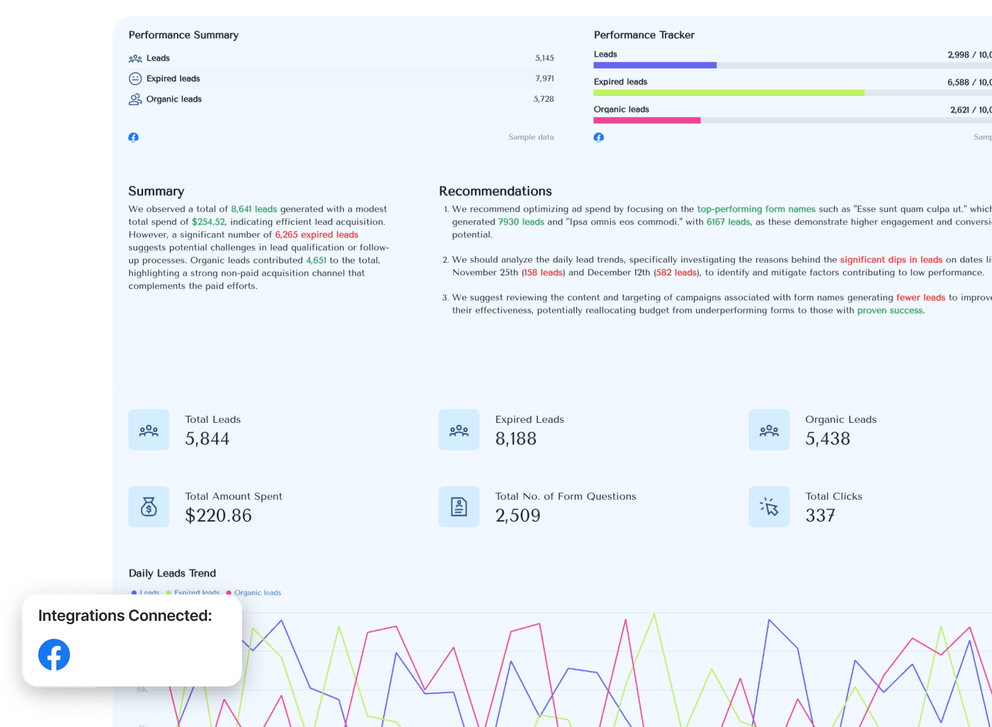
All-in-One Marketing Intelligence Platform for Facebook Lead Ads Data

Connect
Connect to your sources with a stable, native integration that doesn't break. No extra connectors or set up needed.

Organize
Manage and transform your data without a single line of code. Ask AI to create custom blends, metrics, and dimensions.

Visualize
Drag-and-drop, templates, and variety of pre-made building blocks.

Transfer to BigQuery
Move marketing data to a warehouse to create a single source of truth.
Visualize Key Metrics on Your Facebook Lead Ads Reports
See all essential Facebook Lead Ads metrics in one clear report. Track leads, cost per lead, spend, and form performance at a glance without having to dig through Ads Manager.
Facebook Lead Ads Performance Report
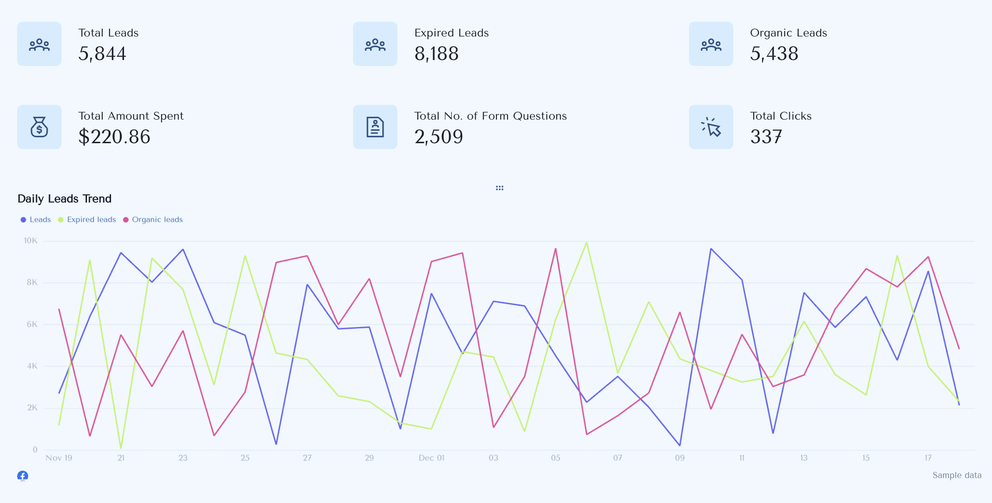
Facebook Lead Ads KPIs Available Instantly in Whatagraph
Category
All
Facebook Lead Ads Forms
3Facebook Lead Ads Form Questions
1Facebook Lead Ads Leads
1
Search...

Leads
Expired Leads
Organic Leads
Count
Check out related integrations:
Save Time on Facebook Lead Ads Data Integration & Reporting
Save anything as a template
Save and reuse anything you create as a template — whether it’s a calculation, filter, widget, or a whole report.

Linked reports
Create team templates and connect as many reports as needed. Never again manually edit hundreds of similar reports one by one.

Overview reports
Monitor your overall performance across regions or accounts and find new opportunities for growth.

Custom branding
Implement custom color themes and logos. Remove all mentions of Whatagraph and connect your custom domain.
Frequently Asked Questions
Have more questions? We answered them below.
How to run Facebook Ads for leads?
Which CRM integrates with Facebook?
Many tools offer CRM integrations with Facebook Lead Ads, including HubSpot, Salesforce, Pipedrive, and other CRM system options. These integrations help marketing teams and sales teams centralize lead data and streamline lead management.
How much do 1,000 clicks cost on Facebook?
The cost of 1,000 clicks depends on your audience, industry, and ad creative, but pricing varies widely across marketing campaigns. Facebook Lead Ads are often more cost-efficient for lead generation than traffic campaigns because forms are native to social media.
What are Facebook Lead Ads?
Facebook Lead Ads are ad formats that let users submit their contact details directly within Facebook. They’re built for lead generation and reduce friction by pre-filling forms with data from a Facebook account.
What is the Facebook Lead Ads integration?
The Facebook Lead Ads integration connects your lead ads data with external tools using an API, webhooks, or SDK. It enables automation, reporting, notifications, and faster access to new Facebook Lead Ads as they come in.
How to connect Facebook Lead Ads to a CRM?
You can connect Facebook Lead Ads to a CRM using native integrations, connectors, or automation tools that rely on webhooks and APIs. Once connected, lead data flows automatically into your CRM system without CSV imports or manual uploads.
How to follow up with Facebook leads?
Once leads enter your CRM, you can trigger follow up workflows using email marketing, SMS, or WhatsApp. Automation ensures every lead gets contacted quickly, improving response time and conversion rates.
What permissions do I need to use Facebook Lead Ads with Zapier?
You’ll need permissions for the Facebook account, Facebook page, and lead ads form to access lead data. Zapier uses webhooks and the Facebook API, so correct permissions are required for automation to work properly.
How do I automate lead management with Facebook Lead Ads integration?
By combining Facebook Lead Ads integration with marketing automation tools, you can build workflows for routing, scoring, and notifications. This helps marketing teams optimize lead management without manual effort.
How do I set up Facebook Lead Ads integration with Mailchimp?
You can connect Facebook Lead Ads to Mailchimp using built-in integrations or automation platforms. Leads from each lead ads form are synced automatically and can trigger email marketing campaigns using templates.
How do I automate lead collection from Facebook Lead Ads?
Automation tools use webhooks to capture new Facebook Lead Ads instantly and send lead data to your dashboard, CRM, or messaging tools. This removes delays and keeps your lead gen pipeline moving.
How do I automate lead data from Facebook Lead Ads to my email marketing platform?
Connect Facebook Lead Ads to your email marketing platform using APIs or webhooks. Once set up, new leads are added automatically, enabling optin-based workflows, templates, and real-time notifications via Gmail, SMS, or WhatsApp.
What others think about Whatagraph
I made a switch from GDS and Sheets for reporting to Whatagraph, and I am saving literal hours each week on performance report creation. Our small firm actually managed to onboard 2 new clients as a result of all the time we saved on managing data and reporting. The customer service is also really helpful and easy to reach.


Capterra verified review by
Mindaugas S., Marketing Consultant
Having active customer support to help fix any issues was a big contributor, but we also really liked the ability to save templates and connect sources to multiple charts/widgets at once without having to edit them individually. And having the grid layout is much easier to stay consistent with than the free form setup that Data Studio has.

Capterra verified review by
Nico T., Media Planner
The system has standard templates that are easy and fast to use. Also you can build your own report with lightning speed. It is very easy to use, has a lot of integration, and let get started very fast.

Capterra verified review by
Rasmus Bernt K., External Senior Management Consultant
We love Whatagraph - we would definitely recommend and our account manager is great! I love how easy this tool is to use, everyone on the team finds it much more user-friendly than other dashboards. Integration was easy, we sent some example reports to the team who duplicated these for us. We literally had to log in and send it to our clients!

Capterra verified review by
Stephanie S., Digital Director
We are showing our clients the work that we're doing for them and this is incredibly important for our clients ROI. They want to see results and having a tool like Whatagraph that can show data from virtually every source we use is hugely important.

Capterra verified review by
John S., SEO Strategist
The tool is easy to use; you do not need to have development resources. Even my junior project managers are capable of making campaign reports in minutes. There are a lot of pre-made templates you can use as well as many pre-made widgets.

Capterra verified review by
Erman E., Marketing Specialist
Really easy to connect data sources within the tool. The library of report templates has been helpful. The customer support team has been responsive to all of our needs. Our team enjoys the simplicity of setting up the reports and how the data is presented.

Capterra verified review by
Brent N., Director of Operations
Easy to create really beautiful graphs and reports which can help other team members to understand the most important takeaways. I especially like the automated report function, so I don't have to check on the same thing repeatedly.

Capterra verified review by
Orsolya S., Online Marketing Manager