





Ready-to-use Google Ads Keyword Planner connector
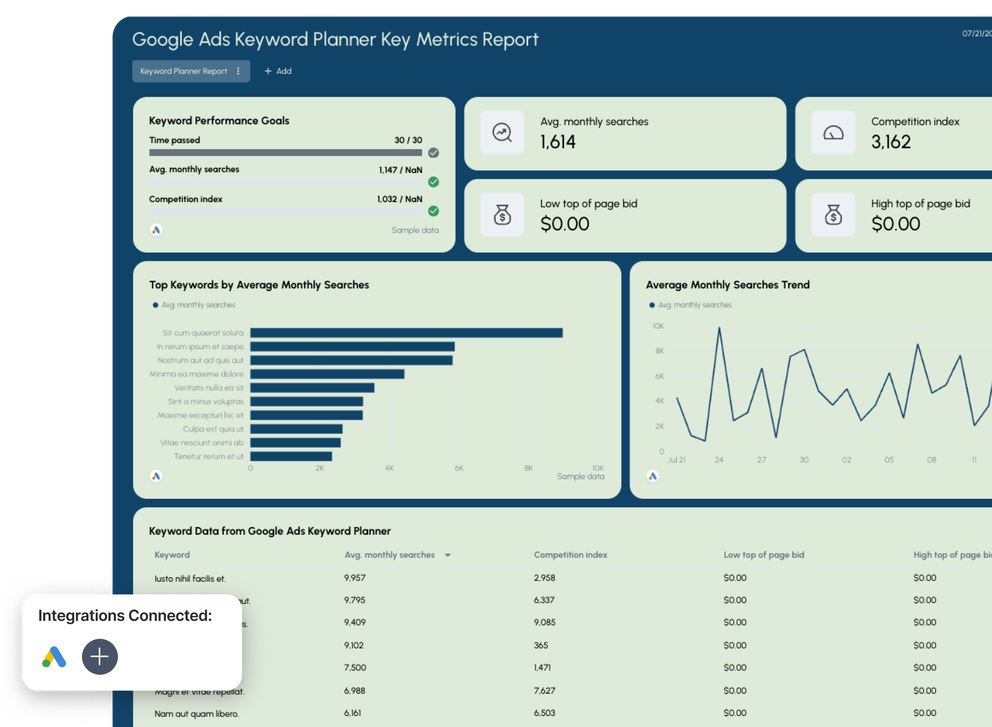
Use the Google Ads Keyword Planner connector to pull search volume, competition, and bid data for any keyword list straight into Whatagraph.
Govern your Google Ads Keyword Planner data plus 60+ other marketing channels in a single source of truth. Push this governed data to reports, dashboards, and AI tools.
Automate reporting and monitoring with IQ Agents working on your behalf.

Marketing intelligence platform you can trust for your Google Ads Keyword Planner data

Connect
Pull keyword research data from Google Ads Keyword Planner and 60+ other channels into Whatagraph through native connectors that don't need babysitting.

Organize
Blend search volume with Google Ads spend, Ahrefs rankings, Google Search Console clicks, and 60+ other sources. Build cross-channel metrics without writing code, or ask AI to do it in seconds.

Visualize
Describe the report you need and Whatagraph IQ builds it in seconds. Save reports, widgets, and metrics as templates and reuse them the next time instead of starting from scratch.

Analyze
Ask Whatagraph IQ Chat which keywords gained demand this quarter and get answers from live data. Or connect Claude, ChatGPT, and other LLMs through MCP.
Automate
Delegate report building and monitoring to Whatagraph IQ Agents. Onboard the next client or account in less than an hour and catch what breaks before your client does.

Share
Send reports on a schedule, share live password-protected links, or export to PDF or CSV. Store keyword research and cross-channel data in your own data warehouse with BigQuery or Snowflake.
All Google Ads Keyword Planner metrics, instantly available in Whatagraph
All
Google Ads Keyword Planner Historical Metrics
6Google Ads Keyword Planner Keyword Ideas
6Search...

Avg. monthly searches

Monthly searches

Competition index

Low top of page bid

High top of page bid

Average CPC
Frequently Asked Questions
What is Google Ads Keyword Planner?
Google Ads Keyword Planner is the free keyword research tool inside Google Ads. You give it a seed keyword or a list of terms, and it returns average monthly searches, competition level, and top of page bid ranges for each one.
It does two jobs:
- Discover new keywords: paste a seed keyword or a URL, and Google will generate keyword ideas grouped into concepts, so you can find terms you weren't targeting yet
- Get search volume and forecasts: paste an existing keyword list and get historical data on how often people actually search those terms
Most PPC teams use it to plan search campaigns and set bidding strategies before launch. SEO teams use it to check demand before committing to content. In both cases the output is a CSV export that has to be repeated by hand every time you want current numbers.
The Google Ads Keyword Planner connector pulls the same data into Whatagraph on a schedule instead.
How do I install the Google Ads Keyword Planner connector?
Add Google Ads Keyword Planner as a source in Whatagraph, sign in with a Google account that has access to an enabled Google Ads account, and you're connected. No developer token, no code, no third-party data connector in the middle.
Then configure the source, which is where this connector differs from most:
- Name it, usually after the client, the market, or the keyword theme
- Add your keywords, up to 10,000 per source, either typed in or pasted from a list
- Pick your locations, one or more geo targets, with data returned per country
- Pick a language and network, either Google Search or Search and partners
- Add a manager account ID if you're connecting through an MCC
Each source is a keyword list, not an ad account. So one client can have several: brand terms in one, category terms in another, a new market in a third.
How to use the Google Ads Keyword Planner connector?
You use it to track keyword demand over time instead of exporting it once.
Here's the usual workflow:
1. Build one source per keyword theme and per market, so the geo split stays clean
2. Pick a report type: Historical metrics for the exact keywords you added, or Keyword ideas for suggestions built from your seed keyword
3. Drop the data into a widget: average monthly searches over time, competition level by keyword, CPC ranges by market
4. Blend it with your Google Ads connector data so demand and ad spend sit in the same widget
5. Schedule the report and let it refresh, instead of rebuilding the export every month
No spreadsheet step is needed at any point. Your keyword plan sits in the same report as the campaign data it's based on.
What are the key features of the Google Ads Keyword Planner connector?
What is the difference between Google Ads Keyword Planner and Google Analytics?
They measure different things.
Keyword Planner measures the market: how many people search a term, how competitive it is, and what advertisers pay per click. It doesn't report on your website at all.
Google Analytics measures your site: sessions, engagement, conversions, and revenue from the people who already arrived.
Put both in one report: demand from Keyword Planner, spend and clicks from your Google Ads account, and on-site conversion rate from GA4. Then you can see a term with rising average monthly searches that your campaigns aren't covering yet.
How can the Google Ads Keyword Planner connector improve my ad performance?
It shows search demand next to what you're paying for that demand.
A few things get easier once both sit in the same report:
- Spot demand you're not buying. Rising monthly searches on a term with no matching ad group is a gap you can act on this week
- Sanity-check your CPCs. Compare your actual average CPC in Google Ads against the top of page bid range Keyword Planner reports for the same term
- Plan bidding strategies with the competition level in view, rather than guessing which terms just got more expensive
- Refine keywords and match types by watching which terms hold volume and which ones fade seasonally
- Feed negative keywords back into search campaigns when keyword ideas surface adjacent terms you clearly don't want
- Give Performance Max campaigns context, since you can't see keyword-level detail inside them but you can still track demand for the themes they're covering
This is the same analysis your team already does. The difference is that the data updates on its own and everyone reads it from the same report.
How to measure the success of campaigns using the Google Ads Keyword Planner connector?
Use it as the demand baseline you compare campaign metrics against.
Practical ways teams do this:
- Track share of demand: your impressions against the average monthly searches for the same keyword set
- Watch CPC drift: your paid CPC compared to Keyword Planner's bid estimates over the same months
- Segment keyword performance by competition level, so high-competition terms are judged against a different CTR and conversion rate benchmark than long-tail ones
- Compare market seasonality against your results, so a soft month reads as a demand dip rather than a campaign failure
- Add conversion tracking data from Google Ads and GA4 and you have demand, spend, clicks, and conversions in one place.
What are the benefits of integrating the Google Ads Keyword Planner connector into marketing strategies?
Four things change once the data is connected:
- Historical data builds up. Keyword Planner shows a limited window; Whatagraph keeps the months you've already pulled, so you don't lose earlier data
- Research and performance sit in one place. PPC and SEO work from the same report instead of separate spreadsheets
- Client reports include market context. You can show whether demand for a client's category went up or down this quarter, not just how many clicks the campaigns got
- Onboarding gets faster. Build the keyword report once, save it as a template, reuse it for the next client
Peak Seven saved 63 hours a month after moving their reporting into Whatagraph, and cut report build time from four hours to 90 minutes.
Will the Google Ads Keyword Planner connector support my content marketing efforts?
Yes. Content teams do the same three things every quarter: find terms worth writing about, check how much demand there is, then show whether the article worked. This connector covers the first two, and blends with the tools that cover the third.
- Use Keyword ideas from a seed keyword to build a topic list, with concept groups already clustering related terms
- Track average monthly searches for your target set month over month, so you can see demand rising early
- Blend with Ahrefs or Semrush for rankings and difficulty, and Google Search Console for the clicks you're actually winning
- Report on the whole thing in one place instead of stitching three exports together
One thing to know: Keyword Planner's volumes are Google's estimates, rounded the same way they are in the interface. They work well for prioritizing topics. For precise volume comparisons, pair them with a dedicated keyword research tool.
Is the Google Ads Keyword Planner connector better than Semrush?
They're not direct substitutes.
Semrush and Ahrefs give you their own keyword databases: difficulty scores, SERP analysis, and volume estimates modelled from clickstream data. Keyword Planner gives you Google's own numbers, straight from the source that runs the auction, plus the bid ranges advertisers are actually paying.
The honest comparison:
Most teams use both. Whatagraph connects Google Ads Keyword Planner, Ahrefs, and Semrush, so you can compare their numbers in one widget instead of across three tabs.
Are there alternatives to the Google Ads Keyword Planner connector?
A few, though they cover less of the job.
Supermetrics, Funnel, and Dataslayer all ship a Keyword Planner data connector. Each one moves the data into Google Sheets, Looker Studio (which you might still call Data Studio), or Power BI, where you then build the report yourself.
The difference is that they stop at the transfer. Building and delivering the report is still your job, in a separate tool.
Whatagraph connects the data, governs it, visualizes it, and delivers the client-ready report in one platform. You can still push to Looker Studio, Power BI, BigQuery, or Snowflake when a data team wants the raw tables, but you don't have to just to see a chart.
The other alternative is building against the Google Ads API yourself. That means an approved developer token, an enabled Google Ads account, and someone maintaining it. For most marketing teams that's more maintenance than the data is worth.
Compatibility of the Google Ads Keyword Planner connector with other marketing tools?
It blends with everything else in Whatagraph, and exports to everything downstream.
Inside the platform, join Keyword Planner with:
- Google Ads for spend, clicks, CTR, conversion rate, and conversion tracking data through the Google Ads connector
- Google Search Console and GA4 for organic clicks and on-site behavior
- Ahrefs and Semrush for rankings and difficulty
- Microsoft Advertising, Facebook Ads, LinkedIn Ads, and 60+ other channels for the full paid picture
Outside the platform, push the same governed data to Google Sheets, Looker Studio, Power BI, BigQuery, or Snowflake, or query it from Claude and ChatGPT through Whatagraph MCP. The metrics and dimensions keep their definitions wherever they land, so nobody's reconciling two versions of the same number.
Best practices for Google Ads Keyword Planner connector users?
Six things worth doing when you set the source up:
- Split sources by market. One geo per source keeps the per-country rows readable and your widgets simple
- Keep keyword lists thematic. Brand, category, and competitor terms in separate sources so you can chart them separately
- Use Historical metrics for tracking, Keyword ideas for discovery. Concept group only comes through on Keyword ideas, so build your discovery widgets there
- Pair every demand widget with a performance widget. Search volume on its own doesn't show how your campaigns did
- Set the refresh expectation early. Google updates Keyword Planner monthly, so daily comparisons aren't possible
- Add goals and alerts on the campaign side so someone is notified when demand or performance shifts
What are common mistakes when using the Google Ads Keyword Planner connector?
Most of them come from reading Google's estimates as exact counts.
- Reading rounded volume bands as precise numbers, especially on low-spend accounts where Google widens the ranges
- Expecting daily data, when Google refreshes Keyword Planner monthly and the current month isn't included
- Mixing geos in one source, then wondering why totals look inflated across countries
- Putting search volume in a client report with no spend or conversion context next to it
- Looking for concept group on a Historical metrics source, where the dimension is empty by design
- Treating Keyword Planner as a rank tracker, when it measures market demand rather than your positions
Can small business owners benefit from the Google Ads Keyword Planner connector?
Yes, though the fit depends on how much reporting you do.
If you run a handful of campaigns and check Keyword Planner a few times a year, the free tool inside your Google Ads account is enough.
The connector is worth it when you're tracking keyword demand across multiple clients, markets, or locations, and someone is currently doing that by hand every month.
Can large enterprises utilize the Google Ads Keyword Planner connector effectively?
Yes. Manager account support is the reason.
Connect through your MCC by adding the manager account customer ID, and one authorization covers reporting across the accounts under it. Add source groups to aggregate keyword lists across brands or regions, apply custom dimensions to standardize naming, and use linked templates so a change to the master report cascades to every market at once.
For teams with a data function, the same governed data pushes to BigQuery or Snowflake on a schedule, so your warehouse and your client reports run on identical definitions.
Can I blend Google Ads Keyword Planner data with Google Ads, Meta, and other channels?
Yes. Blends join Keyword Planner with Google Ads, Meta Ads, LinkedIn Ads, GA4, Ahrefs, and 60+ other sources on a shared key like date, so you get one unified dataset instead of a stack of separate tables.
From there you can build metrics that cross the research and performance line:
- Demand versus ad spend for the same keyword theme, month over month
- Your average CPC against Keyword Planner's top of page bid range
- Search volume trends next to CTR and conversion rate from your search campaigns
- Custom dimensions that standardize keyword grouping across every platform
How do I export Google Ads Keyword Planner data to BigQuery, Looker Studio, or Google Sheets?
Pick the destination and Whatagraph handles the transfer. Email a scheduled report, share a live link, or send raw Keyword Planner data to Google Sheets, Looker Studio, Power BI, BigQuery, or Snowflake, then set the cadence once and leave it.
Your historical data builds up in one place too, so month-on-month demand comparisons don't depend on somebody remembering to save last quarter's export.


