




Ready-to-use OpenAI Ads Manager connector
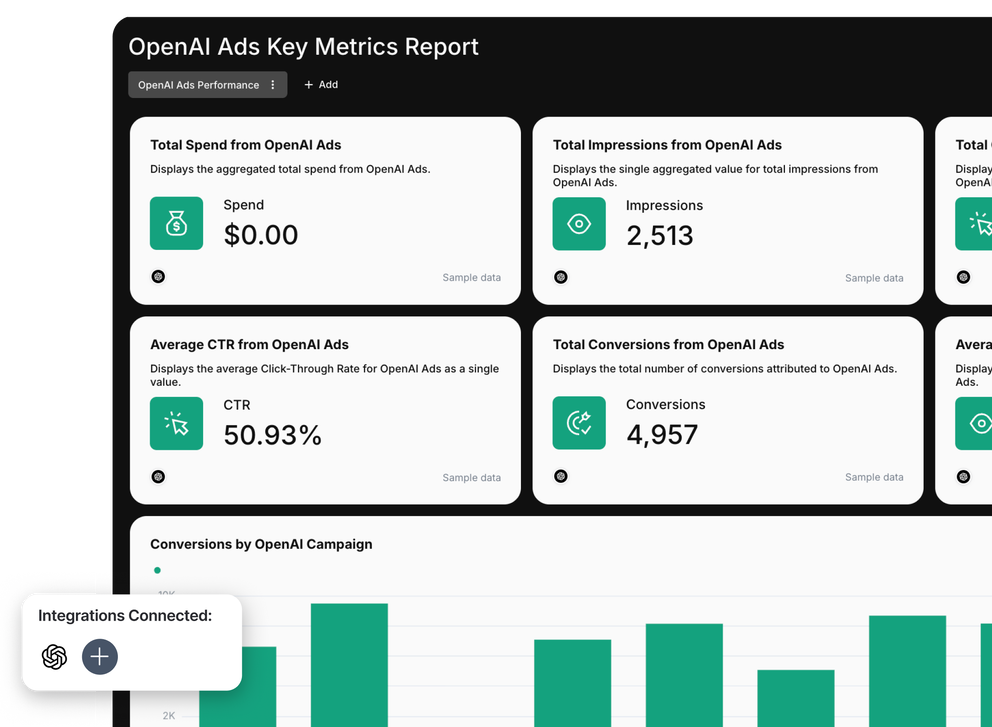
Use OpenAI Ads Manager connector to pull ChatGPT Ads performance straight into Whatagraph.
Govern your OpenAI Ads data plus 60+ other marketing channels in a single source of truth. Push this governed data to reports, dashboards, and AI tools.
Automate reporting and monitoring with IQ Agents working on your behalf.

Marketing intelligence platform you can trust for your OpenAI Ads data

Connect
Pull your data from OpenAI Ads and 60+ other channels into Whatagraph through native connectors that don't need babysitting. Have a single source of truth for your data.

Organize
Blend OpenAI advertising data with Google Ads, Meta Ads, Criteo, and 60+ other channels. Build cross-channel metrics without writing code, or ask AI to do it in seconds.

Visualize
Describe the report you need and Whatagraph IQ builds it in seconds. Save reports, widgets, and metrics as templates and reuse them the next time instead of starting from scratch.

Analyze
Ask Whatagraph IQ Chat anything about your OpenAI Ads performance and get answers from live data, without digging through Ads Manager. Or connect Claude, ChatGPT, and other LLMs through MCP.
Automate
Delegate report building and monitoring to Whatagraph IQ Agents. Onboard the next client or account in less than an hour and catch what breaks before your client does.

Share
Send reports on a schedule, share live password-protected links, or export to PDF or CSV. Store OpenAI Ads and cross-channel data in BigQuery or Snowflake.
All OpenAI Ads Manager metrics, instantly available in Whatagraph
All
OpenAI Ads Ad Account
8OpenAI Ads Ad
8OpenAI Ads Ad Group
8OpenAI Ads Campaign
8Search...

Impressions

Clicks

CTR

Spend

Average CPC

Average CPM

Conversions

Cost per Conversion
Frequently Asked Questions
What is OpenAI's Ads Manager?
OpenAI Ads Manager, officially the Ads Manager Beta at ads.openai.com, is OpenAI's self-serve platform for building and measuring the ads that appear below relevant ChatGPT conversations. You sign in with an OpenAI account, build campaigns in a three-level hierarchy, and read performance through tables, charts, and CSV exports.
Campaigns work like this:
- Campaign: sets the objective and pricing model (CPM, CPC, or oCPC), the budget, the dates, and the country or US geo targeting
- Ad group: groups ads around one theme and holds your context hints, the plain-language descriptions of the conversations where your offer fits
- Ad: the creative itself, made up of advertiser name, favicon, title, copy, image, and landing page URL
Connect the OpenAI Ads integration to Whatagraph and all of that reporting lands next to your other channels, without the CSV step.
What's the future of advertising with AI tools?
Ads inside ChatGPT are one half of the shift. The other half is what happens to the reporting work behind them, and that's the part most teams haven't solved yet.
Whatagraph's IQ Agents is built for exactly that: an always-on team of agents that builds each client's reports from your templates, then keeps watch on the data, catching a broken connection, a drifting metric, or an off-pace goal before your client spots it. It's in early access now, opening by cohort.
Request early access if you want to be in the next one.
What are the features of OpenAI Ads Manager?
Here they are:
How do I connect OpenAI Ads to Whatagraph?
Generate an API key in OpenAI Ads Manager under Settings, then paste it into Whatagraph when you add the source. That's the whole setup, no code and no third-party connector in the middle.
A few things worth knowing before you start:
- Each API key is scoped to one ad account, so reporting on several accounts means one key and one source per account
- Regenerating or revoking a key in Ads Manager stops the source updating, so reconnect with the new key if you rotate them
- Data starts on 9 Feb 2026, when the platform's pilot began, so earlier date ranges come back empty
Once connected, your account, campaign, ad group, and ad data refreshes on a schedule and flows into every report that uses it.
What are the benefits of using OpenAI Ads Manager for digital marketing?
You get access to an audience that isn't sitting on a search results page. Ads appear inside conversations where someone's already describing a problem, so your offer shows up at the moment intent is forming rather than after someone types a keyword.
For digital marketing teams, the practical upside looks like this:
- A new inventory pool while CPCs on Google Ads and Meta Ads keep climbing
- No minimum commitment in the self-serve beta, so you can test with a small daily budget before you scale
- Familiar structure, since the campaign, ad group, and ad hierarchy is the one your PPC team already runs
- Standard performance metrics, so CTR, CPC, CPM, and cost per conversion compare cleanly with your other channels
That last point only pays off if the numbers actually sit side by side, which is where a reporting layer comes in.
How does OpenAI Ads Manager improve ad targeting?
Targeting is conversational, not keyword-based. Instead of bidding on exact-match terms or building interest audiences, you write context hints at the ad group level that describe the topics and situations where your product is relevant.
OpenAI's selection system weighs those hints alongside your ad title, ad copy, and landing page, then decides whether your ad fits the conversation. Layer country, state, DMA, and ZIP code targeting on top and you control where ads run as well as when they're relevant.
The trade-off is less direct control than a keyword list gives you, so reporting matters more. In Whatagraph, you can watch CTR and cost per conversion by ad group to see which context hints are actually pulling their weight.
How does AI enhance ad performance in OpenAI Ads Manager?
The AI does the matching. It reads the intent in a live conversation and picks the ad that fits, which is why relevance depends on your context hints, creative, and landing page rather than on a bid on a keyword.
To improve performance, feed the system better inputs and read the results faster:
- Write specific context hints for each ad group rather than one broad set for the whole campaign
- Match your landing page to what the hint promises, since the selection system looks at it too
- Test ad formats and copy variations, then compare CTR and cost per conversion side by side
- Set up the Conversions API or pixel so conversion data, not just clicks, feeds your decisions
Whatagraph handles the reading part. Ask IQ Chat which ad groups moved this week, or let IQ Summaries write the performance narrative straight into your client report.
OpenAI Ads Manager vs Google Ads Manager: what's the difference?
Here are the key differences:
OpenAI Ads Manager vs Facebook Ads Manager: what's the difference?
Here are the key differences:
What are the best practices for using OpenAI Ads Manager?
Start small, read the data often, and treat the first month as learning rather than scaling.
- Split ad groups by intent, so each set of context hints stays specific enough to judge
- Start with a daily budget to pace spend while you learn, then move to a campaign-total budget once performance holds
- Set up the Conversions API or pixel before launch, not after, so you're never optimizing on clicks alone
- Add tracking parameters to your landing page URLs, so sessions and conversions show up in GA4 next to the spend
- Give campaigns time to gather data before you judge them, since the auction is still young and benchmarks are moving
- Report weekly, not monthly, because the platform ships changes fast and your numbers move with them
What are the common mistakes in using OpenAI Ads Manager?
Most of the early mistakes come from treating it like a mature search platform.
- Writing context hints like keyword lists, which gives the selection system nothing to work with
- Pointing ads at a generic homepage instead of a landing page that matches the hint
- Judging performance on CPC alone while conversion measurement sits unconfigured
- Running one broad ad group, then having no way to tell which theme worked
- Reporting OpenAI Ads in isolation, so nobody can see what it did to blended CAC or ROAS
- Assuming historical data exists before 9 Feb 2026, which it doesn't
Can I blend OpenAI Ads data with Google Ads, Meta, and other channels?
Yes, you can easily blend data on Whatagraph. Blends join OpenAI Ads with Google Ads, Meta Ads, Criteo, LinkedIn Ads, GA4, and 60+ other sources on a shared key like date, so you get one unified dataset instead of a stack of separate tables.
From there you can build the metrics that actually matter across channels:
- Blended ROAS, CAC, and CPL with OpenAI Ads spend included
- Cost-per-click and CTR compared channel by channel in one widget
- Custom dimensions that standardize campaign naming across every platform
- Change currency setting when accounts run in different currencies
Do I need a separate tool to report OpenAI Ads data to clients?
Not on Whatagraph. You get a governed data foundation with the full white-labeling reporting and visualization for clients and internal team members.
Peak Seven saved 63 hours a month after moving their reporting into Whatagraph, and cut report build time from four hours to 90 minutes.
Can you automate OpenAI Ads reports?
Yes. Build the report once on Whatagraph, save it as a template, and re-use it the next time you onboard a new client or account for OpenAI Ads. You can also:
- Schedule email delivery daily, weekly, or monthly
- Share a live link, password-protected and on your own domain
- Export to PDF or CSV when someone wants a file
- Push data to Looker Studio, BigQuery, or Snowflake for deeper analysis
- Add goals and alerts so Slack or email tells you when conversions drop or spend runs hot
How do I export OpenAI Ads data to BigQuery, Looker Studio, or email?
Pick the destination and Whatagraph handles the transfer. Email a scheduled report, share a live link, or send raw OpenAI Ads data to Looker Studio, BigQuery, or Snowflake, then set the cadence once and leave it.
Your historical data builds up in one place too, so month-on-month comparisons don't depend on somebody remembering to save last quarter's export.


