Agentic marketing: what it is and what to set up first
Agentic marketing is the part of your marketing that keeps running on a schedule, according to your instructions, even when your laptop is closed.
Here's what AI agents for marketing actually do day to day, what has to be true about your data before building agents, and where they still fall short.

Aug 28 2026●15 min read



- What is agentic marketing?
- Agentic AI in marketing: what agents do day to day
- What to set up before you point agents at your marketing data
- The best AI agents for marketing, by the job they're built for
- How to implement agentic marketing, step by step
- How to measure agentic marketing ROI
- What are the limitations of AI marketing agents?
- 5 key takeaways
A paid-media agency we talked to with around 30 clients had a problem that never went away.
Meta has no built-in way to switch an ad off on a set date. So they used to write the stop date into the ad name instead, and someone had to remember to scan the names and pause anything past its deadline.
You can guess how that goes in a busy week.
They eventually handed the job to an AI agent at Whatagraph. The agent found around 60 ads still running that should have been switched off weeks earlier. And, their problem went away.
That’s a great example of what agentic marketing is - not replacing humans but automating tedious, recurring tasks and catching catastrophes before they happen.
In this article we'll cover:
- What agentic marketing actually is, and how it differs from marketing automation software or AI chatbots
- What agents do for paid media teams, from real customer use cases
- What has to be true about your data and your team before any of it works
- Which tools are built for which job, and how their pricing works
- How to successfully implement agents
And this is not just an article I generated with Claude either. To make this the most genuinely helpful article out there on AI agents, I did three things:
- Interviewed our CTPO, Arturas Lazejevas, the masterbrain behind IQ Agents at Whatagraph
- Watched calls with performance marketers, agency owners, and data leads on how they’re using AI agents
- Synthesized all their use cases, challenges, and best practices on how to successfully implement AI agents at your marketing agency or team
Let’s get into it.
TL;DR
- Agentic marketing means giving software a job rather than a prompt. It works out the steps, uses tools to do them, and runs on a schedule without you sitting there.
- Agents automate marketing tasks that are repetitive, time-consuming, and rules-based: checking data, chasing what broke, writing first drafts, and making the same change across a lot of accounts.
- Before you start, define every metric once in one place so the agent reads the same number your reports do, then share the context, instructions, and connections across your team instead of leaving them in one person's account.
- The best AI agents for marketing include Whatagraph, Improvado, NinjaCat, Tapclicks, and more.
- Implement by picking the most boring repetitive job first, writing a job spec rather than a prompt, and setting every tool to needs-approval until the agent earns more.
What is agentic marketing?
Agentic marketing is marketing work carried out by software that completes a task from start to finish without step-by-step instructions. You give it a goal, a set of tools, and the rules it has to follow. It works out the steps itself, carries them out, and adjusts when something doesn't go to plan.
Or, put simpler, AI agents for marketing are a kind of “teammates” whom you can onboard, train, and delegate your work to.
An agent is not a tool, it's a teammate. Imagine you’re hiring a specialist to do a task and work with specific kinds of tools. And you don't expect yourself to be available for the AI teammate to be able to do the job.
A marketing AI agent can:
- Read your marketing data across ad platforms, analytics, CRM, and reporting tools
- Monitor it on a schedule and flag anything that breaches a threshold you set
- Write report drafts, performance summaries, and client commentary
- Take action in connected tools, like pausing a campaign, adjusting a budget, creating a task, or posting to Slack
- Run on its own, on a schedule or triggered by an event, without you present
Where agentic marketing sits on the AI maturity ladder
A simpler way to look at AI agents is to think of them as a stepping stone to climb up the AI maturity ladder.
Our product and engineering team uses a four-level framework to track how far along a team is with AI. It was built for software teams, but it maps onto marketing work almost exactly.
Here are the four levels:
| Level | Name | What it looks like | Who leads |
|---|---|---|---|
| 0 | Manual | Barely any AI. Manual work is the default | You do everything |
| 1 | AI assisted | Individuals use AI on individual tasks | You lead, AI helps |
| 2 | AI directed | You set the intent and the spec, AI executes, you validate | You direct, AI executes |
| 3 | AI delegated | A system of agents runs in the background, you review and approve | AI runs, you approve |
Most marketing teams sit at level one. Everyone uses AI, but each person uses it alone, on their own tasks, and rebuilds their context every time they open a new chat.
Agents are how you climb to levels two and three. That’s not because they're smarter, but because one person can set an agent up and the whole team gets the benefit.
Here's what each level looks like across the work a marketing team actually does:
| Phase | Level 0 to 1 | Level 2: AI directed | Level 3: AI delegated |
|---|---|---|---|
| New client onboarding | You build each client's reporting set by hand | You define the template, AI builds it, you check it | Connecting a source triggers the audit and first report |
| Data setup | You create blends, groups, and custom metrics manually | You state the business logic, AI builds the definitions, you approve | AI maintains definitions and flags when one drifts |
| Reporting and commentary | You assemble the numbers, then write the narrative | You define what the client cares about, AI drafts, you add judgment | Drafts arrive on a schedule, you review the ones that need you |
| Monitoring | You check dashboards on Monday and hope you catch it | You define what counts as a problem, AI scans and surfaces it | Agents watch continuously and flag issues as they happen |
| Review and delivery | You check everything line by line | AI summarizes what changed, you approve and send | A second agent reviews the first agent's work before it reaches you |
Not sure where you sit? Here are six signs you've reached level two:
- You start a recurring task by writing a brief for the generative AI, not by opening the report.
- AI writes the first draft of your commentary or report, and you edit instead of build.
- More of your recurring output starts as AI-generated than hand-built.
- You can explain what you validated and why, not just what you produced.
- Your context, rules, and connections are set up once, not retyped every session.
- Work that used to take a week takes a day.
If that doesn't sound like your team yet, agents can help you get there.
Agentic marketing vs. marketing automation
AI agents can be a component of marketing automation software, but here's how they differ:
| Automation (e.g. Zapier) | Chat assistant (e.g. Claude, ChatGPT) | AI agent | |
|---|---|---|---|
| Who starts it | A trigger you set | You, every time | You, once. Then a schedule or trigger |
| Who decides the steps | You did, in advance | You, prompt by prompt | The agent |
| Runs without you | Yes, but only the exact steps | No | Yes |
| Handles the unexpected | No, it breaks | Yes, if you're there to steer | Yes, on its own |
| Shared with your team | Yes | No, it's per person | Yes |
Automation follows fixed steps. A chat assistant follows your prompts. An agent follows a job description.
Agentic marketing vs. AI chatbots: how to spot agent washing
Almost every marketing software has shipped agents, but plenty of them are basically AI chatbots with a new packaging. Gartner calls this “agent washing”.
Here are three questions to ask to understand what you’re buying is an actual agent, and not a chatbot:
- Does it run with your laptop closed? A real agent works on a schedule or a trigger, on someone else's servers. If the work stops when you close the tab, it's an assistant.
- Can it use tools on its own? Agentic AI in marketing means it can pull the data, check it against a threshold, and post the alert without you clicking between each step.
- Can a teammate run the same thing and get the same result? If the setup lives in one person's account, you don't have an agent. You have a power user.
If you’re evaluating AI assistants, these are the questions to ask to make sure you’re not buying an AI chatbot dressed like an agent.

Now let's get into what agents actually do day to day, starting with the people who've given us the sharpest use cases: paid media teams.
Agentic AI in marketing: what agents do day to day
Agents automate marketing tasks that are repetitive, time-consuming, and rules-based: checking data, chasing what broke, writing first drafts, and making the same change across a lot of accounts.
Below are 13 jobs that came straight from paid media leads, agency owners, and data heads testing Whatagraph IQ Agents in early access.
Note that this list isn’t exhaustive and that’s the beauty of agents; any and everything is possible.
| The job | Doing it manually | With an agent |
|---|---|---|
| Budget pacing | Someone checks the sheet every few days and posts a summary | The agent reads the sheet, checks live spend, posts the summary |
| Spend anomalies | You spot it on a Monday, or the client does | Flagged against your thresholds as it happens |
| Delivery drops | Caught whenever someone looks | Watched continuously |
| Pausing overspending campaigns | You catch it, then go and do it | The agent flags it and waits for your approval to act |
| Campaign setup standards | You hope everyone remembered the rules | The agent follows your documented setup every time |
| Ad copy variants A/B testing | Written in batches when someone has time | Drafted to your brief and launched as a structured test |
| Paid to CRM matching | A quarterly analysis, if that | A standing report on cost per qualified lead |
| Report commentary | Assemble the numbers, then write the narrative | Draft is waiting, you add the judgment |
| Expired ads and deprecated metrics | Whenever someone gets to it | Checked on a schedule |
| New client onboarding | Built by hand each time | Triggered by connecting the source |
Now, none of this works if the numbers underneath don't agree with each other. That's the next section.
What to set up before you point agents at your marketing data
AI is only as good as the data underneath it, and we have a data problem in marketing.
In Semarchy's 2025 AI-Data Readiness Survey, 54% of leaders said they don't trust the data powering their AI models.
When you’re working with different marketing channels for different clients and accounts, this problem becomes far worse.
❌ Campaign names not standardized across different channels
❌ Different ways of naming the same metric (e.g. Google Ads call it “cost”, Meta Ads call it “spend”) and not being able to consolidate the total ad spend in one place
❌ Meta reports conversions on a 7-day click window, GA4 reports last click, and the same campaign shows two different conversion counts
When agents inherit this messy data, they also give you messy outputs. You’re probably already familiar with the concept of “garbage in, garbage out”.
An agent doesn't reconcile your data. It reads it. So whatever disagreements already exist in your marketing data, the agent inherits them, and then repeats them faster and more confidently than a person would. This is why data governance is key.
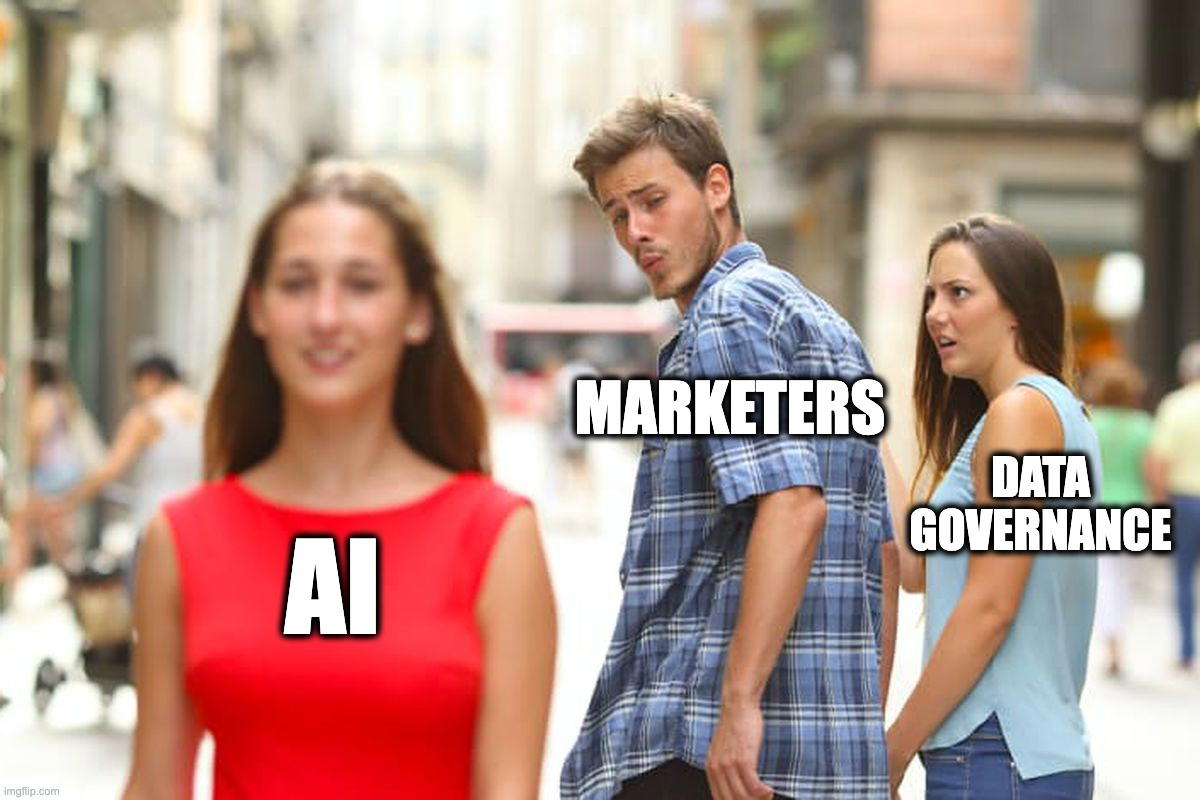
👉 Check if your marketing data is ready for AI in this 1-minute quiz.
Here’s a very simple plan to fix your data, in two ways.
1. Govern your data with a semantic layer
A semantic layer is a place where each metric and dimension is defined, and every report and every agent reads from that definition.
In plain terms, it makes sure your data means the same thing to everyone, including AI agents.
This is also what differentiates between a “meh” AI reporting tool, and one that gives you accurate answers and actions.
This is proven by data too. dbt Labs ran an open-source benchmark that compares querying AI on raw data vs. on a semantic layer.
Querying raw tables, Claude scored 90.0% and GPT 84.1%. Querying through a semantic layer, the same models scored 98.2% and 100%.
This means: for queries covered by a well-modeled semantic layer, AI gives nearly 100% accurate answers, while when querying raw data, it’s not as accurate.
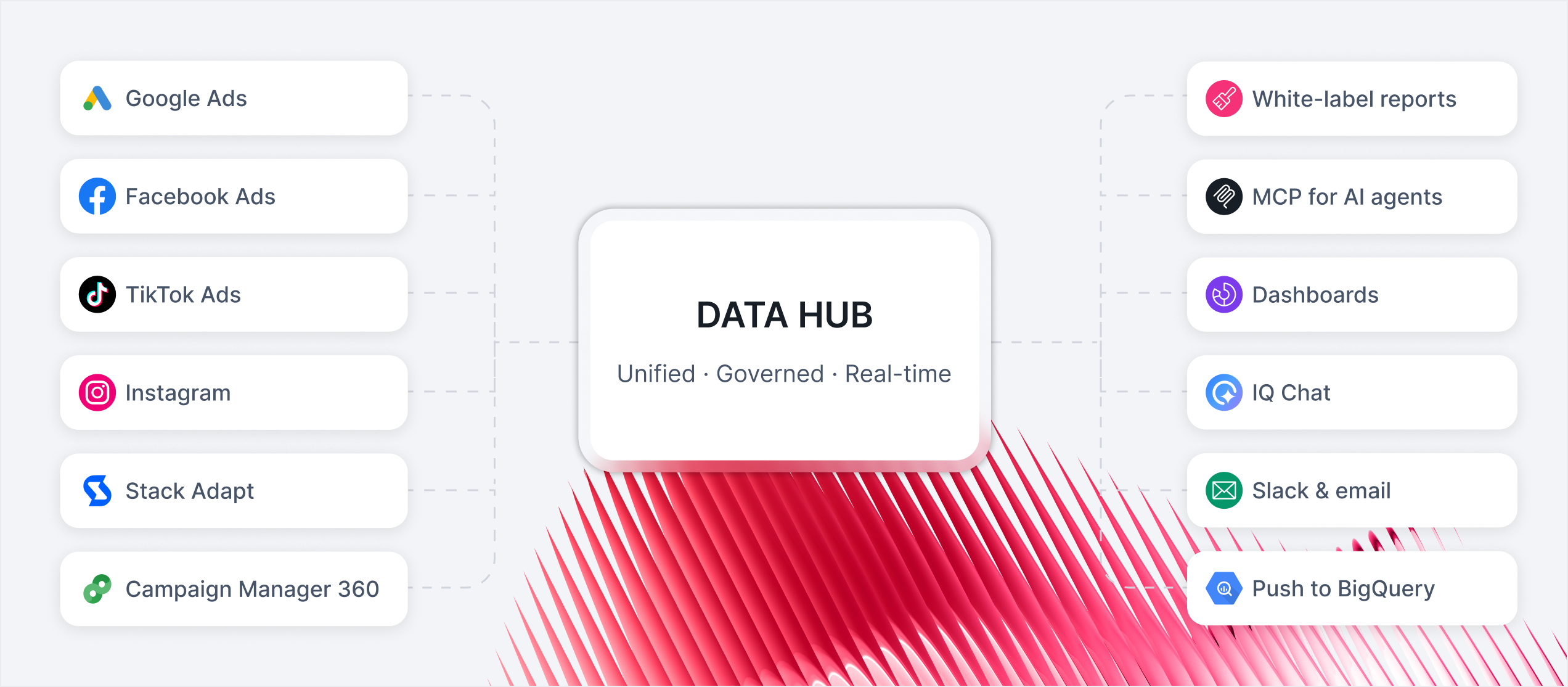
In Whatagraph, this semantic layer is the Data Hub: custom metrics, blends, source groups, and currency conversion are set once, and everything downstream inherits them. The calculations are deterministic, so the agent isn't deciding what ROAS means, it's reading the answer you already agreed on.
 But the tooling is the second step, not the first. The first is agreeing what you measure, and that part happens in a room, not in software. What counts as a conversion. What counts as spend. What makes a lead qualified.
Discrepancies rarely start in the pipeline. They start with a business that never agreed what it was measuring, and occasionally the disagreement isn't technical at all, because when commissions depend on which channel gets credit, people have reasons to prefer one definition over another.
Then verify. If a number says 100 qualified leads, you need a second source to check it against, and you can't check anything without a definition to check it with.
2. The setup has to belong to the team, not one person
The second prerequisite gets less attention and causes just as many problems as messy data.
Most agencies already have someone very good at AI. They've built projects for each client, connected the tools they need, worked out the prompts that get good output. It works, and it's genuinely valuable.
It's also stuck at level one on the ladder from earlier in this article, because almost none of it transfers:
- Connections are authenticated per person. Your colleague can't use the integrations you set up. They have to connect on their own.
- Prompts and skills live in one account and one person's head. There's no reliable way to hand them over.
- There's no shared place for knowledge that several agents, or several people, should all be working from.
- Nothing the team learns accumulates. Two people solve the same problem separately, twice.
Also, another bigger problem. When that person is on holiday, off sick, or leaves, the setup goes away with them. Heavy users describe having so much organizational context inside a personal AI account that switching tools becomes almost impossible.
Whatever AI agents you choose, look for a shared layer rather than a personal one: knowledge that lives at team level as well as per agent, conversations the whole team can see and join, and connections an admin sets up once for everyone.
In IQ Agents, an admin connecting a tool means every teammate's agents can use it, including people who don't hold a login for that tool themselves.
The best AI agents for marketing, by the job they're built for
Most roundups on this topic rank Salesforce against a workflow builder against a content tool, which produces a ranking nobody can act on. A platform that's excellent at CRM agents isn't a candidate for reporting operations, and comparing them head to head doesn’t help.
So here they are grouped by the job they're built to do. Find the group that matches your problem, then compare inside it.
Marketing intelligence and marketing operations agents
Built for teams whose main problem is data spread across platforms and clients, and reporting that doesn't scale.
Whatagraph IQ Agents. Best for mid-size agencies and multi-location operators, roughly 30 to 100 people, where reporting is the biggest bottleneck. The agents work on top of a governed data layer, so they read the same metric definitions your reports use.
Whatagraph is also a listed Claude connector, so if your team already works in Claude, you can create and run agents from there.
But here’s what makes IQ Agents different from Claude:
✅ Organizational context: Claude is great for one-person setups, but with IQ Agents, instructions, skills, and connections are shared across your entire team.
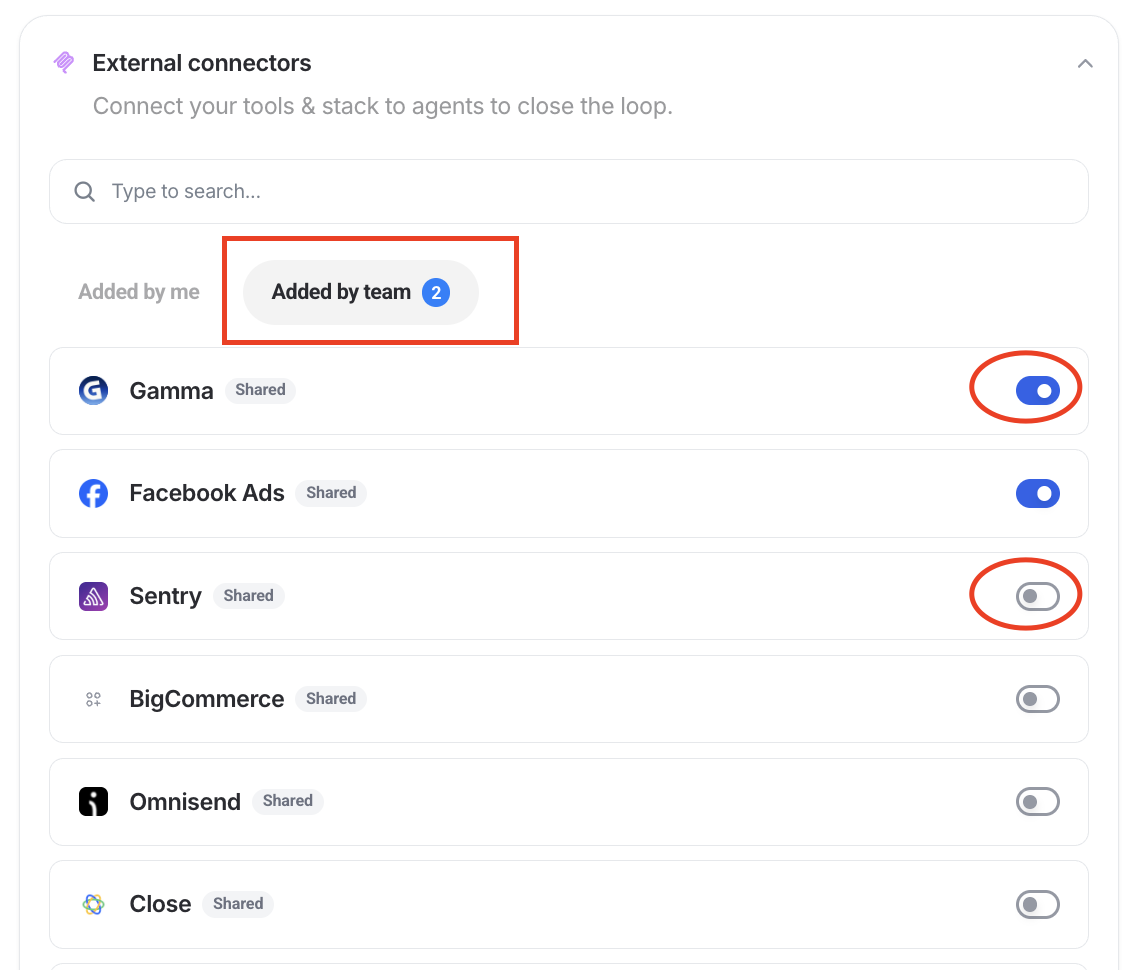
An admin connects a tool once and everyone's agents can use it (just toggle the tool you want on), conversations are visible to the whole team, and knowledge lives at team level as well as per agent. This means no context is lost, and the answers agents give always match your reports.
✅ Security: Your data is processed in a single EU region (Frankfurt), unlike Claude where you’re not sure what happens to your data. Arturas says:
We try to expose data to the least amount of surfaces as possible. If you upload data to Claude or ChatGPT, it's probably going to be sent out to some servers in the US, which Europe doesn't have governance over. You don't know what's happening with it, and it goes all over the place. We have a cap on where this data can go: all of it is computed, stored, and processed by LLMs in a single region in Frankfurt, Google Cloud's europe-west3. It doesn't go anywhere else, ever.
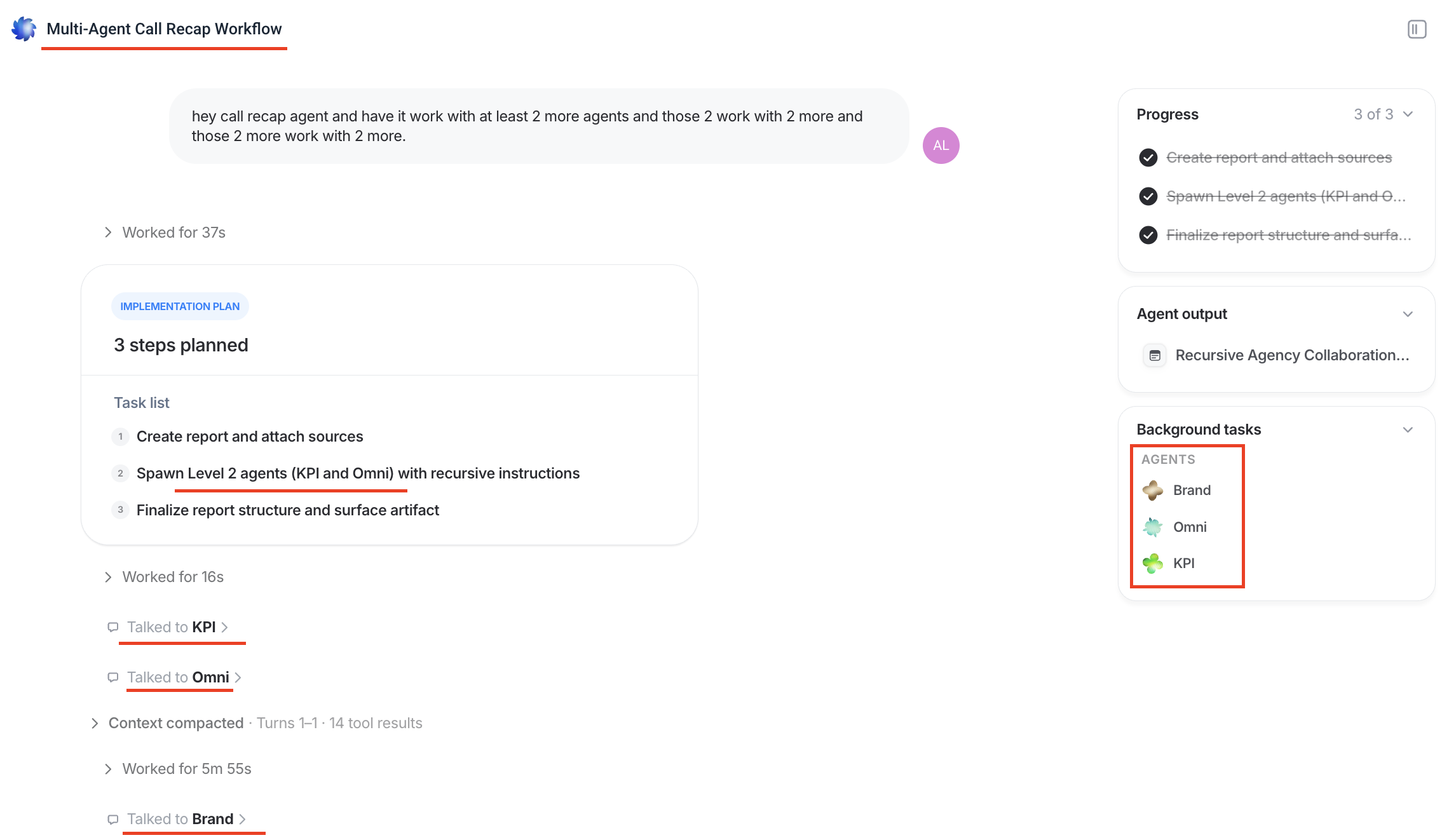
✅ Multi-agents system: Different IQ Agents cross-check each other’s work on the backend even without you prompting it to do so. This makes sure there’s no hallucinations or slip ups.
Request early access to IQ Agents.
Improvado. Best for enterprise teams with dedicated data staff and 500+ sources to manage. Strong pipeline and AI-driven anomaly detection. The tradeoff is that it's a data infrastructure product first, so you'll usually pair it with a separate visualization layer, and implementation is measured in months rather than days. Here’s a full Improvado review.
NinjaCat. Built for agencies and media companies managing multi-channel client reporting, with call tracking data alongside paid media. It's leaning hard into agents, and published its own artificial intelligence maturity research in 2026. Here’s a full breakdown of NinjaCat pricing in 2026.
TapClicks. A broad suite covering ETL, analytics, reporting, order management, and workflow automation. Worth considering if you need the campaign lifecycle and order pieces rather than reporting alone. It sits at the expensive end for agency reporting.
CRM and campaign execution agents
Built for teams whose work already lives in a CRM. If that's you, these are genuinely strong, and nothing in the reporting category will match them for acting on customer records.
Salesforce Agentforce. Agents across service, sales, marketing, and commerce, running on your Salesforce data. Marketing Cloud is now branded Agentforce Marketing, and its agents can build campaigns, draft email copy, create audience segments, and suggest send times from a natural language prompt.
Two things to know before you scope it. Data Cloud is effectively a prerequisite, so if your Salesforce data is inconsistent the agents inherit that, which is the same argument this article made earlier. And pricing is consumption-based: Flex Credits run around $500 per 100,000 credits, with a standard action costing 20 credits, roughly $0.10. There's also a fixed $2 per conversation model for customer-facing agents, but the two can't run in the same org.
HubSpot Agent Hub. HubSpot's agent line-up moved out from under the Breeze brand in July 2026, into Agent Hub, with Agent Builder for custom agents. Both launched in public beta, so if you read a guide written before mid-2026 the names won't match what you see in the product.
Customer Agent, Prospecting Agent, and Data Agent are generally available. Company Research and Customer Health agents are in beta. Breeze Assistant, the in-app copilot, is still free on every tier, and Breeze Intelligence still handles firmographic enrichment.
Pricing shifted in April 2026 to outcome-based for two agents: $0.50 per resolved customer conversation and $1 per lead recommended for outreach. That's a friendlier model to test than credits, though most of the useful capability still needs Professional or Enterprise.
The shared limit. Both platforms know their own system completely and everyone else's not at all. If your paid media data lives outside the CRM, a CRM agent can't tell you whether the campaign was profitable, only what happened to the leads once they arrived.
General-purpose agent builders
Relevance AI, Gumloop, Lindy, n8n, Zapier Agents. Maximum flexibility, no opinion about marketing but great for general content creation.
If you have someone technical who enjoys this, you can build almost anything. The tradeoff is ownership: you're the one maintaining it when a connection breaks or an API changes. That's the most common real-world outcome with these tools, and it's worth being honest with yourself about whether you have the time.
Chat LLMs plus MCP
Claude, ChatGPT, and Gemini connected to your platforms through MCP. A lot of readers are already doing this, and doing it well.
It's fast, cheap to start, and native to how your team already works. Keep using it. Just know what it can't do:
- It runs while you're there. Scheduled runs exist, but they execute as one person and stop at that person's usage limit.
- Approval prompts interrupt unattended runs, so a scheduled job can sit waiting for a click nobody's there to make.
- The setup lives in one account and one person's head, so it doesn't transfer to a teammate.
- Connections are authenticated per person and break more often than anyone admits.
- The answer lands in a chat window, which you can't send to a client.
- On free tiers, availability isn't guaranteed at peak demand.
None of that makes it a bad choice. It makes it a personal tool rather than team infrastructure, which is the distinction from earlier in this article.
Which group is right for you?
- Reporting is your bottleneck, or your data is spread across clients and channels. Marketing intelligence and reporting agents like Whatagraph or NinjaCat.
- Your work lives in the CRM and you need agents acting on customer records. Salesforce or HubSpot, whichever you already run.
- You have a technical person and an unusual workflow. A general-purpose builder.
- You want to start this week with what you already pay for. A chat LLM plus MCP, then revisit when you hit the limits above.
Most agencies end up with two of these rather than one. A reporting platform's agents for the recurring work, and a chat assistant for thinking out loud.
How to implement agentic marketing, step by step
Setting an agent up takes an afternoon, but getting your whole team to use them takes longer - and that’s usually where agentic projects can stall.
To avoid that, I asked our CTPO on how he would implement agents across the entire organization from day one.
1. Pick the most manual and tedious job first
The best first agent is the task that's important, takes real time, and isn't difficult. Not the most sophisticated thing you can think of.
If you're stuck, look for what gets skipped in busy weeks. That's usually the right candidate, because it's both valuable and not getting done.
Resist starting with something client-facing. Build confidence on internal work first.
2. Start from a pre-made agent rather than a blank page
The library ships with agents that already have a job: source blending, KPI monitoring, pacing, auditing, plus orchestrators like a report builder and a recap agent.
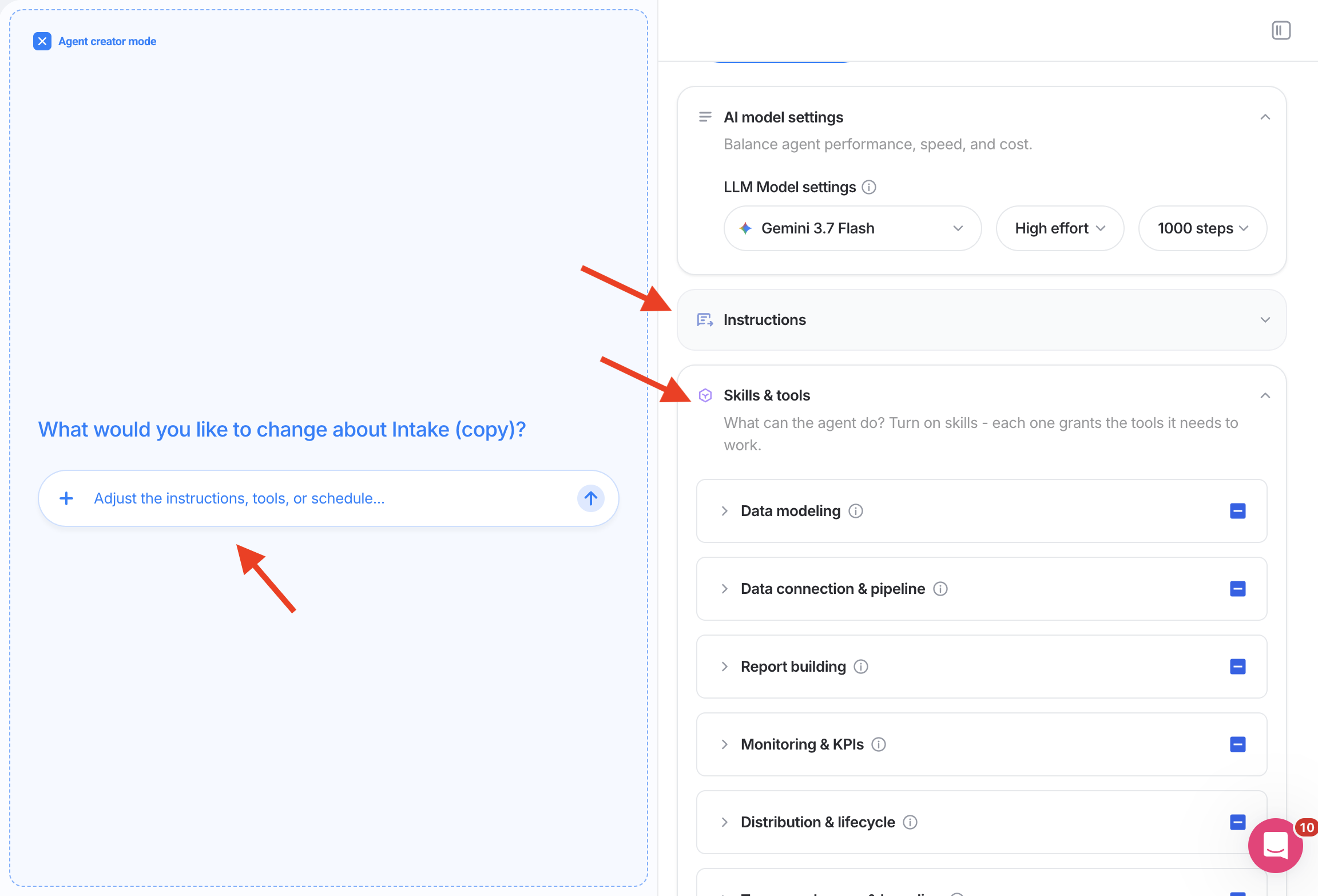
You can't edit a pre-made agent directly. You duplicate it for your team and build on top, which beats describing something from scratch, because you get to see what a well-specified agent looks like before writing your own.
For instance, Whatagraph IQ Agents already come with pre-made agents for paid media teams like so:
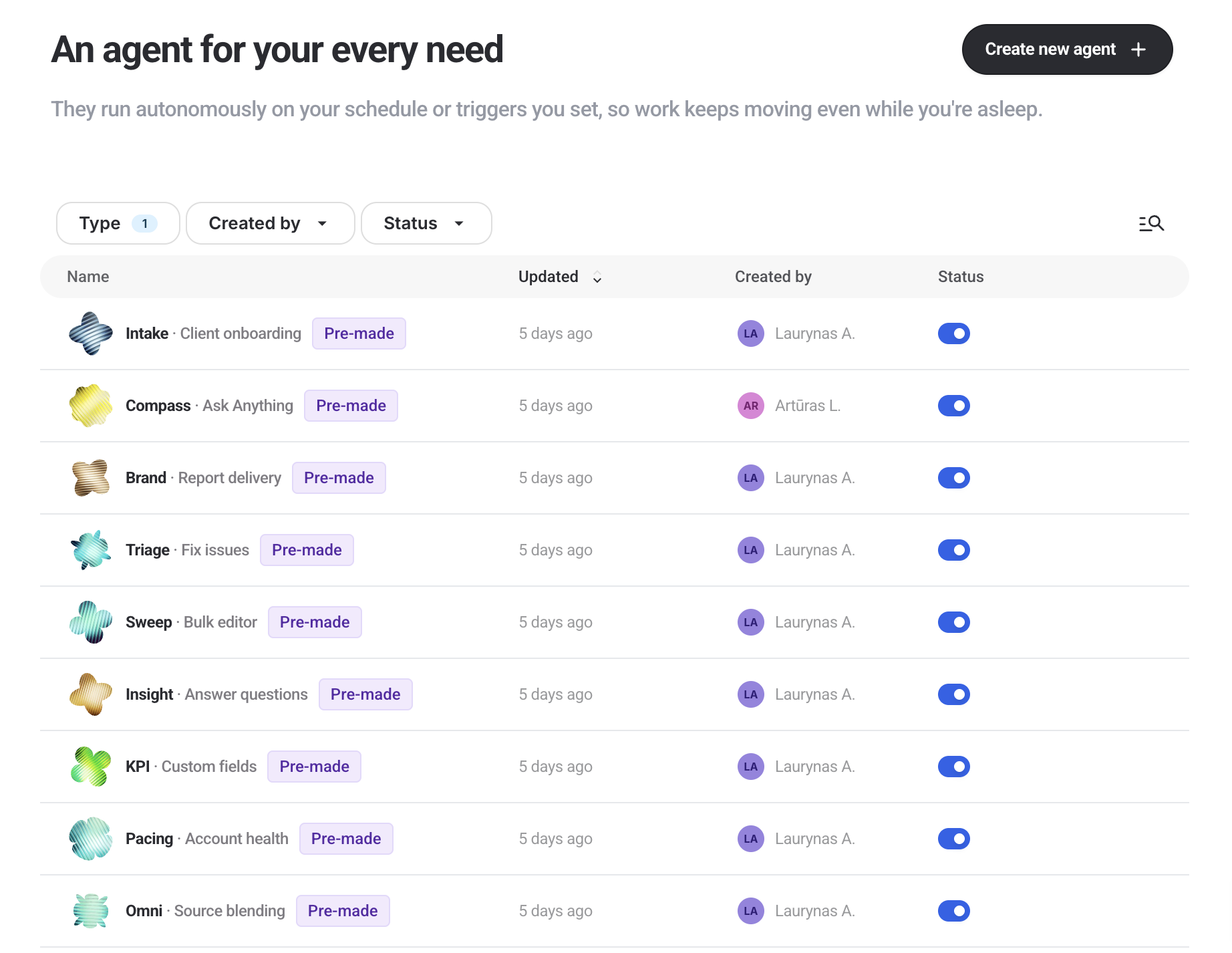
All you need to do is click on one of them, write a plain-language prompt, and sit back and relax.
Pre-made agents significantly remove the initial learning curve barrier for non-technical teammates and make it less intimidating to start.
Among these pre-made agents, “Bulk editor” is a cult favorite. you describe the change you need, it finds every report affected, shows you the list, and makes the change across all of them once you confirm.
For instance, one of our customers uses it to roll out an update across 80 client reports with just one prompt in seconds.
If you want more control you can duplicate and edit an existing pre-made agent with your own instructions, skills, and tools.
3. Write a job spec, not a prompt
Onboarding an agent works like onboarding a person. Output quality tracks the instructions and the context you give it, as well as the model you pick.
In Whatagraph’s agent creator you describe what you want, it asks follow-up questions, then proposes a plan. Read the plan properly before approving it.
Then upload what it needs to know: the client's goals, projections, past decks, your report templates, your internal guidance. Team-level knowledge holds the rules everyone shares, like naming conventions or how you define a qualified lead.
Here's an example of a custom agent I created called “Summit” that conducts comprehensive 360-degree client performance and strategy reviews across your connected marketing channels and external web intelligence for agency QBRs, renewals, and client reviews.
The video was cut slightly for brevity, but the entire process took around 3 minutes.
4. Build specialists, not one agent that does everything
Three agents pointed in three directions beat one with a dozen overlapping responsibilities, which gets unmaintainable fast.
It's the same reason agencies hire a PPC manager and a paid social specialist rather than one person who does both badly.
5. Set permissions, starting in approval mode
Every tool an agent can reach is set to one of three states:
- Allow. It just does it. Reading your reporting data usually sits here.
- Needs approval. It stops and asks first. Anything that changes a live campaign belongs here, at least at the start.
- Block. It can't, at all.
Start restrictive. Review the calls it makes, then loosen as you build trust. Work on duplicated reports before touching live client ones.
You also decide here whether it has web access, and which external connectors it can use.
6. Connect your tools once, for the whole team
An admin connects a tool through OAuth, and every teammate's agents can use it.
That includes people who don't hold a login for that tool. An account manager with no seat in your ticketing system can still ask an agent that reads from it, because the connection belongs to the team rather than to a person.
If you've set up AI at work before, this is probably the step that has cost you the most time, since the usual model is every person connecting every tool for themselves.
7. Be specific when you ask
Two ways in: start a new conversation and let it route to whichever agent fits, or go straight to a specific agent when you already know who should handle it. Post in the channel, or DM the specialist.
Either way, reference the exact account, report, or date range rather than a name that could match several things.
This is the most common failure, and it isn't the model hallucinating. A vague scope produces a confident answer about the wrong data, and you won't always catch it.
8. Watch the first few runs
The agent writes a plan before it acts, and you can see each tool call as it happens. If it hands off to another agent, you can open that conversation too.
Anything it produces appears in the side panel and in Whatagraph itself, so a report it builds is a real report, not a description of one.
9. Check its work, then make the correction stick
Ask where the numbers came from. It'll tell you which source or report it read, which is usually enough to spot a scoping mistake.
When it gets something wrong, write the correction into team knowledge rather than fixing it in that one conversation. Otherwise you'll correct the same thing next month, and so will everyone else on your team.
For anything high-stakes, have a second agent review the first one's output before it goes anywhere. It can inspect the work independently and either approve it or send it back, escalating to a third agent if it isn't sure. Borrow the four-eye principle you'd already apply to a junior's client-facing work. None of this needs engineering; you set it up in plain language.
10. Put it on a schedule or a trigger
Agents run on Whatagraph's servers, so a scheduled job runs with your laptop closed and doesn't slow your machine down.
Schedules are set in plain language. Triggers fire on events instead, like a new source being connected or a connection breaking, so the agent runs without anyone prompting it at all.
11. Share it with the team
This is the step that turns one person's setup into something your agency runs on.
- Pin the agents your team should use, and disable the ones you don't need so routing stays clean.
- Every conversation is visible to the team, filterable by person. You can see how a colleague worked with an agent, and you can see two agents working with each other.
- You can join a colleague's conversation, add your own context, and carry it forward. Two people can work the same conversation at once.
- Sensitive conversations can be marked private. An admin can take over a private conversation if someone leaves, so no work ends up locked inside one person's account.
How to measure agentic marketing ROI
Here are two simple questions to ask to judge whether an AI agent is worth it: what did it cost, and what did it give back.
The cost side is more than the subscription. There's whatever you pay the vendor, plus the time to specify agents properly, plus the ongoing maintenance when a connection breaks or a client's setup changes. That setup cost is real and front-loaded. Budget for it rather than being surprised by it in month two.
The return side is measurable if you pick the right things. Useful metrics:
- Hours returned per reporting cycle, measured before and after
- Accounts or clients per person
- Problems caught before the client saw them
- Days from period end to report delivered
- Spend recovered from things the agent caught, like campaigns that should have been paused
That last one is the easiest to put a number on, and often the most persuasive internally.
Metrics to measure AI agent performance
ROI tells you whether the investment was worth it. These tell you whether the agent is doing its job well, which is a different question and one you should be able to answer within a couple of weeks.
- Correction rate. How often does its output need fixing before it's usable? Track the direction more than the number. A rate that climbs usually means missing context, not a worse model.
- Flag precision. Of the issues it surfaced, how many were real? An agent that cries wolf gets ignored, and an ignored agent is worse than no agent.
- Completion rate. How often does a scheduled run finish without erroring or getting stuck waiting for an approval nobody gave?
- Draft survival. How much of what it wrote makes it into the client-facing version? This is the fastest read on commentary quality.
- Time to done. End to end, against the manual version of the same task. Include your review time, or you're measuring the wrong thing.
If the correction rate is high, resist the urge to change models. Look at what the agent doesn't know first. That's usually the problem.
What are the limitations of AI marketing agents?
Some of this is worth knowing before you start, because it'll save you a wasted week.
They're only as good as their brief. Vague instructions produce confident, wrong output. This is the single most common failure and it isn't fixable with a better model.
They inherit your data problems. Everything in the prerequisites section applies. An agent reading inconsistent data produces inconsistent answers faster than a person would.
Some capabilities aren't there yet. Running code for deeper statistical analysis and browsing as you inside a logged-in session are both on the roadmap rather than in the product, for us and for most of the category. Anyone claiming otherwise is worth pressing on.
External actions depend on the platforms. What an agent can change inside an ad platform is governed by that platform's API and approval process, which no vendor controls. Expect this to be uneven across channels for a while.
They don't have judgment. An agent will tell you a campaign is underperforming. It won't tell you that this client is about to renew and now isn't the moment to shift their budget. Context that lives in a relationship rather than in data stays yours.
They're not free of oversight. Every practice above exists because agents need checking. If your business case depends on nobody reviewing the output, the business case is wrong.
5 key takeaways
There was a ton of information in the article, but here are the five key takeaways:
- Govern your data first, with a semantic layer where every metric is defined and dimensions normalized.
- Make sure the same context, instructions, and connections are shared across everyone in the team, not just one specialist.
- Start with the most manual and tedious task that is eating up your team’s time.
- Have agents check each other's work. One agent reviews another's output before it reaches a client, and you set it up in plain language rather than building anything.
- Keep a human in the loop - start every tool in approval mode and only loosen it if the agent has absolutely proven to you that it can be trusted.
Published on Aug 28 2026
WRITTEN BY
YamonYamon is a Senior Content Marketing Manager at Whatagraph. With an eye for detail and a knack for always considering context, audience, and business goals to guide the narrative, she's on a mission to create genuinely helpful content for marketers. When she’s not working, she’s hiking, meditating, or practicing yoga.