Facebook Ads MCP: How to Connect Meta Ads to Claude
You can connect Facebook Ads to Claude in a few minutes, either with Meta's official Ads AI Connector or with a Facebook Ads MCP like Whatagraph's.
But the harder question is - can you trust the answers Claude gives you?
In this article we'll show you not only how to connect Meta Ads to Claude, but also how to get answers you can actually stand behind.

Jun 05 2026●7 min read


Ask Claude which ad sets are burning budget this month and it'll give you a confident, well-formatted answer.
But something about that answer just feels off.
You can't fully trust it, so you're back to square one cross-checking it against Ads Manager or your own spreadsheet, just to find out your gut feeling was right.
It's not a Claude issue, but a data issue.
Without the right context in place, like normalized metrics, defined conversion actions, or specific Claude skills to ingest the data properly, the answer Claude gives will be incomplete and generic.
With Meta, that context matters more than most. Attribution windows, conversion definitions that have changed several times over the years, and a separate reporting currency per ad account all shape the number before Claude ever sees it.
Then there's the other half of the problem: Meta's own connector only sees Meta. The moment you want Google Ads or GA4 in the same answer, you're back to juggling connectors or uploading spreadsheets.
That's the problem this article is about. In this article we'll cover:
- What a Facebook Ads MCP server actually is
- Three types of connectors and why only one gives you trustworthy answers
- 2 ways to connect Facebook Ads to Claude: Meta's official connector vs. Whatagraph
- A full prompt library organized by use case so you can hit the ground running
TL;DR
- A Facebook Ads MCP server is a connector that lets Claude query your Meta Ads data in plain language.
- Not all MCPs are equal. There are three types: single-platform MCPs (like Meta's official server), stitched connector MCPs, and MCPs over a governed data layer. If you want accurate cross-channel answers from Claude, use the third one.
- Meta's official MCP is useful for single-account reporting and campaign management within one Business Manager. It breaks down the moment you need Google Ads in the same answer, or numbers consistent enough to send to a client.
- Before connecting Whatagraph's MCP, set up your data layer first: connect your Meta Ads sources, set currencies, organize into Spaces by client, define custom metrics, create custom dimensions, and group or blend your channels.
- Once connected, you can query campaign performance, find wasted spend, run period-over-period analysis, get cross-account summaries, and more - all in plain language. A full prompt library is at the end of the article.
What is a Facebook Ads MCP server exactly?
A Facebook Ads MCP server is a connector that gives Claude (or other LLMs) direct access to your Meta Ads data. You ask Claude a question in plain language and it pulls the answer from your actual ad account data.
MCP stands for Model Context Protocol - an open standard introduced by Anthropic in late 2024 that lets AI assistants connect directly to external tools and data sources.
As Whatagraph's CTPO Arturas Lazejevas puts it:
Think of MCP as a door that LLMs like Claude or ChatGPT can use to access any of your systems that you connect (through the MCP).
Unlike a traditional API, which expects structured requests in a specific format, an MCP server is designed to work with natural language. Claude reads the tool descriptions, reasons about how to use them, and adapts on the fly - if the MCP has been trained to do that. (Side note: Whatagraph’s MCP is.)
A note too that Facebook Ads and Instagram Ads both run through the same Meta Ads Manager source. This means you don't need a separate setup step for Instagram.
But here’s the catch - not all Meta Ads MCP servers are built the same. We break down three different types available in the market right now.
3 different types of Facebook Ads MCP servers (and which one to choose)
In 2026, every vendor is saying “We have an MCP”, but this can mean three very different things.
Single-platform MCP | Stitched connector MCPs | MCP over a semantic layer (Whatagraph) | |
| What it is | A protocol wrapper over Meta's own API. Meta's official Ads AI Connector is the clearest example. | Multiple single-platform connectors hooked to the same agent, with nothing shared between them. | A protocol over a unified data model. Metrics defined once, currencies converted, attribution reconciled before Claude ever sees the data. |
| Cross-channel answers | Not its job. One platform by definition. | The LLM stitches at query time. Math drifts. | Pre-blended in the data model. |
| Same question, same answer | Yes, within that platform. | No. Depends on the prompt. | Yes. Metrics defined once. |
| Multi-account handling | Per-account. No rollup. | Depends on each connector. No shared logic. | Source Groups aggregate multiple accounts into one normalized source. |
| Where it fits | Single-platform questions, campaign management for one account. | Quick answers when one platform is enough. | Daily multi-channel reporting, multi-client operations, numbers you can send to a client. |
Whatagraph's MCP is built as an MCP over a semantic data layer so the answers you get from Claude already have your business logic - for example, how you define “Conversions”.
Arturas described the distinction plainly:
You need to understand on which layer the MCP queries - whether that's just a throughput or a proxy to the direct APIs themselves, or does it actually query a semantic layer and centralize data.
That being said, how do you actually analyze your Meta Ads data with an MCP Claude connector? We break down two key options.
Looking for a Google Ads MCP instead? Here's how to connect your Google Ads to Claude.
How to connect Facebook Ads to Claude [2 options]
Option 1: Meta's official MCP Meta Ads server
Meta launched their official Ads AI Connectors in open beta in April 2026. It connects directly to your Meta Ads account through Meta's own auth - you don’t need developer credentials, API setup, or coding.
You can use it to connect to Claude, ChatGPT, and Perplexity. Once connected, ask these LLMs questions about your campaigns, ad sets, creatives, catalogs, and pixel/dataset diagnostics in plain language.
Here's how to set it up:
Step 1: Get the Meta Ads MCP server URL
Go to Meta Ads official documentation and copy the Meta Ads MCP server URL.
Step 2: Add it as a custom connector in Claude
How you do this depends on your plan.
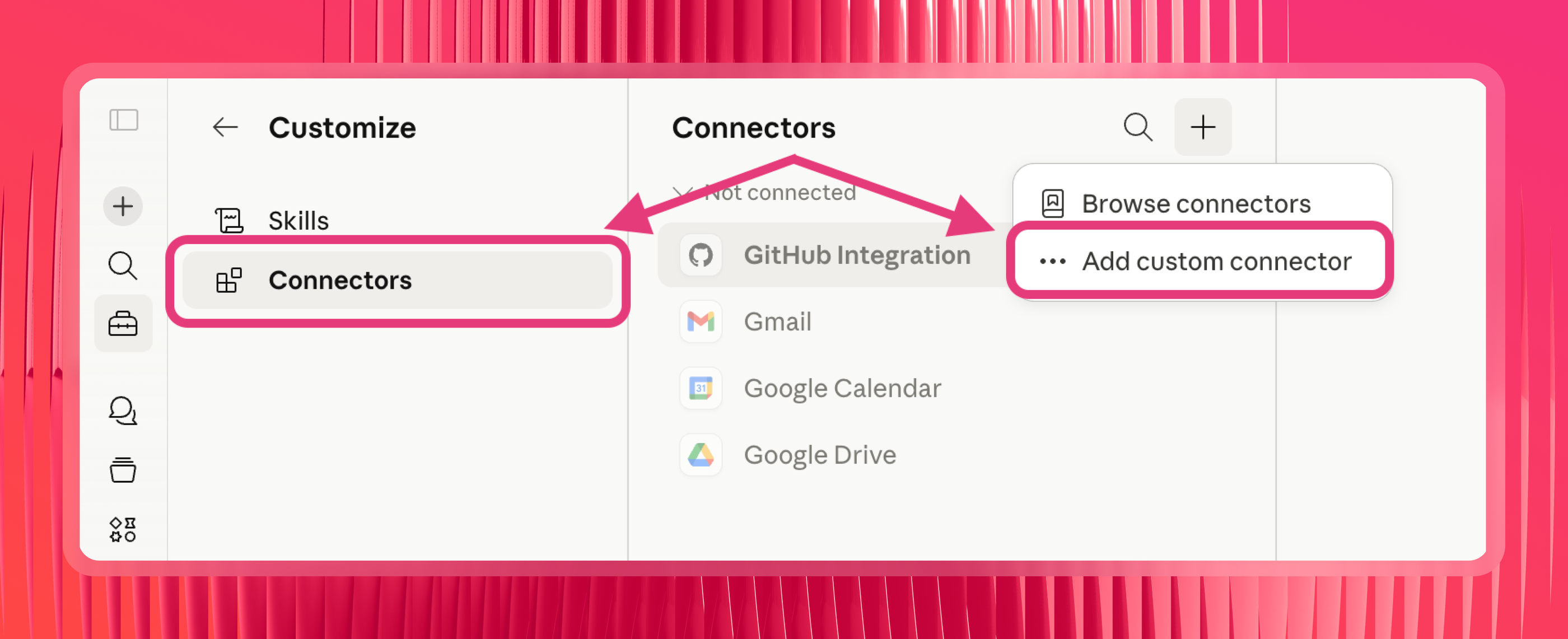
On Pro or Max: Navigate to Customize > Connectors, click "+" then "Add custom connector," and paste in the Meta Ads MCP server URL.
On Team or Enterprise: An Owner needs to go to Organization settings > Connectors first, click "Add," hover over "Custom," select "Web," and paste in the URL. Once added at the organization level, individual members can then connect by going to Customize > Connectors, finding the connector in the list, and clicking "Connect."
On Free: You can add one custom connector. Navigate to Customize > Connectors and follow the same steps as Pro/Max.
Step 3: Authorize with Meta
Claude will open Meta's authorization screen. Click Continue, then select the Business Manager you want to connect. This limits Claude's access to the ad accounts within that Business Manager.
Step 4: Set tool permissions
Once connected, you'll see a list of tool permissions. If they're set to "Needs approval," Claude will ask you to approve every data pull. Switch read-only tools to "Always allow" to skip that. For any write tools - campaign creation, budget edits, catalog management - keep these on "Needs approval" until you're confident in how the connection behaves.
Step 5: Enable the connector for your conversation
Click the "+" button on the lower left of your chat interface, then "Connectors." Toggle the Meta Ads connector on for the current conversation.
Step 6: Test it
Ask Claude: "What campaigns are running in my Meta Ads account?" It should return your active campaigns with basic performance data.
However, there are few things to be aware of before you choose this route.
1️⃣ Meta Ads MCP is single-channel by design - and cross-account aggregation is limited.
This is the biggest limitation. Meta’s MCP only lets you analyze one channel with Claude - Meta.
If you want to connect other channels like Google Analytics, Google Search Console, Google Ads, CRMs, e.t.c. you’d either need to:
- Use multiple different individual MCP connectors
- Build your own MCPs and connectors using codes and scripts
- Download and upload CSVs and spreadsheets
All of which creates more work and takes up a lot of your time.
Also there's no normalization layer as well. You can't create custom metrics, define dimensions, or blend data across different channels (e.g. Meta Ads + Google Analytics 4).
A user - Artificaltreehouse - in this r/FacebookAds thread on Reddit put it well: “hooking up your Meta account .. is one out of ten things you have to do.”
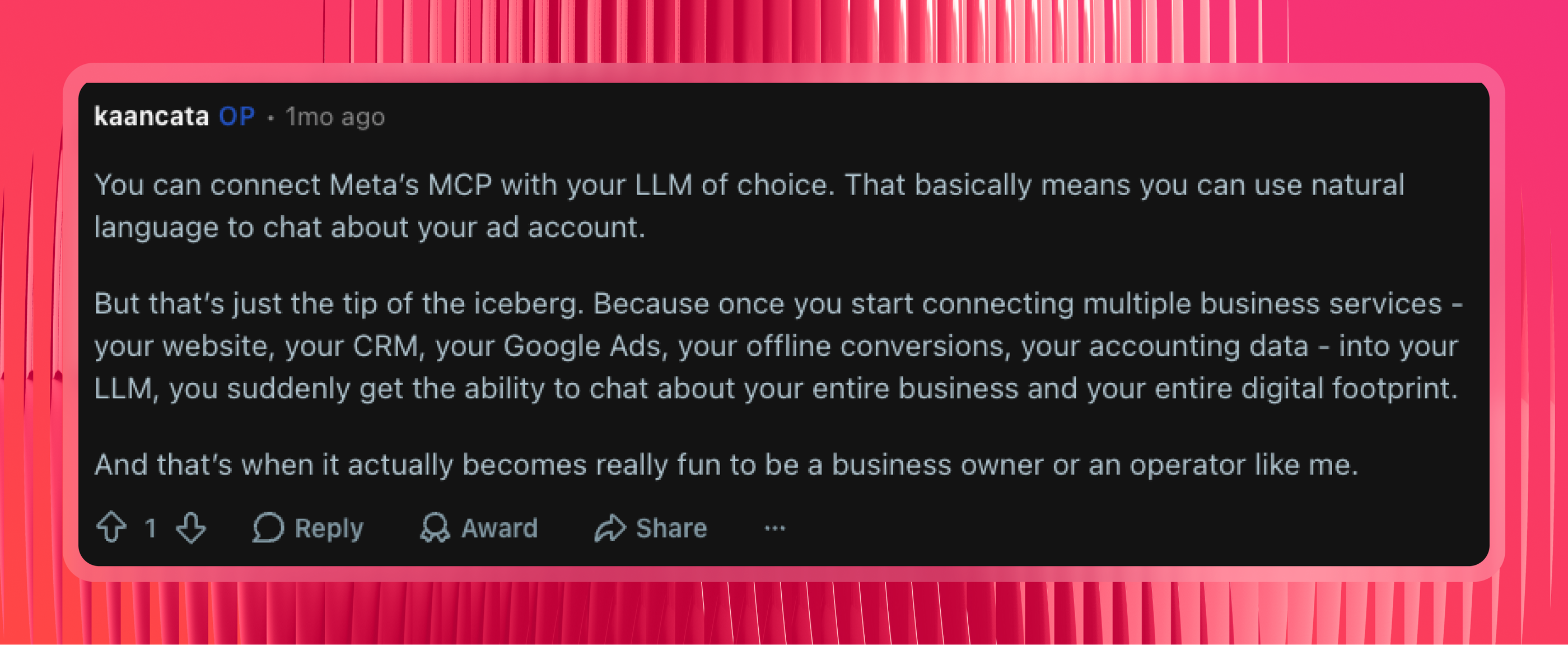
 OP kaancata backs this up - noting that once you start connecting your website, CRM, Google Ads, offline conversions, and accounting data into the same LLM, that's when things get genuinely useful.
 2️⃣ The rollout is still gradual.
As of mid-2026, not all ad accounts have access yet. Several users in the Reddit thread reported getting this message after connecting:
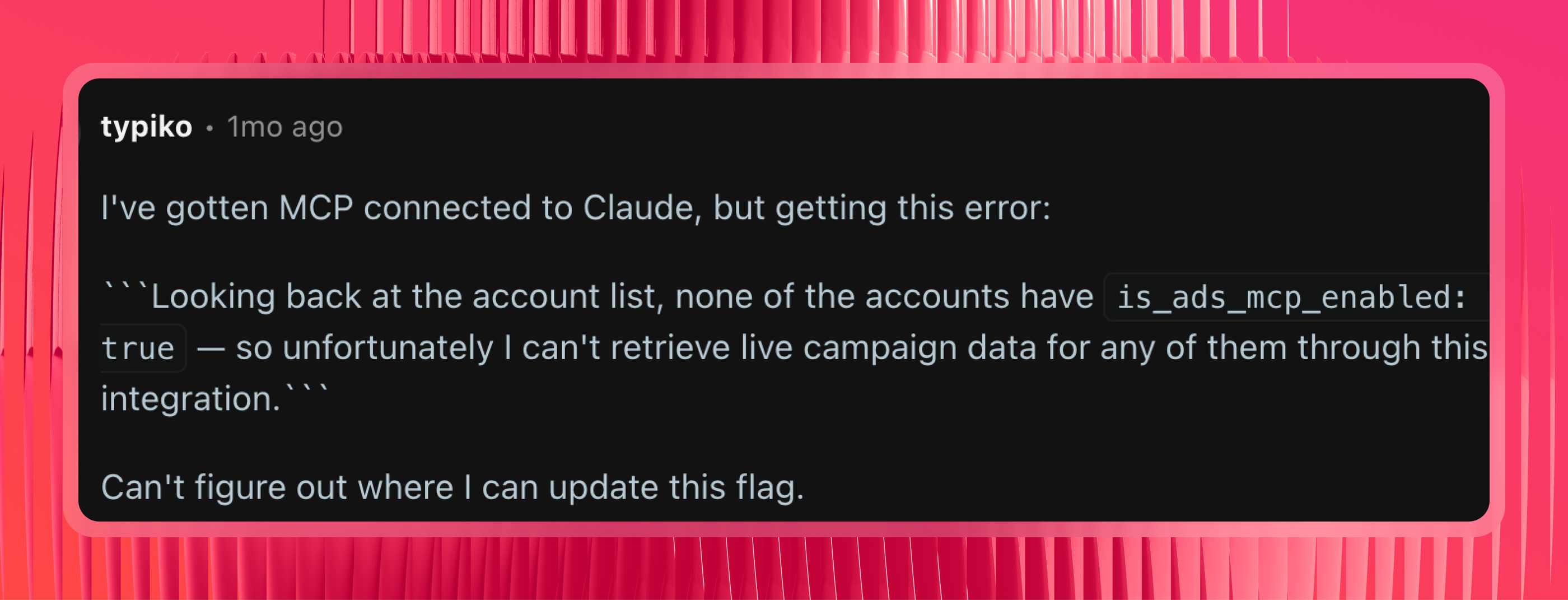 If your account isn't enabled, you can't use it yet - no timeline has been given for full availability.
3️⃣ A lot of things are “broken”.
The Reddit thread was unambiguous on this. Multiple users reported errors immediately after connecting - accounts not recognized, tools failing mid-query, and the is_ads_mcp_enabled flag returning false even after a successful authorization.
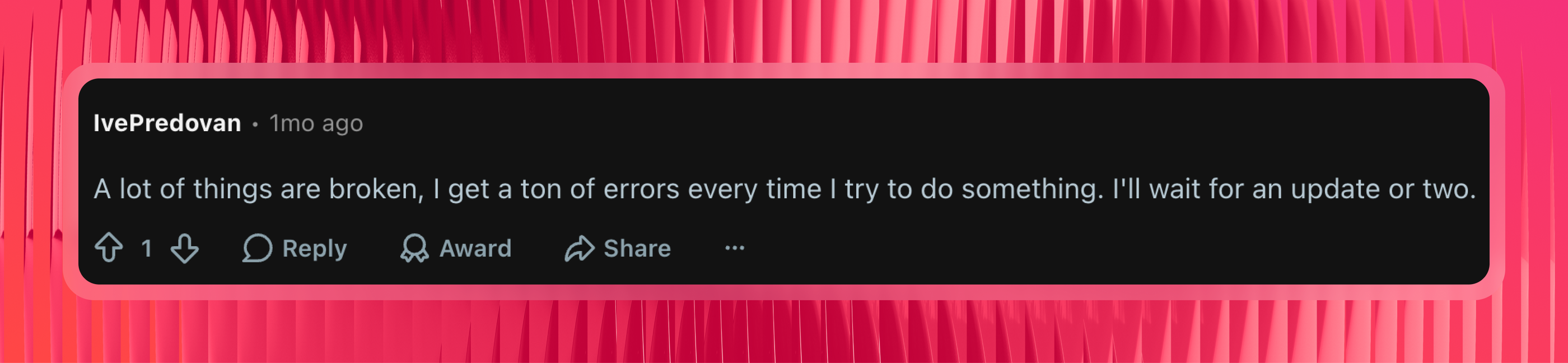
One commenter summed it up plainly: “A lot of things are broken. I get a ton of errors every time I try to do something. I'll wait for an update or two.”
 For single-account Meta reporting, Meta's official MCP does the job. For anything that requires Google Ads in the same answer, multi-client aggregation, or numbers you'd put in front of a client, it runs out of road quickly.
Option 2: Connect Meta Ads to Claude with Whatagraph's MCP
Whatagraph's MCP is built differently from Meta Ads’ MCP in two key ways:
- You can connect not just Meta Ads but 60+ other marketing channels like Google Ads, Google Analytics 4, Hubspot, Ahrefs, and more
- You can aggregate, standardize, and define all your metrics from all your channels inside of Whatagraph once - and this defined data flows into your Facebook Ads reports, dashboards, and AI tools like Claude
Setup takes a few minutes, no code required, and you get the same trustworthy numbers whether you ask on Monday or Friday.
Here's how an example cross-channel analysis between Facebook Ads and Google Ads looks like on Claude with Whatagraph's MCP.
We used this prompt:
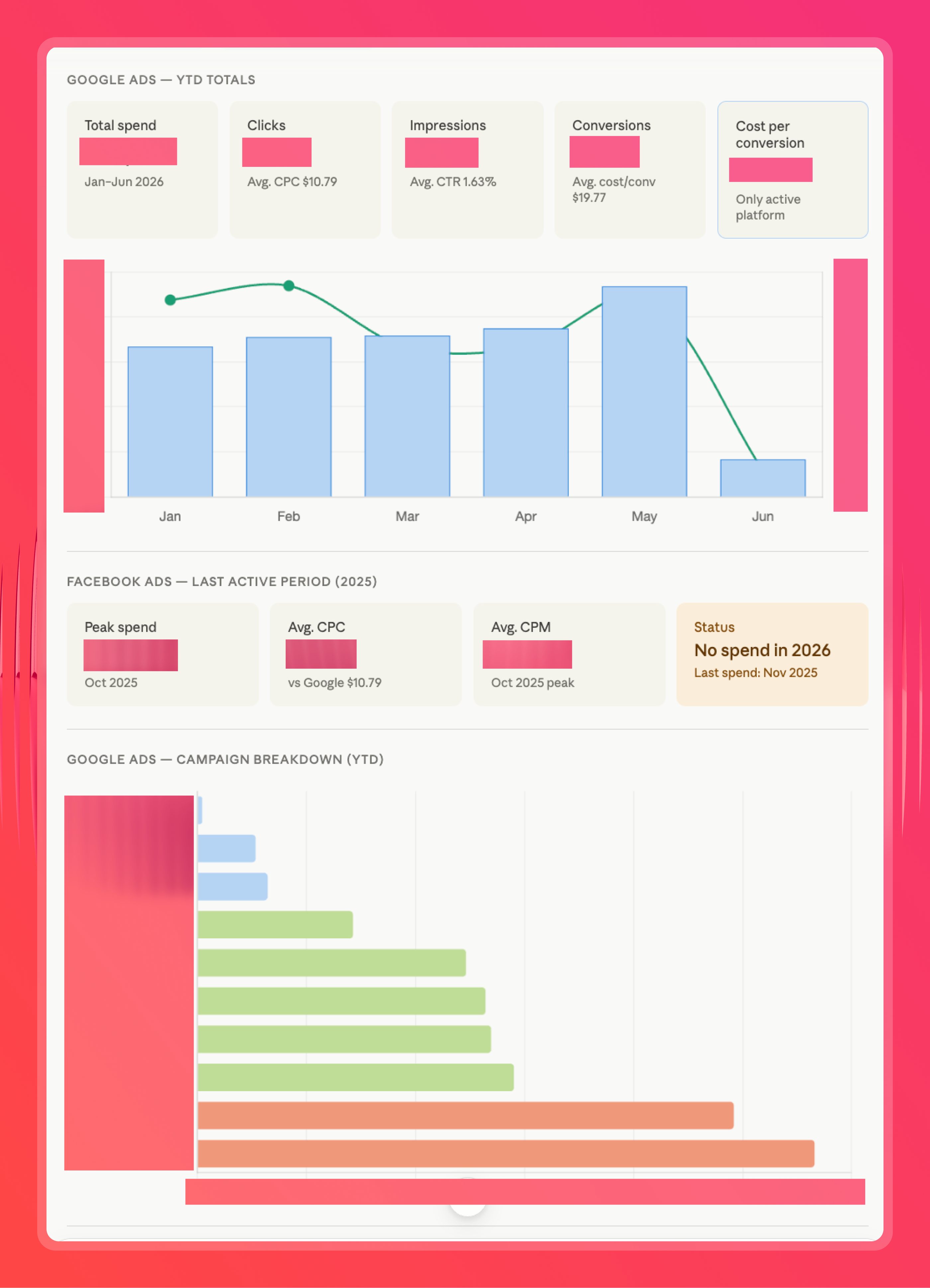
Using Whatagraph MCP analyze this year-to-date performance data for Facebook Ads and Google Ads. Which platform is delivering the lowest cost per conversion? Recommend a step-by-step budget reallocation plan based on the current CPC, search volume and spend.
And received this side-by-side comparison graph of Facebook Ads and Google Ads spend (note: we didn't have any budget allocated to Facebook Ads recently):
And this budget reallocation plan:
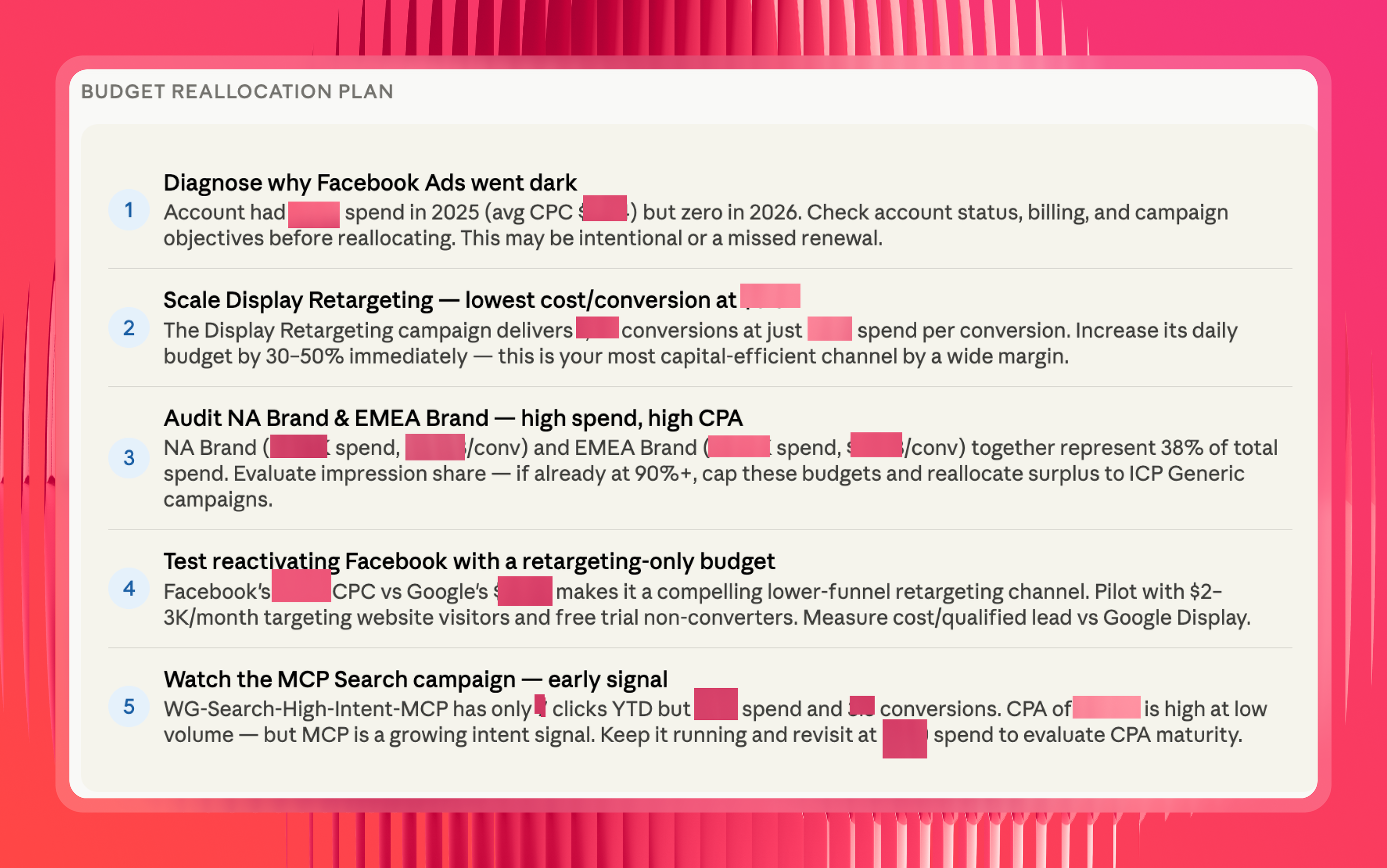
This is the kind of cross-channel analysis you can do with Whatagraph's Meta Ads MCP.
Whatagraph also comes with AI agents for marketing that build reports, monitor accounts, and alert you of important updates, even with your laptop closed.
On Meta Ads data, teams are using them to:
- Flag ad sets where frequency is climbing and CTR is dropping, before the creative burns out
- Onboard a new client's Meta account and build the report from your template
- Check spend against the monthly cap daily and flag anything off pace
- Pull the month's optimizations into the commentary widgets so your AM edits instead of writes
- Find ads still running past the end date buried in the ad name
The difference between agents and MCP is this:
- With an MCP, only individuals have access to the context, connections, and skills built on Claude or ChatGPT.
- With Whatagraph IQ Agents, the entire organization (and all your team members) have access to the same context, connections, and skills.
This means reports are consistent, insights are truly self-serve, and the entire organization stays aligned.
Request early access to IQ Agents here.
7 steps to connect Meta Ads to Claude with Whatagraph’s MCP
Before you start, make sure you have:
- A Whatagraph account with your Meta Ads account connected (get a demo)
- A Claude account (Pro or Max)
- Owner or Full Admin access to your Claude workspace
If you're on a team plan and don't see the option to add a custom connector, you'll need whoever manages the account to do this part.
A trick: log into your Whatagraph account in the same browser you're using for Claude. It makes the authorization step a one-click thing instead of a whole separate login flow.
Here's a video walkthrough:
Step 1: Connect your Meta Ads account in Whatagraph
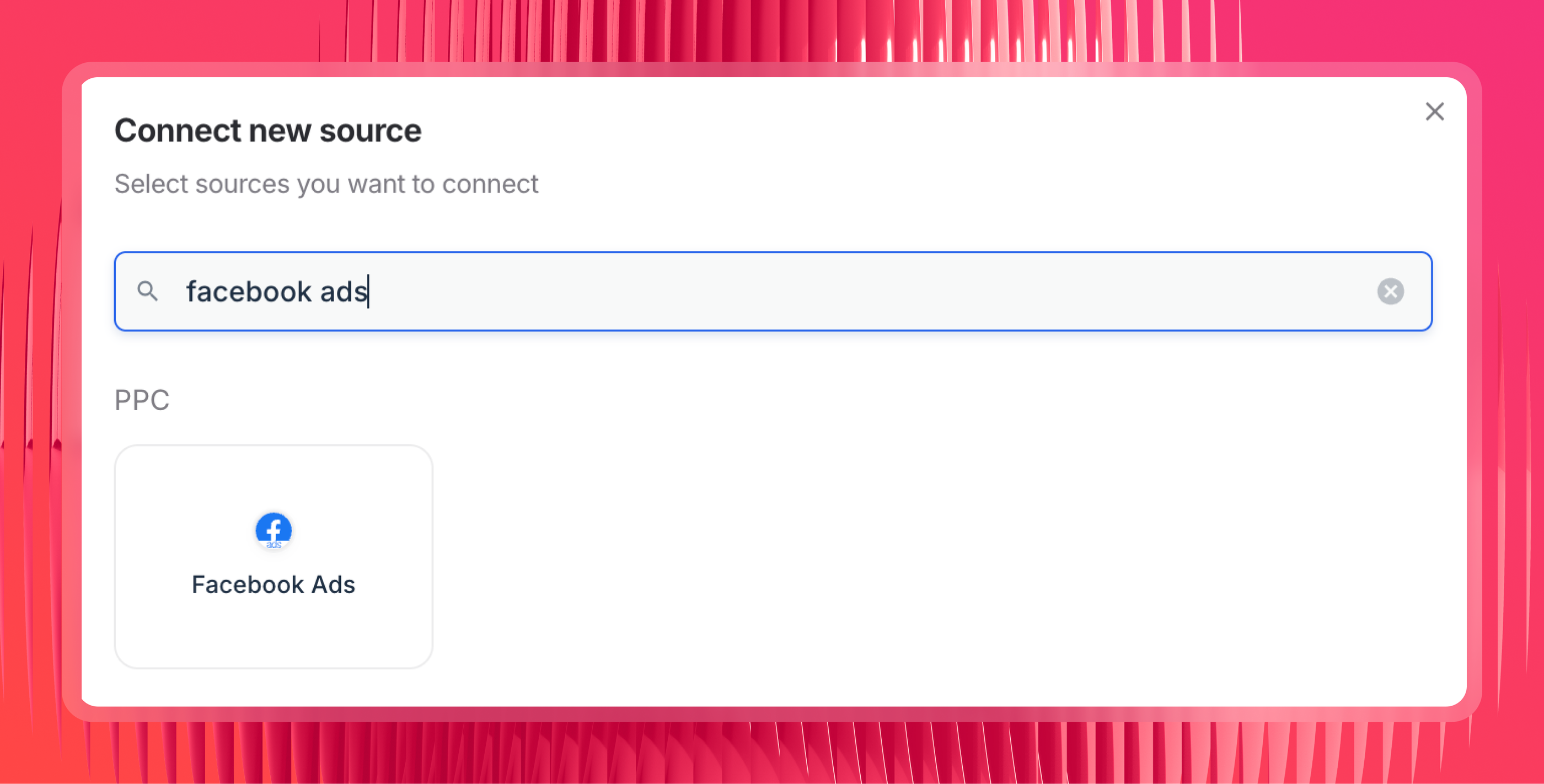
Connect your Meta Ads account as a data source inside Whatagraph. Facebook Ads and Instagram Ads both come through the same Meta source - one connection, no separate Instagram setup needed.
Step 2: Set up your data layer
This step is what separates a Whatagraph connection from a raw API connector. Arturas Lazejevas, Whatagraph's CTPO, puts it plainly:
My suggestion would be to really embed your business logic into Whatagraph first, so that Claude doesn't need to reason about it or figure stuff out on the fly.
Here's what to set up before you start querying:
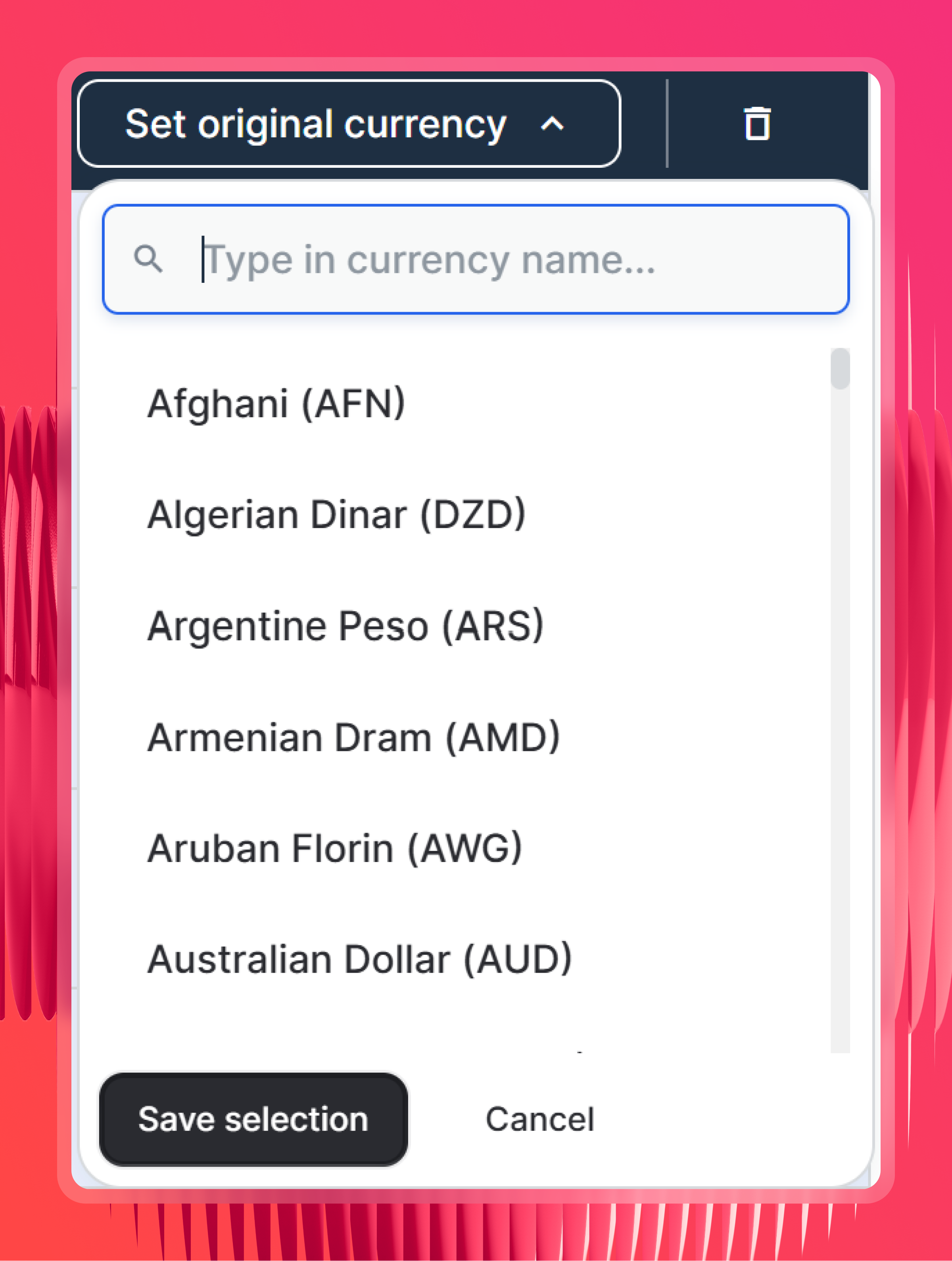
- Check currency settings - Whatagraph detects the original currency for each Meta Ads account automatically. Meta reports spend in the currency of each ad account, so if you're managing clients across the UK, Germany, and Australia, this step is what makes cross-account spend totals meaningful. In the rare cases where currency can't be detected, set it manually.
- Organize sources into Spaces by client - Claude scopes queries by Space, so if your Meta Ads sources aren't organized this way, it has to search across everything. Name your Spaces after clients and Claude can scope any request to that client without you listing individual source names.
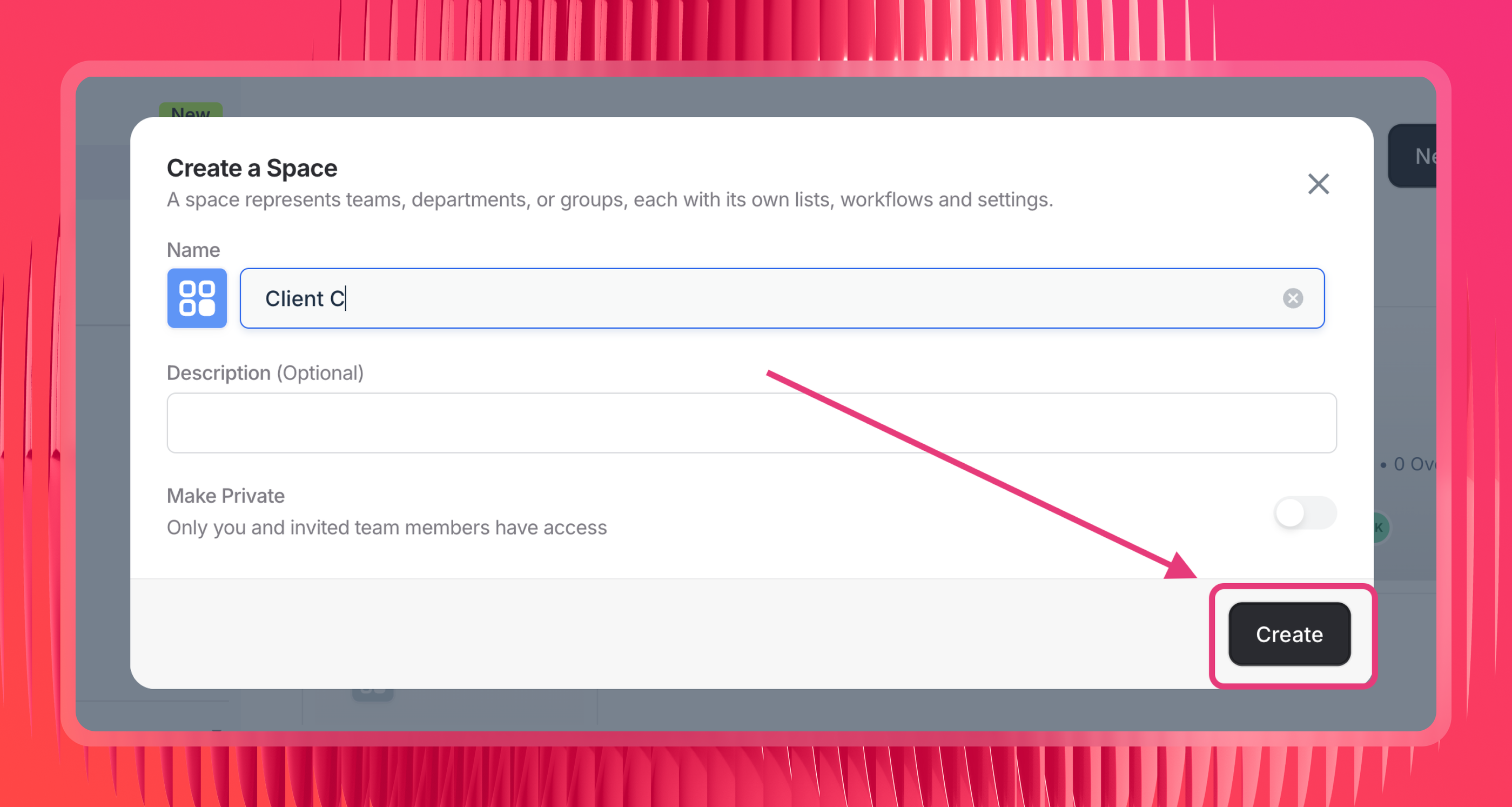
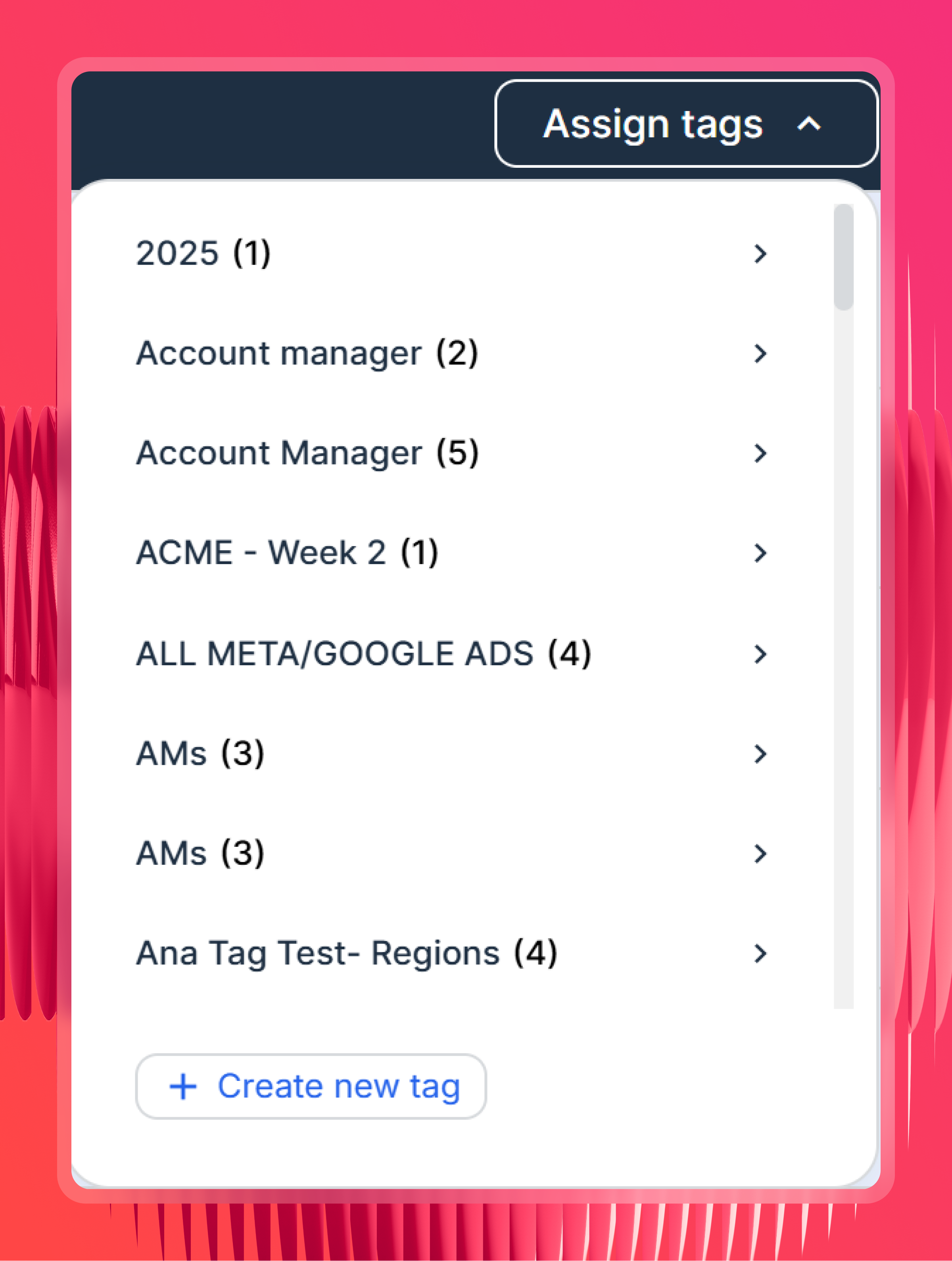
- Tag your sources (optional but useful) - label Meta Ads sources by client, region, or account manager so you can filter by those labels in Claude without spelling out which accounts to include every time.
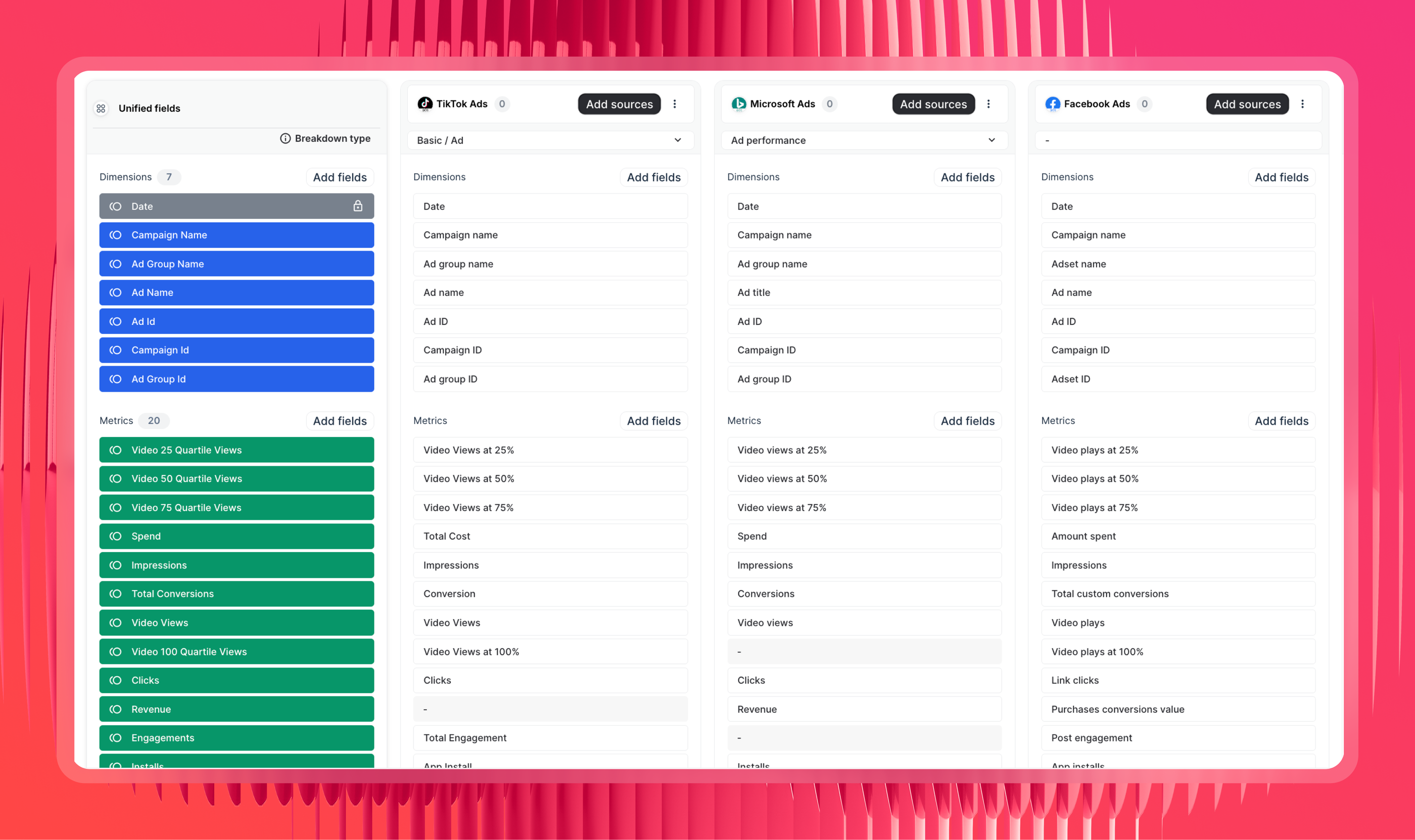
- Create Source Groups for similar channels - if you're running Meta Ads alongside Google Ads, TikTok Ads, or Microsoft Ads, source groups are a fast and easy to aggregate metrics like “Ad Spend” into a single unified source.
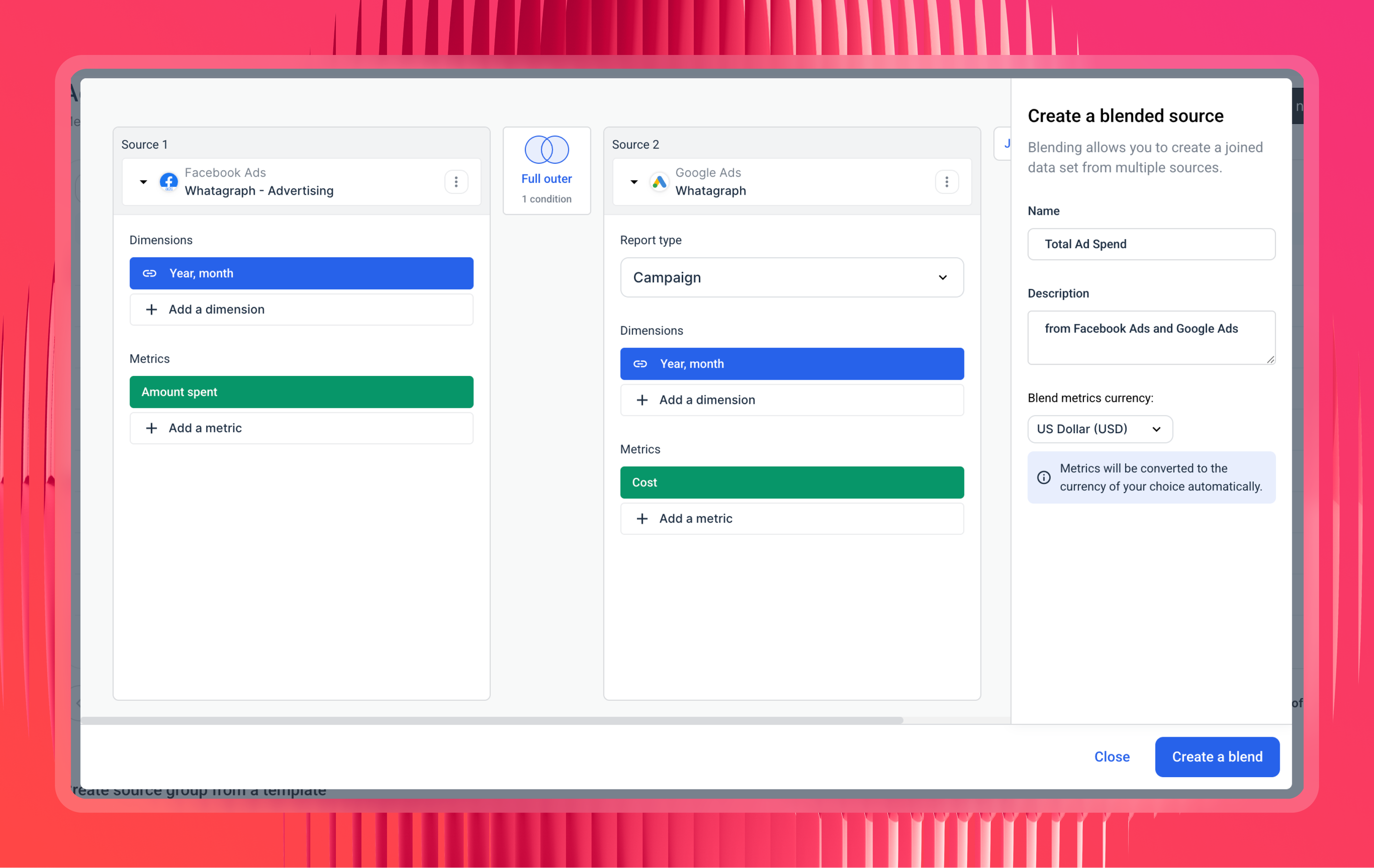
- Create data blends for different channel types - for channels that don't share the same report type, like Google Ads and Shopify or Google Ads and GA4, use a blend to merge them into one virtual source with a shared join key like date or campaign UTM.
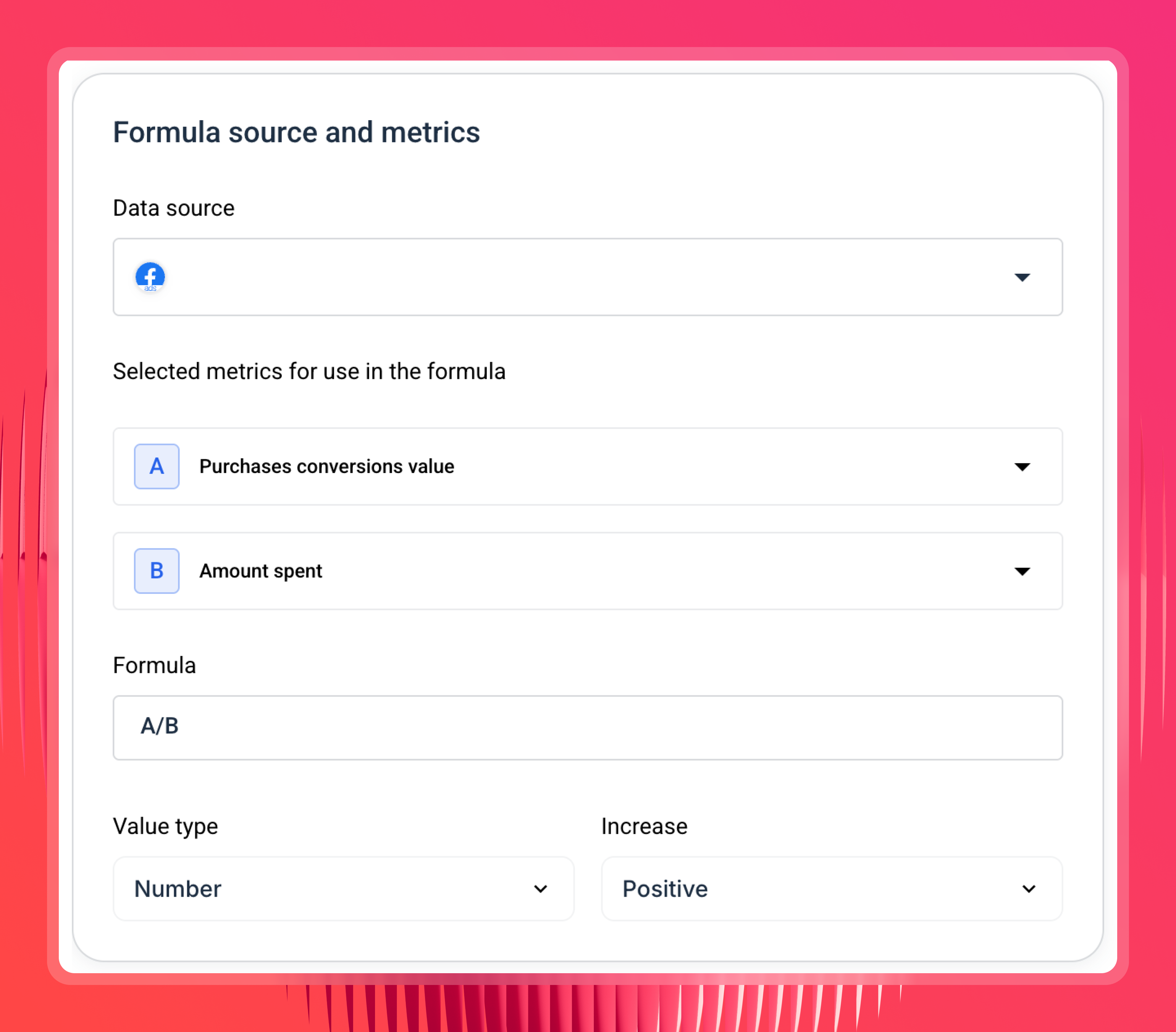
- Define your custom metrics and formulas - set your ROAS formula, what counts as a conversion, how you calculate CPA. Meta's conversion definitions have changed multiple times over the years - defining them once here means Claude always uses the right definition for your business, not whatever the API currently returns.
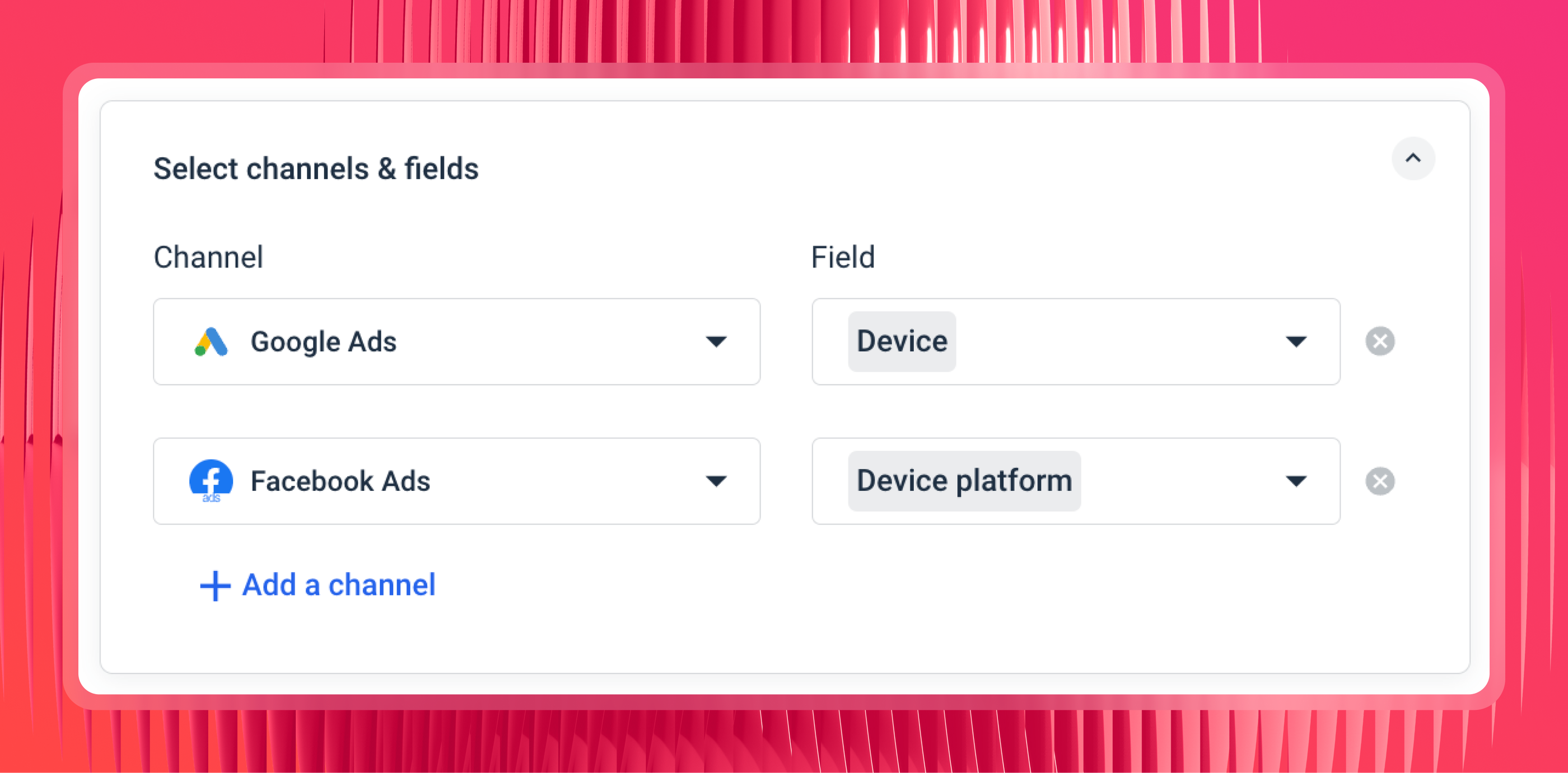
- Define custom dimensions if needed - if your Meta Ads campaign naming is inconsistent across clients or accounts, normalize it here. "Brand," "Brand_Exact," and "01_Brand_FB" can all show up as "Brand" when Claude queries them.
The more of this you set up upfront, the better Claude's answers will be.
Step 3: Add the Whatagraph MCP connector in Claude
Open Claude Settings, go to Connectors, and add a custom connector.
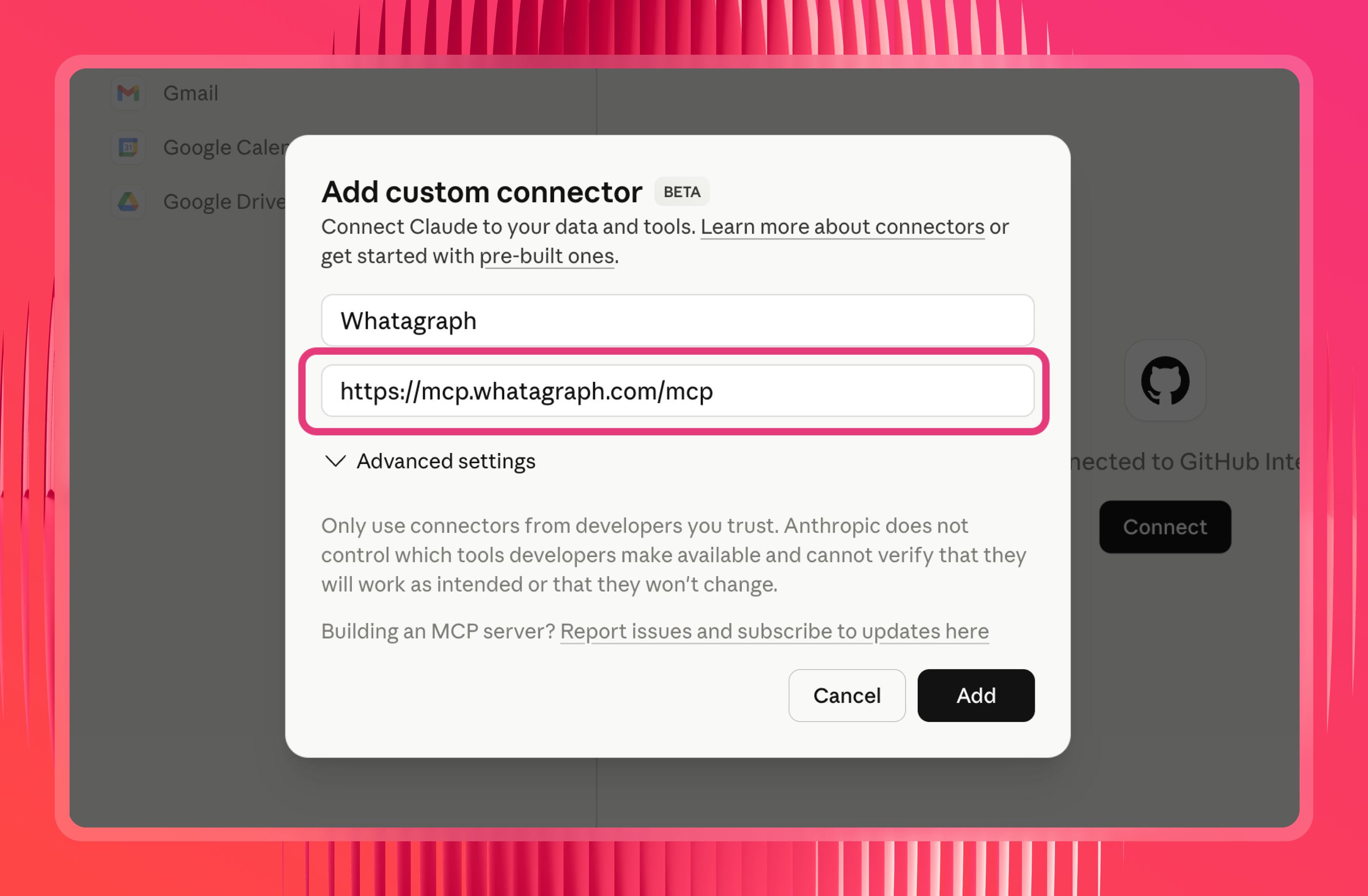
Paste in the Whatagraph MCP server URL: https://mcp.whatagraph.com/mcp
Step 4: Authorize the connection
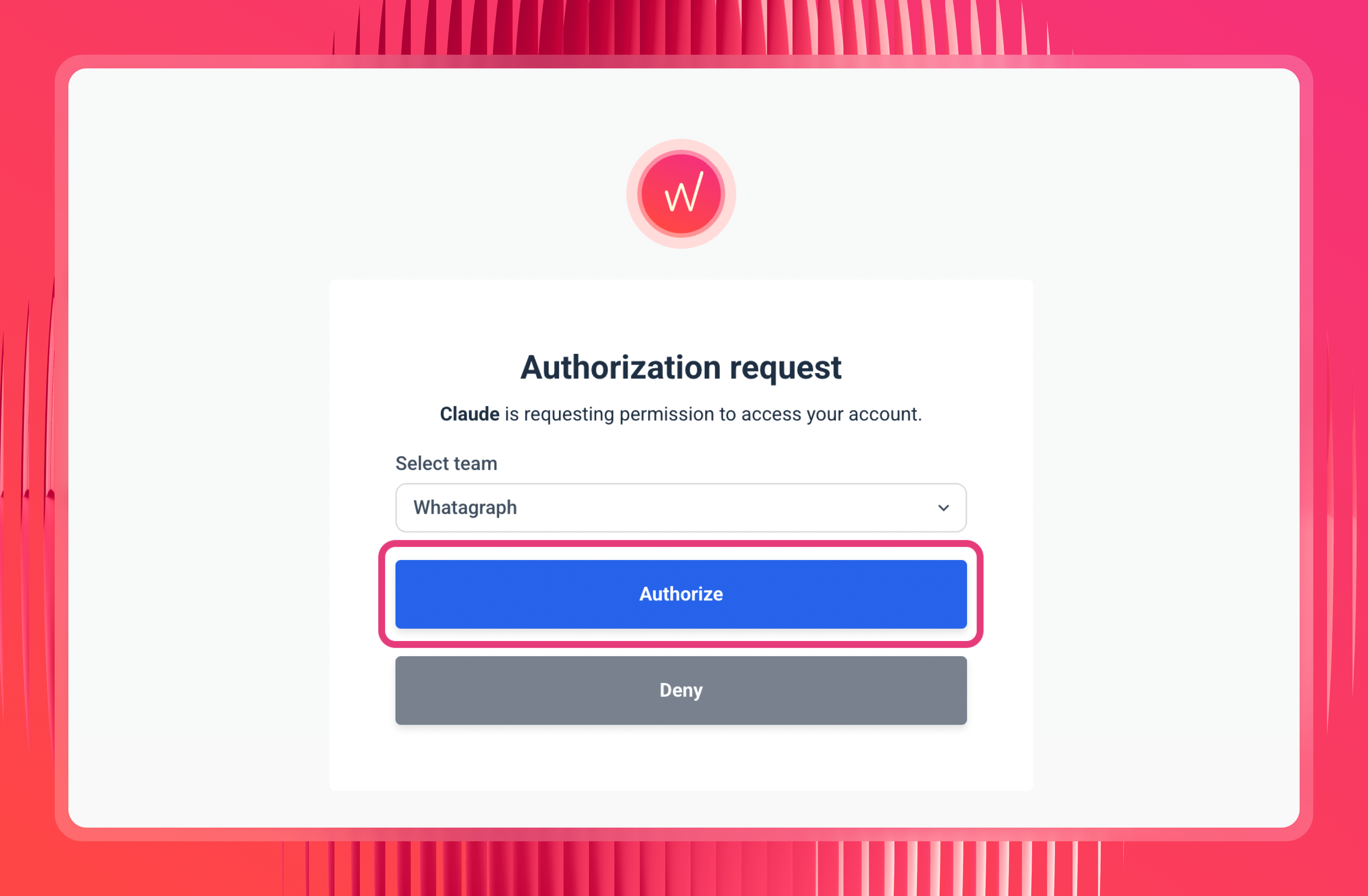
Claude will open a Whatagraph authorization page. Select the team you want Claude to access and click Authorize.
Step 5: Set permissions to "Always allow"
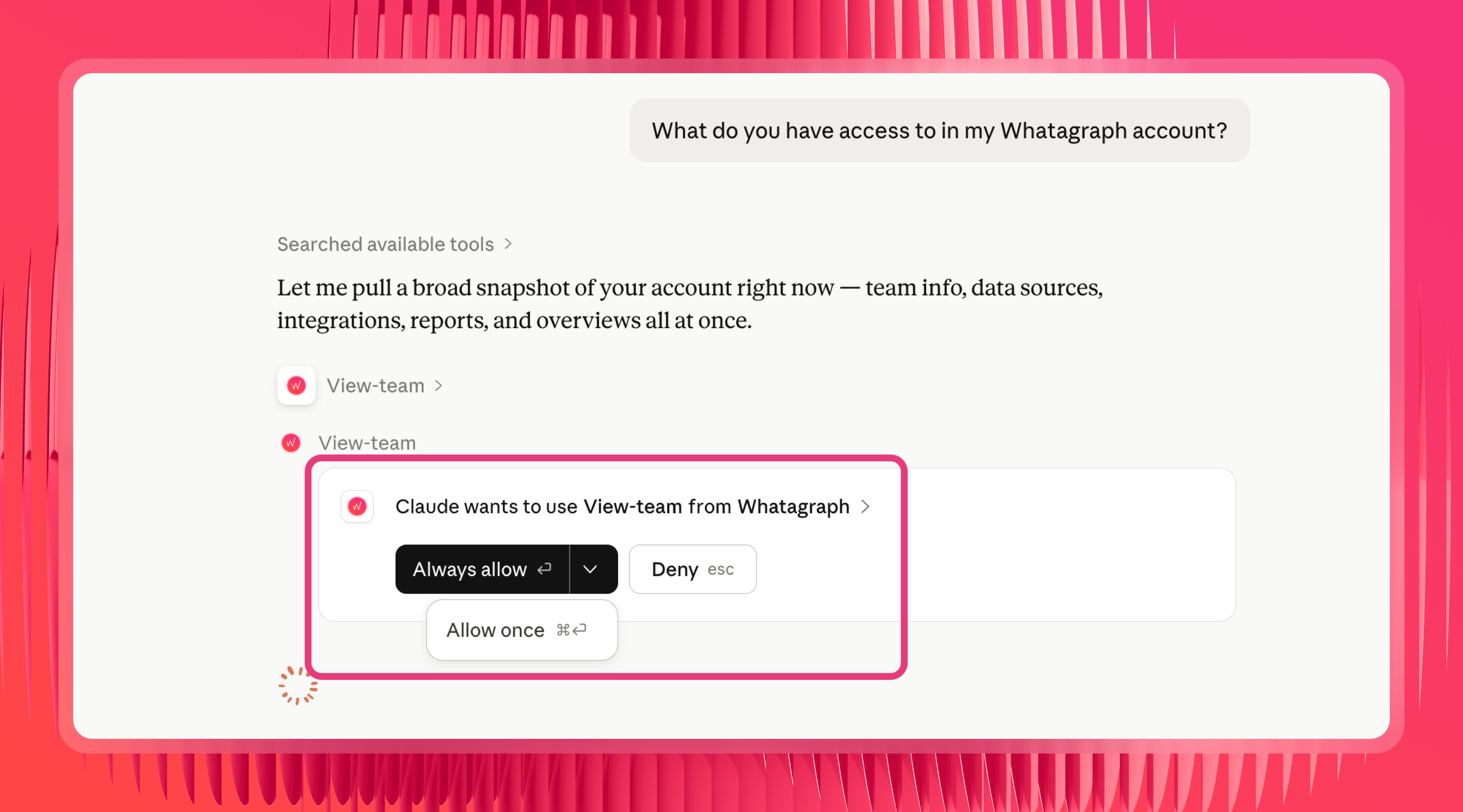
Once connected, you'll see tool permissions listed. Switch these to "Always allow" - otherwise Claude asks you to approve every single data pull, which can be annoying.
Step 6: Test it
Ask Claude: "What do you have access to in my Whatagraph account?" It should come back with your connected sources and account details.
Step 7: Add your own context with Claude skills (optional but recommended)
Whatagraph has a set of pre-built skills that are already embedded directly in the MCP. They're automatically available once you connect - no download or upload needed.
As Laurynas Arminas, Whatagraph's product manager, explains:
Skills don't unlock data that MCP can't already access. They change how the assistant works with that data. Each of Whatagraph's pre-made skills either sequences multiple tool calls in a logical order, or brings structured knowledge so you don't have to piece the picture together yourself.
What you can add on top is your own organizational context.
Create a custom Claude Skill that tells Claude things only you know: which Source Groups to query for which clients, what your Meta Ads ROAS formula is, which campaigns to prioritize, which conversion actions matter for each client.
As Arturas recommends:
Start a chat with Claude, get to the result you want, and then use Skill Creator to turn that into a reusable skill. That's where you embed the conversions you care about, the source group to query, the filters for campaigns that matter.
For even more pre-built skills, check out the Claude Skills Meta Ads repo by Pau Ferrer, Paid Media Specialist and marketing engineer.
Meta's MCP or Whatagraph’s MCP: which option is right for you?
It depends on what you're actually trying to do.
Use Meta's MCP if:
- You manage one or two Meta accounts and don't need Google Ads, GA4, or any other channel in the same answer.
- You want campaign management capabilities (with caution) - creating ad sets, editing budgets, managing catalogs - directly from Claude.
- You're doing one-off internal analysis where approximate numbers are good enough.
Use Whatagraph's MCP if:
- You manage Meta Ads across multiple clients and need cross-account aggregation in a single query.
- You need cross-channel answers - Meta Ads alongside Google Ads, LinkedIn, or GA4 - without Claude doing the reconciliation itself.
- You're putting numbers in front of clients and need them to match what's in the report every time.
- Your clients use different attribution windows, currencies, or conversion definitions and you need those normalized before Claude sees the data.
Meta Ads prompts library for Claude
Once your Meta Ads data is connected and your business logic is set up in Whatagraph, you can use these prompts to analyze your Facebook Ads campaigns with Claude.
When you ask Claude a question, it automatically calls the right tools behind the scenes to find and return your data - you never have to interact with them directly.
Finding wasted spend in Meta Ads
Use Claude to find wasted spend in Meta Ads faster than any manual report. Surface underperforming ad sets, high-CPA campaigns, and spend that isn't converting - without pulling exports.
Try these prompts:
- "Pull campaign_name, adset_name, spend, impressions, clicks, ctr, and actions for all active campaigns in the last 30 days. Which ad sets are spending the most with zero conversions?"
- "Which Meta Ads campaigns have a cost_per_result above [target CPA] this month? Rank by spend descending."
- "Find ad sets where spend has increased month-over-month but conversions have dropped. Show the delta."
- "Which campaigns have high reach and impressions but a ctr below 0.5%? Flag these as creative fatigue candidates."
- "Show me spend, cpm, ctr, and cost_per_result for all ad sets in the last 14 days. Which have the worst efficiency ratio?"
- "Evaluate my current budget allocation. Based on impression share, impression share lost to budget, and conversion rates, which campaigns should I shift budget away from to maximize total account revenue?"
- "Pull adset_name, spend, ctr, cost_per_result, frequency, and reach for all active ad sets in the last 30 days. Group by campaign. For each campaign: flag ad sets with frequency above 4 and ctr below 1% as likely fatigued, flag ad sets with cost_per_result more than 50% above the campaign average as underperformers, and flag ad sets with cost_per_result below target and spend below 20% of campaign budget as under-invested. Give me a prioritized list of actions."
Cross-account Meta Ads performance
Ask Claude for a Meta Ads performance summary across all clients in a single query. This only works reliably when accounts are normalized through Whatagraph's Source Groups - raw API connectors return per-account data with no shared logic.
Try these prompts:
- "Give me a Meta Ads performance summary across all client spaces: spend, impressions, clicks, ctr, conversions, and roas for the last 30 days."
- "Which client accounts have the best roas on Meta this month? Rank them."
- "Compare cost_per_result across all Meta Ads source groups this month vs. last month. Which clients are trending in the wrong direction?"
- "Which of my Meta Ads accounts are pacing ahead of budget this month, and which are behind?"
- "Show me total spend across all connected Meta Ads accounts for the last 7 days, broken down by client space."
- "Using Whatagraph MCP analyze the 90-day performance data for Google Ads. What are the top 3 campaigns driving the most conversions, and what do they have in common regarding ad copy and targeting?"
Ad-level creative performance
Use Claude to identify top-performing Meta Ads creatives and surface which ads are driving results - without pulling asset-level reports manually from each account. Meta-specific use case with no direct Google Ads equivalent.
Try these prompts:
- "Which Meta ads had the best ctr last week? Show spend, impressions, clicks, ctr, and cost_per_result for the top 10, broken down by ad_name."
- "Find ads with high spend but a ctr below 1%. These may need new creative."
- "Compare ctr and cost_per_result across my top 5 ads by spend for [Client Name] this month vs. last month."
- "Which ad_name values have the lowest frequency combined with the highest ctr? These are likely fresh creatives worth scaling."
- "Pull reach, frequency, ctr, and cpm for all active ads in the last 30 days. Flag any with frequency above 5 - those are likely fatigued."
- "Pull ad_name, spend, impressions, reach, frequency, ctr, cpm, and cost_per_result for all ads in [Client Name]'s account for the last 60 days. Identify the top 3 ads by cost_per_result efficiency. For each, tell me the frequency level, whether it's showing signs of fatigue, and whether it's worth increasing budget based on current cpm trends. Then identify the bottom 3 by the same metric and tell me whether to pause or test new creative."
Client-ready Meta Ads performance summaries
Use Claude to write a Meta Ads performance summary for clients in plain language - ready to drop into a report or use before a call. The output is only reliable enough to share externally when the underlying data has been normalized through Whatagraph first.
Try these prompts:
- "Using Meta Ads data for [Client Name] for this month vs. last month: compare spend, impressions, clicks, ctr, conversions, and cost_per_result. Write a 3-paragraph summary that leads with the headline result, explains the two biggest drivers of the change at campaign or ad set level, and gives one specific recommendation for next month."
- "Give me an executive summary of [Client Name]'s Meta Ads performance for the last 14 days."
- "What were the top 5 campaigns by conversions for [Client Name] this month?"
- "Summarize the key wins and issues across all Meta Ads sources in the [Space Name] space."
- "Which clients improved most week-over-week on Meta, and which declined? Show spend, conversions, and cost_per_result for each."
- "Pull Meta Ads data for [Client Name] for the last 90 days. Break performance into three 30-day periods. For each period show spend, conversions, cost_per_result, ctr, and roas. Identify the trend direction for each metric, flag any period where performance dropped more than 20% vs. the prior period, and give me two sentences on what likely caused each drop based on which metrics moved together."
Cross-channel paid media analysis
Build a cross-channel paid media performance report in Claude - a unified view across Meta, Google Ads, and other paid channels in a single query. This only works when all channel data is normalized through Whatagraph first - raw connectors return separate, unreconciled numbers per source.
Try these prompts:
- "How much have I spent across all paid channels in the last 30 days? Break it down by channel."
- "Give me a channel comparison: impressions, clicks, spend, and roas across Meta Ads, Google Ads, and LinkedIn for this month."
- "Which channel has the best cost_per_result right now across all connected paid sources?"
- "Fetch data from my [Blend Name] blend and show me combined paid performance for [Client Name] this month."
- "Which channels are improving and which are declining compared to last month? Show spend, conversions, and roas for each."
- "What percentage of total paid spend went to Meta vs. Google Ads vs. other channels this month?"
- "Compare last 3 months of data from Google Ads, Meta Ads, and TikTok Ads. Analyze spend, cpa, and conversions per channel in one view and tell me which channel has the worst cost-per-result and where I should shift budget."
- "Something looks off in our numbers this week. Check Google Ads, Facebook Ads, and GA4: did anything spike or drop significantly compared to last week? Give me a plain-English explanation of what happened and where to look first."
Account health and report auditing
Check the health of your connected Meta sources and audit reports before they go to clients.
Try these prompts:
- "Are there any broken or disconnected Meta Ads sources right now?"
- "Show me all Meta Ads sources that are failing and which client space they belong to."
- "Do I have any reports that aren't set up with automated delivery?"
- "Are there any sources in [Report Name] with missing or zero data?"
- "My Meta Ads spend in Whatagraph looks lower than in Ads Manager. Can you check the widget configuration for [Report Name]?"
- "Are there any filters applied to [Report Name] that might be excluding campaigns or ad sets?"
- "Show me a day-by-day breakdown of spend and conversions for the last two weeks so I can spot where the numbers diverge."
- “Run a full health check on [Client Name]'s Whatagraph setup. Check: are all Meta Ads sources connected and syncing? Are there any sources with zero data in the last 7 days? Is the report set up with automated delivery? Are there any widgets missing a date range? Are there spaces with no reports assigned? Give me a summary of what's broken, what's missing, and what needs attention before the next client call.”
Now, you’re all set! Get a demo of Whatagraph, start connecting Meta Ads to Claude, and get back answers you can trust.
Want a more personalized walkthrough? Book a demo with our team.
Published on Jun 05 2026
WRITTEN BY
YamonYamon is a Senior Content Marketing Manager at Whatagraph. With an eye for detail and a knack for always considering context, audience, and business goals to guide the narrative, she's on a mission to create genuinely helpful content for marketers. When she’s not working, she’s hiking, meditating, or practicing yoga.