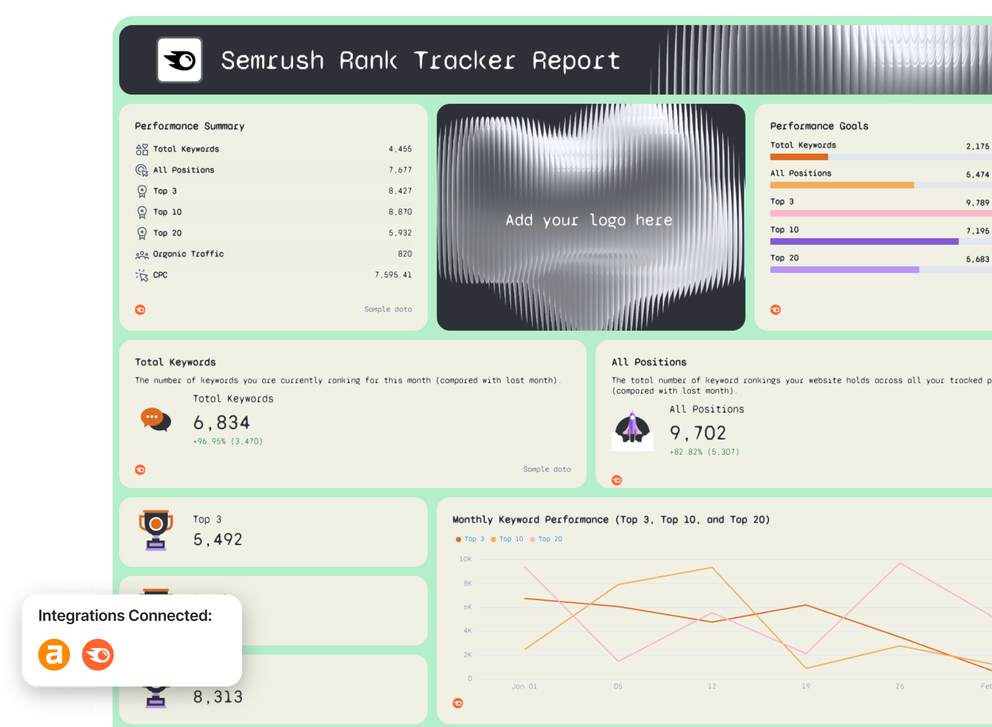








Free Rank Tracker Report Template

Use this rank tracker report template to pull your keyword rankings into one clear, stunning report.

Get actionable insights, act faster, and share reports your clients will love.

Rank Tracker Report Template - A Semrush rank tracker report showing performance summary.

Create Custom Rank Tracker Reports in Seconds

With Whatagraph IQ, just tell us what you need, and we'll build a stunning rank tracker report for you in seconds. No templates or manual setup needed.

How To Use Whatagraph’s Rank Tracker Report Template

What to Include in a Rank Tracker Report Template

Based on rank tracking reports created by SEO specialists on Whatagraph, here’s what we recommend you include in your rank tracker report template.

This structure works whether you’re reporting internally, to clients, or across multiple projects, and it scales far better than spreadsheets or basic rank trackers.

1. Goals, Benchmarks & Targets
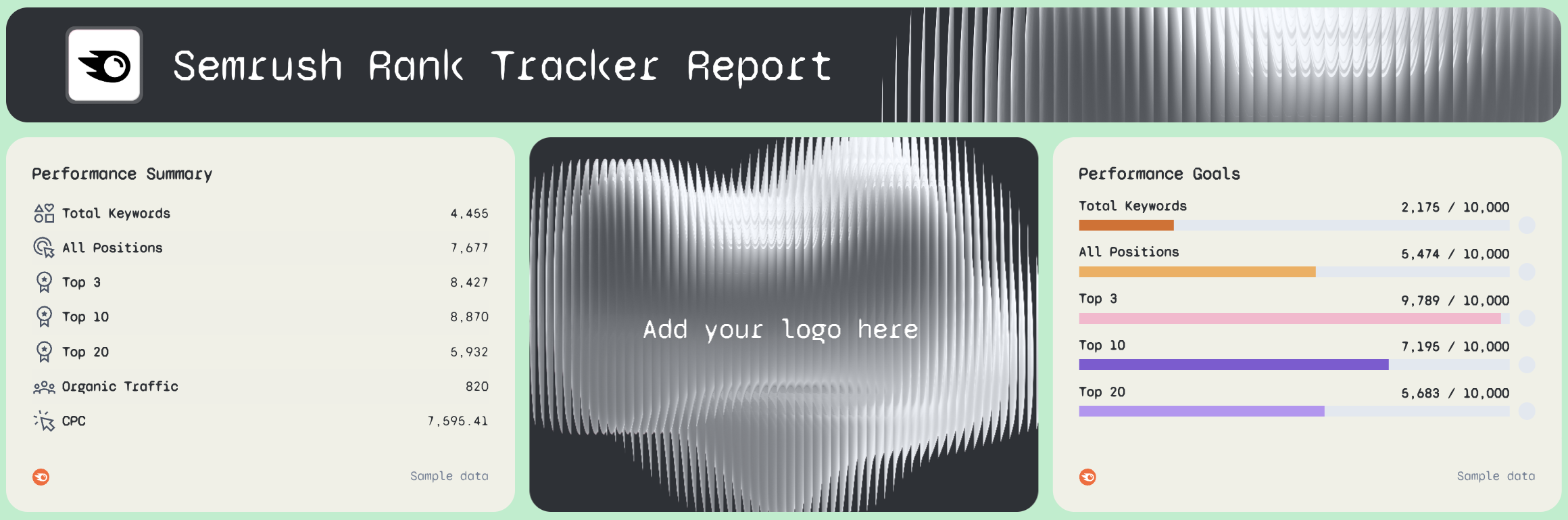
Rank Tracker Report - Semrush rank tracker report with performance summary and goals charts.

Add context by setting goals for:

  • Total keywords
  • Average position
  • Top 3 / Top 10 visibility
  • Organic traffic growth

Progress bars or goal widgets make SEO performance easy to track over time, and much easier to communicate.

2. Stakeholder-Friendly Summary & Next Actions
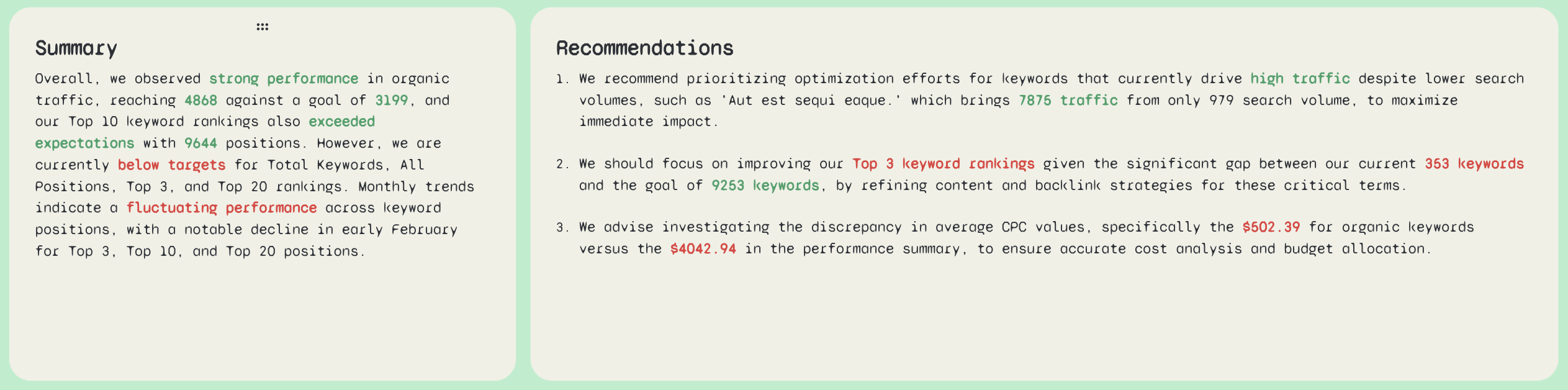
Rank Tracker Report Template - Summary - Two column document with summary and recommendations.

Next, include a short narrative layer:

  • Key wins and losses
  • At-risk keywords
  • Pages to optimize next
  • Clear next steps for SEO efforts

This gives stakeholders the key insights they need without having to dig through charts and numbers.

3. Top-Line SEO Performance Metrics
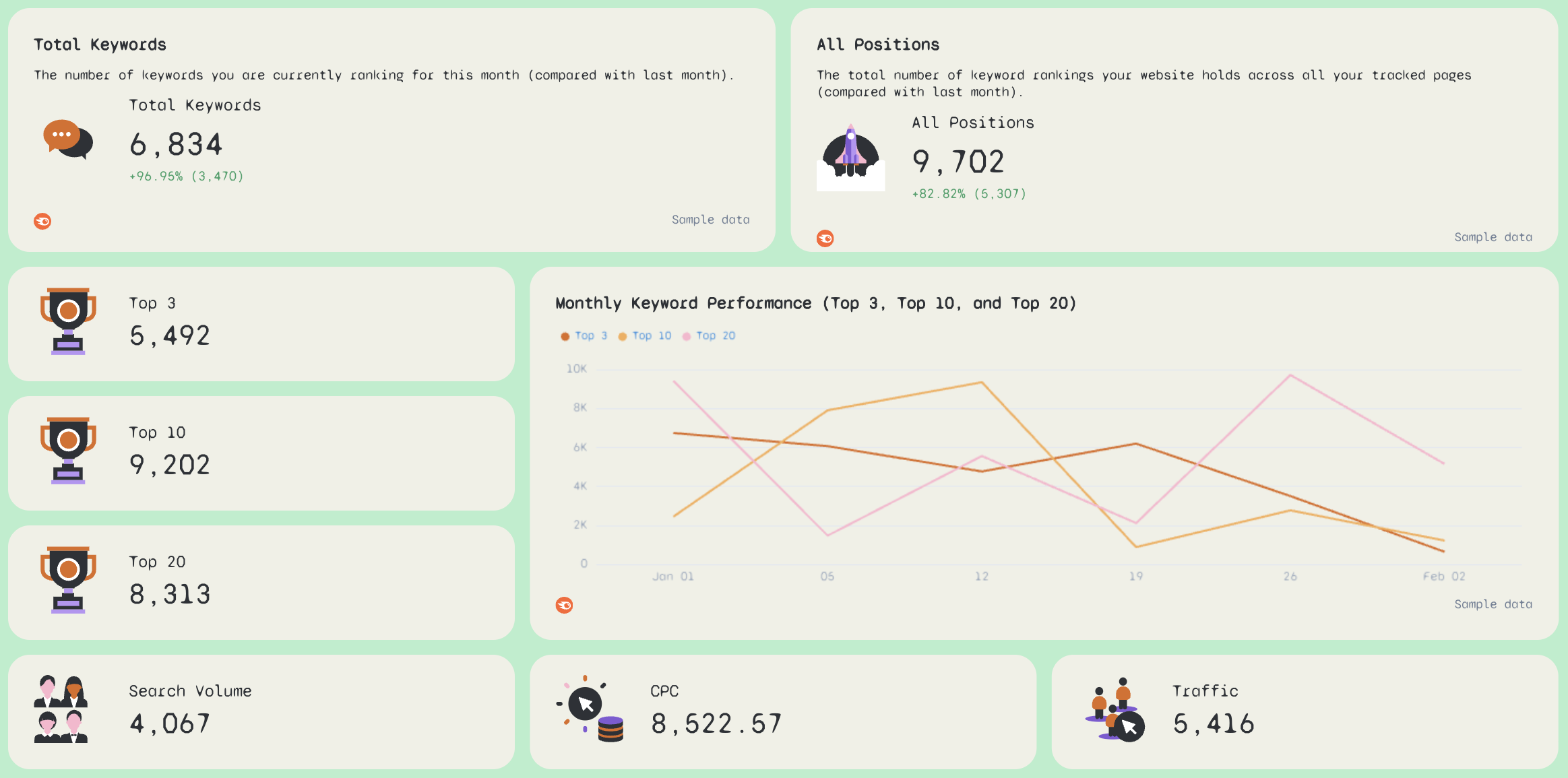
Rank Tracker Report Template - Dashboard showing keyword ranking performance with charts and metrics.Follow with high-level KPIs that summarize your SEO performance at a glance.

Include:

  • Total organic keywords
  • Average position
  • Organic traffic
  • Top 3, Top 10, and Top 20 keyword counts
  • Keyword ranking distribution
  • Rankings change vs previous period

These metrics give immediate visibility into search engine rankings and keyword performance, without forcing stakeholders to scan raw tables.

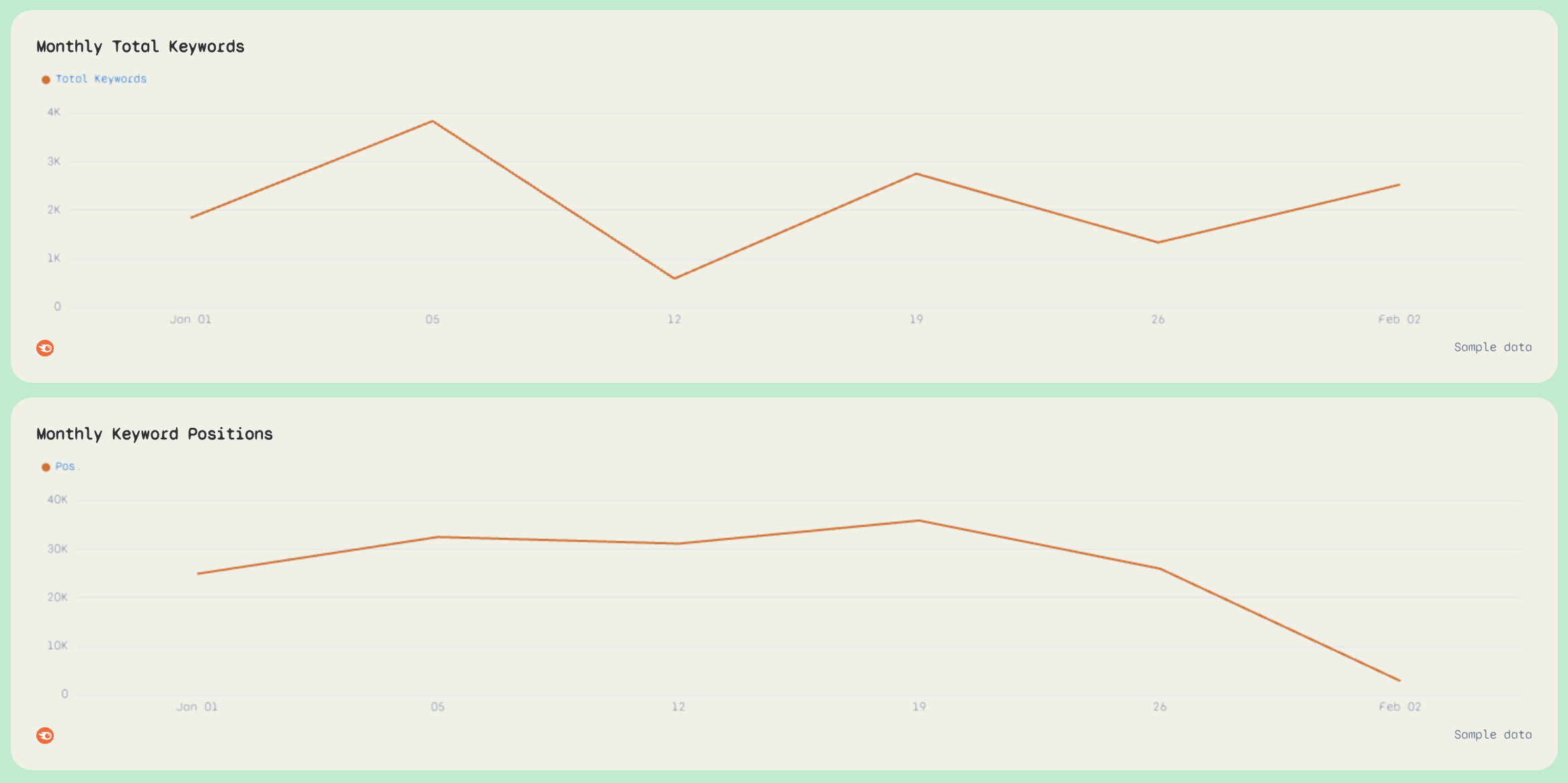
Rank Tracker Report Template - Keyword Ranking Trends - Two line graphs showing keyword performance over time.Next, visualize how rankings evolve.

Use:

  • Line charts for keyword position trends
  • Separate trend lines for Top 3, Top 10, and Top 20 keywords
  • Monthly or weekly rank tracking views

This helps explain why rankings change, not just that they changed—something spreadsheet-based rank tracking struggles with.

5. Ranking Distribution & SERP Visibility
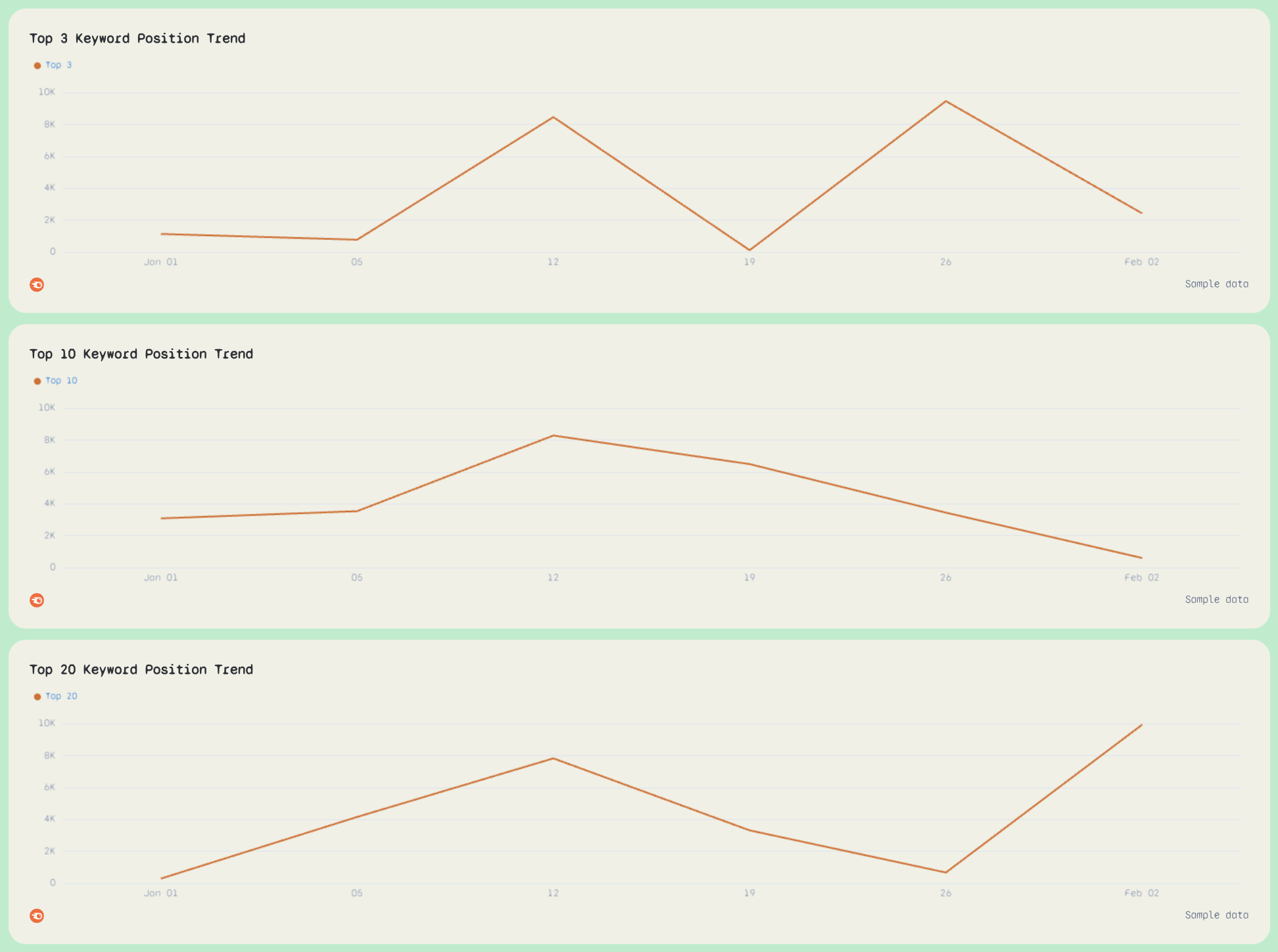
Rank Tracker Report Template - Three line graphs showing keyword position trends over time.

Show how your keywords are spread across the SERP.

Include:

  • Position buckets (1–3, 4–10, 11–20, etc.)
  • Visualizations that highlight movement between buckets
  • Average position trends

This is one of the most stakeholder-friendly ways to communicate SEO ranking progress.

6. Top Ranking Keywords Table
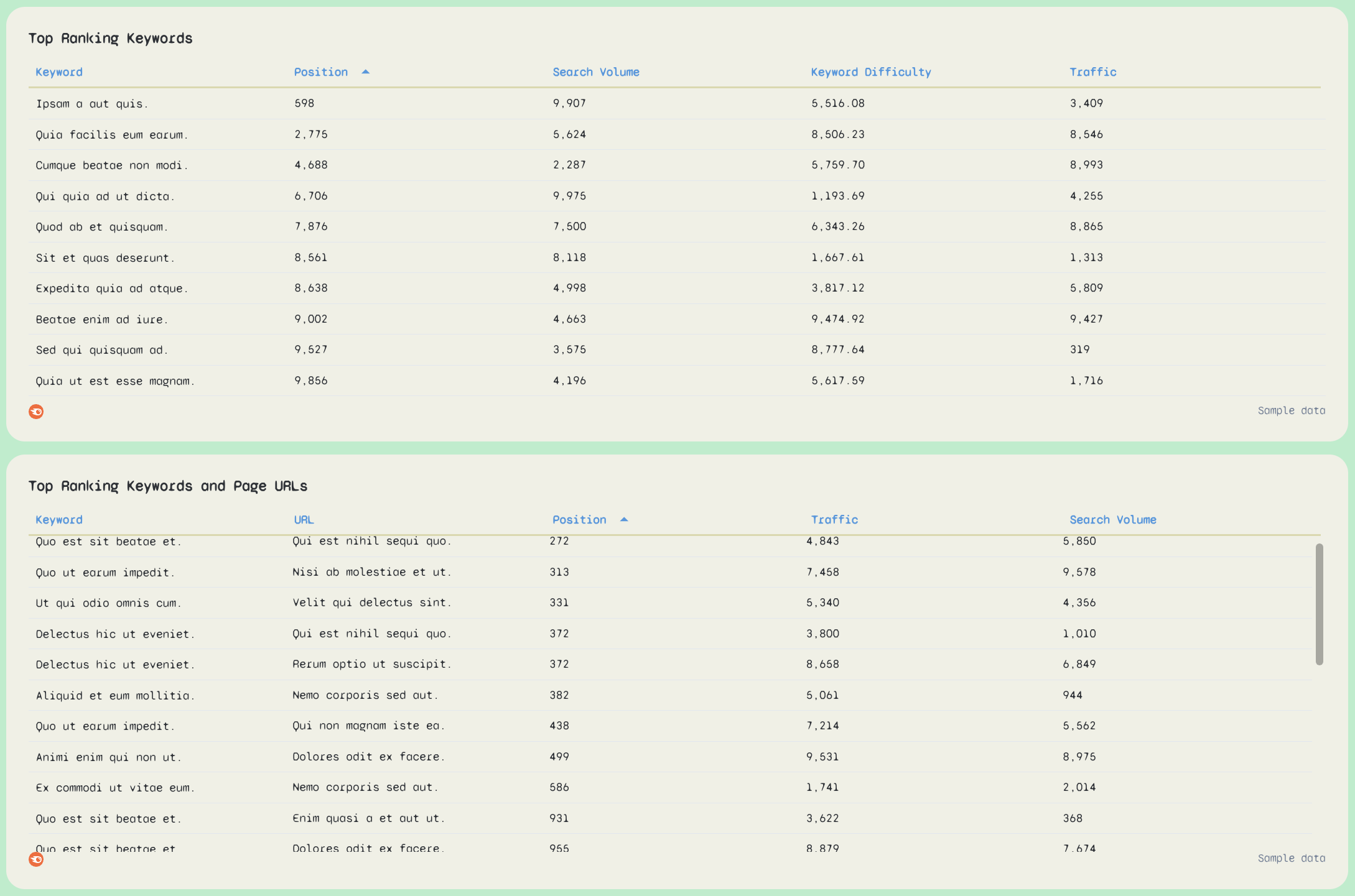
Rank Tracker Report Template - Top Ranking Keywords - Two tables showing keywords, URLs, and ranking data.Your rank tracker report template should always include a detailed keyword table.

Recommended columns:

  • Keyword
  • Keyword position
  • Search volume
  • Traffic
  • Keyword difficulty (if available)
  • Ranking change

This table supports keyword research, optimization planning, and SEO strategy decisions, all in one place.

7. Top Performing Pages & URLs
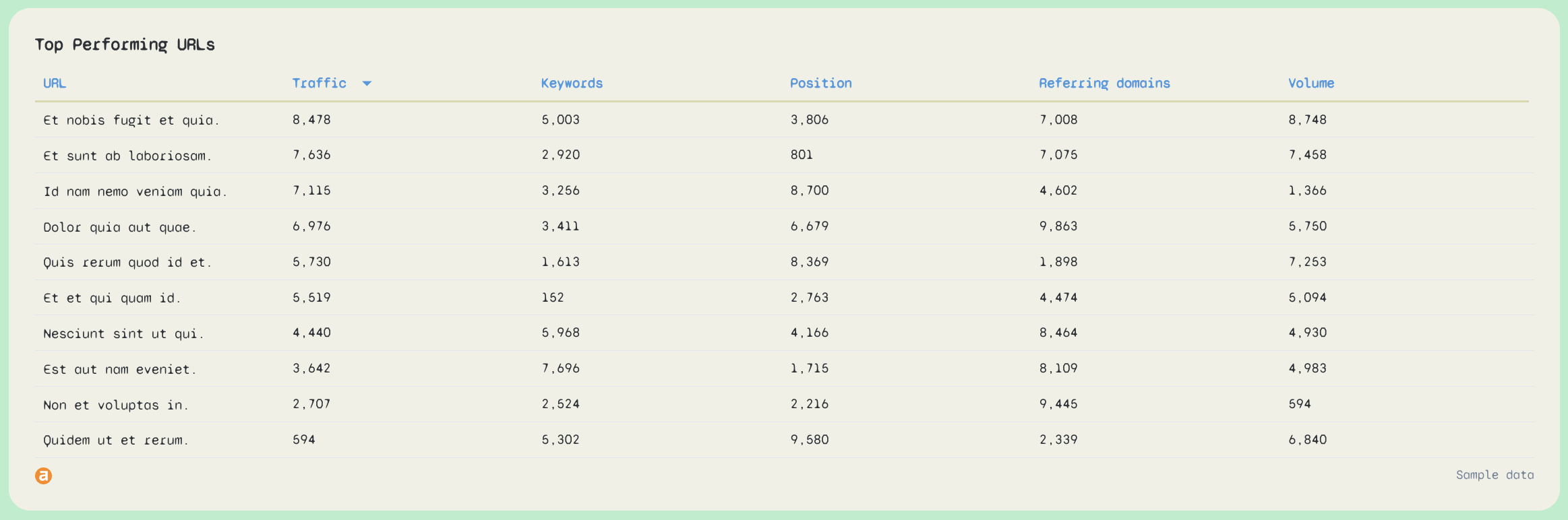
Rank Tracker Report Template - Top Performing URLs - A table with top performing URLs and metrics.

Rankings only matter if they drive results.

Include a URL-level table with:

  • Page URL
  • Traffic
  • Number of ranking keywords
  • Average position
  • Search volume
  • Referring domains (optional)

This connects ranking data to real business impact like organic traffic and conversions.

Connect All Your SEO and Marketing Data Sources in One Place

Bring all your data into one place with no-code, stable connectors that you don't need to babysit. 

Why Marketers Love Reporting on Whatagraph

Whatagraph’s AI saves time and energy for our marketing specialists. And the hours we’re saving is just pure profit.

Lars Maat

Lars Maat

Company Owner, Maatwerk Online

StarStarStarStarStar

Whatagraph is easy to use, visually attractive, and much smoother compared to tools like Looker Studio. It helped us not only get clients on board but also keep them within the agency.

Stef Oosterik

Stef Oosterik

Quality Manager @ Dtch. Digitals

StarStarStarStarStar

Whatagraph has become an essential partner for scaling our reporting, and my teams love it because it saves so much time. We’d recommend it to any team looking to automate data reporting and use AI for insights.

Danielle Roberts

Danielle Roberts

Director of Implementation & Support @ Rentable

StarStarStarStarStar

Whatagraph took us to the next level with our clients and within our team. Our relationships with clients have been amazing, and we’ve even been able to retain them longer.

Kim Strickland

Kim Strickland

Digital Marketing Specialist @ Peak Seven

StarStarStarStarStar

Frequently Asked Questions

Have more questions? We answered them here.

What is the best way to display ranked data?

The best way to display ranked data is to combine high-level visuals with detailed tables—not rely on raw exports or spreadsheets.


Based on the rank tracker report template above, the most effective setup is:


- Top-line KPIs showing keyword rankings, average position, and rankings change


- Trend charts that visualize keyword position over time (Top 3, Top 10, Top 20)


- Position distribution views to show SERP visibility at a glance


- Detailed tables for keyword performance and page-level results


This mix of visualizations and tables makes ranking data easy to understand for both SEO specialists and non-technical stakeholders, while still supporting deep analysis and SEO strategy decisions.

What is a ranking report?

A ranking report is an SEO report that tracks how a website ranks for specific keywords in search engine results over time.


A good ranking report typically includes:


- Keyword position and rankings change


- Search volume and keyword difficulty


- SERP visibility (Top 3, Top 10, Top 20)


- Organic traffic and CTR context


- Trends that show whether SEO efforts are working


Modern ranking reports go beyond positions alone and connect keyword ranking data with website’s performance, organic traffic, and business metrics.

What is a rank tracker template?

A rank tracker template is a pre-built report template designed to track, visualize, and communicate keyword rankings consistently.


Instead of rebuilding reports in Google Sheets or Looker Studio every month, a rank tracker template gives you:


- A ready-made structure for rank tracking


- Pre-defined charts, tables, and key metrics


- Reusable layouts for clients, projects, or locations


- Automated SEO reporting workflows


In short, it’s a faster, more reliable way to track rankings and report on SEO performance.

How to create a keyword ranking report?

The easiest and fastest way is to use a dedicated SEO reporting tool like Whatagraph.


Here’s how to do it step by step:


Step 1: Use the rank tracker report template


Start with Whatagraph’s ready-made rank tracker report template. It’s free to use and already structured with best-practice SEO reporting sections, charts, and tables.


Or you can also use this keyword ranking report template


Step 2: Connect your data sources


Connect your existing SEO tools like Ahrefs, Semrush, and Google Search Console using native connectors. You can also blend in Google Analytics data to connect rankings with organic traffic, CTR, and conversions.


Step 3: Customize the report


Drag and drop widgets, add new tables, or create additional tabs. Filter ranking data by search engine, device, location, brand vs non-brand, or specific keywords. Create custom metrics and dimensions without code.


Step 4: Style the report with Whatagraph IQ


Upload a screenshot of your brand book—or type a prompt like “make this look clean and minimal.” Whatagraph IQ automatically applies fonts, colors, and styles across the entire dashboard.


Step 5: Automate delivery


Schedule the rank tracker report to send automatically on a specific day and time. Share it as a white-label PDF, Excel file, CSV export, or a live, password-protected link.

Why use this rank tracker report template?

Whatagraph’s rank tracker report template is built for how SEO teams actually work.


It helps you:


- Centralize ranking data from multiple SEO tools


- Track keyword performance and rankings change in one dashboard


- Visualize SERP visibility instead of scanning raw tables


- Tie keyword rankings to organic traffic and SEO results


- Automate recurring SEO reporting and save hours every month


It’s a practical alternative to spreadsheets, basic rank trackers, and manual Looker Studio dashboards.

What should be included in a rank tracker report template?

Based on rank tracking reports created by SEO specialists on Whatagraph, a strong template should include:


- Top-line KPIs (total keywords, average position, Top 3 / Top 10 / Top 20)


- Keyword ranking trend charts


- Position distribution and SERP visibility views


- A detailed keyword ranking report table


- Page-level performance tables (URLs, traffic, keyword count)


- Search volume, CTR, and organic traffic context


- Clear summaries and next actions


This structure supports both high-level reporting and deep SEO analysis.

How can I customize a rank tracker report template for my needs?

Rank tracker report templates in Whatagraph are fully customizable.


You can:


- Customize fonts and colors manually or with Whatagraph IQ


- Create custom SEO metrics, dimensions, and blends


- Add headers, footers, icons, and images anywhere in the report


- Drag and drop charts, tables, and visualizations


- Add or remove rows, sections, and entire tabs


- Filter ranking data by device, location, or search engine


- Segment keywords by brand, non-brand, or priority


This makes it easy to tailor rank tracker reports for clients, internal teams, or different SEO workflows—without rebuilding them from scratch.

How can I generate a rank tracker report using a template?

To generate a rank tracker report using a template in Whatagraph:


1. Choose the rank tracker report template


2. Connect your SEO data sources (Ahrefs, Semrush, Google Search Console)


3. Review and customize charts, tables, and key metrics


4. Apply branding and styling


5. Automate delivery or share a live report link


From there, your keyword ranking report updates automatically—so you can focus on optimizing rankings, not maintaining reports.