






Free eCommerce Report Template

Use this ecommerce report template to connect marketing spend to revenue in one clear view.

Track performance across channels and make faster decisions without stitching data together.

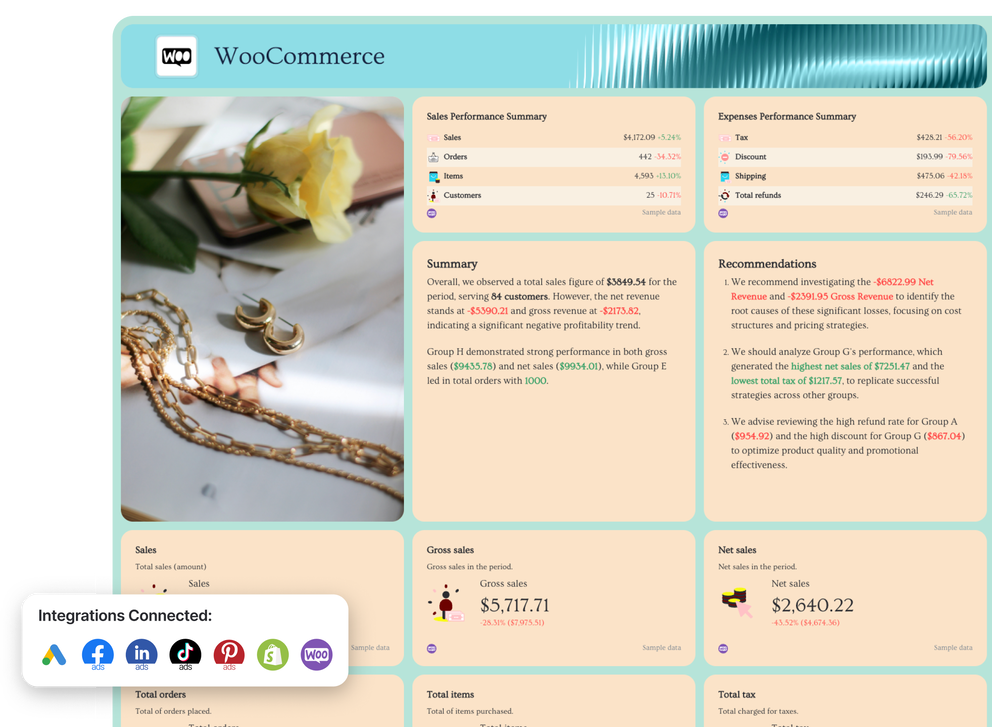
Ecommerce Report Template - Dashboard of sales and expense performance summaries and recommendations.

Create Custom eCommerce Reports in Seconds

With Whatagraph IQ, just tell us what you need, and we'll build a stunning eCommerce marketing report for you in seconds. No templates or manual setup needed.

How To Use Whatagraph’s eCommerce Report Template

What to Include in an Ecommerce Report Template

Based on ecommerce reports built by marketers on Whatagraph, a strong ecommerce report template should answer one core question:

Is our marketing driving profitable growth for the online store, and where should we act next?

The structure below balances executive clarity with channel-level depth, replacing fragmented reporting tools, Google Sheets, and Looker Studio dashboards with one unified, automated view.

1. Overview

This section gives stakeholders a fast health check of overall ecommerce performance across all paid channels. It’s designed so founders, executives, and clients can understand results at a glance before diving deeper.

What to include

  • KPI tiles / widgets
    • Total ad spend
    • Total revenue
    • ROAS
    • Conversion rate
    • Average order value
  • Charts
    • Trend line: ad spend vs total revenue
    • Bar or stacked chart: revenue by marketing channel
  • Breakdowns
    • Facebook Ads, Google Ads, TikTok Ads, LinkedIn Ads, Pinterest Ads
  • Text blocks
    • Performance summary
    • Key wins, losses, and recommendations

2. Facebook Ads

This section focuses on how paid social contributes to revenue, customer acquisition, and ROAS.

What to include

  • Metrics
    • Ad spend, clicks, impressions
    • Conversion rate, purchases, revenue
    • ROAS and customer acquisition cost
  • Charts
    • Spend vs revenue trend
    • ROAS by campaign
  • Tables
    • Top campaigns by revenue and ROAS
    • Underperforming campaigns by cost

This section shows how high-intent traffic from search drives ecommerce revenue.

What to include

  • Metrics
    • Spend, clicks, CPC
    • Purchases, revenue, ROAS
    • Conversion rate by campaign
  • Charts
    • Revenue and ROAS trends
  • Tables
    • Top-performing campaigns and keywords
    • Campaign performance by device or country

4. LinkedIn Ads

This section is especially relevant for higher-AOV or B2B-leaning ecommerce brands.

What to include

  • Metrics
    • Spend, impressions, clicks
    • Conversions and revenue (where applicable)
  • Charts
    • Spend vs conversion trend
  • Tables
    • Campaign-level performance

5. TikTok Ads

This section highlights how short-form video drives discovery, demand, and sales.

What to include

  • Metrics
    • Spend, impressions, clicks
    • Purchases, revenue, ROAS
  • Charts
    • Spend vs revenue over time
  • Tables
    • Top-performing TikTok campaigns

6. Shopify

This section connects marketing activity to actual store performance using Shopify data.

What to include

  • Metrics
    • Total revenue
    • Orders and conversion rate
    • Average order value
  • Charts
    • Revenue and orders over time
  • Tables
    • Top products by revenue
    • Products impacting AOV

7. WooCommerce

For brands running on WooCommerce, this section mirrors the Shopify view with platform-specific data.

What to include

  • Metrics
    • Revenue, orders, conversion rate
    • Refunds (if available)
  • Charts
    • Revenue trends
  • Tables
    • Best- and worst-performing products

Why This Ecommerce Report Template Structure Works

This structure helps teams:

  • Replace fragmented analytics reports with one ecommerce dashboard
  • Pull trusted ecommerce data from GA4, ad platforms, and commerce tools
  • Automate recurring reporting with real-time updates
  • Turn raw metrics into actionable insights
  • Align marketing strategies with revenue, retention, and growth

Whether you’re running a single ecommerce business or managing dozens of clients, this template supports clarity, scale, and confident optimization.

Connect All Your eCommerce and Marketing Data Sources in One Place

Bring all your eCommerce and marketing data into one place with no-code, stable connectors that you don't need to babysit. 

Why Marketers Love Reporting on Whatagraph

Whatagraph's AI is saving so much time and energy for our marketing specialists. We now have more time to focus on strategic things that help both our agency and our clients grow.

Lars Maat

Lars Maat

Co-Founder @ Maatwerk Online

StarStarStarStarStar

Whatagraph took us to the next level with our clients and within our team. Our relationships with clients have been amazing, and we’ve even been able to retain them longer.

Kim Strickland

Kim Strickland

Digital Marketing Specialist @ Peak Seven

StarStarStarStarStar

Whatagraph is easy to use, visually attractive, and much smoother compared to tools like Looker Studio. It helped us not only get clients on board but also keep them within the agency.

Stef Oosterik

Stef Oosterik

Quality Manager @ Dtch. Digitals

StarStarStarStarStar

Whatagraph has become an essential partner for scaling our reporting, and my teams love it because it saves so much time. We’d recommend it to any team looking to automate data reporting and use AI for insights.

Danielle Roberts

Danielle Roberts

Director of Implementation & Support @ Rentable

StarStarStarStarStar

Frequently Asked Questions

Have more questions? We answered them below.

What is an ecommerce report?

An ecommerce report is a marketing report that shows how traffic, campaigns, and customer behavior translate into sales and revenue for an online store. 


It combines ecommerce data from tools like Google Analytics 4, Shopify, WooCommerce, and ad platforms into a single view of store performance.


A good ecommerce report connects digital marketing activity—such as Facebook Ads, Google Ads, SEO, email marketing, and social media—to outcomes like total revenue, conversion rate, and customer lifetime value, helping teams understand what’s driving the bottom line.

What key metrics should be included in an ecommerce report template?

An effective ecommerce report template should focus on metrics that explain both revenue and efficiency. Common key metrics include:


- Total revenue, orders, and sales performance


- Conversion rate, checkout completion, and cart behavior


- Average order value and product contribution


- Ad spend, ROAS, and customer acquisition cost


- Channel performance across marketing channels (paid search, paid social, email, SEO)


Together, these KPIs give a complete picture of e-commerce performance, not just clicks or impressions.

How can I create an effective ecommerce report template?

Start by defining what decisions the report should support—budget allocation, campaign optimization, or growth planning. 


A strong template uses a clear structure: an executive overview, channel-level breakdowns, and store performance sections that highlight actionable insights.

To scale reporting, use tools that automate data collection from core data sources like Google Analytics 4, Shopify, WooCommerce, Facebook Ads, Google Ads, and email platforms. 


Replace manual Google Sheets, Looker Studio, or fragmented dashboards with a unified ecommerce dashboard that updates in real-time, supports white-label reporting if needed, and makes it easy to optimize marketing strategies based on reliable performance data.