10 AI marketing workflows from real marketing agencies we talked to
An AI marketing workflow is a recurring job that runs on a schedule, with an AI agent doing the tasks and marketers adding the judgement on top.
I watched calls with over 30 marketing agencies building AI marketing workflows inside Whatagraph and compiled their use cases in this article.
One agency cut reporting time by over 50% with AI agents and use that time to deliver faster, deeper proactive analysis to clients. Another agency also got 150+ hours back a month for their specialists to focus on strategic tasks.
But one thing is unanimous across all marketing agencies: human specialists are still in the loop at every stage, from building agents to reviewing the output, and making judgements based on what the agents find. AI is just a way to reduce the time to get there faster.
If you want to see the workflows, skip straight to them. If you want to build one right away, start here.

Sep 24 2026●10 min read


What is an AI marketing workflow and how is it different from prompting on LLMs?
As we mentioned, an AI marketing workflow is a recurring job that runs on a schedule or a trigger, with AI agents doing the tasks and a person approving what matters.
Some examples include:
- Reporting that builds itself on a set day each month
- Budget monitoring that tells you when spend goes off track
- A daily check across your accounts that flags what changed
- Regular audits of creative, content or account health
- Researching keyword and fan-out queries for your SEO
This is different from opening up Claude and telling it what you want to do. Here are the key differences:
| Prompting Claude or ChatGPT | AI-powered workflows | |
|---|---|---|
| Who starts it | You, every time | Nobody. It runs on a schedule or a trigger |
| Context | You re-explain it in each new chat | Stored once, applied on every run |
| Who can use it | Whoever built the chat | Anyone on the team |
| Data | Whatever you paste or connect that session | Your own marketing data, with your definitions |
| Output | An answer in a chat window | A built report, an updated widget, an alert in your channel |
| Consistency | Depends how you phrased it today | Same steps, same format, every run |
| Control | You act on what it says | Permissions per action, approval before anything changes |
This is a similar concept to “agentic marketing” where you build AI agents to automate tasks and just input your guidance and check the work wherever necessary.
But this all seems abstract to you probably, and we agree. In the next sections, we’ll go through how real marketing agencies are using artificial intelligence for marketing automation.
How do marketing agencies use AI agents to automate marketing workflows?
Marketing agencies are using AI agents to automate tedious, repetitive marketing tasks like creating monthly reports, writing commentary, pacing budget, auditing client’s accounts and more.
These tasks are inevitable, but take up so much of your time and mental energy that you don’t have the space to be proactive and for more strategic, human tasks like connecting with stakeholders and answering ad-hoc questions from clients and teams.
A Director of Analytics from a US-agency told us:
“If the agents can automate regular monthly reporting that could exponentially save us time. This gives us the time to go to meetings, connect with stakeholders, answer ad-hoc questions, and do the more human and strategic parts of the job.”
Below, I’ll share 10 ways that real marketing agencies are automating marketing workflows with AI, specifically IQ Agents in Whatagraph.
IQ Agents work off of a governed data foundation you build on Whatagraph, and they automate marketing operations, from writing commentary in reports to sending audit digests to your inbox.
Just describe the workflow you want to automate in plain language, and the agents work autonomously even with your laptop closed. IQ Agents are also “multiplayer” by default, you can share them across the entire organization and someone on the team can use them to do your work while you’re on PTO.
Since IQ Agents opened for early access (explore IQ Agents), I’ve watched over 30 calls with our customers who have been using it for automating their marketing workflows. I anonymized their names and companies (except where I got explicit consent to publish).
Here’s a summary table:
| Workflow | Doing it manually | With an agent | Human checkpoint |
|---|---|---|---|
| Automating monthly client reporting | 10-15 hours for each report with with some reports only going out to clients in week four | 1-2 hours per report, with specialist review included | The analytics lead reads each report and sends the agent back in |
| Writing commentary in your brand guidelines | Analysis in Claude, commentary pasted into reports by hand, all in one specialist's account | 43 reports shipped by the managing director while the specialist was on holiday. 150+ hours saved for specialists on writing commentary | The agent shows its plan first, and a person reviews before send |
| Preparing weekly reports and optimizations | Every report copied forward each week, then waiting on specialists for optimizations | Reports duplicated and filled on Sunday, optimizations written by a second agent | Specialists check every report on Monday; agents don't write to ad accounts |
| Pacing budget and setting alerts | A spreadsheet someone has to keep checking, with no alerts | Spend checked against the cap automatically on the 18th, agent created in under a minute | The agent flags; people change spend |
| Monitoring every account every day | Nobody can look at 200-plus campaigns every morning | A 9am audit of campaigns, ads, creatives and connections, ready before work starts | The agent reports; people decide what to pause or fix |
| Onboarding a new client | The same setup steps for every client, done by hand across multiple tabs | Source connected, tagged, and report built and filed from one prompt in about two minutes | Someone checks the report before the client sees it |
| Bulk editing across dozens of reports | Half a day to change 50 reports by hand | 72 reports updated in 18 seconds, with a snapshot of each saved first | Tested on two reports and checked before the rollout |
| Conducting creative analysis | You can see which creative won, but working out why takes half an hour per creative | The reason behind each result, plus a weekly list of LinkedIn creatives to replace | The team decides what creative gets made next |
| Running ad-hoc analysis | A couple of hours across multiple dashboards, so it goes in the backlog | Affected campaigns scoped across 15 clients in 10 minutes | You decide what it means and what changes |
| Mapping keywords and AI fan-out queries | A few hours of the same research steps for every page | A keyword and fan-out CSV in 13 seconds | The agent stops and asks when two keywords compete |
1. Automating monthly client reporting
The workflow: produce client's monthly performance report, including the commentary, on a schedule
This one came from a US communications agency where a two-person analytics team covers around 15 clients. Every month they used to spend 10 working days just to create reports and some clients would only get theirs in week four of the following month. Any work that wasn't reporting was deprioritized.
To cut down reporting time, the Director of Analytics built a specialist agent per client in Whatagraph in plain language that would:
- Create monthly performance reports for each client on a schedule
- Analyze insights and write key takeaways on a schedule and ad-hoc
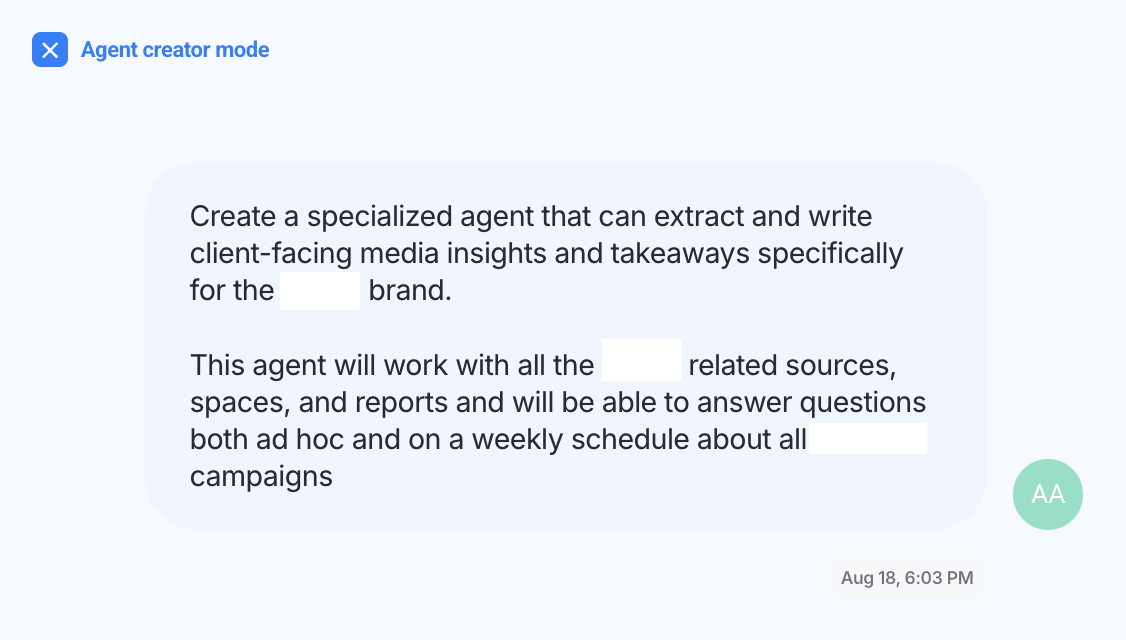
Each agent was pointed at that client's past reports, connected data sources, metric definitions and brand theme. Then, the analytics lead set up a schedule for the agent to build reports for each client including the narratives on the 2nd of every month.
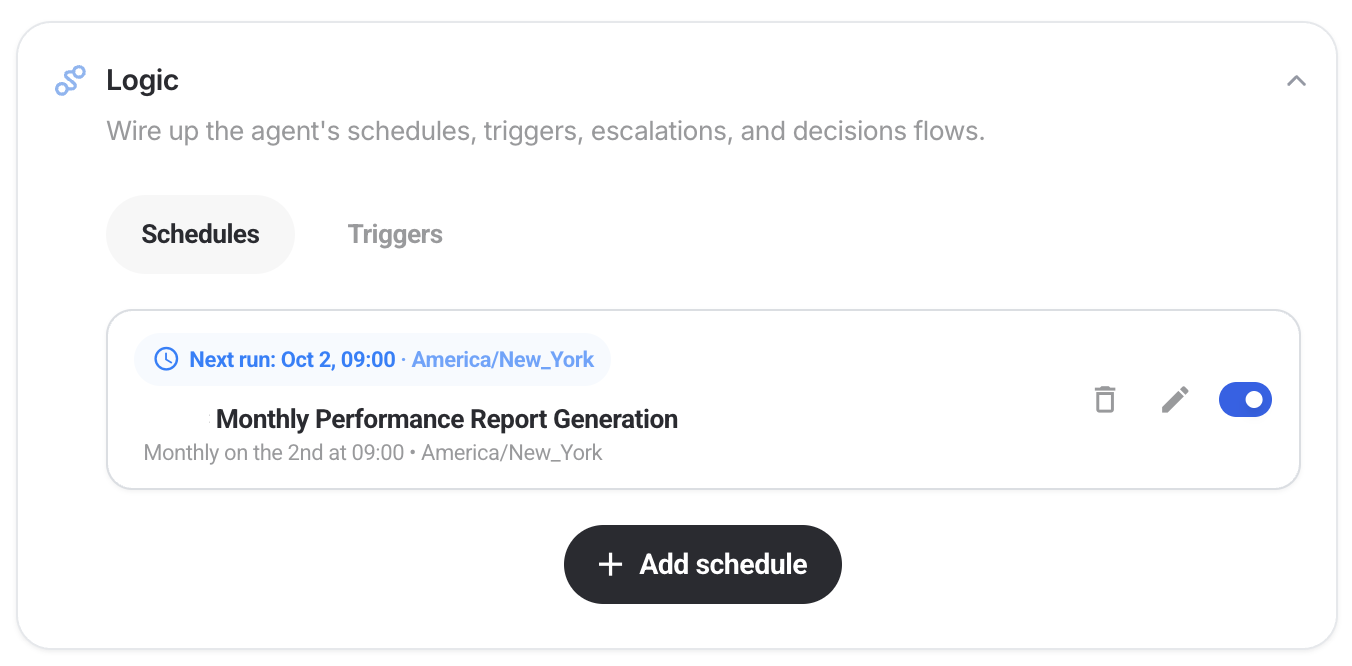
With scheduled agents, reporting time was reduced to 1-2 hours per report, with specialist review included. Some simple reports were done in just 8 minutes.
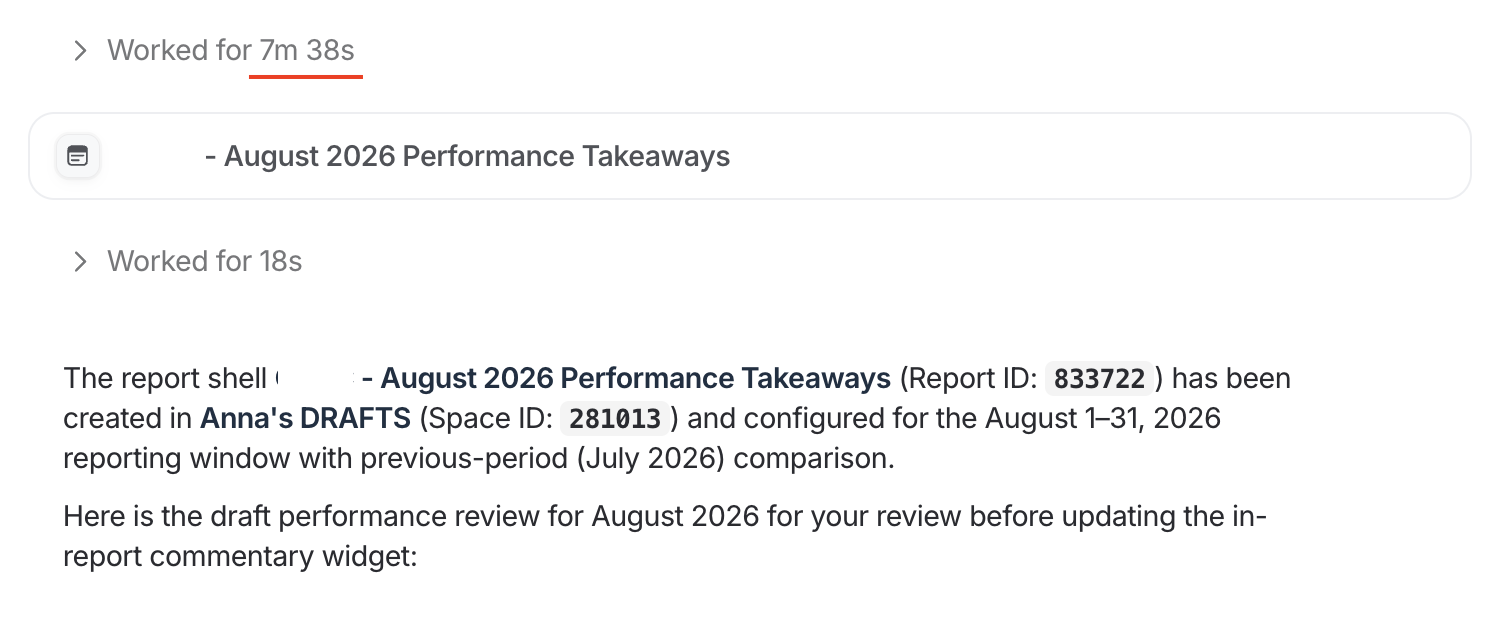
Where the human stays in the loop: the Director of Analytics reads the report, then sends the agent back in to dive deeper, check numbers, and sharpen sections. Reports never go out with the analyst reviewing it and signing it off.
Benefits of this AI marketing workflow:
- Reporting time cut from 10 working days to one hour across 15 clients, about seven minutes per report
- Reports land in week one instead of week four, while there's still a month left to act on them
- The analytics team's month opens up for stakeholder meetings, following up on recommendations and client questions
“Whatagraph IQ Agents have helped me shorten the time taken to get our standard analytics monthly reporting by more than half.”
2. Writing commentary in your brand guidelines with the full context
The workflow: write the analysis that goes on top of the numbers, in the agency's voice, for every client, every month.
I collected this one from a UK brand and digital agency running 50+ client reports across SEO, PPC and email marketing.
To write commentary, previously the Head of Search would do the analysis on Claude through Whatagraph MCP. But he had to copy the commentary manually back to the reports, and the whole setup lived in his Claude account.
He built that as an AI agent on Whatagraph in plain language and instructed it to do three things:
- Use the agency’s brand guidelines while writing commentary, for example highlighting positive sentiment in green and negatives in red
- Research the latest SEO news every week, save that to memory, and use these insights to explain the data
- Look at the previous report for each client, understand the recommendations given in that report, and use that (plus the SEO news) to write the recommendations for this month
Then, the Head of Search went on holiday. His managing director, who had never built a report, ran the agent and shipped all 50+, commentary included. One report was done in 11 minutes.
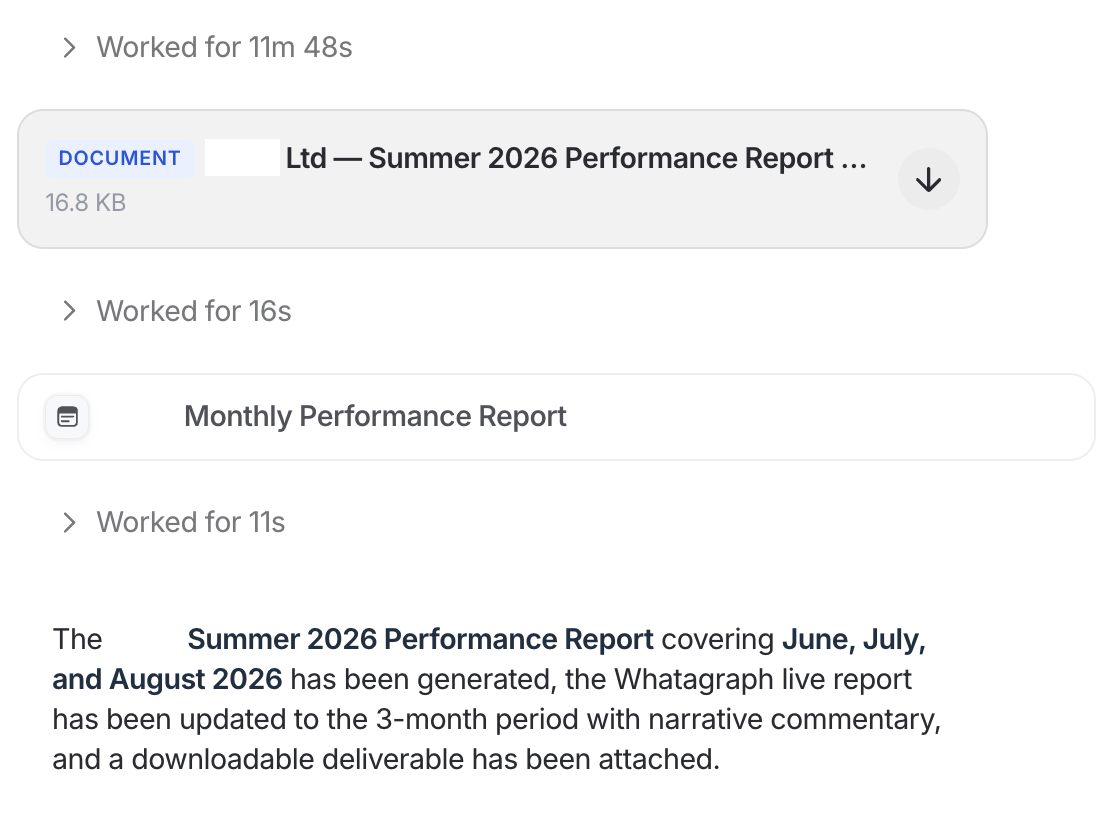
Where the human stays in the loop: the agent shows its plan before it writes anything, and specialists review and sign off reports before they reach clients.
Benefits of this AI marketing workflow:
- Anyone in the agency can run the reporting, with the managing director shipping all 50+ reports as the proof
- The work doesn't depend on one person's AI account, because the agent, its instructions and its house style belong to the team
- The same house style across SEO, PPC and email channels, because every service line uses the same agent instructions
“Agents pull the data together and get a first draft in our house style. That frees our specialists to do what clients value most: reading the numbers against what's happening in their sector and telling them what to do next. Every report is still reviewed and signed off by someone who knows the account.”
3. Preparing weekly reports and optimizations for Monday mornings
The workflow: have next week's reports built and the optimizations drafted before anyone starts work on Monday.
This is one of the coolest workflows I saw, and it came from a AI-native agency in the Netherlands running around 100 data sources.
The owner built two agents that work together on a schedule. Every Sunday, the first one duplicates every client report for the coming week and fills in the commentary sections. It then hands the report to a second agent, a performance marketing specialist, which reviews the numbers and writes the recommended optimizations straight into the report.

Monday morning, his specialists open a finished report, check it, and tweak the optimizations or implement them straight away.
This is AI orchestration in marketing workflows in its simplest useful form: not one agent doing everything, but a few specialist agents working together and cross-checking their work.
With Whatagraph IQ Agents, when you write a prompt, an “orchestrator” employs the best specialist agents who can do the work for you. It’s like having a CEO employing different people to carry out a task. This means the work the agents give you is high-quality, accurate, and exactly what you wanted.
Where the human stays in the loop: specialists fact-check every report before it goes to a client, and agents DO NOT write directly to ad accounts unless you give it permission to.
Benefits of this AI marketing workflow:
- Campaigns get optimized every week, not when there's time, since changes go live Monday for every client
- The same team can take on more clients, because specialist hours move from building reports to optimization, the work clients pay for
- Clients see recommendations every week, not just numbers, which is easier to justify at renewal
“Every week, on Monday, every client will have their report ready. And then the specialist goes to the report, just checks it, and then does the optimization in the campaign.”
4. Pacing budget and setting alerts
The workflow: compare what every campaign was supposed to spend against what it actually spent, every day, and say something when the two drift apart.
A US agency we talked to has a nonprofit client that can't under- or over-spend their ad budget of $1000 by the 18th of each month.
You probably already have some version of budget pacing, probably in a spreadsheet. But someone needs to continuously check and update the spreadsheet, with no way to get proactive alerts when your actual ad spend is going close to or above the budget.
And we're all humans. We can't always be checking this static spreadsheet every day, especially on weekends when we're spending time with our loved ones.
That's exactly what robots are great for. The agency's paid media lead built a pacing agent in plain language in Whatagraph, and in less than a minute, it was created.
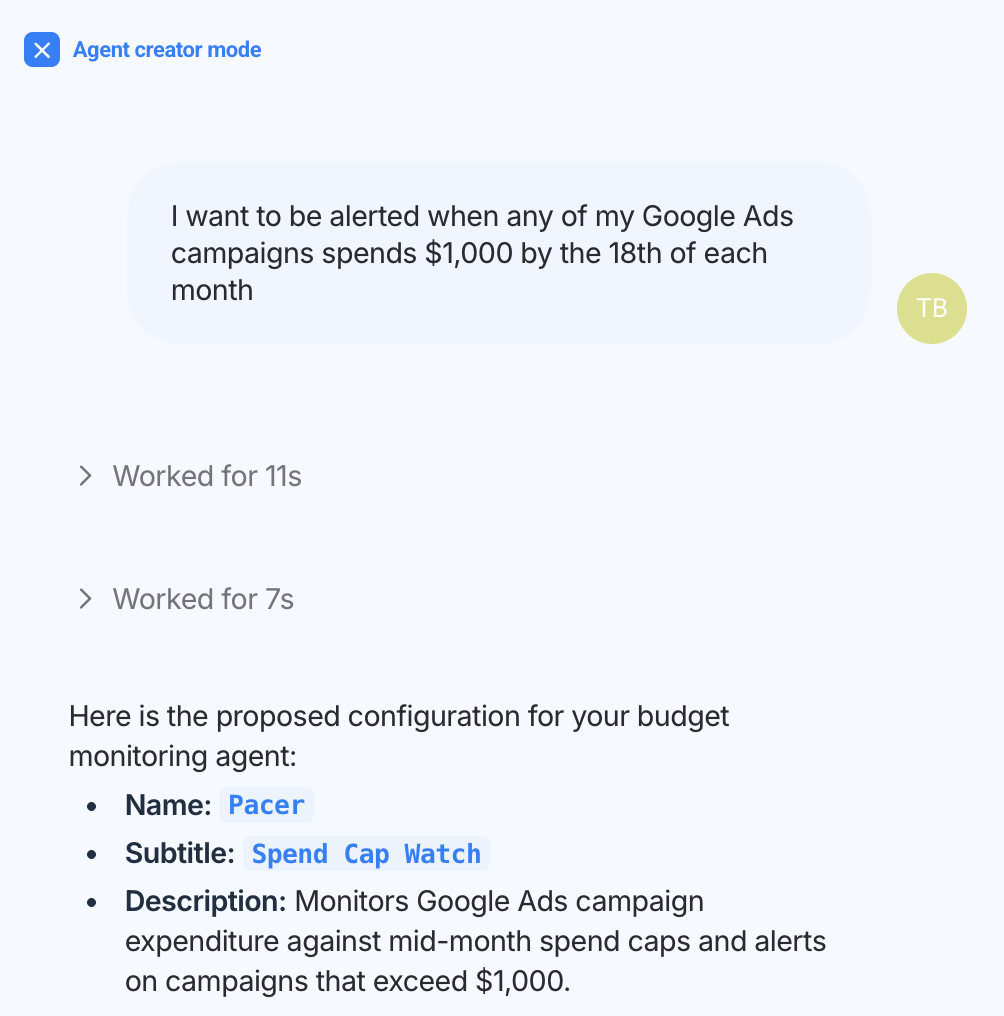
The pacing agent:
- Pull month-to-date spend for every campaign across all connected Google Ads accounts, from the 1st to the 18th
- Flag any campaign at or over $1,000
- Output a table with the account, the campaign, the exact spend and the daily run rate
- Run automatically on the 18th of every month at 9am
And when the 18th came around, the agent did a budget audit and gave a full analysis for all the Google Ads accounts.
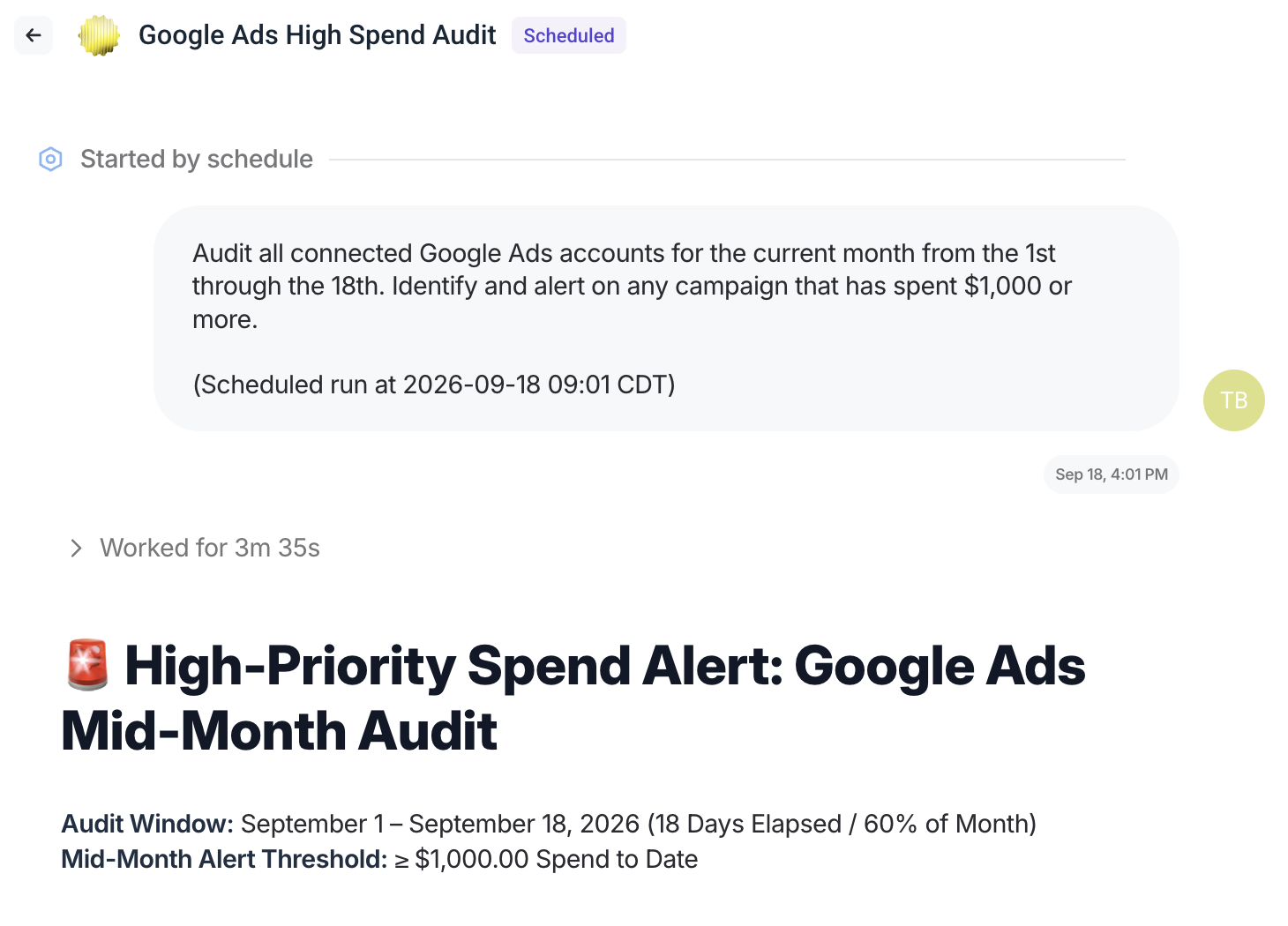
Where the human stays in the loop: the agent flags and explains. It doesn't touch the budget. Any change to spend is a person's decision.
Benefits of this AI marketing workflow:
- No overspend surprises on the client's invoice. Campaigns running hot get caught mid-month, while there's still time to pull them back, instead of turning into a conversation you have to apologize for
- Client budgets get spent the way they were planned. For a client like the nonprofit, money left unspent is results they paid for and didn't get
- Nobody gives up their week, or their weekend, to watch a spreadsheet. The check runs on its own, so that time goes back into campaign work
5. Monitoring every account every day
The workflow: every day, before anyone logs into work, check every client account and report back on what changed.
Pacing watches a number you already decided to watch. This one looks across the whole book and tells you what you didn't know to look for.
The pain is a scale problem. One paid media manager put it plainly: with 200-plus campaigns running, it's impossible to have a real grasp on what's doing what. Nobody has the time to look at 200 accounts every morning, so you find out about issues only by luck or when the client asks.
With AI, you can build a digest agent that runs every day at 09:00 that audits your campaigns, ads, creatives, and even connection sources so you’re covering all ground. The audit is finished and waiting for you by the time you clock into work.

A South African digital media agency built this kind of digest agent in Whatagraph, and found ads that were supposed to expire on the 12th of August, but were still running on the 19th. Another agency's agent found five Google Ads connections that had dropped without any alerts.
Where the human stays in the loop: the agent reports what it finds. It doesn't act. What to pause, fix or follow up on is a person's decision.
Benefits of this AI marketing workflow:
- Problems caught before the client sees them. You're the one raising the issue on the call, not the one explaining it.
- Less wasted spend. An ad that should have stopped a week ago stops today.
- Reports stay accurate. Five disconnected Google Ads connections were found in one run, before a month of missing data reached a client report
“With IQ Agents, I can now do my job faster and better. I anticipated the faster, but I didn't anticipate the better.”
6. Onboarding a new client without rebuilding everything by hand
The workflow: take a new client from "we just signed them" to a working report, without anyone clicking through setup screens.
Every agency has a standard way of setting up a new client. Connect the ad accounts and analytics, tag everything so it sorts into the right place later, apply the report template, drop it in the right folder, match the client's branding. It's the same set of steps for every client, usually done manually and across multiple tabs.
A UK PPC agency handed the whole thing to an agent in one prompt with details like client URL, Google Ads ID, account manager, and assigned folder name.
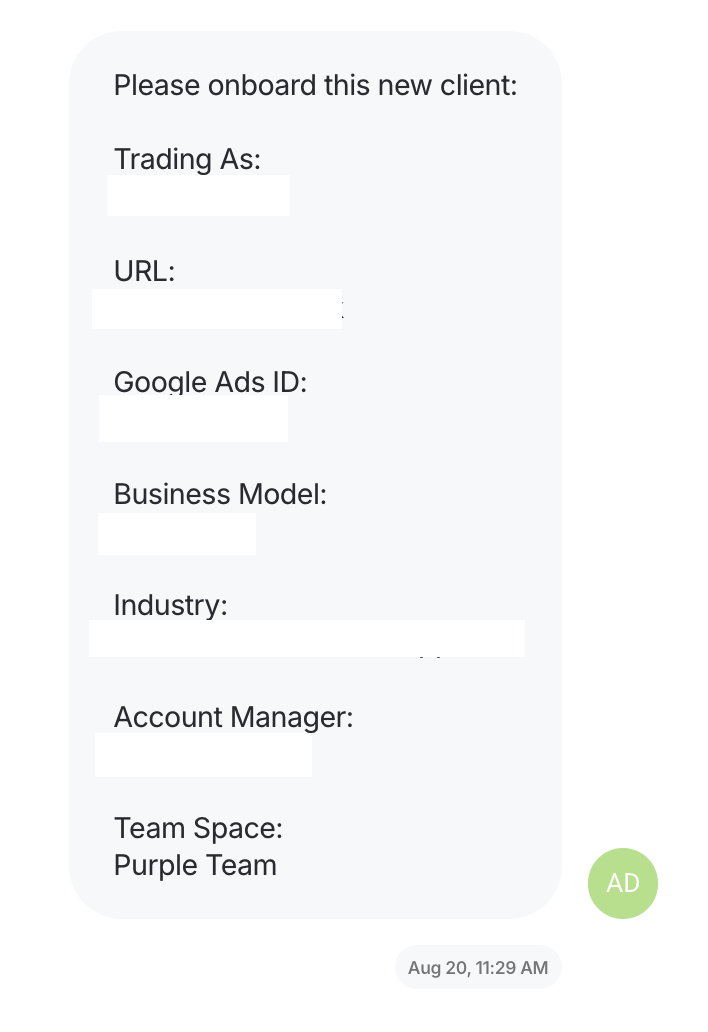
In about two minutes, the agent connected the client's source from their ad account manager, applied the tags including the industry tag, built the report from the agency's own template, and put it in the right folder. First attempt, no retries.
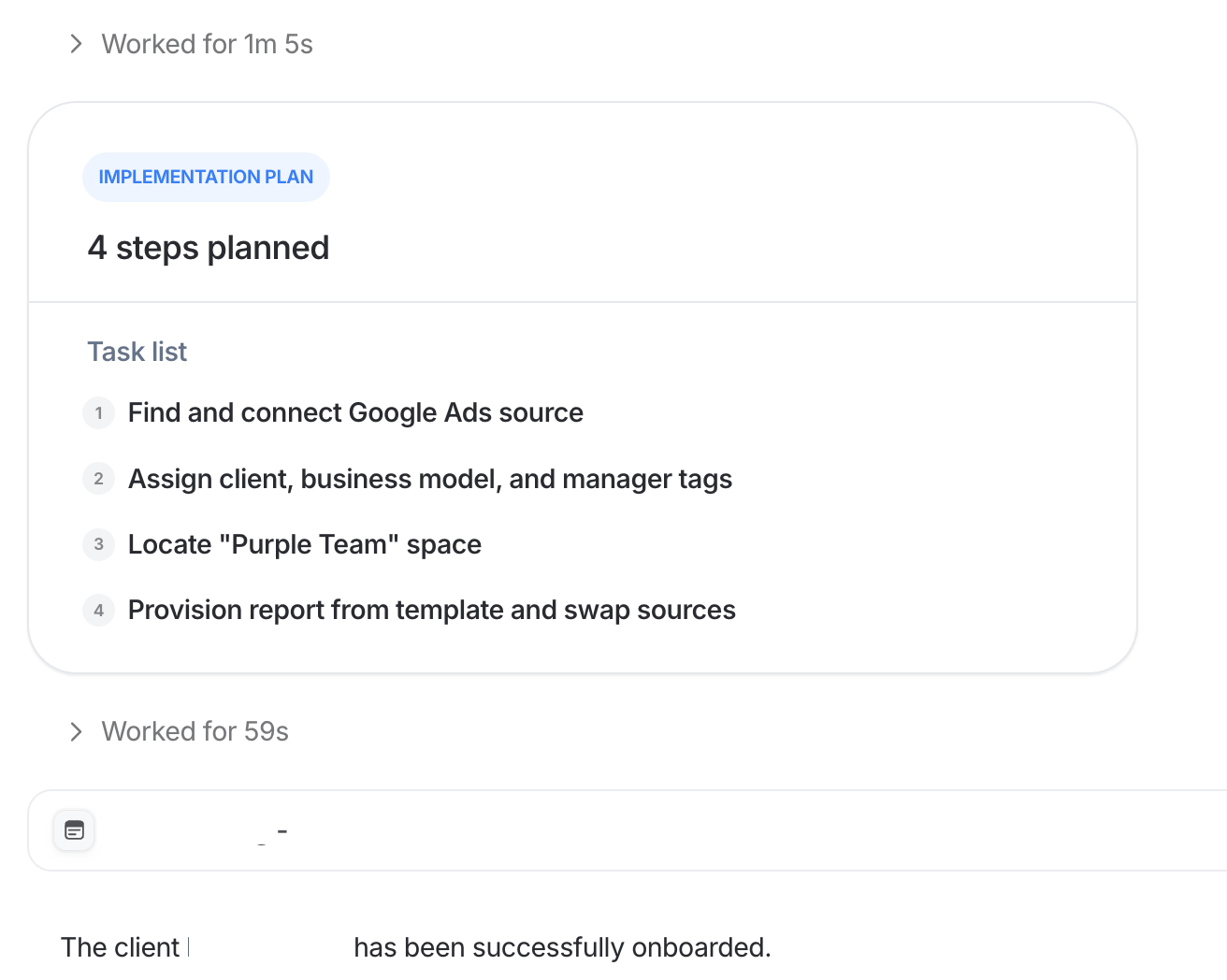
It’s important to note that the agent agent isn't inventing a setup here, it's applying yours. One caveat is that you do need to have your templates, tags, and folder names organized so the agent will know exactly what to do and where.
Where the human stays in the loop: someone opens the finished report and checks it before the client ever sees it.
Benefits of this AI marketing workflow:
- Onboarding stops eating into the busiest week. Setup went from five minutes per client to almost nothing, which adds up when several new clients land in the same month
- New clients get a working report on day one. Source connected, tags applied, report built and filed from one prompt, on the first attempt
- Every client starts on the agency's standard. The agent applies your templates and naming, so a new client's setup matches every other client's, whether it's lead generation or ecommerce
“The fact the agent works the first time just from a simple prompt is first-class. It just changes onboarding from five minutes per client to nothing at all, really.”
7. Bulk editing across dozens of reports
The workflow: apply a single change, a new attribution model, a retired metric, a date view, a rebrand, across an entire estate of reports in one pass.
This isn’t a s*xy workflow but it can save you a day of work. Here’s an example.
An ad operations lead at a publishing company had 72 reports built from the same template. They wanted two changes on all of them: switch the date range from year to date, and group the two main charts by week instead of automatically.
They turned to an AI agent to do this, because that’s the exact kind of job it was made for.
Here’s how it went:
- The agent tested the change on one report, saving a snapshot of the report first
- It ran a second test on another report, with the ad ops lead checking the output every time
- Then it applied the change across 72 reports in 18 seconds (literally!), saving a snapshot of each one before editing
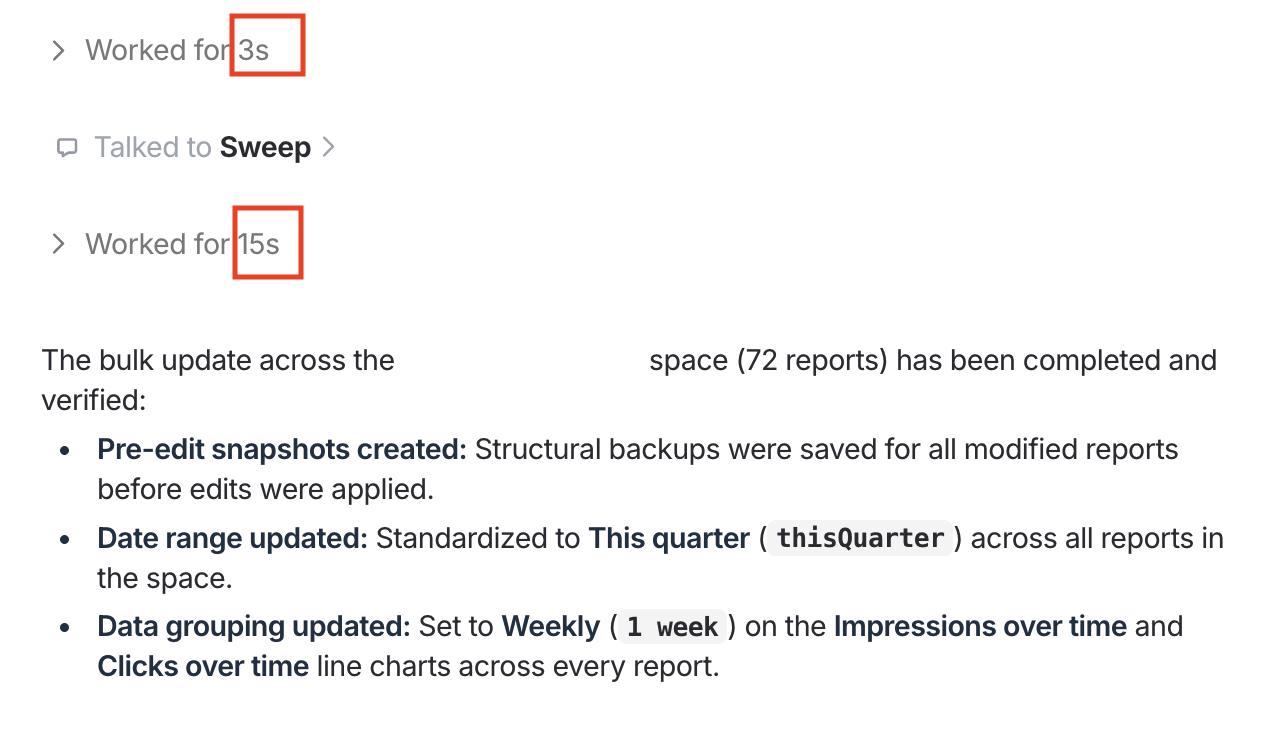
The ad ops lead went further and asked the agent to turn the report into a “master template” so the agent wouldn’t have to edit each report individually.
In Whatagraph, reports can be linked to a master template: change the template once, and every linked report updates with it. If you have a master template set up, agents just need to that master template once, and the changes will automatically propagate across the linked reports, saving even more time (and tokens).
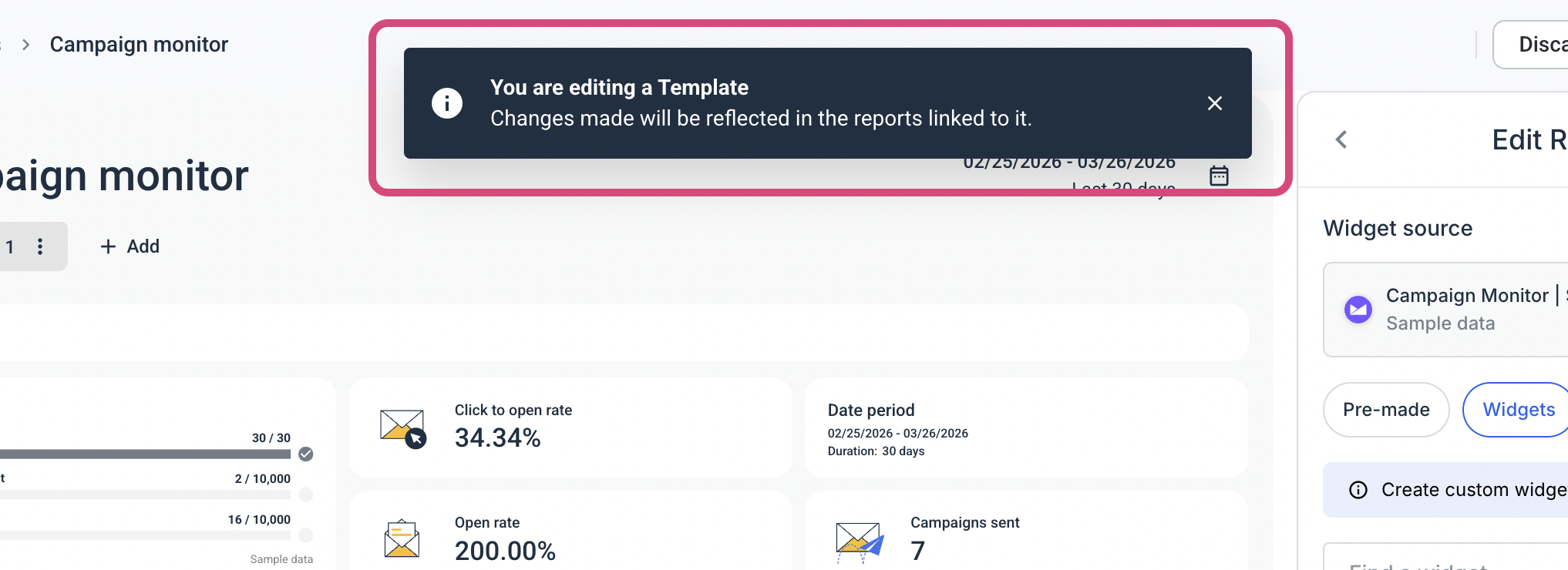
This bulk-editing is also especially useful when an ad platform deprecates a metric and your reports break (ahem, we’re looking at you Meta). Instead of you wasting a day updating all your reports individually, agents can do it for you in a few minutes.
Where the human stays in the loop: the agent confirms the scope before it acts, and the person verifies the first change before it scales to the rest.
Benefits of this AI marketing workflow:
- Hours of manual editing come off the team's plate. One team updated 72 reports in a single pass. Another agency had spent half a day changing 50 by hand
- Clients never see a broken chart. Every widget using a retired metric gets found and fixed before the client opens the report
- Big changes stop being risky. Every report is snapshotted before it's edited, and testing on one or two first means a mistake gets caught on one report, not across 400
"I didn't want to go and apply changes on every single report. So I've used IQ Agents to do this... it was successfully done, and that was a good use case that saved a lot of time for me.”
8. Conducting creative analysis
The workflow: look at creative performance across your portfolio and explain what's behind it, so someone can act on it.
Every reporting tool can tell you which ad performed best or worst. But what you really want to know is these two eversions:
- Why is X creative performing badly and what can we do to improve
- Why is Y creative performing great and what can we replicate
A US agency's analytics lead had an agent do that. She'd already spotted a creative underperforming. What she hadn't done was figure out why, and that analysis usually takes half an hour per creative. The agent found the reason, fast enough to fix it that day.
A UK agency ran the same thing on the winning side, asking for the best performing ads and the reason each one was working. The agent surfaced a Google Ads quality score field he hadn't been able to find manually, in about two minutes. You can also go further and use insights of what’s working for creating content for ads.
Our demand generation manager also built an agent that watches active LinkedIn Ads for early signs of fatigue. It reads daily performance over the last one to two weeks and sorts every active creative into three piles:
- Replace now. CTR has fallen off a cliff, frequency is above 3.5, and cost per result is climbing while clicks dry up.
- A week or two left. CTR is sliding a few percent a day, frequency is creeping up, and it estimates how many days the creative has left at the current burn rate.
- Still working. CTR steady or improving, frequency in range, cost per result on benchmark.
Then it gives you a rotation schedule: which creatives to swap this week, which next week, and which audiences are seeing the same ad too often. The same setup works on Meta Ads.
The agent sends this analysis to our demand generation manager every Monday at 09:00.
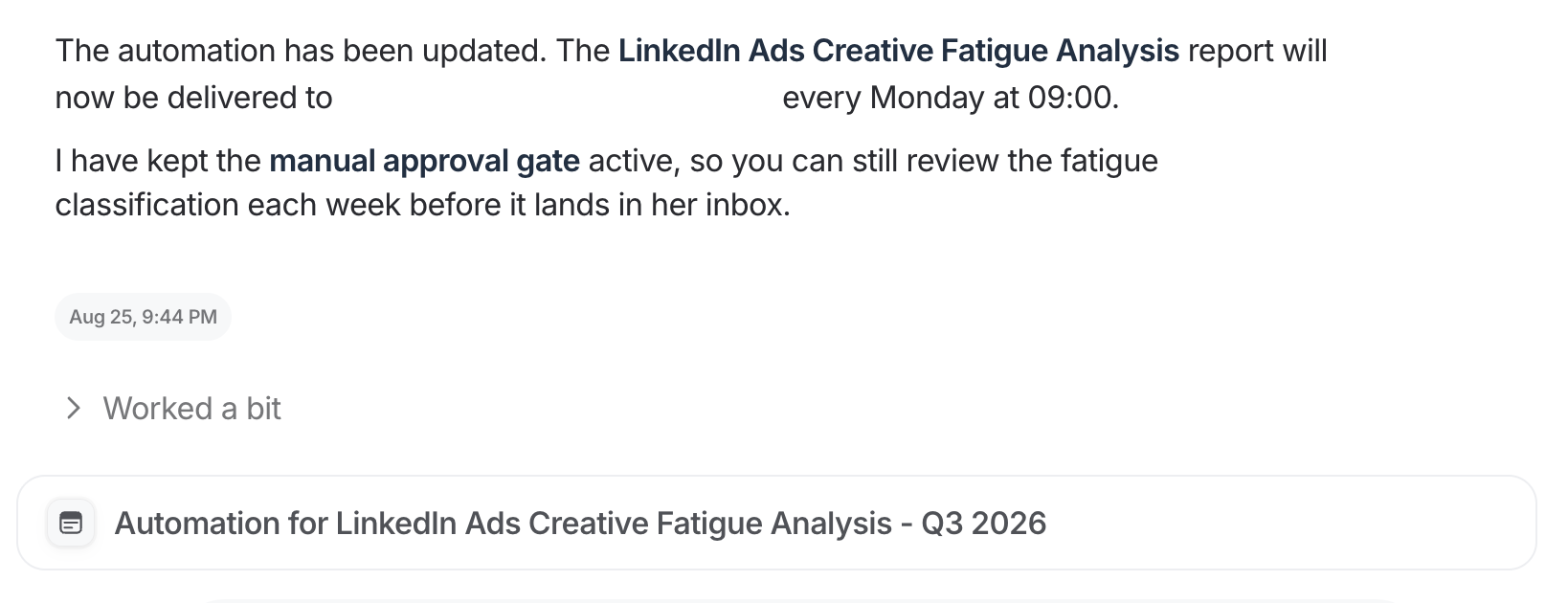
Where the human stays in the loop: the agent explains the performance. What you make next is a creative decision, and it stays with the people making creative.
Benefits of this AI marketing workflow:
- Less ad spend wasted on tired creative. Creatives get flagged while they're declining, not after they've stopped converting
- New creative gets briefed on time. A rotation schedule for this week and next means the design team isn't asked for replacements at the last minute
- Clients and teams get more insights into which creatives work and why. You can tell the client why an ad worked or failed, and what to do about it
"I would have noted that the creative is underperforming, but the agent was able to figure out why, very quickly, and so we can have a fix for it."
9. Running ad-hoc analysis
The workflow: run a one-off analysis across your accounts whenever something changes without having to go through multiple dashboards
Marketers rarely have time for ad-hoc analysis (we have a million other things to do), but it’s also what drives better campaigns, creatives, and content that deliver better results.
Some examples include:
- Scoping how a platform change affects your clients
- Investigating why your lead numbers dropped last week
- Testing a hunch about which channel is driving another
- Checking whether a pattern in one account shows up in the others
Done by hand, each of these means logging into multiple dashboards, pulling the data, and cross-referencing everything yourself. That can take hours, so most of it either gets a quick surface-level look or goes into the backlog.
Here’s an example.
When Google Ads changed how it optimizes target CPA campaigns, the analytics lead at a US agency wanted to scope the impact across her 15 clients.
Manually, that meant going into Google Ads, or building a widget that listed every campaign by objective, and then working out which ones were affected. A couple of hours at minimum, for an analysis nobody had asked for.
She asked an agent to do the analysis instead. Ten minutes later she had the affected campaigns listed and sent them to the media team for optimization on the spot. Then she texted us on Slack about how the agent helped her:

She also uses it to give clients deeper answers. When a client asked about their TikTok and Google Analytics performance, she had the agent analyze both channels together, several layers deeper than she'd normally have time for. The analysis showed how the client's Meta activity was affecting their organic traffic. This is something a single dashboard wouldn’t show, but a cross-channel analytics platform like Whatagraph can surface.
Where the human stays in the loop: the agent runs the analysis. The specialist decides what it means, what to tell the client, and what the media team should change.
Benefits of this AI marketing workflow:
- Analysis that used to be skipped gets done. A couple of hours of work took ten minutes, so it happened instead of sitting in the backlog
- You scope platform changes before clients feel them. Knowing which accounts a Google Ads change affects, the same day it lands, is the kind of thing that keeps a client
- Clients get analysis across channels, not just per channel. The analysis can combine TikTok, Meta and organic data, which is often where the explanation is
"I'm able to get back to the client not only faster, but with more informed feedback."
10. Mapping keywords and AI fan-out queries for SEO/AEO
The workflow: for every new article or page refresh, produce the keyword and fan-out mapping a writer can build from, with the reasoning shown.
Our SEO manager built this one for us, and it can be very useful for SEO agencies or in-house teams.
Keyword research is a recurring job that always follows the same structure and takes a few hours for each page.
An agent can do it for you in minutes. For instance our SEO manager trained the agent to:
- Take the primary keyword and check the closely related terms around it, in case one of them is an easier or bigger win
- Pull search volume and difficulty for all of them
- Open the actual search results for each and see who ranks and what kind of page Google is rewarding
- Sort the remaining keywords into groups, so keywords covered by the same section of the article sit together instead of becoming separate headings
- Work out which follow-up questions an AI answer engine will ask about the topic, since those are what it pulls from when it builds an answer
The agent then produces a CSV file: target and secondary keywords with their metrics, merged clusters, question keywords, and the fan-out queries grouped by theme. It pulls from Search Console baselines and runs a set sequence of checks against our SEO tool: Ahrefs.
Pulling the numbers is the easy half. Any AI tool with a keyword database can hand you a list. The hard part is what you do with that list, and that usually lives in one person's head, which is why two people mapping the same page come back with different answers.
So our SEO manager wrote his head into the agent's instructions.
The first thing he told it: search intent relevance beats search volume. In his words, not as a principle. Every expensive mistake we've made here has been a volume decision. Volume tells you how big a room is, not whether your buyer is in it.
The second thing: stay in your lane. This agent produces keyword and fan-out lists. It doesn't write a blog outline and it doesn't make content strategy calls, because those are someone else's job.
He also told it when to stop. A primary keyword handed to the agent is a proposal, not an order. It prices the neighbouring terms first, and when two candidates share enough of the same search results that one page could rank for either, it stops and asks instead of picking one.
Where the human stays in the loop: it produces briefs, not posts. Which ones we act on, and what we do with them, is a person's call.
It runs every week and we work through the list it gives us.
Benefits of this AI marketing workflow:
- Writing time goes to the pages that make money. Pages are ranked by the pipeline they bring in, so the first refresh is the one most likely to protect leads
- Decay gets caught before it shows up in pipeline. The audit runs every Tuesday, so a page losing traffic gets flagged within weeks, not whenever someone next checks
- Writers start from a brief, not a blank page. Each refresh comes with what to add, rewrite or cut, so the fix ships faster
What are the benefits of integrating AI into marketing workflows?
Based on all these workflows marketing agencies are running with AI agents on Whatagraph, these are the benefits they're seeing:
Each client costs less to serve. A US agency with a two-person analytics team covering 15 clients used to spend about 10 working days a month on reporting. After they scheduled the agent, the same work took one hour, around seven minutes per report. That's most of a month of analyst time freed up every month.
Clients get value sooner, which makes them easier to keep. Their clients used to get last month's report in week four. Now it lands in week one, while there's still a month left to act on it.
You can grow without hiring for reporting. One agency group found its campaign managers spend a quarter of their time on reporting. When agents take that on, the same team can carry more clients before the next hire.
Reporting stops eating your margin. One agency bills clients for four hours of reporting that takes six to eight. Closing that gap turns reporting from a loss on every retainer into work that pays for itself.
Clients get more for the same retainer. Questions that took two hours to answer manually got dropped every time, because they were important but never urgent. At five minutes, they get asked, and the client hears about a platform change from you before they notice it themselves.
Client budgets and trust are protected. Agents found ads still spending a week past their end date and five data sources that had disconnected, before either reached a client.
The business doesn't depend on one person. One specialist's agent shipped 43 reports while he was on holiday, run by his managing director. If a key person leaves, the workflow stays with the agency.
Agents don't make the judgment calls. Every team above still reads the report, approves the change, and decides what to do about what the agent found.
That’s great, but how do you integrate AI into your marketing workflows? Where do you start?
How to integrate AI into your marketing workflow (according to our CTPO)
Start with one workflow. The steps below come from our CTPO, Arturas Lazejevas, and they match what the agencies above did.
1. Pick a task that wastes your time.
Arturas's advice is to start with your biggest pain point, not whatever looks most impressive. If you start by playing around, you won't see the value. Look for work that takes a long time, has to be done every month, is easy to get wrong, or is boring. His example: going through 80 reports to update the date range.
That's the kind of task agents handle well. It's important, it takes hours, and it isn't difficult.
2. Write it down like instructions for a new hire.
Don't write a one-line prompt. Write out:
- When it should run
- Exactly which reports, clients or accounts it covers
- The steps, in order
- What the output should look like and where it goes
- What it should do when it isn't sure
3. Decide what needs your approval.
Let the agent read data and draft things on its own. Anything that changes a client report, a budget or a campaign should wait for a person to approve it.
If that sounds like a lot of checking, Arturas points out that we already do this with people. Nobody gets every decision right, which is why teams have "peer reviews, retrospectives." Agents need the same thing.
You can also have agents check each other. One agent does the work, then hands it to a second agent to review before it reaches you.
4. Test it on one report first.
Run it on a single report. Check the result. Run it on a second one. Only then run it across everything. This is exactly how the ad ops team above updated 72 reports without breaking any.
Arturas compares it to onboarding a new hire: "You don't start them on the deep end." You give them simple work first and build up.
5. Schedule it, and keep improving it.
The first version won't be perfect. When you spot a mistake, fix it in the agent's instructions, not in the output. Otherwise you'll be fixing the same thing next month.
The teams who saw results fastest had one thing in common, and it wasn't technical skill. They picked a job they already understood well enough to explain to a new hire, and they wrote it down that way.
We're opening access to IQ Agents in cohorts with guided setup for each. Explore IQ Agents.
Published on Sep 24 2026
WRITTEN BY
YamonYamon is a Senior Content Marketing Manager at Whatagraph. With an eye for detail and a knack for always considering context, audience, and business goals to guide the narrative, she's on a mission to create genuinely helpful content for marketers. When she’s not working, she’s hiking, meditating, or practicing yoga.