















Free Client Reporting Template

Build reports faster with a white-label client reporting template that scales across clients.

Turn raw data into actionable insights in seconds, without juggling spreadsheets or slides.

Client Reporting Template - Marketing report with charts, graphs and performance metrics

Create Custom Client Reports in Seconds

With Whatagraph IQ, just tell us what you need, and we'll build a stunning client report for you in seconds. No templates or manual setup needed.

How To Use Whatagraph’s Client Reporting Template

What Should a Client Reporting Template Include?

Based on client reports created by 1,000+ marketers at agencies using Whatagraph, below are the sections we recommend you include in yours.

(This is also exactly how we structured our client reporting template that you can use right away.)

1. Marketing Summary
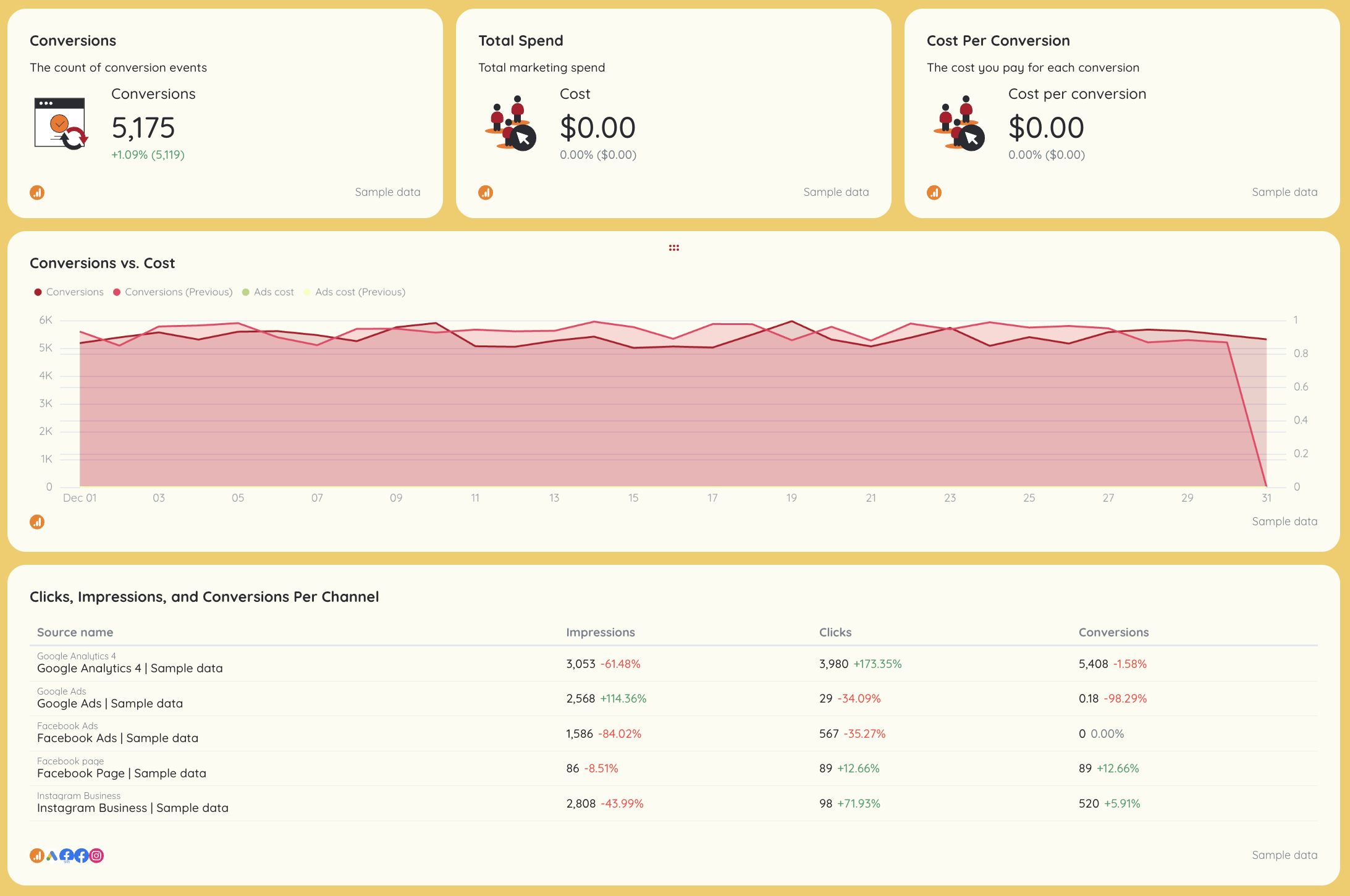
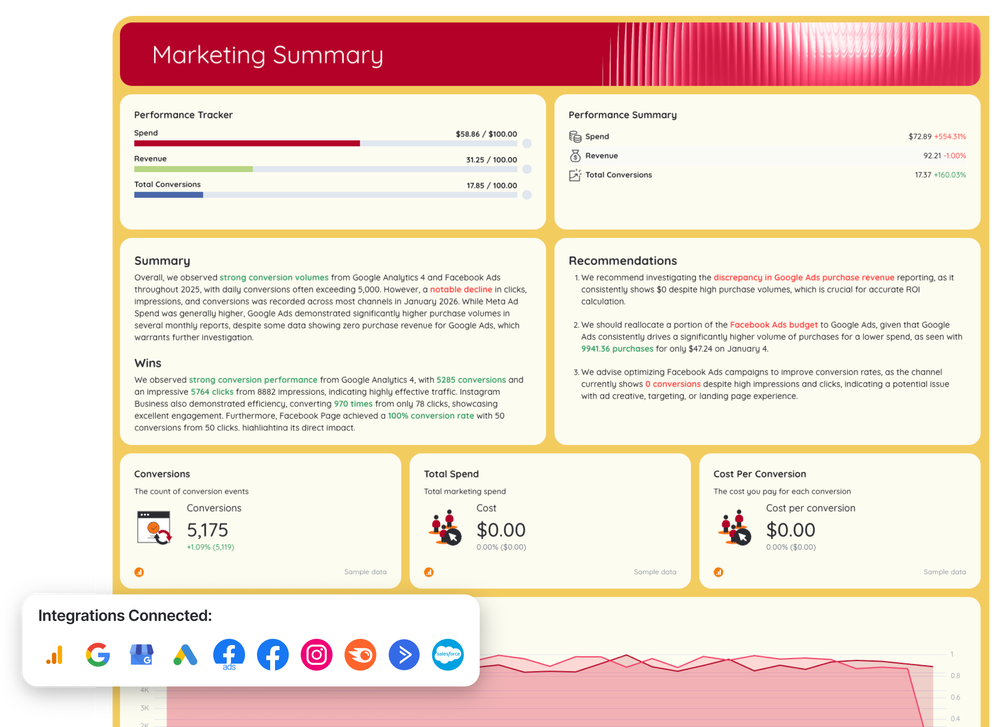
Client Reporting Template - Dashboard with charts and tables of marketing metrics.Purpose: Executive summary for fast stakeholder decision-making.

This section acts as the executive summary of the client reporting template, giving account managers and stakeholders an instant read on overall campaign performance.

What’s included

  • Written summary highlighting wins, risks, and key takeaways
  • Clear recommendations tied to client needs and next steps
  • KPI scorecards vs targets

Key metrics

  • Total ad spend
  • Revenue
  • Total conversions
  • Cost per conversion
  • Clicks, impressions, conversions by channel

Visuals

  • KPI scorecards
  • Line charts showing conversions vs spend over time
  • Channel comparison tables across Google Ads, Facebook Ads, and organic sources

2. Website Performance
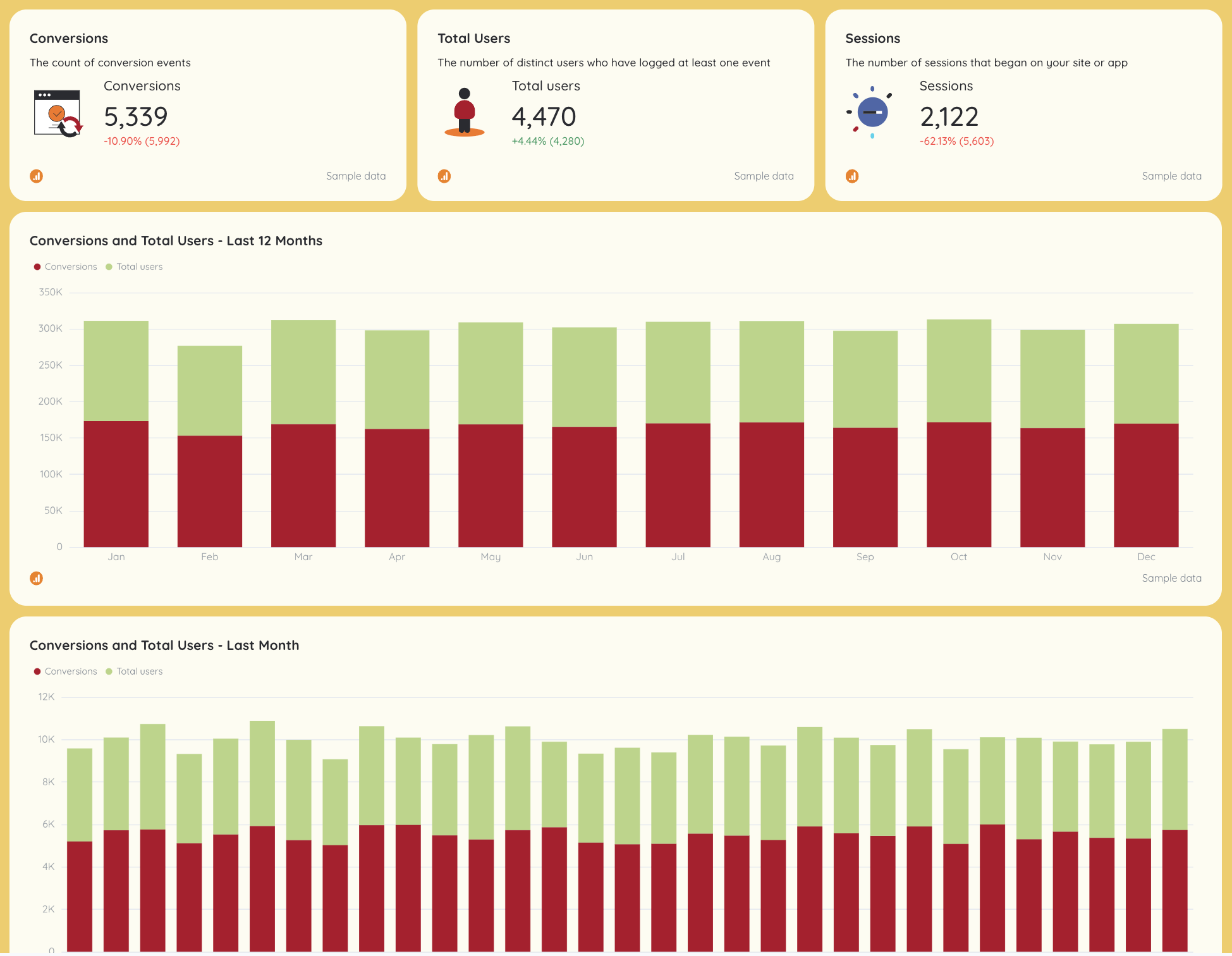
Client Reporting Template - Dashboard view with bar graphs of conversions and users.Purpose: Core performance report for how the website drives results.

This section pulls Google Analytics data into a structured marketing report focused on traffic quality, conversions, and engagement.

Key metrics

  • Total users and new users
  • Sessions
  • Conversions and conversion rates
  • Bounce rate
  • Average engagement time
  • Traffic and conversions by source, device, and location

Visuals

  • Time-series graphs for sessions and conversions
  • Source breakdown charts (organic traffic, PPC, social media)
  • Page-level tables showing key performance indicators like bounce rate and engagement

3. SEO
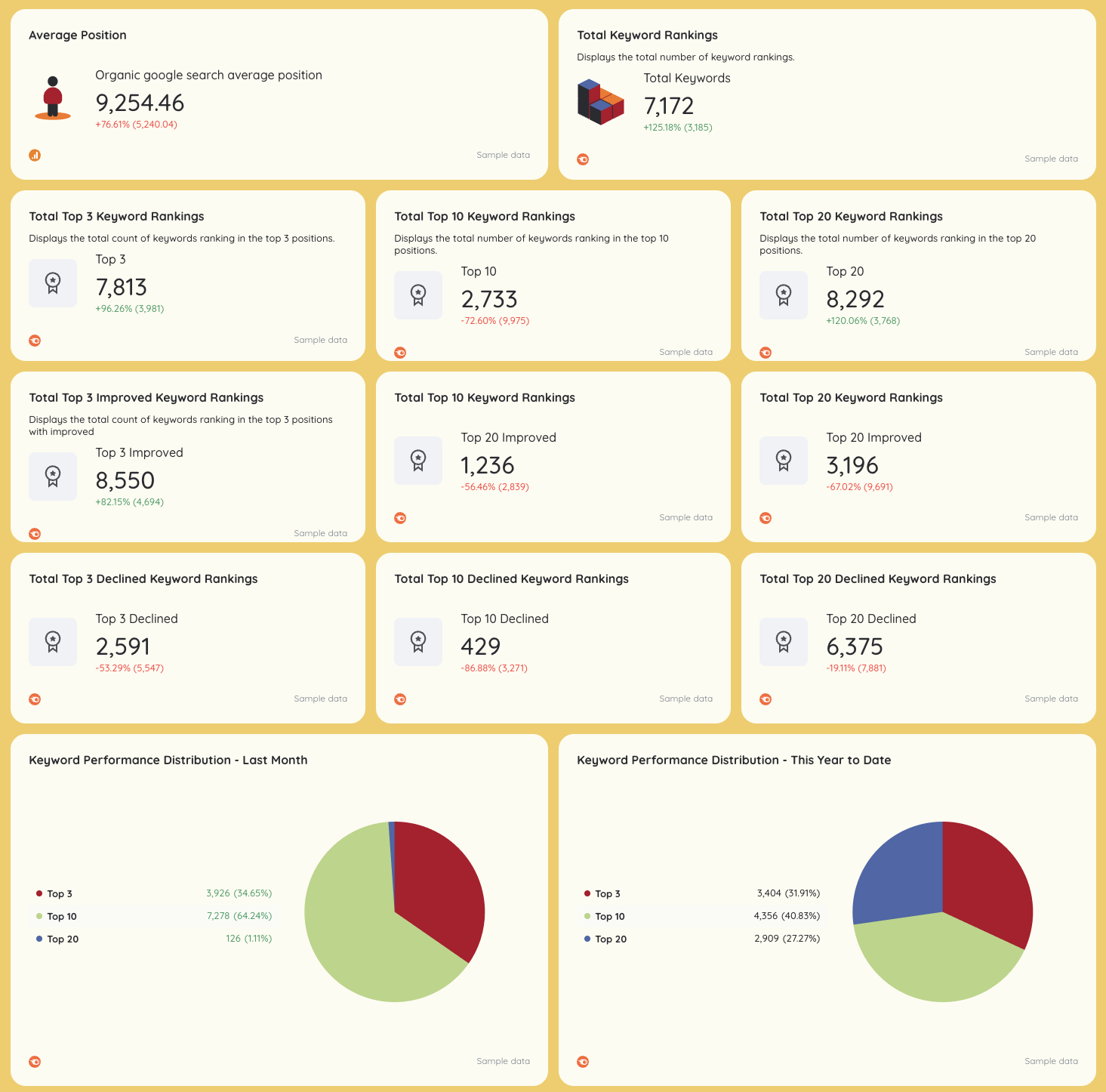
SEO - Dashboard with charts and metrics for keyword performance.Purpose: Organic growth and rankings visibility.

This SEO report shows how organic search contributes to long-term performance and retention.

Key metrics

  • Organic traffic
  • Average rankings
  • Total keywords tracked
  • Top 3 / Top 10 / Top 20 keyword positions
  • Backlinks and referring domains
  • Domain authority

Visuals

  • Keyword distribution charts
  • Ranking trend graphs
  • Backlink growth over time
  • Tables highlighting improved vs declined rankings

4. GEO (AI / Generative Engine Optimization)
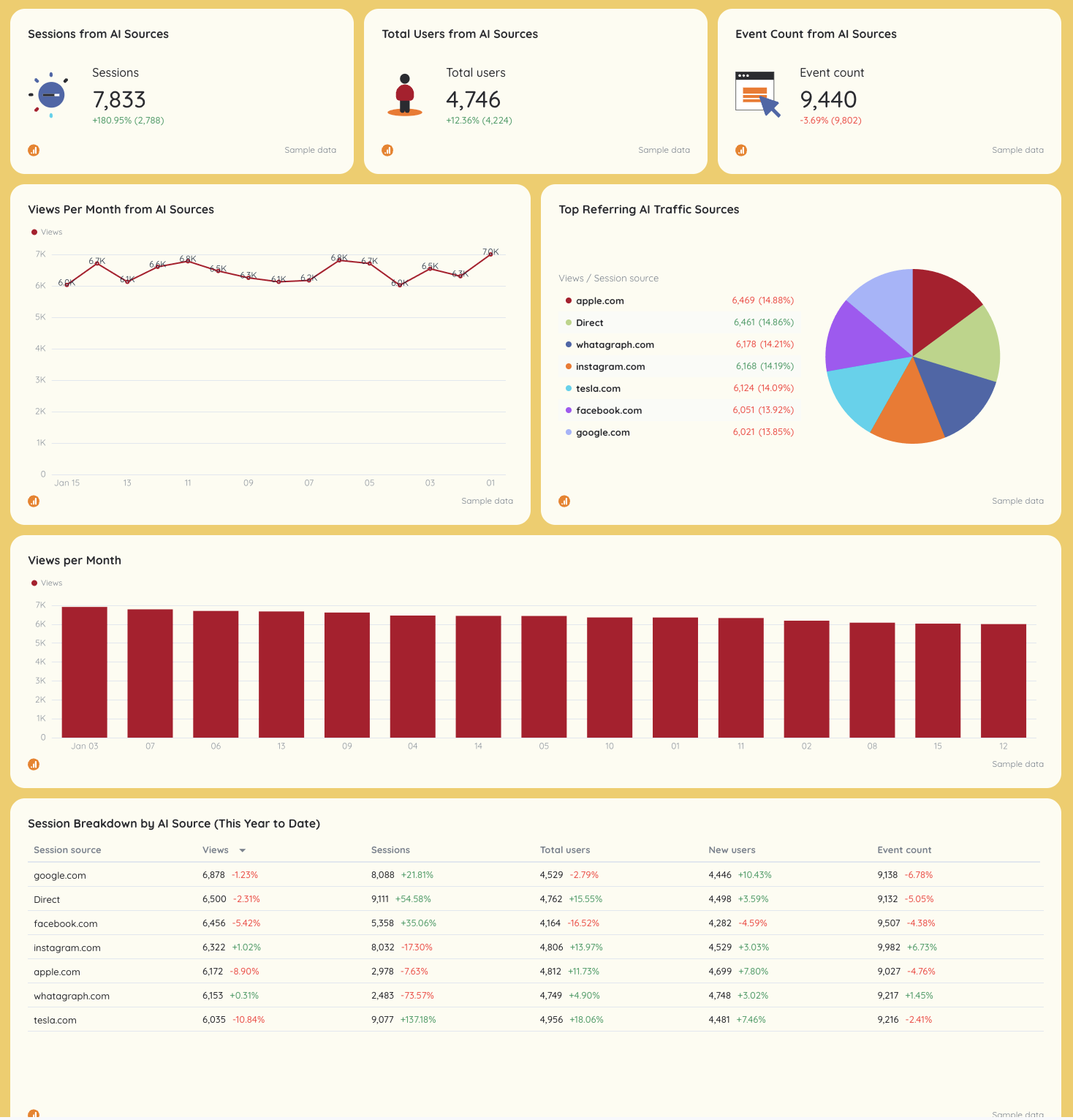
Client Reporting Template - Dashboard with charts on sessions, users, and traffic sources.Purpose: Track visibility and traffic from AI-driven discovery.

This section extends traditional SEO into GEO, showing how content performs across AI and referral sources in near real-time.

Key metrics

  • Sessions and users from AI sources
  • Views by AI referrer
  • Events and conversions
  • Landing page engagement from AI traffic

Visuals

  • Line charts for AI sessions and views
  • Source breakdown tables
  • SEO vs GEO comparison dashboards for decision-making

5. Keyword Tracking
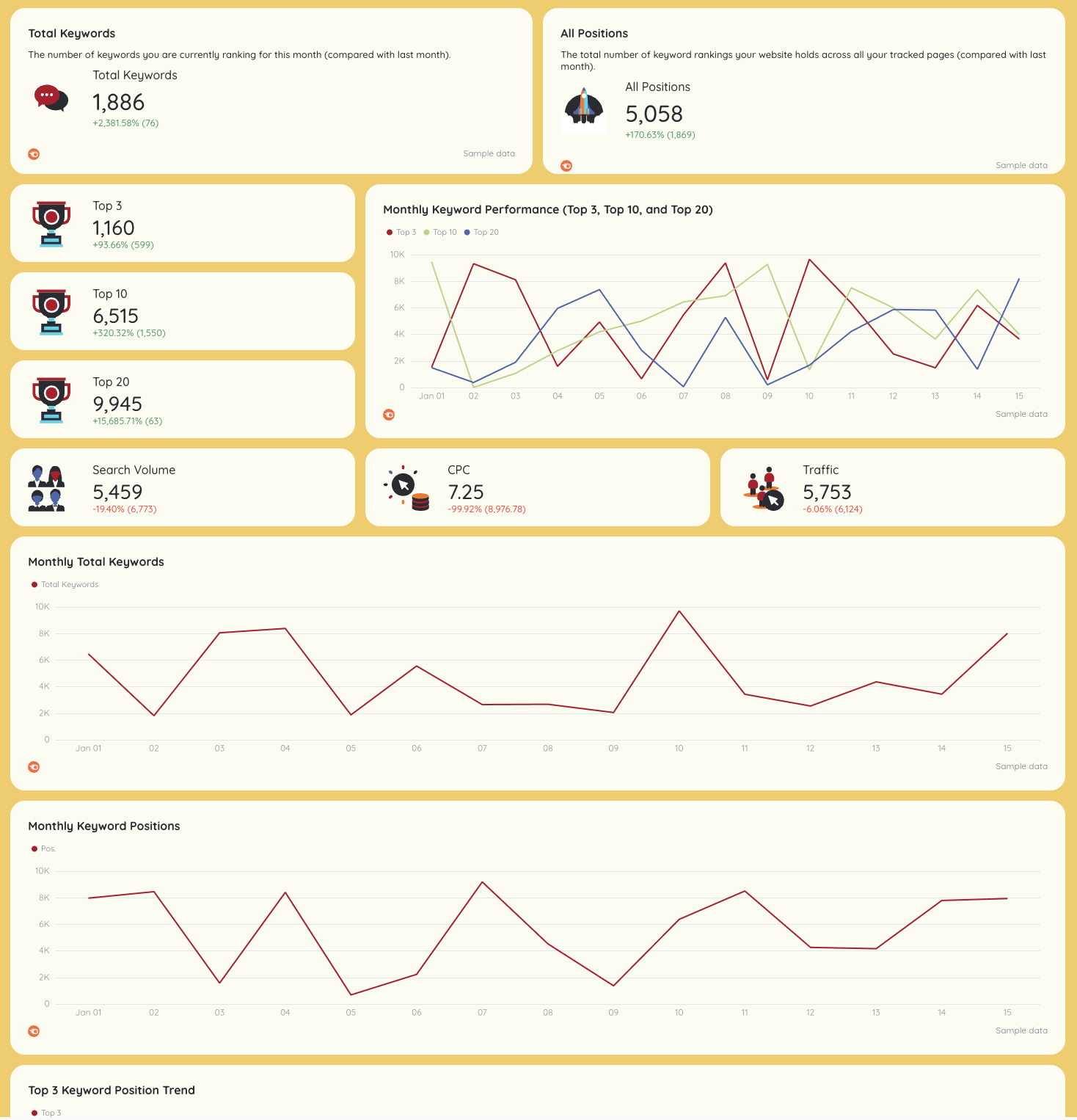
Keyword Ranking - Dashboard displaying keyword ranking metrics with graphs and charts.Purpose: Detailed progress report on keyword performance.

This section focuses on actionable keyword insights for data-driven optimization.

Key metrics

  • Keyword rankings
  • Search volume
  • Keyword difficulty
  • CPC
  • Traffic per keyword
  • Ranking movement across Top 3, 10, and 20

Visuals

  • Ranking trend graphs
  • Monthly keyword distribution charts
  • Keyword and URL performance tables

6. Google My Business
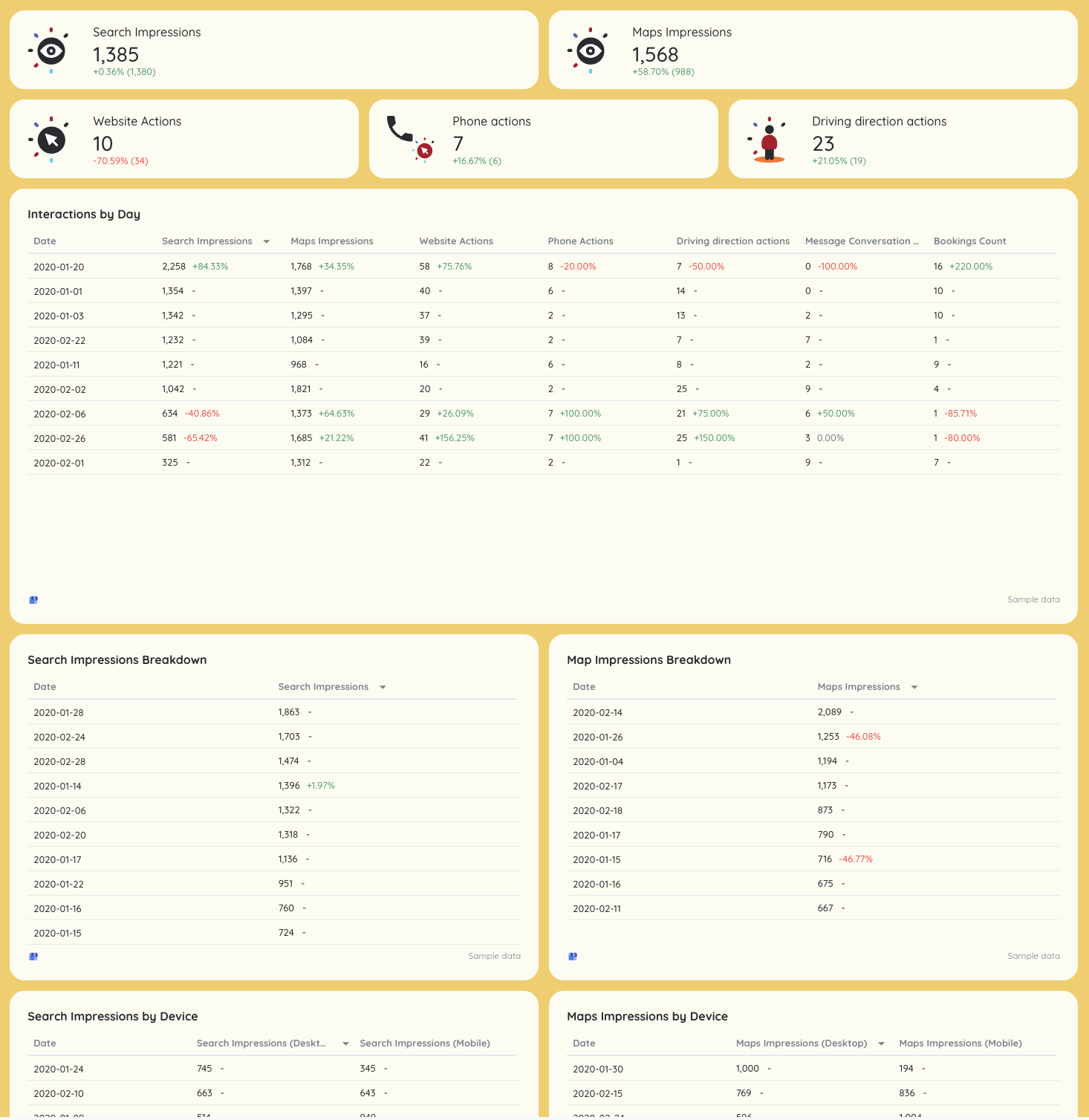
Client Reporting Template - Dashboard view of Google My Business performance metrics and charts.Purpose: Local visibility and reputation management.

This section supports local client relationships by tracking Google My Business performance and reviews.

Key metrics

  • Search impressions
  • Maps impressions
  • Website actions
  • Phone calls and direction requests
  • Total reviews and average rating

Visuals

  • Daily interaction tables
  • Device-level breakdowns
  • Review growth and rating trend charts
  • KPI cards vs local visibility goals

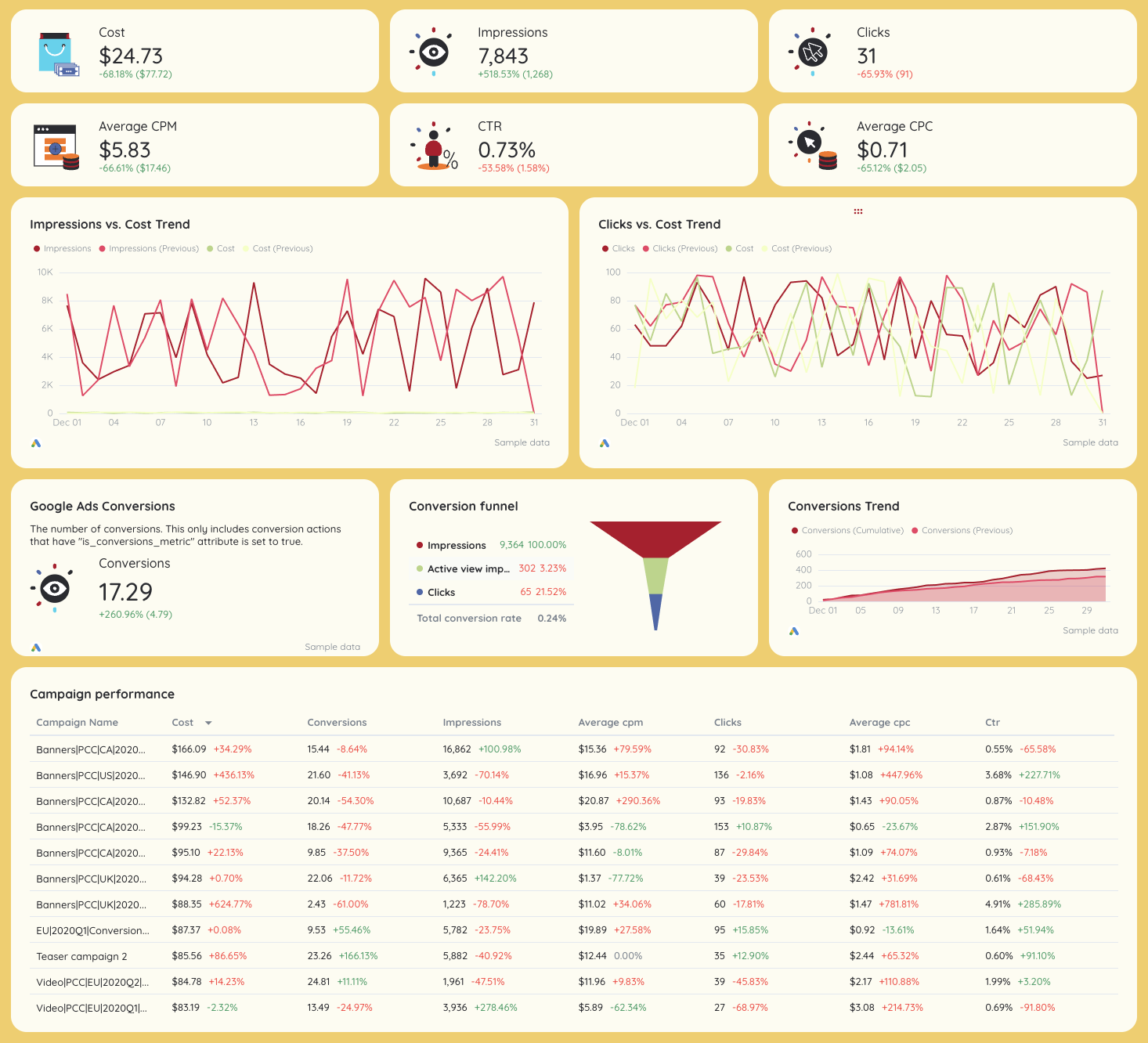
Client Reporting Template Google Ads - Dashboard showing key ad metrics, charts and conversion funnel.Purpose: PPC performance and spend efficiency.

The first part of this PPC performance report connects ad spend to outcomes, helping account managers optimize budgets.

Key metrics

  • Impressions
  • Clicks and click-through rate
  • CPC and CPM
  • Conversions
  • Cost per conversion

Visuals

  • Conversion funnel charts
  • Spend vs conversions trend graphs
  • Campaign-level performance tables
  • Network breakdowns (Search vs Display)

8. Facebook Ads

Purpose: Paid social performance tracking.

This section focuses on ads performance across Meta, helping teams justify spend and improve ROAS.

Key metrics

  • Spend
  • Impressions
  • Clicks
  • CTR
  • CPC
  • Conversions and cost per conversion
  • ROAS (when revenue data is available)

Visuals

  • Spend vs conversion graphs
  • Campaign and ad set tables
  • Creative-level performance breakdowns

9. Social Media (Facebook & Instagram)
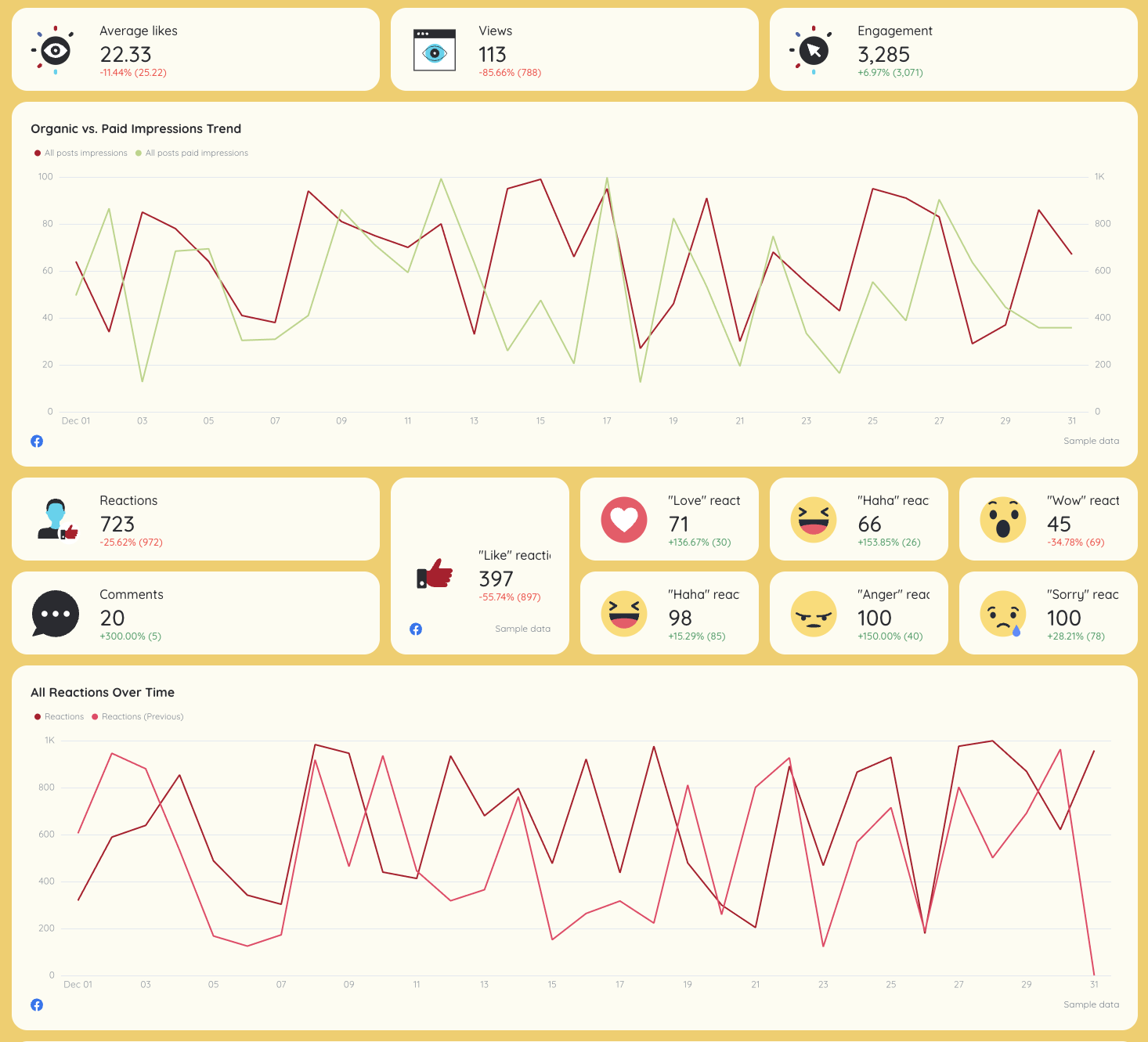
Facebook - Social media report showing engagement metrics and impression trends.Purpose: Organic social media reporting.

This social media report shows how content drives engagement and supports broader marketing campaigns.

Key metrics

  • Followers
  • Reach
  • Impressions
  • Engagements and engagement rate
  • Clicks and conversions

Visuals

  • Follower growth charts
  • Engagement trend graphs
  • Platform comparison tables
  • Post-level performance data

10. Email Marketing
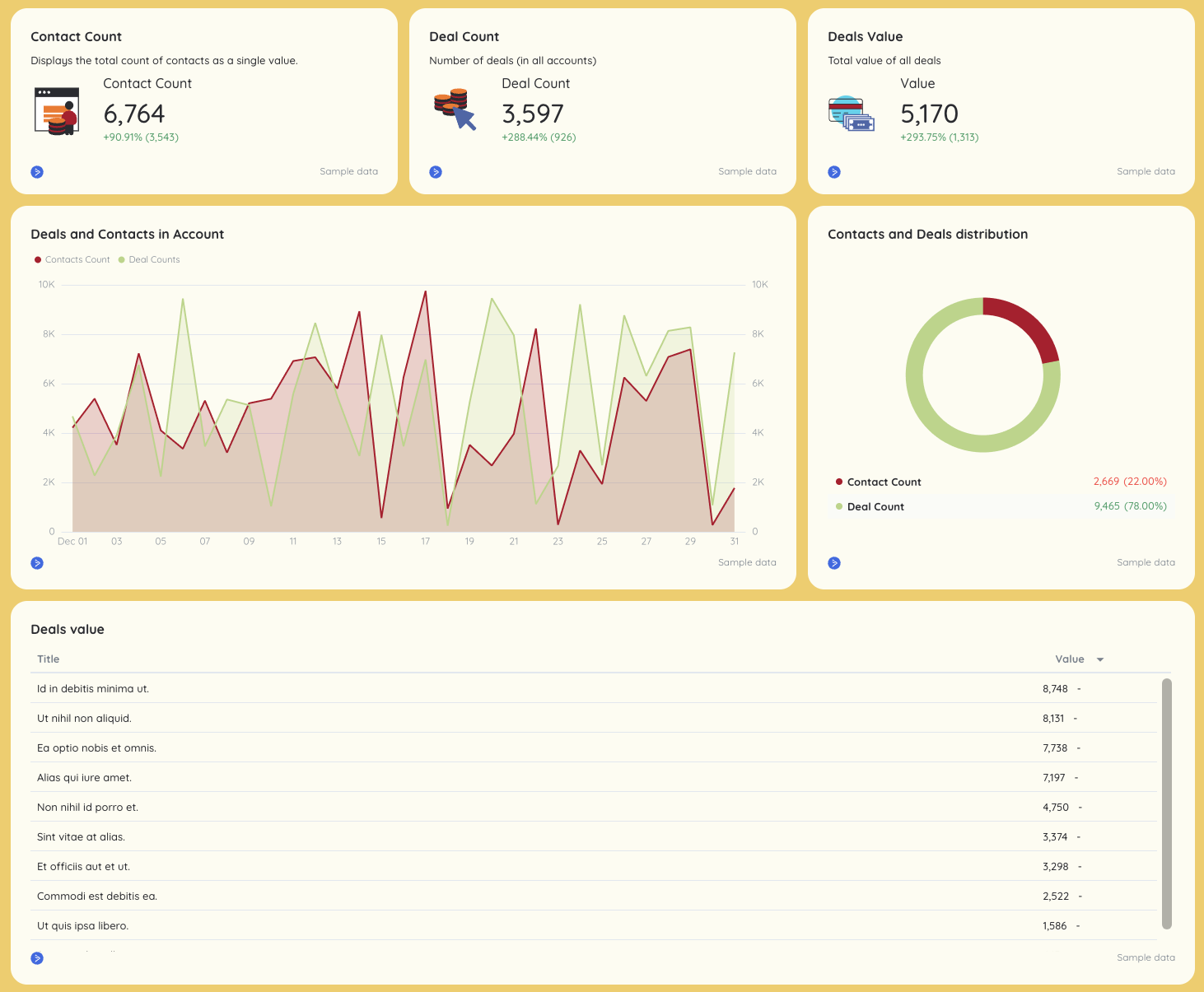
Client Reporting Template - Dashboard view with charts, graphs, and data tables.Purpose: Measure lifecycle and retention impact.

This section connects email marketing to conversions and pipeline influence.

Key metrics

  • Emails sent
  • Opens and open rate
  • Clicks and click-through rate
  • Conversions
  • Revenue (if tracked)

Visuals

  • Campaign comparison tables
  • Time-based performance graphs
  • KPI summaries aligned to campaign goals

11. Salesforce
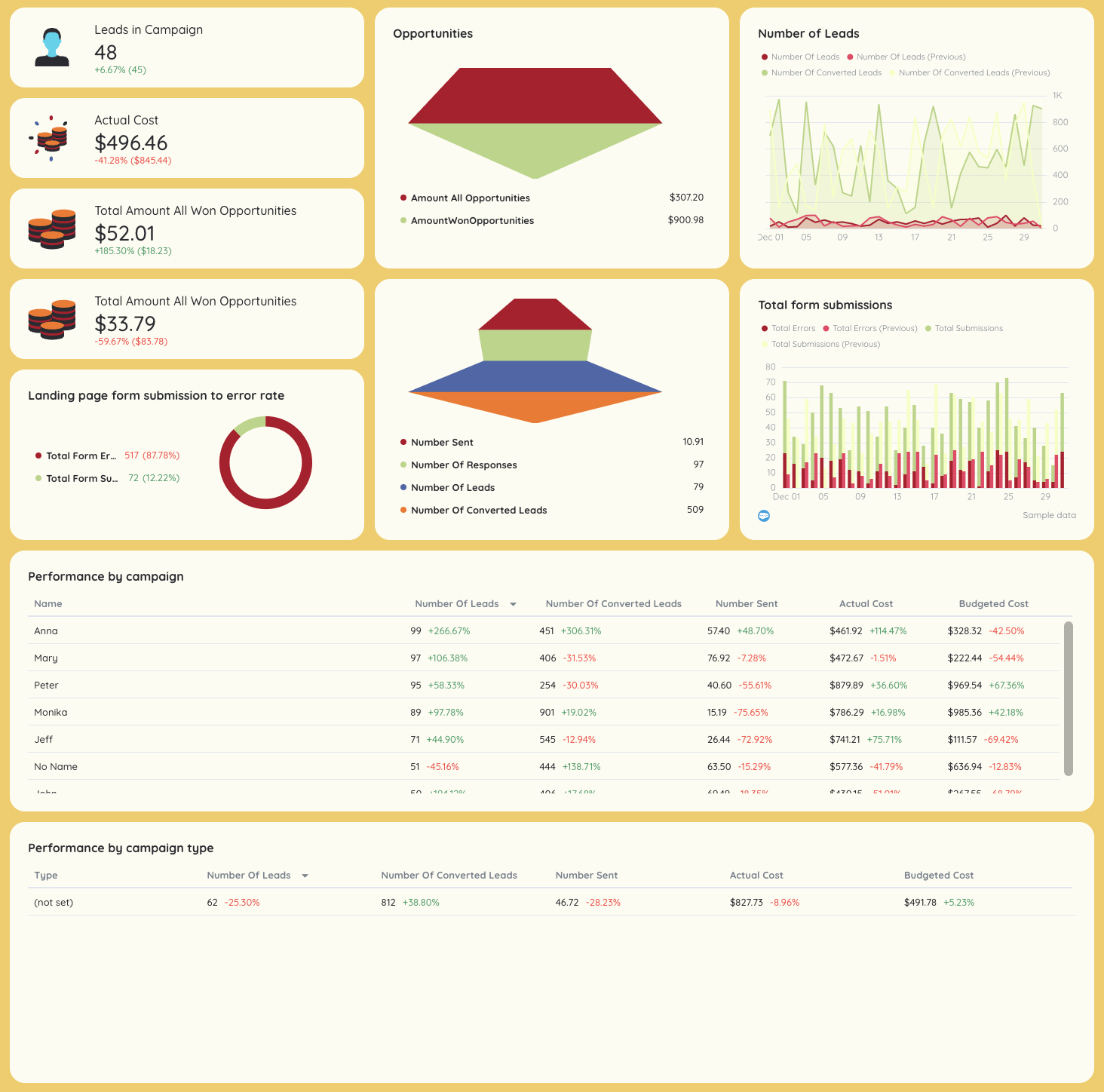
Client Reporting Template - Dashboard with sales metrics, charts, and campaign performance data.Purpose: Revenue and pipeline visibility.

This section closes the loop between marketing and sales using CRM data.

Key metrics

  • Leads
  • Opportunities
  • Pipeline value
  • Closed-won deals
  • Revenue
  • Funnel conversion rates

Visuals

  • Funnel charts
  • Stage-by-stage pipeline tables
  • Revenue trend graphs
  • KPI scorecards tied to business milestones

Connect All Your Marketing Data in One Place

Bring all your marketing data into one place with no-code, stable connectors that you don't need to babysit. 

Why Marketers Love Reporting on Whatagraph

Whatagraph's AI is saving so much time and energy for our marketing specialists. We now have more time to focus on strategic things that help both our agency and our clients grow.

Lars Maat

Lars Maat

Co-Founder @ Maatwerk Online

StarStarStarStarStar

Whatagraph has become an essential partner for scaling our reporting, and my teams love it because it saves so much time. We’d recommend it to any team looking to automate data reporting and use AI for insights.

Danielle Roberts

Danielle Roberts

Director of Implementation & Support @ Rentable

StarStarStarStarStar

Whatagraph took us to the next level with our clients and within our team. Our relationships with clients have been amazing, and we’ve even been able to retain them longer.

Kim Strickland

Kim Strickland

Digital Marketing Specialist @ Peak Seven

StarStarStarStarStar

Whatagraph is easy to use, visually attractive, and much smoother compared to tools like Looker Studio.

Stef Oosterik

Stef Oosterik

Quality Manager @ Dtch. Digitals

StarStarStarStarStar

Frequently Asked Questions

Have more questions? We answered them below.

How to write a client report example?

A strong client report follows a simple structure: start with an executive summary, show key metrics and KPIs, explain campaign performance, and end with clear actionable insights and next steps. Use interactive charts and graphs instead of raw tables so stakeholders can quickly understand results without digging into spreadsheets.

How to create a client report?

Start by defining the client’s goals and key performance indicators. Pull data from your reporting tools (Google Analytics, ads platforms, CRM), visualize it with dashboards, and add short explanations that connect results to business outcomes. Reusing a report template helps streamline the reporting process and saves time every month.

What are the 5 basic parts of a report?

Most client report templates include:


1. Executive summary


2. Goals and KPIs


3. Performance metrics and data visualizations


4. Project progress or campaign updates


5. Takeaways and next steps


This structure keeps reports clear and decision-focused.

What are 5 examples of reports?

Common examples include:


1. Marketing report


2. PPC report


3. SEO report


4. Social media report


5. eCommerce report


Marketing agencies often combine several of these into one monthly client report.

What is a client report template?

A client report template is a reusable framework for presenting client data, KPIs, and results in a consistent format. It helps account managers deliver professional reports faster while maintaining clarity across different clients, industries, and deliverables.

How do you make a KPI dashboard?

Start by selecting the most important performance metrics tied to business goals. Use a reporting tool to connect data sources, then build dashboards with scorecards, graphs, and trend lines. A good KPI dashboard shows progress in real time and supports faster decision-making.

What is a monthly marketing report template?

A monthly marketing report template summarizes results for a specific period. It typically includes ad spend, conversion rates, traffic trends, channel performance (SEO, PPC, social media, email marketing), and a short narrative explaining what changed and why.

What are the most popular report templates used by marketing agencies?

Marketing agencies most commonly use:


1. White label marketing report template


2. White label SEO report template


3. Content marketing report template


4. Keyword ranking report template


5. Paid ads report template


6. Social media ROI report template


7. eCommerce report template


8. Real estate marketing report template (for agencies that work with real estate companies)


9. Google My Business report template


10. AI report template (for GEO reporting)


These templates are often standardized to improve workflow and onboarding.

How do automated reports benefit client relationships?

Automated reporting reduces manual work, eliminates errors, and ensures consistent delivery. More importantly, it frees teams to focus on insights instead of data prep—improving client communication, building trust, and supporting long-term retention.

What should be included in a client reporting template?

A complete client reporting template should include:


1. Executive summary


2. Goals, KPIs, and milestones


3. Channel-level performance metrics


4. Clear data visualizations (charts, graphs, dashboards)


5. Actionable insights and recommendations


Together, these elements turn raw data into a clear, professional report clients actually understand.