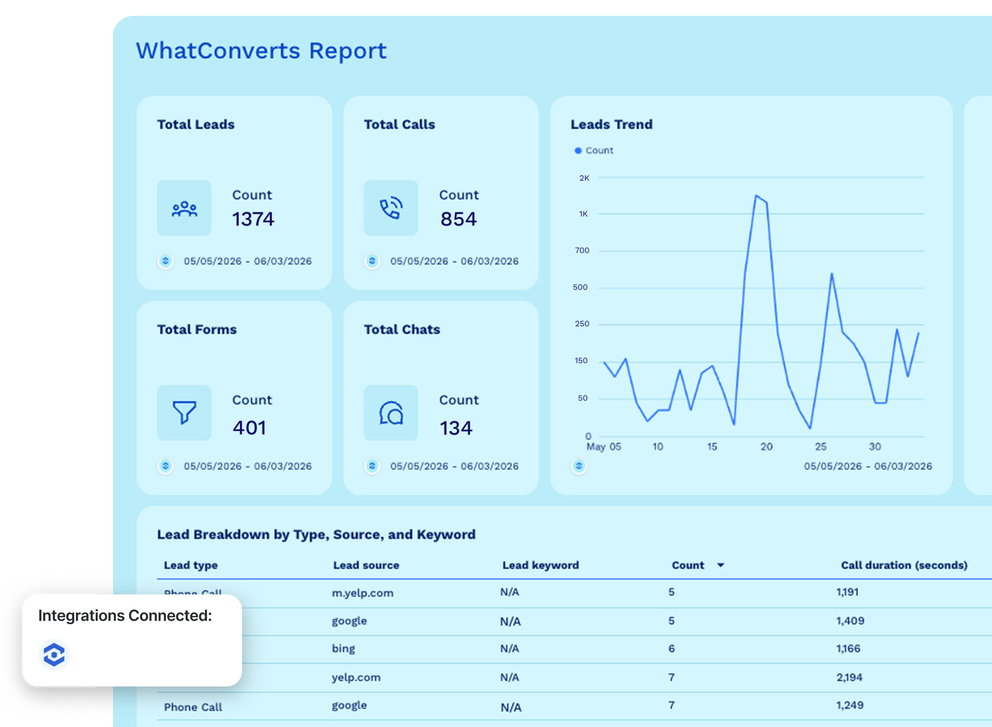





Ready-to-use WhatConverts integration

Bring WhatConverts lead attribution data and other paid ads data into one platform. Blend cross-channel data, define dimensions and metrics, and send white-labeled reports in seconds.

Analyze your data in your favorite AI tool with Whatagraph’s MCP for WhatConverts integration.

Whatagraph marketing reporting tool

Marketing intelligence platform you can trust for your WhatConverts data

Connect - Icon featuring four circles and a plus sign on a black background.

Connect

Pull WhatConverts lead data through a native, stable integration that requires no middleware, Zapier workflows, webhooks, or developer configuration. Connect once and every metric flows into Whatagraph automatically.

Organize - Stacked diamonds icon with three layers.

Organize

Blend WhatConverts data with metrics from Google Ads, Facebook Ads, or any other connected channel. Use custom metrics to calculate ROAS, cost per lead, or sales value by campaign - defined once, consistent across every report.

Visualize - A minimalist line drawing of two mountain peaks and a sun inside a frame.

Visualize

Build a WhatConverts dashboard or report in seconds: describe what you need and Whatagraph IQ assembles the widgets, layout, and data connections. Apply your branding or your client's from a screenshot or prompt.

Analyze - Icon showing horizontal lines and a magnifying glass.

Analyze

Ask IQ Chat any question about your WhatConverts data and get an answer grounded in your actual numbers. Use IQ Summaries to write lead performance commentary directly inside the report without switching tools.

Share - Simple icon showing an arrow exiting a square frame.

Automate

Deliver WhatConverts reports to clients on a schedule, via a password-protected live link, or as a PDF or CSV export. Push the governed dataset to Looker Studio for teams that already work there.

Here's the alt text for the image:

Store - Cloud with an upward pointing arrow.

Store

Export your WhatConverts lead attribution data to BigQuery or Snowflake to power deeper analysis, attribution modeling, or warehouse-level reporting.

WhatConverts metrics instantly available in Whatagraph

SVG image

Search...

Lead count
Lead score
Quote value
Sales value
Call duration (seconds)
Transaction tax
Transaction shipping

All your WhatConverts and marketing data in one place

Connect WhatConverts to Whatagraph and bring call tracking, form, and chat lead attribution into one reporting platform alongside every other channel.

WhatConverts logoCallRail logoCallTrackingMetrics logoGoogle Ads logo
Facebook Ads logoLinkedIn Ads logoAmazon Advertising logoMicrosoft Advertising logo
Pinterest Ads logoTikTok Ads logoSnapchat Ads logoApple Search Ads logo
Facebook Lead Ads logoQuora Ads logoReddit Ads logoGoogle Ad Manager logo

Frequently Asked Questions

All your questions answered. And if you can’t find it here, chat to our friendly team.

How to connect WhatConverts to a reporting tool?

Connecting WhatConverts to Whatagraph takes a few minutes and requires no developer support. 


In your Whatagraph workspace, navigate to the “Sources” tab, select WhatConverts, and authenticate using the Profile API Key generated inside your WhatConverts account. 


Note that API access requires a WhatConverts Pro plan ($100/month) or higher - Call Tracking and Plus plan users cannot connect. If your agency manages multiple clients in WhatConverts, each client profile needs to be connected as a separate data source in Whatagraph.

Can you blend WhatConverts leads with ad spend data?

Yes, and this is the most common reason agencies set up the WhatConverts integration in Whatagraph. 


In the Organize layer, you can create a blended source that merges WhatConverts lead data with spend metrics from Google Ads, Meta, or Microsoft Advertising into a single unified dataset, using a shared dimension like date as the join key. 


That blended source then powers any widget in your reports, so you can show cost per lead by campaign or lead volume alongside spend without exporting anything. 


This is what lead attribution for agencies actually requires: not just lead volume, but lead cost and lead quality in one view, built on Whatagraph's lead tracking and marketing attribution software so the output stays current and consistent across every client report.

How do agencies report WhatConverts leads to clients?

Agencies build white-labeled WhatConverts dashboards and reports in Whatagraph that clients access directly via a password-protected live link. 


The report updates on your chosen schedule so clients are never looking at stale data, and everything carries your agency's or your client's branding - logo, colors, and domain. 


WhatConverts agency reports in Whatagraph can include IQ Summaries, which generate written performance commentary on lead quality, qualified call rate, or campaign-level attribution inside the report, reducing the manual work your team puts in before every client review.


You can also enable IQ Chat for your clients which let them ask questions about performance directly inside the report. 


For internal analysis, Whatagraph has an MCP that lets you connect your WhatConverts and other marketing data to Claude or ChatGPT and analyze your data in plain language.

What WhatConverts metrics are available in Whatagraph?

All core WhatConverts metrics available in Whatagraph are: 


  • Lead count


  • Lead score


  • Quote value


  • Sales value


  • Call duration (seconds)


  • Transaction tax


  • Transaction shipping


If you need a calculated KPI that isn't available out of the box - like cost per qualified lead or blended ROAS - Whatagraph's custom metrics builder lets you create it using any available field in your WhatConverts dataset combined with data from other connected sources.

Do I need a separate tool to visualize WhatConverts data?

No. Whatagraph is a complete WhatConverts reporting tool: it connects to your WhatConverts account, stores and organizes the data, and provides a full visualization layer including charts, scorecards, tables, and custom dashboards. 


You do not need a separate BI tool or a Looker Studio setup to get client-ready reports. 


If your team already uses Looker Studio, Whatagraph can push your governed WhatConverts data there as a destination, but it is not a requirement - everything from connection to published report lives inside one platform.

What other marketing sources can I connect alongside WhatConverts?

Whatagraph connects to 60+ marketing platforms, so you can pull WhatConverts lead attribution data into the same reports as Google Ads, Facebook Ads, LinkedIn Ads, Microsoft Advertising, GA4, HubSpot, Salesforce, Shopify, Calendly, and more. 


Lead attribution software delivers the most value when lead data sits next to channel performance across all your marketing campaigns - you see which marketing channels generated the calls and web forms, and exactly what those campaigns cost. 


All source connections are native and maintained by Whatagraph, so you are not managing API keys or connector updates separately for each platform - including any CRM integration you already have in place.

What is the best WhatConverts reporting tool for agencies?

The best WhatConverts reporting tool for agencies is one that goes beyond displaying raw lead data - it should let you combine WhatConverts with your paid channel data, apply your agency's branding, and deliver reports to clients automatically. 


Whatagraph does all of this natively: connect WhatConverts alongside Google Ads, Facebook Ads, and other marketing channels, build white-labeled reports with IQ Report Builder, and share them via live link or scheduled export without manual work. Plus, you can analyze your data with Claude or ChatGPT with Whatagraph's MCP. 


AgencyAnalytics is the most common alternative agencies evaluate, but Whatagraph offers deeper data organization through blended sources, custom metrics, and BigQuery export for teams that need more than a reporting dashboard.

Does WhatConverts integrate with CRMs like HubSpot and Salesforce?

WhatConverts has its own native CRM integrations that push lead data into HubSpot, Salesforce, and other CRM platforms directly. 


On the Whatagraph side, you can connect HubSpot and Salesforce as separate data sources and report on CRM data alongside your WhatConverts lead data in the same dashboard. 


This means your agency can show clients the full picture - from new lead captured in WhatConverts, through to deal stage and revenue in the CRM - without switching between tools or exporting anything manually.

Can I connect WhatConverts to Whatagraph without Zapier or webhooks?

Yes. The WhatConverts integration in Whatagraph is a direct, native connection - no Zapier workflows, webhooks, or third-party automation tools are needed. 


You authenticate once using your WhatConverts API keys and your lead data syncs automatically. 


Zapier and webhooks are useful for pushing WhatConverts lead data into other tools like CRMs or Slack, but for reporting in Whatagraph, the native integration handles everything.

How does WhatConverts help with lead management and qualifying leads?

WhatConverts captures every new lead from calls, web forms, and chat and lets you qualify leads, assign sales value, and add quote value directly inside the platform. 


When you connect WhatConverts to Whatagraph, all of that lead management data comes through - so your reports show lead score, quote value, and sales value by campaign. This gives agencies the lead intelligence they need to prove ROI to clients beyond click and impression metrics.